 Meet the new
 Normalized Authentication Rules
Normalized authentication rules detect activities that compromise accounts using authentication logs from any data source that Cloud SIEM parsers and mappings support. New authentication data sources can immediately take advantage of this rule logic without the need to customize for the specific product or vendor.
Requirements and prerequisites
Out of the box, the normalized authentication rules support a variety of data sources, ranging from cloud-based authentication services like AWS CloudTrail, VPN authentication services like Cisco ASA, and OS-based authentication like that provided by Windows and Linux.
For the rules to support a particular product or service, the log mapping for that service must map several fields correctly.
You can check whether a given data source is already supported by reviewing its log mapping in Cloud SIEM. If it is, you’re good to go. If a mapping already exists for the data source, you can update it as described in this topic. If the data source doesn’t already have a mapping, you can create one.
The mapping requirements are:
| Output field | Mapping requirement |
|---|---|
objectType | This field is populated as a result of the value selected for the record Type in the log mapping. It must be set to Authentication. |
normalizedAction | Set to logon or domainLogon depending on the nature of the authentication attempt, as described in Normalized authentication rules, below. |
success | Set to true if the logon was successful, or false if it was not. |
mfa | If the log message contains a field that indicates multi-factor authentication usage, set mfa to true if MFA is used or false if not. |
user_username | user_username must be mapped to the input field that contains the user identity. If an alternative input field also contains the user identity, that field should be mapped as an alternate input field. |
srcDevice_ip | If an IP address is present in the log message, srcDevice_ip must be mapped to the input field that contains it. |
srcDevice_hostname | If a hostname is present in the log message, srcDevice_hostname must be mapped to the input field that contains it. |
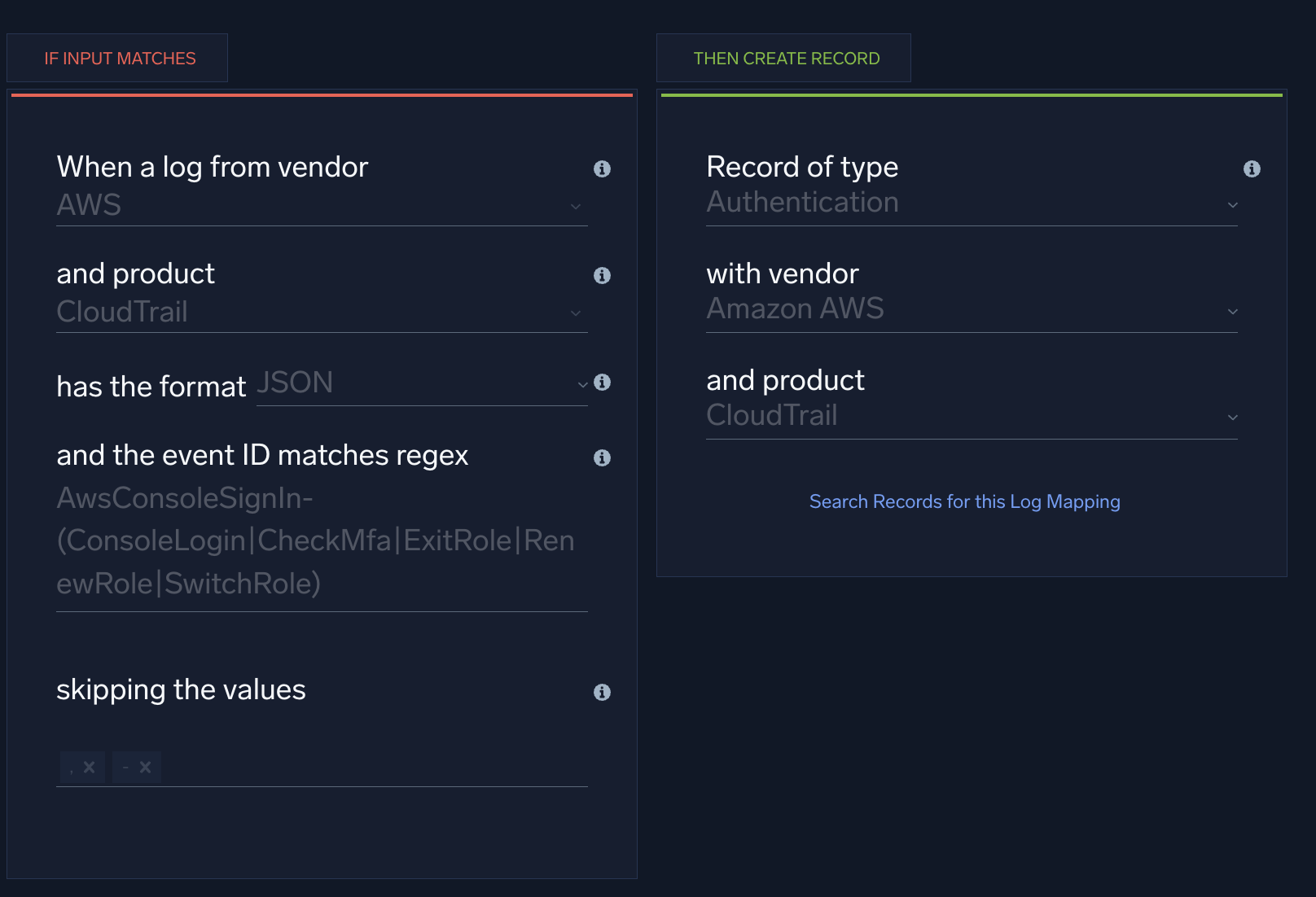
This log mapping for the AWS CloudTrail ConsoleSignIn event meets the requirements described above. (Note that srcDevice_hostname is not mapped because the AWS log message for that event doesn’t contain a hostname.)
Normalized authentication rules
- Authentication Without MFA - Detects a successful login where the account did NOT use multi-factor authentication (MFA) to gain access. We strongly recommend that you require MFA to protect accounts in the event that credentials are stolen. If you don’t require MFA for a data source, we recommend you disable this rule, or that you use a Rule Tuning Expression to exclude the data source so that messages from it won’t be processed by this rule.
- Brute Force Attempt - Detects multiple failed login attempts for the same username over a 24 hour timeframe. This is designed to catch both slow and quick brute force type attacks. The threshold and time frame can be adjusted based on your environment. This rule only monitors events with a
normalizedActionof logon. - Domain Brute Force Attempt - Detects multiple failed login attempts for the same username over a 1 hour timeframe. This is designed to catch attacks that leverage domain resources to attempt credential validation. The threshold and time frame can be adjusted based on your environment. This rule only monitors events with a
normalizedActionof domainLogon. - Password Attack from IP - Detects multiple failed login attempts from a single source with unique usernames over a 24 hour timeframe. This is designed to catch both slow and quick password spray type attacks. The threshold and time frame can be adjusted based on your environment. This rule only monitors events with a
normalizedActionof logon. - Domain Password Attack - Detects multiple failed login attempts from a single source with unique usernames over a 1 hour timeframe. This is designed to catch attacks leveraging domain resources to attempt credential validation. The threshold and time frame can be adjusted based on your environment. This rule only monitors events with a
normalizedActionof domainLogon. - Successful Brute Force - Detects a series of failed logins followed by a successful login. This could indicate that an attacker was successful in guessing a user's password and has compromised the user’s account. This rule only monitors events with a
normalizedActionof logon. There is no “Domain” version of this rule. That means Windows workstation logging is required to achieve full visibility for Windows environments. - Impossible Travel - Successful - Detects two successful logins from the same user with different country codes, indicating possible credential theft. We recommend you add filtering criteria to the rule expression to reduce false positives, for example, known VPN addresses.
- Impossible Travel - Unsuccessful - Detects two failed logins from the same user with different country codes, indicating a possible credential theft attempt. We recommend you use a Rule Tuning Expression to add filtering criteria to the rule to reduce false positives, for example, known VPN addresses.
What's the difference between logon and domainLogon?
There are two normalizedAction values that relate to user logins: domainLogon and logon. This enables Cloud SIEM to distinguish between Windows authentication events that represent access to a domain resource (domainLogon) and events that represent a user accessing a specific machine (logon). Currently, only Windows domain (meaning an Active Directory authentication setup regardless of client OS) authentication events will have a normalizedAction value of domainLogon.
This is done for several reasons:
- To account for Windows generating multiple authentication event messages for a single occurrence of credentials being entered.
- To differentiate between instances where a user account’s credentials are definitively being used to log into a machine, such as a Windows interactive logon as reported in event code 4624, from instances where credentials are being checked for access to the domain, such as a Kerberos TGT request as reported in event code 4768.
- To allow for different thresholds to be applied to domain access checks as these events tend to be more voluminous and difficult to attribute to a specific action. For example, a 4768 could be generated when Username1 logs in by typing credentials in on a keyboard or when another user accesses the same host using RDP with the credentials for Username1, but there would be no way of reliably determining which scenario occurred based on the 4768 log alone.
Cloud SIEM determines which value of of normalizedAction is appropriate for a given log message, using this logic:
- Windows Event Codes 4768 and 4771 are statically assigned the value domainLogon.
- Windows Event Code 4776 is statically assigned the value logon but logic is included in several of the normalized authentication rules to differentiate between an NTLM authentication to a domain controller and to a local account on a machine
- Windows Event Codes 4624 and 4625 use the below table to dynamically assign values (Descriptions are based on official Microsoft documentation).
| Logon Type | Logon Title | Description | Value of normalizedAction |
|---|---|---|---|
| 1 | System | Used only by the System account, for example, at system startup. | <none> |
| 2 | Interactive | A user logged on to this computer. | logon |
| 3 | Network | A user or computer logged on to this computer from the network. | domainLogon |
| 4 | Batch | Batch logon type is used by batch servers, where processes may be executing on behalf of a user without their direct intervention. | logon |
| 5 | Service | A service was started by the Service Control Manager. | logon |
| 7 | Unlock | This workstation was unlocked. | <none> |
| 8 | NetworkCleartext | A user logged on to this computer from the network. The user's password was passed to the authentication package in its unhashed form. The built-in authentication packages all hash credentials before sending them across the network. The credentials do not traverse the network in plaintext (also called cleartext). | domainLogon |
| 9 | NewCredentials | A caller cloned its current token and specified new credentials for outbound connections. The new logon session has the same local identity, but uses different credentials for other network connections. | domainLogon |
| 10 | RemoteInteractive | A user logged on to this computer remotely using Terminal Services or Remote Desktop. | logon |
| 11 | CachedInteractive | A user logged on to this computer with network credentials that were stored locally on the computer. The domain controller was not contacted to verify the credentials. | logon |
| 12 | CachedRemoteInteractive | Same as RemoteInteractive. This is used for internal auditing. | logon |
| 13 | CachedUnlock | Workstation logon. | <none> |
FAQ
What are normalized authentication rules?
Normalized authentication rules are built-in Cloud SIEM rules that detect account-compromise activity, such as brute force attempts and impossible travel, using authentication logs from any data source whose log mapping meets Cloud SIEM's normalization requirements.
What data sources do normalized authentication rules support?
Any data source with a log mapping that correctly sets the objectType, normalizedAction, success, and related fields, including cloud services like AWS CloudTrail, VPN services like Cisco ASA, and OS-based authentication like Windows and Linux.
Do I need to write custom rules for a new authentication data source?
No. Once you create or update a log mapping that meets the normalization requirements, the existing normalized authentication rules automatically apply to the new data source without customization.
What happens if MFA isn't required for a login?
The Authentication Without MFA rule detects a successful login where the account didn't use multi-factor authentication. If you don't require MFA for a particular data source, disable the rule or use a rule tuning expression to exclude that data source.
Can normalized authentication rules detect impossible travel?
Yes. The Impossible Travel - Successful and Impossible Travel - Unsuccessful rules detect two logins from the same user with different country codes, which can indicate credential theft. Add filtering criteria, such as known VPN addresses, to reduce false positives.