 Meet the new
Markdown Syntax for Dashboards
The following Markdown syntax options are supported in Sumo Logic dashboards. When your syntax is supported, Markdown Supported appears near the bottom-left corner of the text box. If the syntax is not supported, you cannot click the Submit button.
Images, blockquotes, code blocks, URLs, and email addresses are not supported in text panels.
Basic text
You do not need to apply any syntax to display basic text. Type your text in the Text box.
Bold/italic text
To make text italic, surround the text with * *. For example, *This text will be italic*.
To make text bold, surround the text with ** **. For example, **This text will be bold**.
You can combine bold and italic syntax.
Headings
You can set text to one of six heading levels by starting the line with one to six # characters:
# Heading one

## Heading two

### Heading three

#### Heading four

##### Heading five

###### Heading six
Lists
Ordered Lists
To create a numbered list, precede each list item with a number and a period. Indent by adding a space.
1. Item One

1. Item Two

    1. Indented Item One

    1. Indented Item Two
The Text panel displays this as: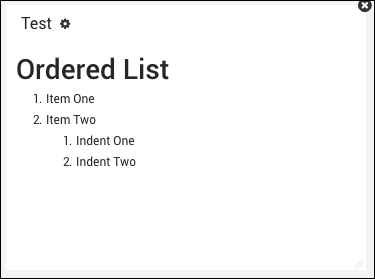
Unordered Lists
To create an unordered bullet list, add * or - to each item. Both
will produce a bullet. Indent by adding a space.
* Bullet One
* Bullet Two

    * Bullet Indent One
    * Bullet Indent Two
The Text panel displays this as: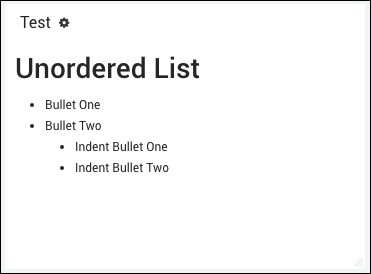
Combined Lists
To create a combined, nested list of numbered and bulleted items, start each line with either a number and a period or an asterisk *.
1. Item One

    * Bullet Indent One

1. Item Two

    * Bullet Indent Two
The Text panel displays this as: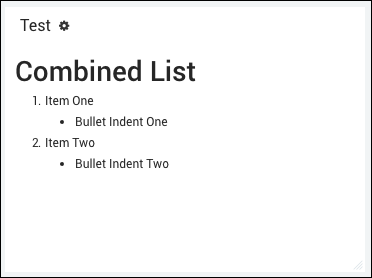
For more information about Markdown elements, see the Markdown guide.