Training and Certifications FAQ

Sumo Logic Academy is your hub for training and professional development. All courses (self‑paced eLearning, public hands‑on virtual classes, and workshops) are free, with paid private instruction offerings available.
Certification exams are paid and live‑proctored through our assessment partner, Kryterion. Successful candidates receive industry‑recognized digital badges issued by Credly. Check out our certification catalog here.
- Sumo Logic Learning Portal, only available in-product, where you'll find our courses and certifications.
- Sumo Logic Training Lab Environment, curated and set up to work along with our training curriculum.
- Sumo Logic Partner Training, dedicated technical training for Sumo Logic partners. To sign up, you'll need an access code, which you can obtain from your account manager.
- Sumo Logic Certified, our certification program for Sumo Logic Academy, allowing you to certify via proctored exam and receive a digital credential reflecting your new, proven skillset.
In this video, we'll walk through learning and certification offerings to help you maximize your investment in the Sumo Logic platform.
Getting started
How do I access the learning portal?
Access complimentary on-demand courses and onboarding tutorials in our self-paced learning portal:
- Sign in to Sumo Logic.
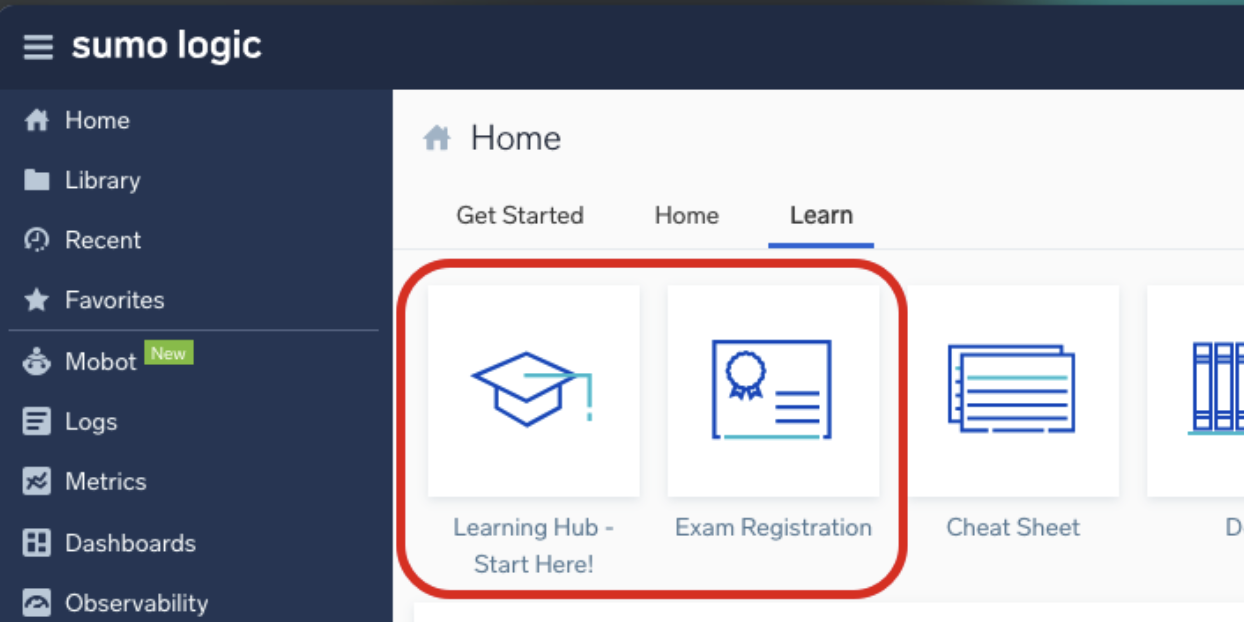
- From your Home page, click the Learn tab > Learning Hub – Start Here!
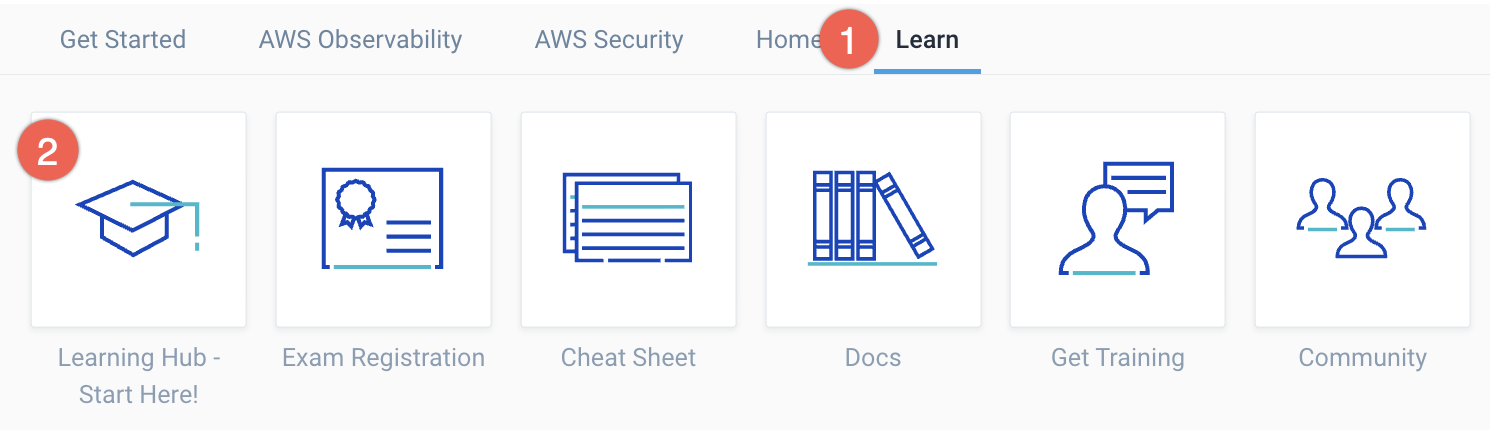
- Explore our self-paced certification courses and workshops, built to the same standard as our instructor-led offerings, ready for you to learn anytime, anywhere, at your own pace.
How can I sign up for free live instructor-led classes?
Check out our Training website for information on free live classes and to view our current schedule. Sign up for as many as you’d like! Multiple timezone options are available to meet your schedule. Other training options like tailored private sessions are also available.
Self‑paced training
How do I access self‑paced training?
Self‑paced training is available in our learning portal.
What content is available for self‑paced learning?
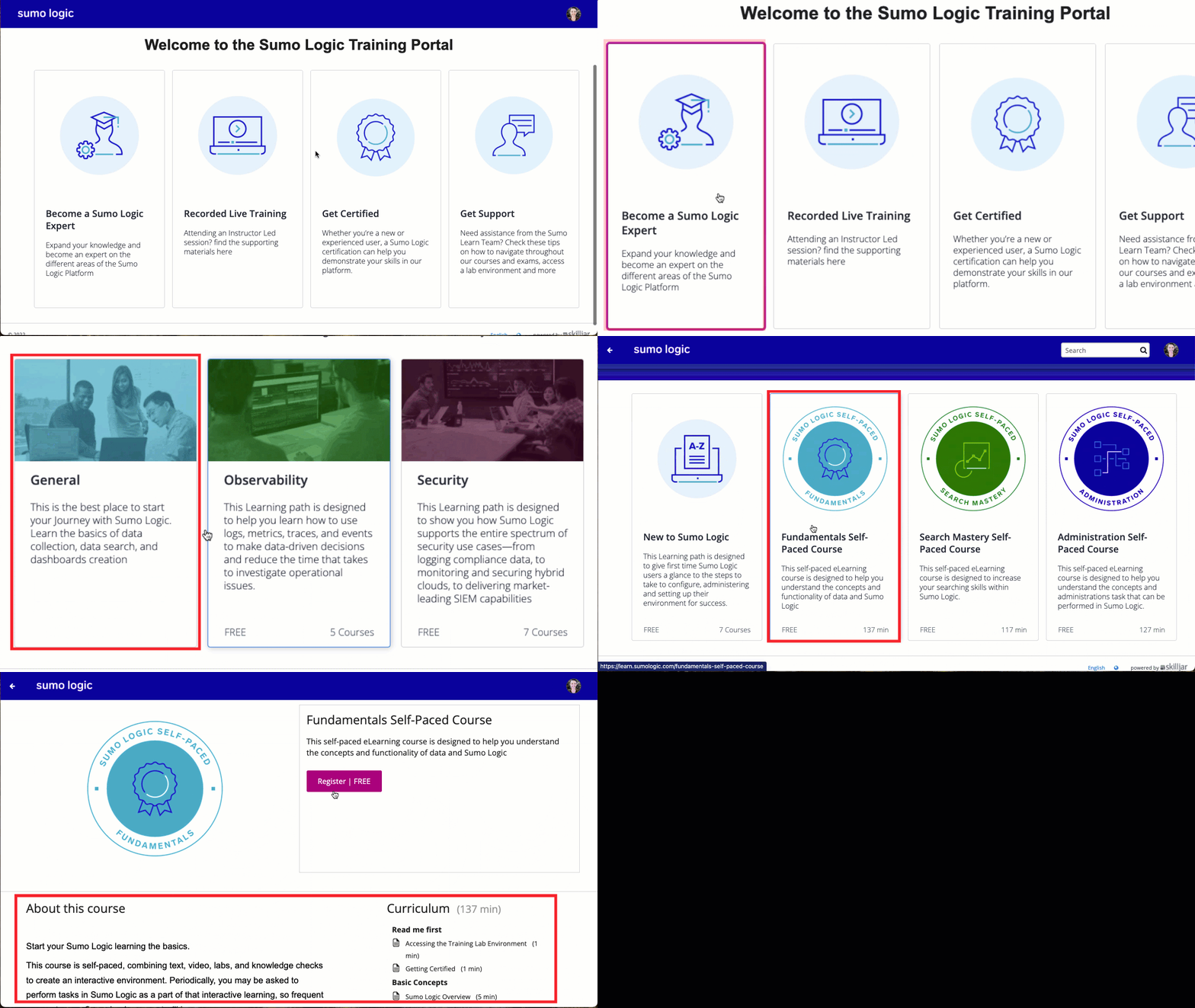
- Learning Paths for General, Observability, and Security (Learning Hub > Become a Sumo Logic Expert).
- Micro Lessons (Learning Hub > Learn a New Skill).
- Recorded Live Training sessions with lab guides and slides (Learning Hub > Recorded Live Training).
How do I register for a self‑paced course?
Navigate to the course and click Register.
How do I navigate inside a self‑paced course?
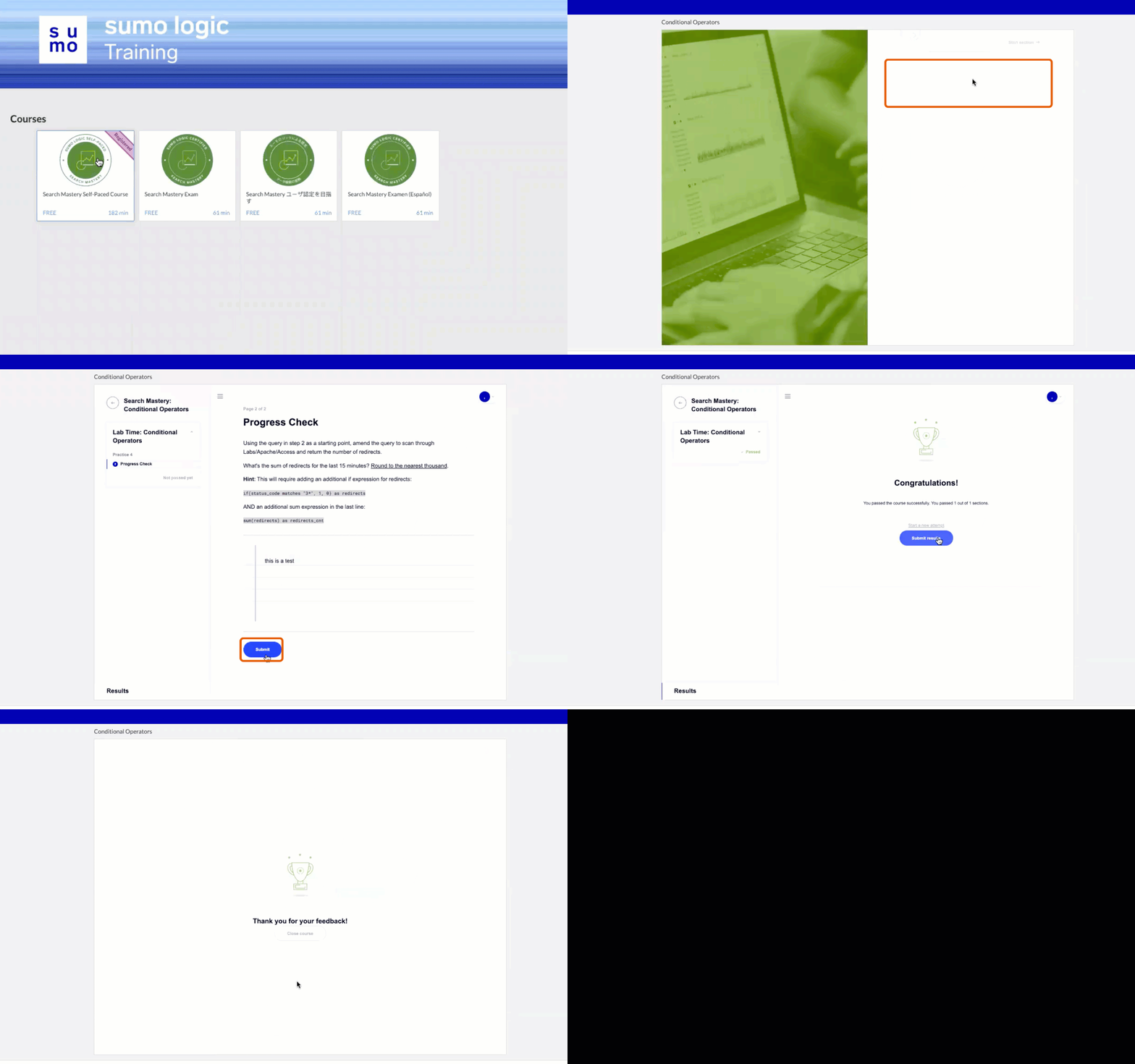
- Select the course.
- Select the section you want to review.
- View all materials, complete knowledge checks and progress checks, then click Next or Submit after each section.
- At the end of a section, click Go to results, then Submit Results and rate the section.
- Verify that a blue checkmark appears next to the completed section. Continue until all sections are complete.
How do I complete a course?
Complete all sections in the course.
Do I have to pay for training courses?
Self-paced training is free. Private and custom training is available for purchase.
How do I verify my email address?
To verify your email address and activate your account:
- New UI. In the top menu select Help, and then select either Community.
Classic UI. In the main Sumo Logic menu select Help, and then select Community. - You will be prompted to activate your account.
- Click Send Activation/Verification Email.
- Open the email and click Verify Your Email.
Now that your email is verified, you'll be able access to third-party services.
How do I fix the data pipeline error?
If you see an error when starting a new lesson, try these steps:
- Refresh the page, then clear cache and cookies.
- Close and reopen your browser.
- Allow third‑party cookies or add
[*.]sj-cdn.netas a trusted site in browser privacy settings. - Confirm your internet connection.
- Try an Incognito/Private window. If it works there, a browser extension may be blocking content.
- For
Video Error Code 232011orCannot load M3U8: Crossdomain access denied, work with your IT team to check firewall settings. Allow the headerAccess-Control-Allow-Origin: *if applicable.
Training lab environment
Use the Training Lab environment to get hands‑on practice with course exercises. This environment is curated and set up to work along with our training curriculum.
During instructor-led and on-demand courses, you may be asked to access a Sumo Logic training lab environment. This environment is separate from your production Sumo Logic account and is provided specifically for hands-on learning.
Training lab accounts are for working through hands-on lab guides using built-in data only. To trial Sumo Logic with your own data, set up a separate trial or paid account.
How do I access the training lab environment?
Training lab credentials are available via self-service directly from your learning portal.
Choose your credential type
Both Analyst and Admin accounts are available for any learner to request. Choose the credentials you need based on the requirements or instructions in your course. In most cases, this is Analyst, but certain courses (like Administration) need admin-level privileges.
How to request credentials
- Open a second browser (for example, Firefox if you are reading this in Chrome) so you can stay logged in to both your regular Sumo Logic account and the training lab at the same time.
- Go to your learning portal and click Become a Sumo Logic Expert.
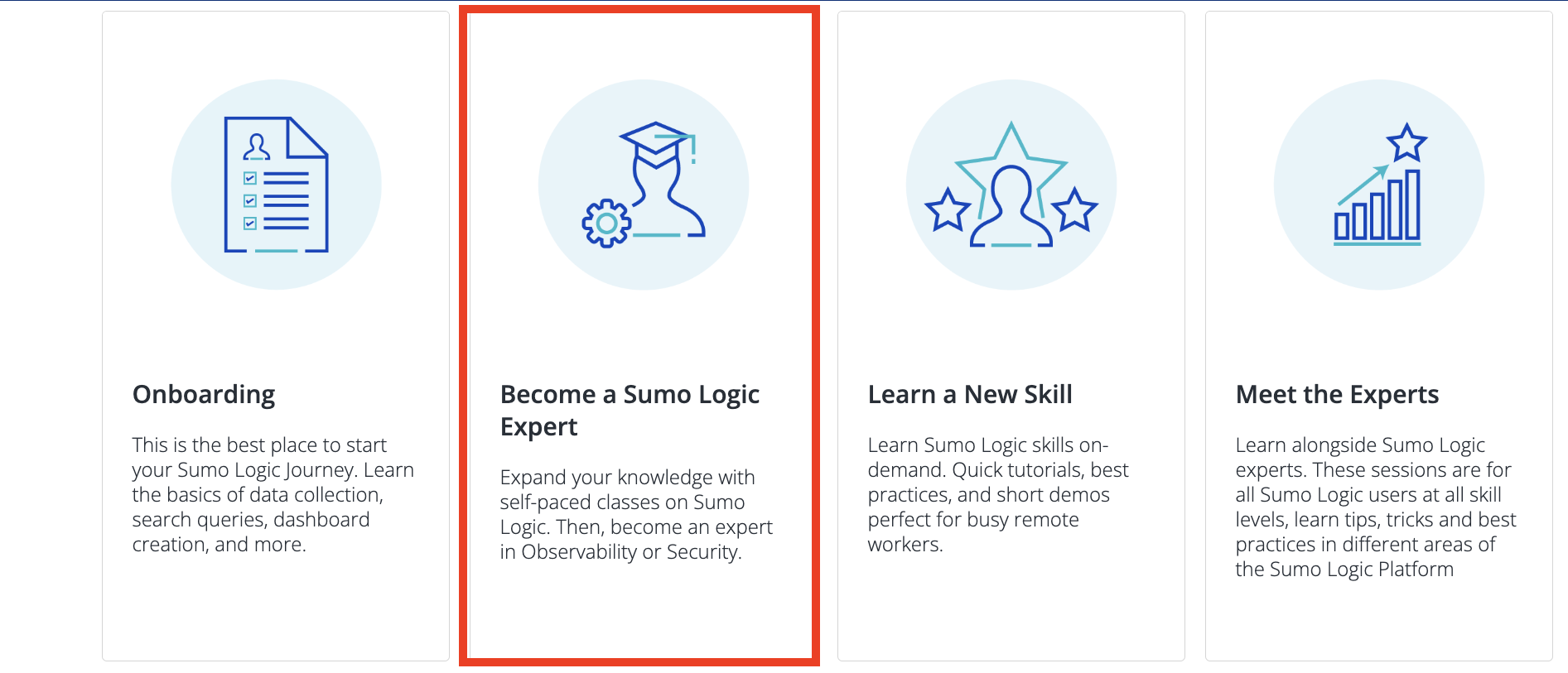
- Click Request Training Analyst Login or Request Training Admin Login based on your course requirements.
- Review the summary confirmation that appears and accept to proceed.
- The system will automatically assign you an available account:
- Analyst accounts.
training+analyst###@sumologic.com(where ### is between 001-999). - Admin accounts.
training+admin###@sumologic.com(where ### is between 001-999).
- Analyst accounts.
- Your credentials will be displayed on screen and sent to your email address.
- In the second browser window, go to service.sumologic.com and log in with your assigned credentials.
- You will know you have access when hovering over the user profile in the upper-right corner shows Sumo Logic Training.
- Save your training username for use during training.
- Do not share your credentials with others.
- Training lab credentials expire at the end of each month.
- A new set of credentials needs to be generated after the first of each month.
- Any account-specific data you add will be wiped when credentials expire.
Certifications
Sumo Logic Academy certifications use proctored, skills-based exams with digital badges issued through Credly. We recommend six months of hands-on experience before registering.
What are the benefits of certification?
By investing in a Sumo Logic Certified credential, you’ll gain a meaningful, industry-recognized certification that validates your real-world skills.
Unlike our previous knowledge-based quizzes, the new exams are skills-based, proctored, and credentialed. This ensures your certification carries weight and distinction, giving you a proven advantage in your career while driving adoption of advanced use cases in your organization.
Improvements include:
- All new exams. Assessments now measure skills rather than basic knowledge checks. Refer to our full catalog of certifications.
- Live, remote proctoring. Exams are administered by Kryterion with live proctors to ensure fairness and integrity.
- Digital badges. After passing your exam, you’ll receive a Credly-issued badge you can share on LinkedIn, your resume, and within your organization.
What certifications does Sumo Logic offer?
- Sumo Logic Certified Fundamentals User
- Sumo Logic Certified Search Mastery User
- Sumo Logic Certified Admin
- Sumo Logic Certified Logs for Security Analyst
- Sumo Logic Certified Cloud SIEM Practitioner
- Sumo Logic Certified Metrics Analyst
More information here.
Do I have to take certifications in a specific order?
No. However, we recommend passing Sumo Logic Certified Fundamentals User before attempting advanced certifications.
How long do certifications last?
Certifications are valid for two years before renewal is required.
Can I get re‑certified?
Yes. You can renew at any time by retaking the relevant exam.
If I already have Sumo Logic certifications, will I lose those?
The new credentials replace our previous certifications. Existing certifications remain valid until their original expiration (Fundamentals: two years; all others: one year). You’re welcome to renew under the new program at any time.
Are there fees for certifications?
While self-paced and public live training options are free, there are fees associated with certification exams.
The Sumo Logic Certified Fundamentals User certification exam fee costs $100, and all others are $150. Payment is by credit card or purchase order through your Sumo Logic account representative or reseller.
Is a voucher included in my training class? Do I have to pay for training courses or just the certification?
All Sumo Logic training, including self-paced eLearning, hands-on public virtual classes, and workshops, remains free to all users. A separate cost applied to the certification exam itself. Private and custom training will continue to be available for purchase.
How long do I have to use my voucher?
After purchasing a certification voucher, the exam must be taken within one year from the date of issue.
Are continuing education credits included with the certification?
Not at this time.
I cannot install third-party software on my company-issued device. Can I use a personal device to take exams?
Sumo Logic Academy uses Kryterion Webassessor for exam registration. To ensure a secure testing environment, you must install the "Lockdown Browser" to attend a live proctored Sumo Logic Certified exam. Because many corporate IT policies restrict third-party software, we strongly recommend using a personal device to complete your exam. In this case, simply follow the normal process to access Kryterion through the in-product Learn tab from your personal device.
For customers whose access to their Sumo Logic organization is also restricted to approved company machines, a standalone login process is required to log in to Kryterion Webassessor to attend the exam via a personal machine.
If you cannot access your Sumo Logic environment from your personal machine, use the following process to enroll you into Webassessor through our standard single sign-on (SSO) procedure, and set a password on your account so that you can log in from a different machine without needing to access Sumo Logic first:
- Log in from your work machine:
- Sign in to Sumo Logic as normal.
- Select the Learn tab in the UI.
- Click on Learning Portal - Start Here! to register via SSO for. You may be prompted to validate your login via email.
- Click on Exam Registration. This will enroll you into Kryterion Webassessor through SSO.
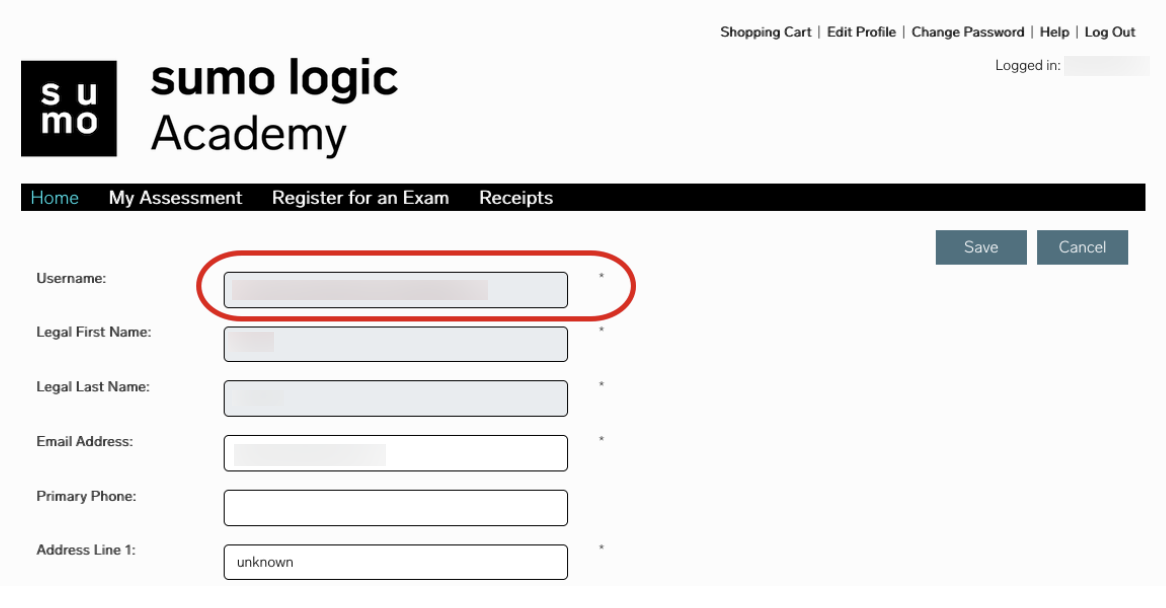
- Once logged in to Webassessor, click Edit Profile at the top. Copy your username into a note for later use. Note that this will be a string of alphanumeric characters.
- Click Log Out, then on the next screen, Log In.
- Now click Forgot Password.
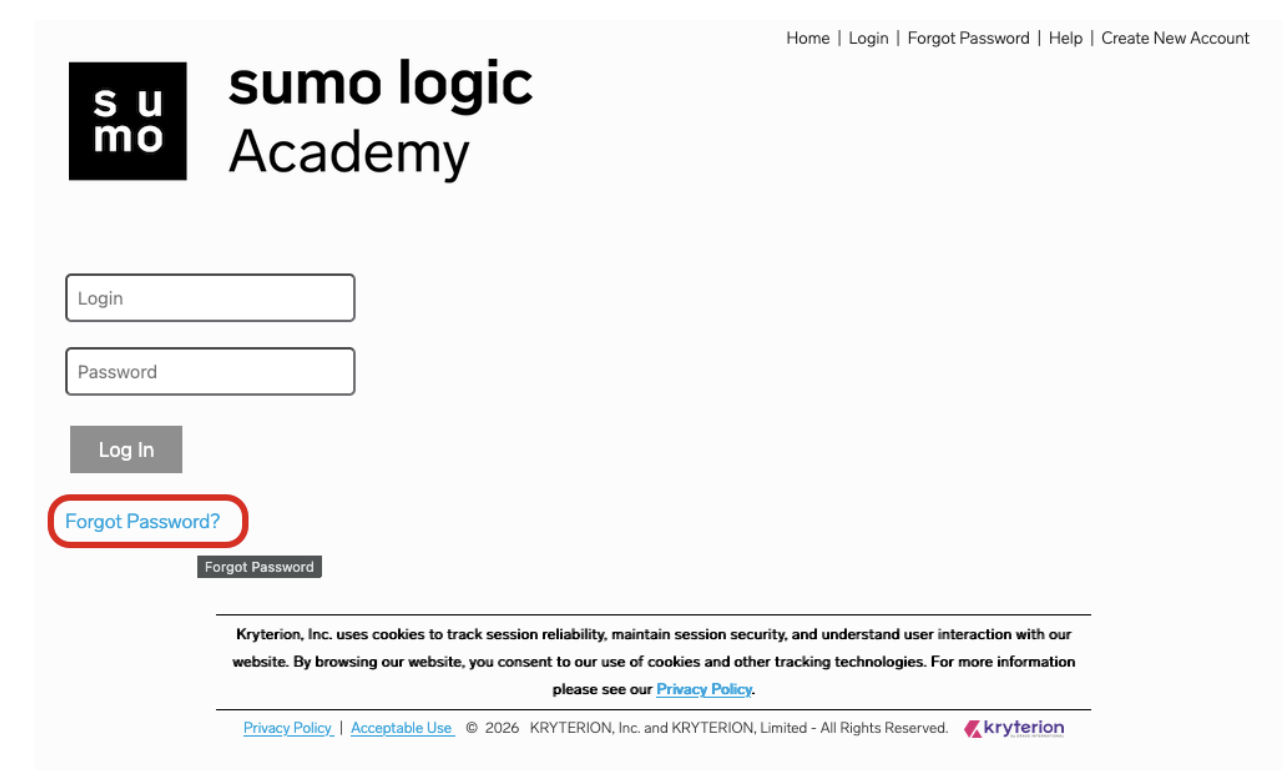
- Paste your username (not your email address) and click Submit.
- An email with a password reset link will be sent to your inbox. Click the link in the email and set a password. Note the password for future use. You can now log in to your Webassessor account using both single sign on (SSO) and from the Webassessor login page.
- Log in from your personal machine:
- Access the Kryterion Webassessor standalone login page.
- Log in using your username (not your email address) and password set in the previous section.
- You can now proceed as normal with attending your live exam.
- If you pass the exam, you will see the new badge in your Skilljar learner transcript, and an email with your Credly badge acceptance request will also follow as normal.
Exam logistics
How do I schedule an exam?
We recommend at least six months of hands‑on Sumo Logic experience before taking an exam.
We recommend at least six months of hands‑on Sumo Logic experience before taking an exam.
- Sign in to Sumo Logic.
- From the Home page, click the Learn tab > Exam Registration.
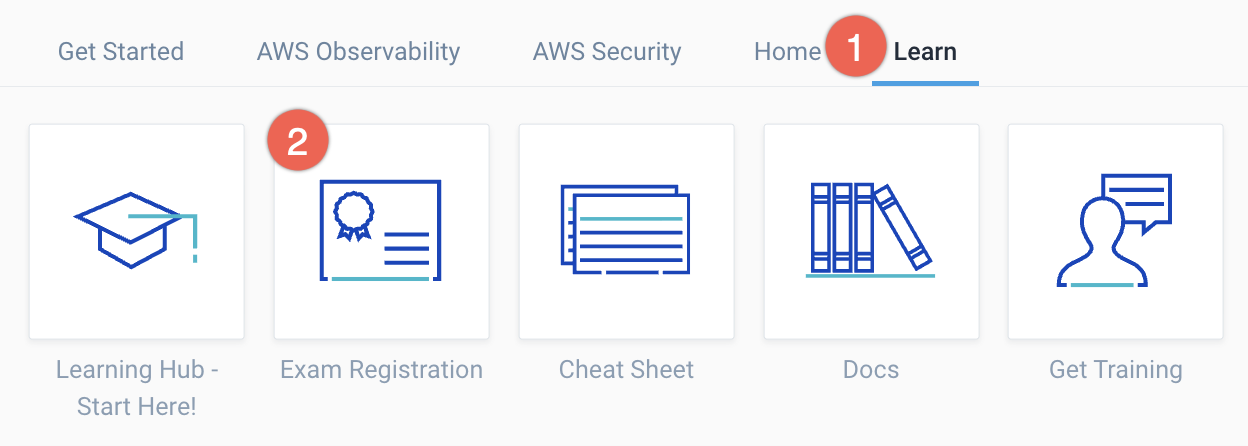
- Purchase your exam credit and register through Kryterion.
- Select and schedule your exam.
- View your pass/fail result immediately after submission. If you pass, follow the email instructions to claim your Credly badge.
What are the requirements for taking an exam?
Kryterion provides technical and workspace requirements for live proctored exams. Your desk must be clear of materials and will be reviewed by the proctor before the exam begins. See Kryterion Online Testing Requirements.
What if I run into a technical issue during the exam?
Kryterion support is available during the exam. Use Live Chat or submit a request via Kryterion Candidate Support.
Will I see preliminary results on screen when I finish?
Yes. A pass/fail result appears after submission once you exit the secure proctored environment.
What is the pass criteria for exams?
A score of 75% or higher is required to pass a Sumo Logic certification exam.
What is the retake policy? Will I have to pay again?
You can retake your exam 48 hours after a previous attempt. Each retake requires a new payment. For security, only your overall score is shown.
Badges and community
Where can I find my Sumo Logic certification digital badges?
After passing an exam, you'll receive a digital badge via Credly. Manage and share badges through the Credly portal. We encourage you to join the Sumo Logic Certification community on LinkedIn and add your badges to your profile.
How do I post my certification on LinkedIn?
After earning a Sumo Logic Academy certification, you can share your achievement directly from Credly to LinkedIn.
- Log in into your LinkedIn account.
- Log in into to your Credly account and open your profile.
- Find the certification badge you want to share and select it.
- Click Share Badge in the lower-right corner.
- Under the Promote section, click the LinkedIn option.
- In the panel that appears, keep both Add to Profile and Share to Feed checked, then click Share to LinkedIn.
- LinkedIn will open a confirmation panel displaying your certification details. Click Save on the lower right corner.
- When prompted with Certification added, click Skip to avoid posting a duplicate entry.
Your new Sumo Logic certification will now appear under the Licenses & certifications section on your LinkedIn profile.
My badges were issued to my work email address. Can I add a personal email address to my Credly account?
Yes. To learn how to add an alternative email address to your Credly profile, see Credly Help Center | Can I add multiple emails to my account?.
While we're required to issue badges to the same email you use to sign in to Sumo Logic, adding a personal email in Credly keeps your badges portable.
Additional information
Have questions about training or certifications?
Contact the Sumo Logic Training and Education team at training@sumologic.com.
For help with exam registration, scheduling, or technical issues during proctored sessions, visit Kryterion support:
Learn more about our training programs and certification paths:
- Introducing Sumo Logic Academy: Your new hub for learning and certifications. Overview of our hands-on learning experiences, proctored certification exams, and digital credentialing through Credly.