 Meet the new
 PCI Compliance For AWS CloudTrail

The Sumo Logic app for Payment Card Industry (PCI) Compliance for AWS CloudTrail app offers dashboards to monitor systems, account and users activity to ensure that login activity and privileged users are within the expected ranges. The PCI Compliance for AWS CloudTrail app covers PCI requirements 02, 07, 08 and 10.
Sample log messages
{
   "eventVersion":"1.01",
   "userIdentity":{
      "type":"IAMUser",
      "principalId":"AIDAJ6IGVQ4XQZQDAYEOA",
      "arn":"arn:aws:iam::956882708938:user/Olaf",
      "accountId":"956882708938",
      "userName":"system"
   },
   "eventTime":"2017-09-27T20:00:10Z",
   "eventSource":"signin.amazonaws.com",
   "eventName":"ConsoleLogin",
   "awsRegion":"us-east-1",
   "sourceIPAddress":"65.98.119.36",
   "userAgent":"Mozilla/5.0 (Macintosh; Intel Mac OS X 10_9_5) AppleWebKit/537.36 (KHTML, like Gecko) Chrome/37.0.2062.124 Safari/537.36",
   "requestParameters":null,
   "responseElements":{
      "ConsoleLogin":"Failure"
   },
   "additionalEventData":{
      "MobileVersion":"No",
      "LoginTo":"https://console.aws.amazon.com/console/home",
      "MFAUsed":"No"
   },
   "eventID":"f36c1d07-73cf-4ab8-84b1-04c93ac2aaeb"
}
Sample queries
=AWS/CloudTrail ConsoleLogin AwsConsoleSignIn Failure
| json field= "userIdentity.accountId", "awsRegion", "eventName", "eventType", "sourceIPAddress", "responseElements.ConsoleLogin", "additionalEventData.MFAUsed" as accountId, aws_region, event_name, event_type, src_ip, loginResult, mfaUsed nodrop
| parse regex "\"(?i)userName\":\"(?<user_name>.*?)\"" nodrop
| parse "\"userId\":\"*\"" as user_id nodrop
| if (user_name="", user_id, user_name) as user
| where event_name="ConsoleLogin" and event_type="AwsConsoleSignIn" and loginResult="Failure"
| count by user, accountId, src_ip
Collecting logs for the PCI Compliance for AWS CloudTrail app
This section provides instructions for collecting logs for the the PCI Compliance for AWS CloudTrail app.
To configure an AWS CloudTrail Source, do the following:
- Grant Sumo Logic access to an Amazon S3 bucket.
- Configure CloudTrail in your AWS account.
- Confirm that logs are being delivered to the Amazon S3 bucket.
- Add an AWS CloudTrail Source to Sumo Logic.
- Install the Sumo Logic app for PCI Compliance for AWS CloudTrail.
Installing the PCI Compliance for AWS CloudTrail app
Now that you have set up collection, install the Sumo Logic app for PCI Compliance for AWS CloudTrail to use the preconfigured searches and dashboards that provide insight into your data.
To install the app, do the following:
Next-Gen App: To install or update the app, you must be an account administrator or a user with Manage Apps, Manage Monitors, Manage Fields, Manage Metric Rules, and Manage Collectors capabilities depending upon the different content types part of the app.
- Select App Catalog.
- In the 🔎 Search Apps field, run a search for your desired app, then select it.
- Click Install App.
note
Sometimes this button says Add Integration.
- Click Next in the Setup Data section.
- In the Configure section of your respective app, complete the following fields.
- Field Name. If you already have collectors and sources set up, select the configured metadata field name (eg _sourcecategory) or specify other custom metadata (eg: _collector) along with its metadata Field Value.
- Click Next. You will be redirected to the Preview & Done section.
Post-installation
Once your app is installed, it will appear in your Installed Apps folder, and dashboard panels will start to fill automatically.
Each panel slowly fills with data matching the time range query received since the panel was created. Results will not immediately be available but will be updated with full graphs and charts over time.
Viewing PCI Compliance for AWS CloudTrail Dashboards
All dashboards have a set of filters that you can apply to the entire dashboard. Use these filters to drill down and examine the data to a granular level.
- You can change the time range for a dashboard or panel by selecting a predefined interval from a drop-down list, choosing a recently used time range, or specifying custom dates and times. Learn more.
- You can use template variables to drill down and examine the data on a granular level. For more information, see Filtering Dashboards with Template Variables.
- Most Next-Gen apps allow you to provide the scope at the installation time and are comprised of a key (
_sourceCategoryby default) and a default value for this key. Based on your input, the app dashboards will be parameterized with a dashboard variable, allowing you to change the dataset queried by all panels. This eliminates the need to create multiple copies of the same dashboard with different queries.
PCI Req 01 - Access Monitoring
See the details of security group activities and all AWS activities in compliance with PCI Requirement 01.
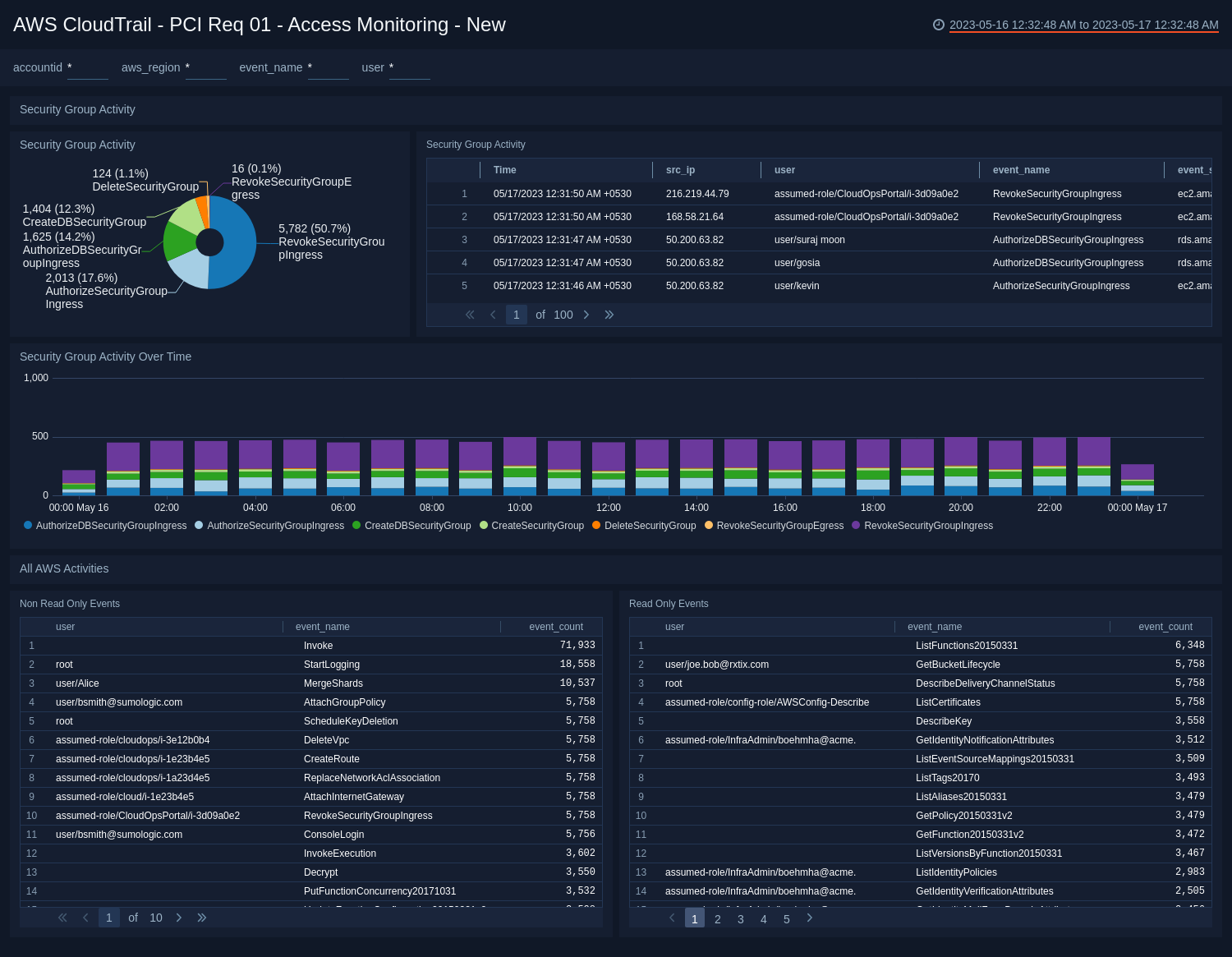
- Security Group Activity. Pie chart of the security group activity over the last 24 hours.
- Security Group Activity. Aggregation table of the security group activity over the last 24 hours.
- Security Group Activity Over Time. Bar chart of security group activity time sliced by 30 minutes for the last 24 hours.
- (All AWS Activities) Non Read Only Events. Aggregation table of the user, event, and count of non-read only events.
- (All AWS Activities) Read Only Events. Aggregation table of the user, event, and count of read only events.
PCI Req 10 - Login Activity
See the details of failed logins and successful logins in compliance with PCI Requirement 10.
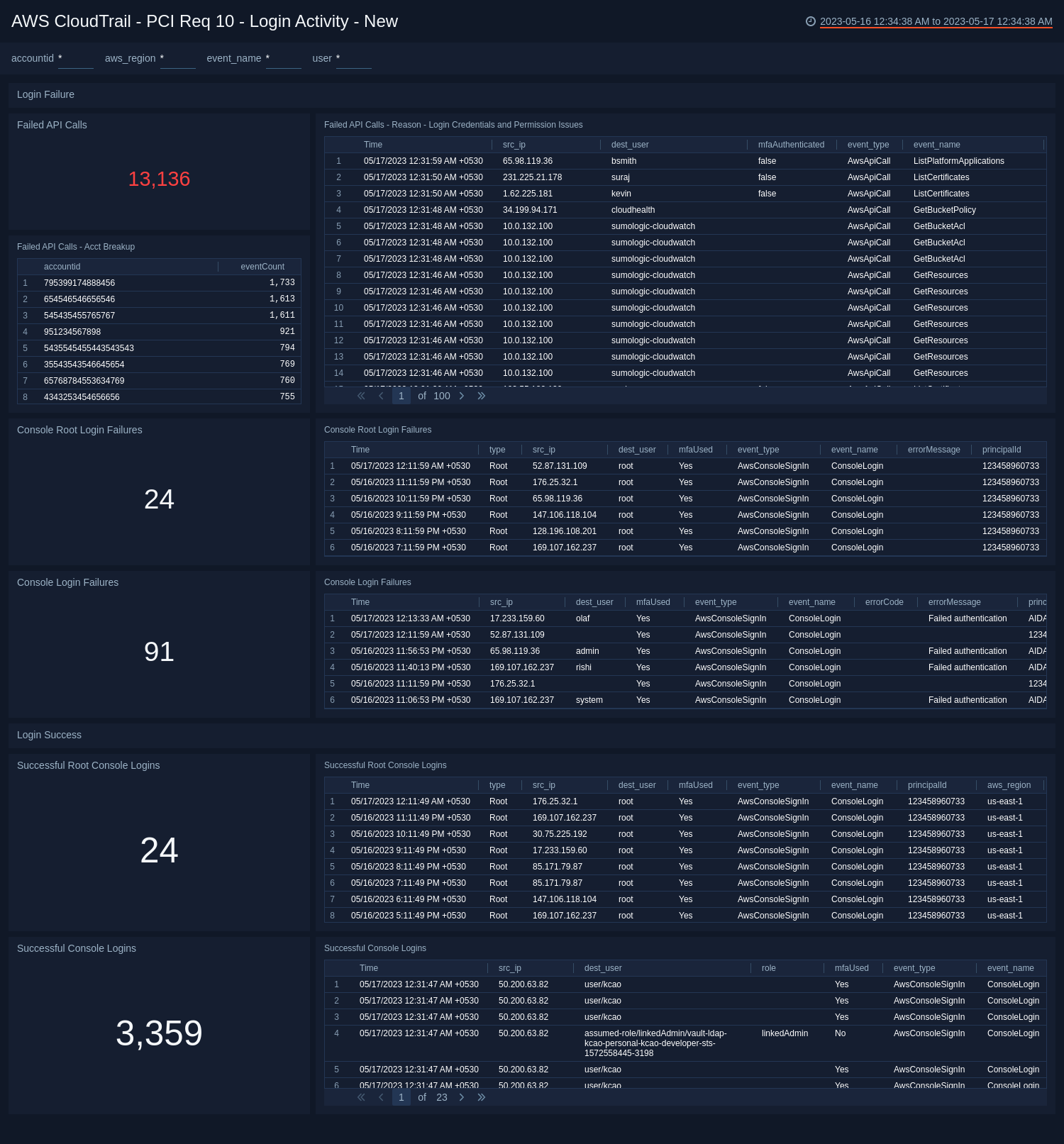
- Failed API Calls. Total number of failed API calls over the last 24 hours. Adjust time range as needed.
- Failed API Calls- Reason - Login Credentials and Permission Issues. Aggregation table detailing failed API calls, source IP, destination user, event type, error code, region, and account ID.
- Failed API Calls - Acct Breakup. Aggregation table of accounts with failed API calls and the number of events.
- Console Root Login Failures. See the count of console root login failures in the last 24 hours.
- Console Root Login Failures. See the details of console root login failures, in the last 24 hours, including the time, type, source type, destination user, MFA used, event type, event name, error message, principal ID, AWS region, and account ID.
- Console Login Failures. Aggregation table of failed logins from the console.
- Successful Console Logins. Total number of successful logins over the last 24 hours. Adjust time range as needed.
- Successful Console Logins. For more details on successful console logins, see the aggregation table of the successful logins over the 24 hours.
- Successful Root Console Logins. See the count of successful console root logins in the last 24 hours.
- Successful Root Console Logins. See the details of successful console root logins, in the last 24 hours, including the time, type, source IP, destination user, MFA used, event type, event name, principal ID, AWS region, and account ID.
PCI Req 08 - Account, System Monitoring
Search user account and IAM activity in compliance with PCI Requirement 08.
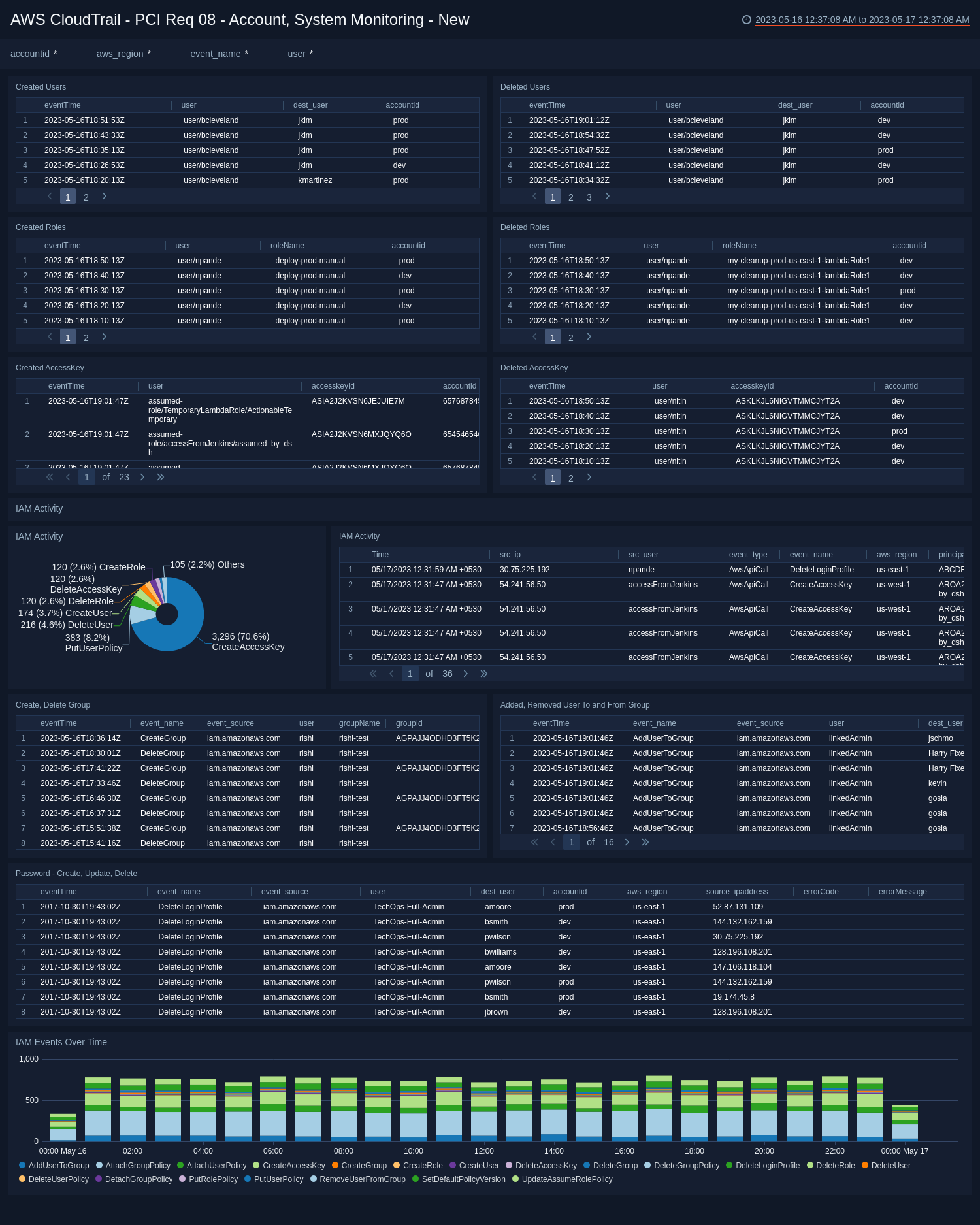
- Created Users. Aggregation table of users created in the last 24 hours.
- Deleted Users. Aggregation table of users deleted in the last 24 hours.
- Created Roles. Aggregation table of users created in the last 24 hours.
- Deleted Roles. Aggregation table of users deleted in the last 24 hours.
- Created Access Key. Aggregation table of access keys created in the last 24 hours.
- Deleted Access Key. Aggregation table of access keys deleted in the last 24 hours.
- IAM Activity. Pie chart detailing the percentage of IAM Activity for policies and users over the last 24 hours.
- IAM Activity. Aggregation table of IAM Activity for policies and users over the last 24 hours.
- Create, Delete Group. See the details of the events - create group, and delete group, in the last 24 hours including the event time, event name, event source, user, group name, group ID, account ID, AWS region, and source IP address.
- Added, Removed User To and From Group. See the details of the events - add user to group, and remove user from group, in the last 24 hours including the event time, event name, event source, user, destination user, group name, account ID, AWS region, and source IP address.
- Password - Create, Update, Delete. See the details of the events - change password, update login profile, and delete login profile, in the last 24 hours including the event time, event name, event source, user, destination user, account ID, AWS region, source IP address, error code, and error message.
- IAM Events Over Time. IAM events over the last 24 hours time sliced by every 30 minutes.
PCI Req 08, 10 - Privileged Activity
See the successful and failed configuration changes, policy changes, and security group activity.
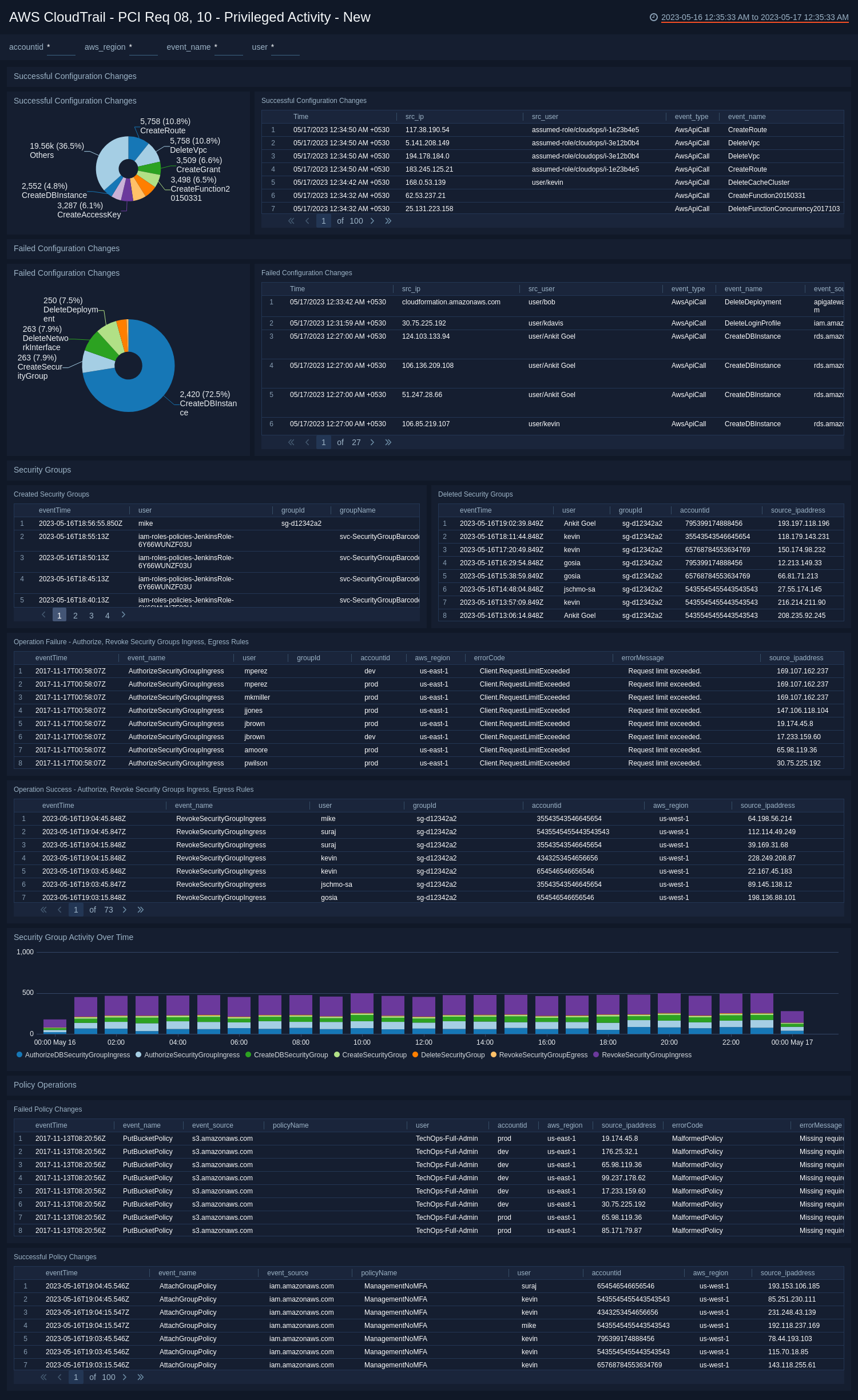
Successful Configuration Changes
- Successful Configuration Changes. Pie chart of the successful configuration changes over the last 24 hours.
- Successful Configuration Changes. Aggregation table of the successful configuration changes over the last 24 hours.
Failed Configuration Changes
- Failed Configuration Changes. Pie chart of the failed configuration changes over the last 24 hours.
- Failed Configuration Changes. Aggregation table of the failed configuration changes over the last 24 hours.
Security Groups
- Created Security Groups. Aggregation table of security groups created in the last 24 hours.
- Deleted Security Groups. Aggregation table of security groups created in the last 24 hours.
- Operation Failure - Authorize, Revoke Security Groups Ingress, Egress Rules. See the details of failed events - authorize security group ingress, authorize security group egress, revoke security group ingress, and revoke security group egress, in the last 24 hours, including the event time, event name, user, group ID, account ID, error code, error message, and source IP address.
- Operation Success - Authorize, Revoke Security Groups Ingress, Egress Rules. See the details of successful events - authorize security group ingress, authorize security group egress, revoke security group ingress, and revoke security group egress, in the last 24 hours, including the event time, event name, user, group ID, account ID, AWS region, and source IP address.
- Security Group Activity Over Time. Histogram of security group activity over the last 24 hours time sliced by hour.
Policy Operations
- Failed Policy Changes. See the details of failed policy changes, in the last 24 hours, including the event time, event name, event source, policy name, user, account ID, AWS region, source IP address, error code, and error message.
- Successful Policy Changes. See the details of successful policy changes, in the last 24 hours, including the event time, event name, event source, policy name, user, account ID, AWS region, and source IP address.
Create monitors for PCI Compliance for AWS CloudTrail app
From your App Catalog:
- From the Sumo Logic navigation, select App Catalog.
- In the Search Apps field, search for and then select your app.
- Make sure the app is installed.
- Navigate to What's Included tab and scroll down to the Monitors section.
- Click Create next to the pre-configured monitors. In the create monitors window, adjust the trigger conditions and notifications settings based on your requirements.
- Scroll down to Monitor Details.
- Under Location click on New Folder.
note
By default, monitor will be saved in the root folder. So to make the maintenance easier, create a new folder in the location of your choice.
- Enter Folder Name. Folder Description is optional.
tip
Using app version in the folder name will be helpful to determine the versioning for future updates.
- Click Create. Once the folder is created, click on Save.
PCI Compliance for AWS CloudTrail alerts
| Name | Description | Alert Condition | Recover Condition |
|---|---|---|---|
PCI Compliance For AWS CloudTrail - Security Group Ingress or Egress Rule Modified | This alert is triggered when a security group ingress or egress rule is modified (authorized or revoked). Unauthorized changes to security group rules can expose the cardholder data environment to untrusted networks. | Count > 0 | Count < = 0 |
PCI Compliance For AWS CloudTrail - IAM Policy Changed | This alert is triggered when an IAM policy is created, updated, or deleted. Policy changes can grant excessive permissions or remove access controls protecting the cardholder data environment. | Count > 0 | Count < = 0 |
PCI Compliance For AWS CloudTrail - Console Login Without MFA | This alert is triggered when a successful AWS Console login is detected without multi-factor authentication (MFA). MFA is required for all administrative access under PCI DSS requirement 8.3. | Count > 0 | Count < = 0 |
PCI Compliance For AWS CloudTrail - Excessive Failed API Calls | This alert is triggered when more than 5 failed API calls are detected in 5 minutes with error codes indicating authentication or authorization failures (AccessDenied, Client.UnauthorizedOperation). This pattern indicates privilege escalation attempts or compromised credentials probing permission boundaries. | Count > 5 | Count < = 5 |
PCI Compliance For AWS CloudTrail - Console Login Failures | This alert is triggered when more than 5 failed AWS Console login attempts are detected in 5 minutes. A burst of console login failures from a single IP indicates brute-force, while failures from multiple IPs indicate credential stuffing attacks. | Count > 5 | Count < = 5 |
PCI Compliance For AWS CloudTrail - Root Account Login | This alert is triggered when a successful AWS root account console login is detected. Root bypasses all IAM controls and should never be used in normal operations. Any successful root login requires immediate investigation. | Count > 0 | Count < = 0 |
PCI Compliance For AWS CloudTrail - Root Account Login Failure | This alert is triggered when a failed AWS root account console login attempt is detected. Any attempt to log in as root is extremely suspicious and warrants immediate investigation. | Count > 0 | Count < = 0 |
Upgrade/Downgrade the PCI Compliance for AWS CloudTrail app (Optional)
To update the app, do the following:
Next-Gen App: To install or update the app, you must be an account administrator or a user with Manage Apps, Manage Monitors, Manage Fields, Manage Metric Rules, and Manage Collectors capabilities depending upon the different content types part of the app.
- Select App Catalog.
- In the Search Apps field, search for and then select your app.
Optionally, you can identify apps that can be upgraded in the Upgrade available section. - To upgrade the app, select Upgrade from the Manage dropdown.
- If the upgrade does not have any configuration or property changes, you will be redirected to the Preview & Done section.
- If the upgrade has any configuration or property changes, you will be redirected to the Setup Data page.
- In the Configure section of your respective app, complete the following fields.
- Field Name. If you already have collectors and sources set up, select the configured metadata field name (eg _sourcecategory) or specify other custom metadata (eg: _collector) along with its metadata Field Value.
- Click Next. You will be redirected to the Preview & Done section.
Post-update
Your upgraded app will be installed in the Installed Apps folder and dashboard panels will start to fill automatically.
See our Release Notes changelog for new updates in the app.
To revert the app to a previous version, do the following:
- Select App Catalog.
- In the Search Apps field, search for and then select your app.
- To version down the app, select Revert to < previous version of your app > from the Manage dropdown.
Uninstalling the PCI Compliance for AWS CloudTrail app (Optional)
To uninstall the app, do the following:
- Select App Catalog.
- In the 🔎 Search Apps field, run a search for your desired app, then select it.
- Click Uninstall.