 Meet the new
 Claude Compliance

The Sumo Logic app for Claude Compliance provides security, compliance, and operations teams with centralized visibility into Claude platform and local session activity, covering API usage, authentication events, billing operations, data access, integrations, SSO, policy changes, and Claude local session interactions. It includes prebuilt dashboards for local sessions, messages, and tool activity so teams can monitor user behavior, model usage, workspace context, and tool execution outcomes, alongside detection monitors that help you identify suspicious behavior, investigate threats, and maintain governance across your Claude environment.
Log types
This app uses Claude Compliance's activity logs, chat message logs, and local session endpoint logs.
Sample log message
{
  "actor": {
    "type": "user_actor",
    "user_agent": "Mozilla/5.0 (iPhone; CPU iPhone OS 17_1 like Mac OS X) AppleWebKit/605.1.15 (KHTML, like Gecko) CriOS/120.0.6099.119 Mobile/15E148 Safari/604.1",
    "user_id": "user_01KQS2GBC9MK53Y7WE6G16G2Y8",
    "email_address": "alex.martinez482@example.org",
    "ip_address": "45.150.108.61"
  },
  "id": "activity_01KQS28XP295M0QR9VRCX7C3K0",
  "type": "org_join_request_instant_approved",
  "organization_uuid": "org_081m2TJpAuK364YHLwQCXe5r",
  "created_at": "2026-05-08T12:18:11.000538Z",
  "organization_id": "01KQS4ZBD35MR4678P2NNXZPW1"
}
{
    "id": "claude_chat_01BKzmfeRdSfq7otZxLhEAUp",
    "name": "Greeting",
    "created_at": "2026-05-07T17:29:59.354315Z",
    "updated_at": "2026-05-07T17:30:01.282925Z",
    "deleted_at": null,
    "organization_id": "org_013w9ZYpBvS942YQNwJAPw6z",
    "organization_uuid": "17c1b787-c3ac-46e3-a107-0b58fc85b293",
    "project_id": null,
    "model": "claude-sonnet-4-6",
    "user": {
        "id": "user_01XyDMpzjS89pFZXqSFUBDr6",
        "email_address": "giacomo@giacomo.plutoenterprise.org"
    },
    "chat_messages": [
        {
            "id": "claude_chat_msg_011Caoc3TT3u8K38ho6SPUPJ",
            "role": "user",
            "created_at": "2026-05-07T17:29:59.774439Z",
            "content": [
                {
                    "type": "text",
                    "text": "hey"
                }
            ],
            "files": null,
            "generated_files": null,
            "artifacts": null
        },
        {
            "id": "claude_chat_msg_011Caoc3TT4Gh3TnqUYitFAB",
            "role": "assistant",
            "created_at": "2026-05-07T17:30:01.282925Z",
            "content": [
                {
                    "type": "text",
                    "text": " Hey! How can I help you today?"
                }
            ],
            "files": null,
            "generated_files": null,
            "artifacts": null
        }
    ],
    "href": "https://claude.ai/chat/53a26065-dc3e-4f8d-99da-5fb6525f14b9",
    "has_more": false,
    "first_id": "eyJtc2dfdXVpZCI6ICIwMTllMDM3ZC0zYTRjLTc2NGMtOGMxMy1iZGI0ZDNkZTU4NzkifQ==",
    "last_id": "eyJtc2dfdXVpZCI6ICIwMTllMDM3ZC0zYTRjLTdjZWEtYjJlNi01M2E5YWNjMDRmYjQifQ=="
}
{
  "session": {
    "type": "compliance_local_session",
    "id": "clls_eyJ2IjoxLCJvIjoiZmJjMWY3MzAtZTBhZi00MGVlLWEwYmUtNjA1N2QxOTcxYjk3IiwicCI6IjhlMWQ5OTNhLTM2NjUtNDc2Ni1hMDUxLTk2YWZjYmIzNDhiMiIsInMiOiI4OWRhZGJlYS1jNDQ5LTQ1YjAtYmJhYy1iZTUzOTI5OWVmM2QifQ",
    "organization_uuid": "fbc1f730-e0af-40ee-a0be-6057d1971b97",
    "workspace_id": null,
    "user": { "id": "user_01JYqynkuhhK4gkr2VXdzqF", "email_address": "giacomo@giacomo.plutoenterprise.org" },
    "product_surface": "cowork",
    "created_at": "2026-09-17T05:50:03.258238Z",
    "updated_at": "2026-09-17T06:12:27.967457Z",
    "truncated": false
  },
  "message": {
    "type": "compliance_local_session_message",
    "id": "clsm_eyJ2IjoxLCJsIjoibXNnXzAxMUNmOFd4aEpVRHJzSmZiVTlqanJFMyIsInIiOiJhc3Npc3RhbnQiLCJwIjoxLCJxaCI6ImY5ZjdkNmQ1In0",
    "role": "user",
    "created_at": "2026-09-17T06:12:27.967457Z",
    "provenance": null,
    "model": "claude-sonnet-5",
    "content": [
      {
        "type": "text",
        "text": "hey, how are you? Do you know about the claude compliance source in SumoLogic?",
        "truncated": false
      }
    ]
  }
}
Sample queries
="claude_compliance" type actor
| json "type","organization_uuid","id","actor.type" as event_type,org_uuid,id,actor_type nodrop
// Global filter
| where if("{{event_type}}" = "*",true,event_type matches "{{event_type}}")
| where if("{{organization}}" = "*",true,org_uuid matches "{{organization}}")
| where if("{{actor_type}}" = "*",true,actor_type matches "{{actor_type}}")
// Panel specific
| count by id
| count
="claude_compliance" type actor
| json "type","organization_uuid","id","actor.type" as event_type,org_uuid,id,actor_type nodrop
// Global filter
| where if("{{event_type}}" = "*",true,event_type matches "{{event_type}}")
| where if("{{organization}}" = "*",true,org_uuid matches "{{organization}}")
| where if("{{actor_type}}" = "*",true,actor_type matches "{{actor_type}}")
// Panel specific
| count by id,event_type
| count by event_type
| count
="claude_compliance" "claude_chat_msg"
| json "id", "updated_at", "user.id", "user.email_address", "name", "organization_id", "message.role", "message.content[0].type", "message.content[0].text", "message.model", "message.id" as id, updated_at, user_id, user_email, name, organization_id, role, message_type, message_value, model, message_id nodrop
| where user_email matches "{{user}}" or isBlank(user_email)
| where role matches "{{role}}" or isBlank(role)
| where model matches "{{model}}" or isBlank(model)
| where message_type matches "{{message_type}}" or isBlank(message_type)
| where message_value contains "{{message}}" or "{{message}}" == "*"
| where !isBlank(role)
| count by message_id, role
| count by role
| sort by _count, role
="claude_compliance" "compliance_local_session_message"
| json "session.id", "session.product_surface", "session.user.email_address", "message.id", "message.role", "message.model", "message.content[0].type" as session_id, product_surface, user_email, message_id, role, model, message_type nodrop
| where user_email matches "{{user}}" or isBlank(user_email)
| where role matches "{{role}}" or isBlank(role)
| where model matches "{{model}}" or isBlank(model)
| where product_surface matches "{{product_surface}}" or isBlank(product_surface)
| where !isBlank(role)
| count by message_id, role
| count by role
| sort by _count, role
Collection configuration
This app requires three types of logs: activity logs (compliance events across your Claude environment), chat message logs (conversation-level data from the Claude Messages API), and local session endpoint logs (session, message, and tool activity from Claude local sessions). We recommend using the dedicated Cloud-to-Cloud (C2C) source, which supports collecting all three log types and handles API-specific behaviors automatically.
Vendor configuration
To collect logs, you need a Claude API key with access to the Compliance API. Use one of the following options to create the API key:
Admin keys created through Console are limited to the Activity Feed and cannot access chat messages or local session data via C2C source.
Console / API
Keys are created in the Admin keys section of Console Settings.
- Click Create key to name your key.
- Receive a secret access key and store it securely.
If the Compliance API is enabled for your organization, Admin keys created here are automatically granted the read:compliance_activities scope. If the Compliance API is not yet enabled, contact your Anthropic representative to request access.
Claude.ai
Keys are created in the Compliance access keys section of Data Management Settings.
- Click Create key to name your key.
- Name the key and select its scopes. For activities select
read:compliance_activities, and for chat messages and local session data selectread:compliance_user_data. - Receive a secret access key and store it securely.
If you do not see the Compliance access keys section, either you are not a Primary Owner of the organization, or the Compliance API is not enabled for your organization. The Primary Owner needs to enable it in the Data and Privacy section of your organization's settings.
Collection methods
-
Cloud-to-Cloud (C2C) source (recommended). Supports collection of activity logs, chat message logs, and local session endpoint logs. Handles Anthropic's Compliance API ingestion delay automatically, ensuring no data is missed at polling boundaries.
-
Universal Connector. Collects activity logs only — chat message logs and local session endpoint logs are not supported. Because the Universal Connector does not account for Anthropic's ~1-minute API propagation delay, events that arrive at the API boundary may be missed. For this reason, the dedicated C2C source is preferred.
Details for C2C source (recommended)
Use the Cloud-to-Cloud Integration for Claude Compliance to create the source. Ensure the _sourceCategory configured on your source matches the source category used when installing the app.
Details for Universal Connector
The Universal Connector collects activity logs only. It does not support chat message logs or local session endpoint logs, and does not account for Anthropic's ~1-minute Compliance API propagation delay, which may cause data to be missed at polling window boundaries. Use the C2C source instead.
- On the Data Collection page, click Add Source next to a Hosted Collector.
- Search for and select Universal Connector.
- Configure the General settings:
- Name. Enter a name for the source.
- Description. (Optional) Enter a description.
- Source Category. Enter a value such as
claude_compliance. This value is stored in the_sourceCategorymetadata field and must match the source category used when installing the app. - Fields. (Optional) Click +Add to define any additional fields to associate with the source.
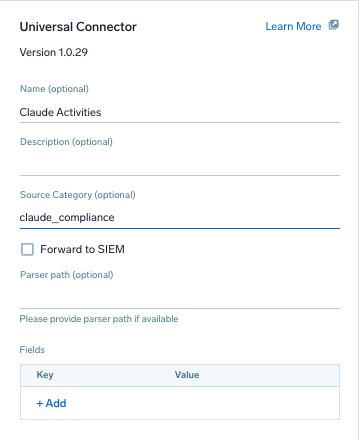
- Configure the Authentication Configuration:
- Authentication Type. Select API Key.
- How should we use your API key? Select In HTTP Request Header.
- Location Key. Enter
x-api-key. - API Key. Enter the Claude API key you copied above.
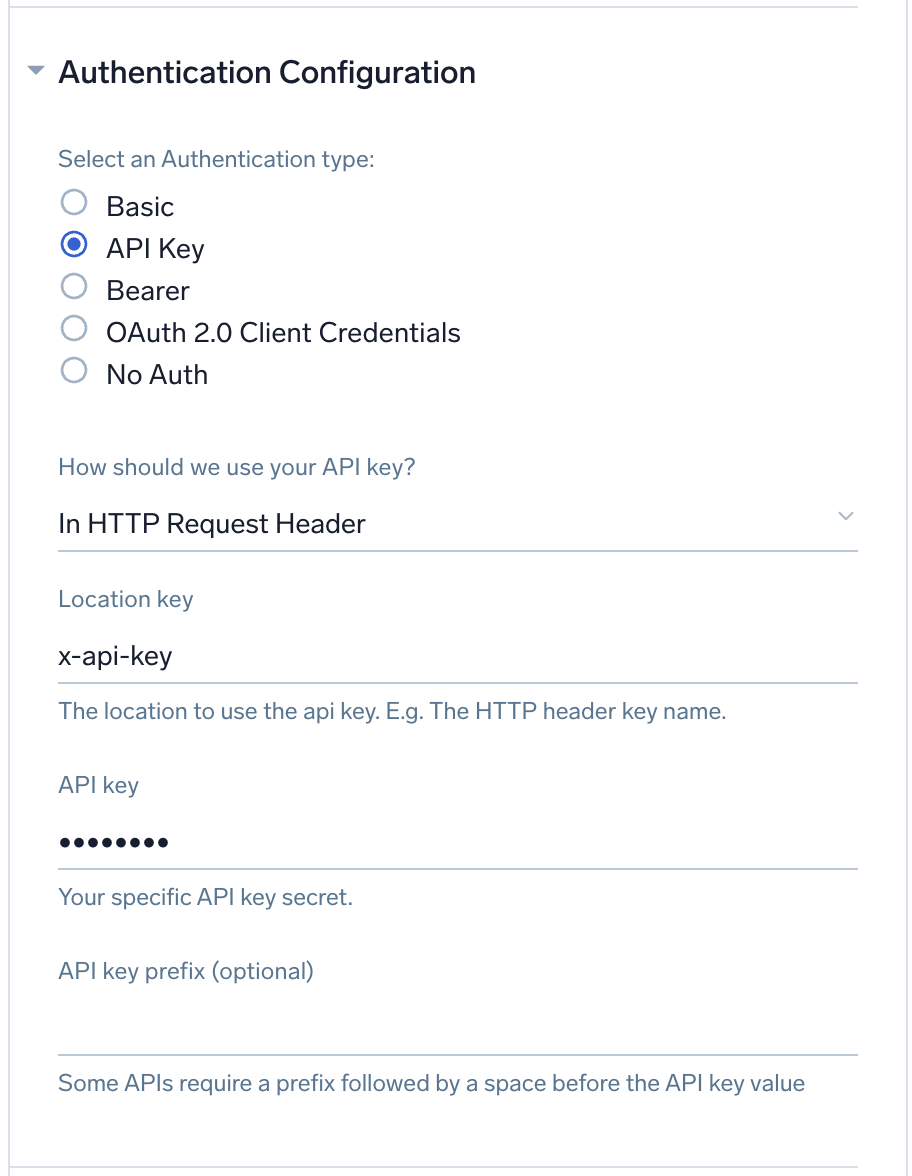
- Configure the Request Configuration:
- HTTP Method. Select
GET. - Endpoint URL. Enter
https://api.anthropic.com/v1/compliance/activities.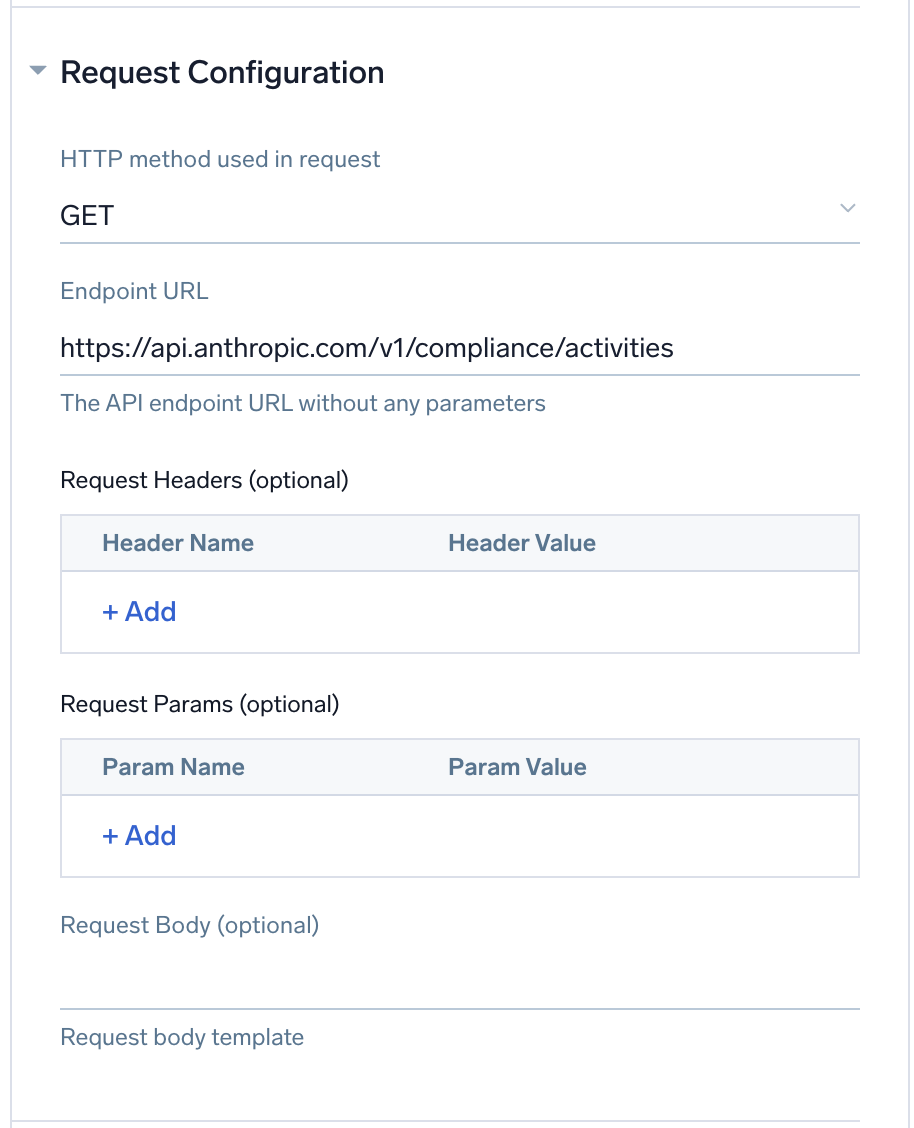
- HTTP Method. Select
- Configure the Tracking Progression:
- Type. Select Time Window.
- Window Size. Enter
5m(default recommended). - Initial Lookback. Enter
24h. - Progress Window Parameters. Add the following parameters:
Parameter Name Parameter Value created_at.gte{{ .WindowStartUTC "yyyy-MM-ddTHH:mm:ssZ" }}created_at.lt{{ .WindowEndUTC "yyyy-MM-ddTHH:mm:ssZ" }}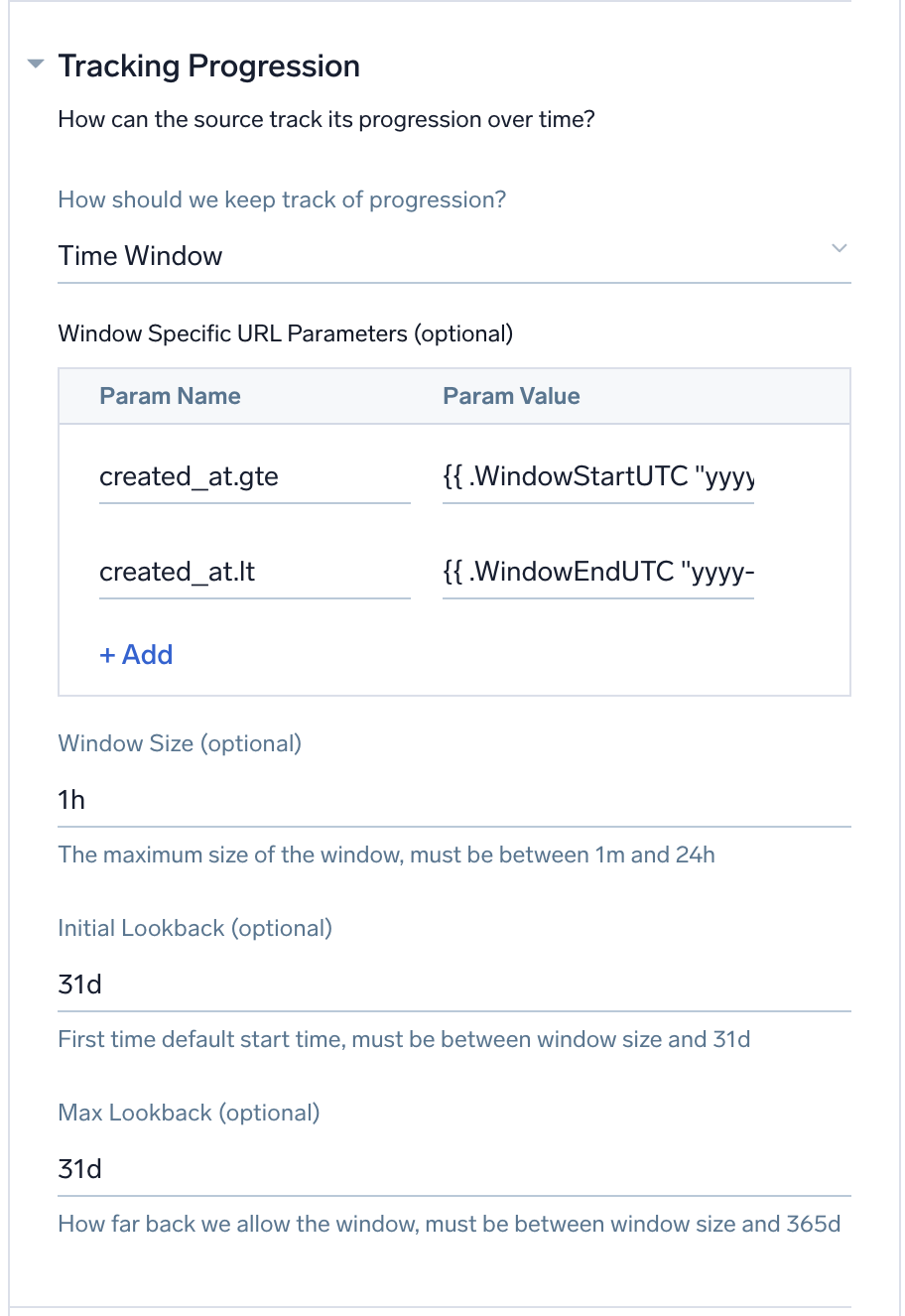
- Configure the HTTP Response Log Ingest Configuration:
- Format. Select JSON with JPath.
- Configure the following log path settings:
Field Value Logs JPath $.data[*]Timestamp JPath $.created_atTimestamp Format 2006-01-02T15:04:05.000000Z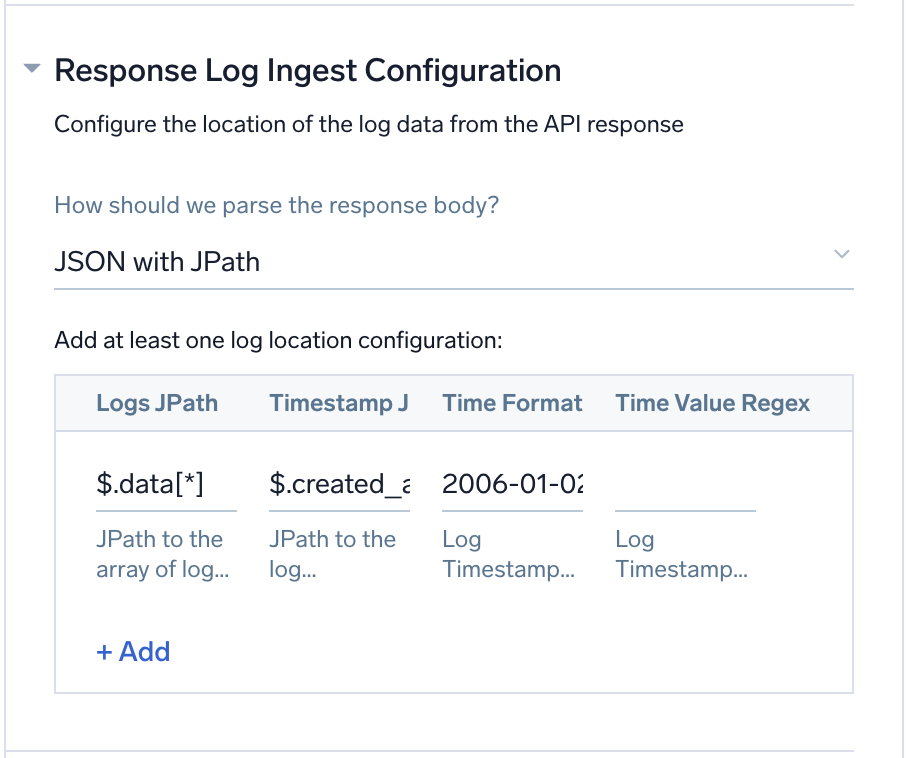
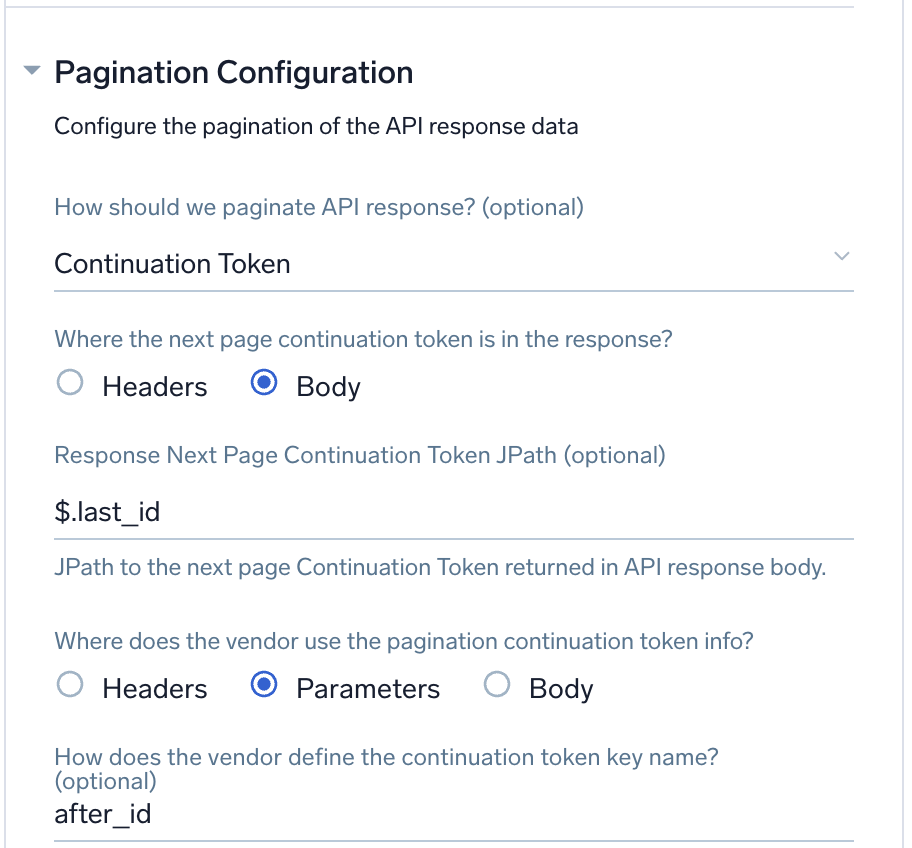
- Configure the Pagination Configuration:
- Type. Select Continuation Token.
- Token Location. Select Body.
- Next Page Continuation Token JPath. Enter
$.last_id. - Send Token In. Select Parameters.
- Parameter Key. Enter
after_id.
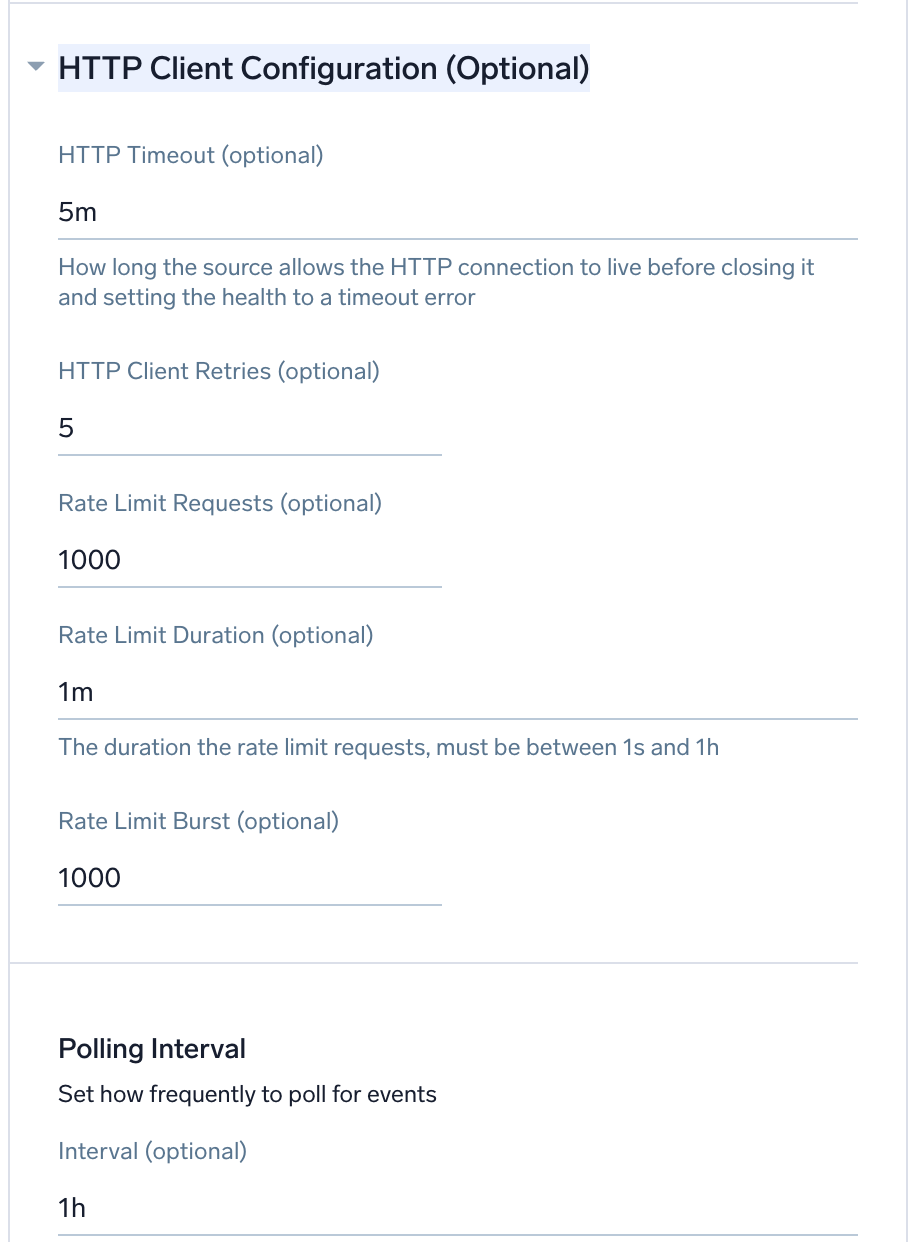
- (Optional) Configure the HTTP Client Configuration:
- HTTP Timeout.
5m(default). - HTTP Client Retries.
5(default). - Rate Limit Requests.
1000(default). - Rate Limit Duration.
1m(default). - Rate Limit Burst.
1000(default). - Polling Interval. Set how frequently to poll for new data, between 5 minutes and 48 hours.
- HTTP Timeout.
- Click Save.
Once the source is configured, you can verify successful log collection by running searches on the Search page in Sumo Logic using the source category. For example, _sourceCategory=claude_compliance.
App installation
Depending on the set up collection method, you can configure and install the app in three ways:
- Create a new collector and install the app. Create a new Sumo Logic Cloud-to-Cloud (C2C) source under a new Sumo Logic Collector and later install the app, or
- Use an existing collector and install the app. Create a new Sumo Logic Cloud-to-Cloud (C2C) source under an existing Sumo Logic Collector and later install the app, or
- Use existing source and install the app. Use your existing configured Sumo Logic Cloud-to-Cloud (C2C) source and install the app.
Create a new collector and install the app
To set up collection and install the app, do the following:
Next-Gen App: To install or update the app, you must be an account administrator or a user with Manage Apps, Manage Monitors, Manage Fields, Manage Metric Rules, and Manage Collectors capabilities depending upon the different content types part of the app.
- Select App Catalog.
- In the 🔎 Search Apps field, run a search for your desired app, then select it.
- Click Install App.
note
Sometimes this button says Add Integration.
- In the Set Up Collection section of your respective app, select Create a new Collector.
- Collector Name. Enter a Name to display the Source in the Sumo Logic web application. The description is optional.
- Timezone. Set the default time zone when it is not extracted from the log timestamp. Time zone settings on Sources override a Collector time zone setting.
- (Optional) Metadata. Click the +Add Metadata link to add a custom log Metadata Fields. Define the fields you want to associate, each metadata field needs a name (key) and value.
 A green circle with a checkmark is shown when the field exists and is enabled in the Fields table schema.
 An orange triangle with an exclamation point is shown when the field doesn't exist, or is disabled in the Fields table schema. In this case, you'll see an option to automatically add or enable the nonexistent fields to the Fields table schema. If a field is sent to Sumo Logic but isn’t present or enabled in the schema, it’s ignored and marked as Dropped.
- Click Next.
- Configure the source as specified in the
Infobox above, ensuring all required fields are included. - In the Configure section of your respective app, complete the following fields.
- Field Name. If you already have collectors and sources set up, select the configured metadata field name (eg _sourcecategory) or specify other custom metadata (eg: _collector) along with its metadata Field Value.
- Click Next. You will be redirected to the Preview & Done section.
Post-installation
Once your app is installed, it will appear in your Installed Apps folder, and dashboard panels will start to fill automatically.
Each panel slowly fills with data matching the time range query received since the panel was created. Results will not immediately be available but will be updated with full graphs and charts over time.
Use an existing collector and install the app
To set up the source in the existing collector and install the app, do the following:
Next-Gen App: To install or update the app, you must be an account administrator or a user with Manage Apps, Manage Monitors, Manage Fields, Manage Metric Rules, and Manage Collectors capabilities depending upon the different content types part of the app.
- Select App Catalog.
- In the 🔎 Search Apps field, run a search for your desired app, then select it.
- Click Install App.
note
Sometimes this button says Add Integration.
- In the Set Up Collection section of your respective app, select Use an existing Collector.
- From the Select Collector dropdown, select the collector that you want to set up your source with and click Next.
- Configure the source as specified in the
Infobox above, ensuring all required fields are included. - In the Configure section of your respective app, complete the following fields.
- Field Name. If you already have collectors and sources set up, select the configured metadata field name (eg _sourcecategory) or specify other custom metadata (eg: _collector) along with its metadata Field Value.
- Click Next. You will be redirected to the Preview & Done section.
Post-installation
Once your app is installed, it will appear in your Installed Apps folder, and dashboard panels will start to fill automatically.
Each panel slowly fills with data matching the time range query received since the panel was created. Results will not immediately be available but will be updated with full graphs and charts over time.
Use an existing source and install the app
To skip collection and only install the app, do the following:
Next-Gen App: To install or update the app, you must be an account administrator or a user with Manage Apps, Manage Monitors, Manage Fields, Manage Metric Rules, and Manage Collectors capabilities depending upon the different content types part of the app.
- Select App Catalog.
- In the 🔎 Search Apps field, run a search for your desired app, then select it.
- Click Install App.
note
Sometimes this button says Add Integration.
- In the Set Up Collection section of your respective app, select Skip this step and use existing source and click Next.
- In the Configure section of your respective app, complete the following fields.
- Field Name. If you already have collectors and sources set up, select the configured metadata field name (eg _sourcecategory) or specify other custom metadata (eg: _collector) along with its metadata Field Value.
- Click Next. You will be redirected to the Preview & Done section.
Post-installation
Once your app is installed, it will appear in your Installed Apps folder, and dashboard panels will start to fill automatically.
Each panel slowly fills with data matching the time range query received since the panel was created. Results will not immediately be available but will be updated with full graphs and charts over time.
Viewing the Claude Compliance dashboards
All dashboards have a set of filters that you can apply to the entire dashboard. Use these filters to drill down and examine the data to a granular level.
- You can change the time range for a dashboard or panel by selecting a predefined interval from a drop-down list, choosing a recently used time range, or specifying custom dates and times. Learn more.
- You can use template variables to drill down and examine the data on a granular level. For more information, see Filtering Dashboards with Template Variables.
- Most Next-Gen apps allow you to provide the scope at the installation time and are comprised of a key (
_sourceCategoryby default) and a default value for this key. Based on your input, the app dashboards will be parameterized with a dashboard variable, allowing you to change the dataset queried by all panels. This eliminates the need to create multiple copies of the same dashboard with different queries.
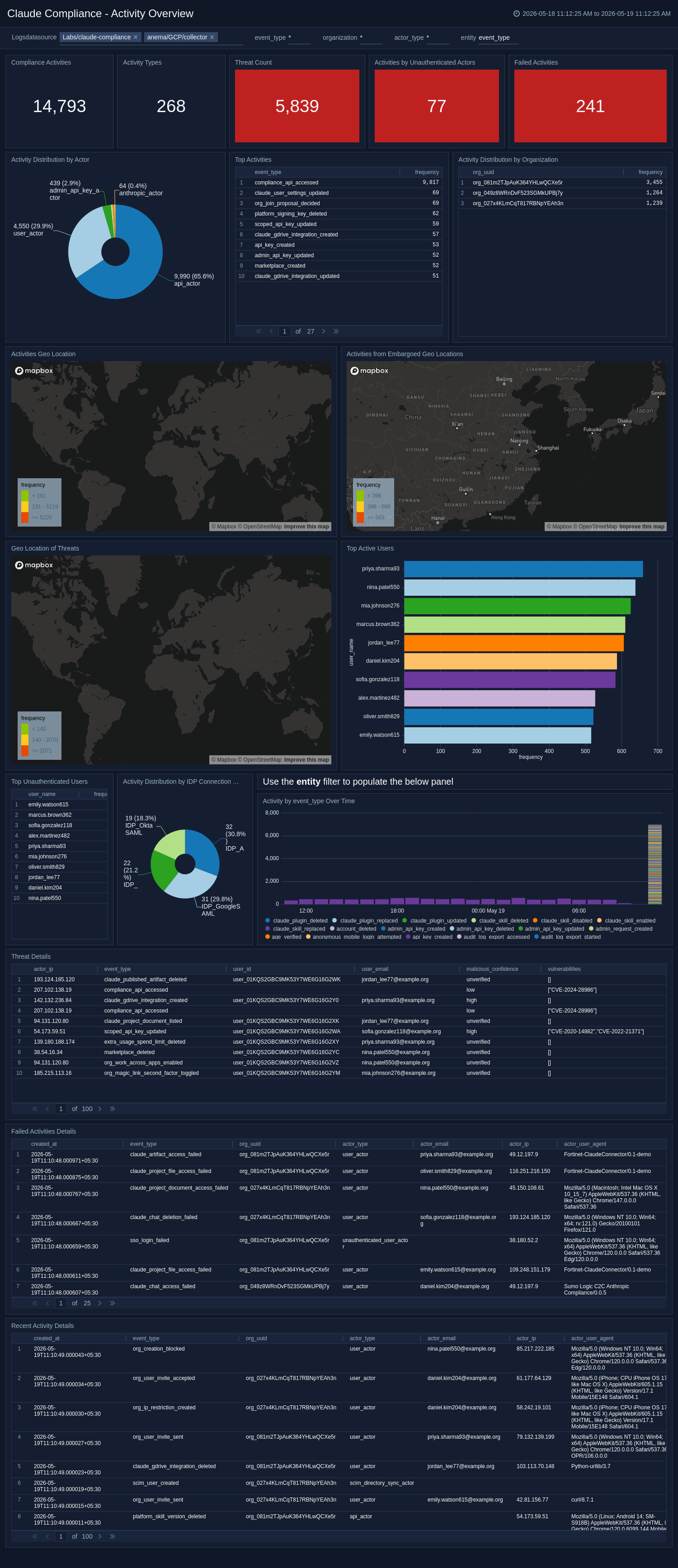
Activity Overview
The Claude Compliance - Activity Overview dashboard delivers a high-level summary of all compliance-relevant activities occurring across your Claude environment, including event volumes, activity types, and threat counts. It maps activity by geographic location, highlights events from embargoed regions, and identifies unauthenticated actors and failed activities. Teams can drill into activity distribution by organization, actor, and identity provider connection type.
Use this dashboard to:
- Quickly assess the overall compliance posture.
- Surface anomalous behavior patterns.
- Detect activities from embargoed regions.
Billing Monitoring
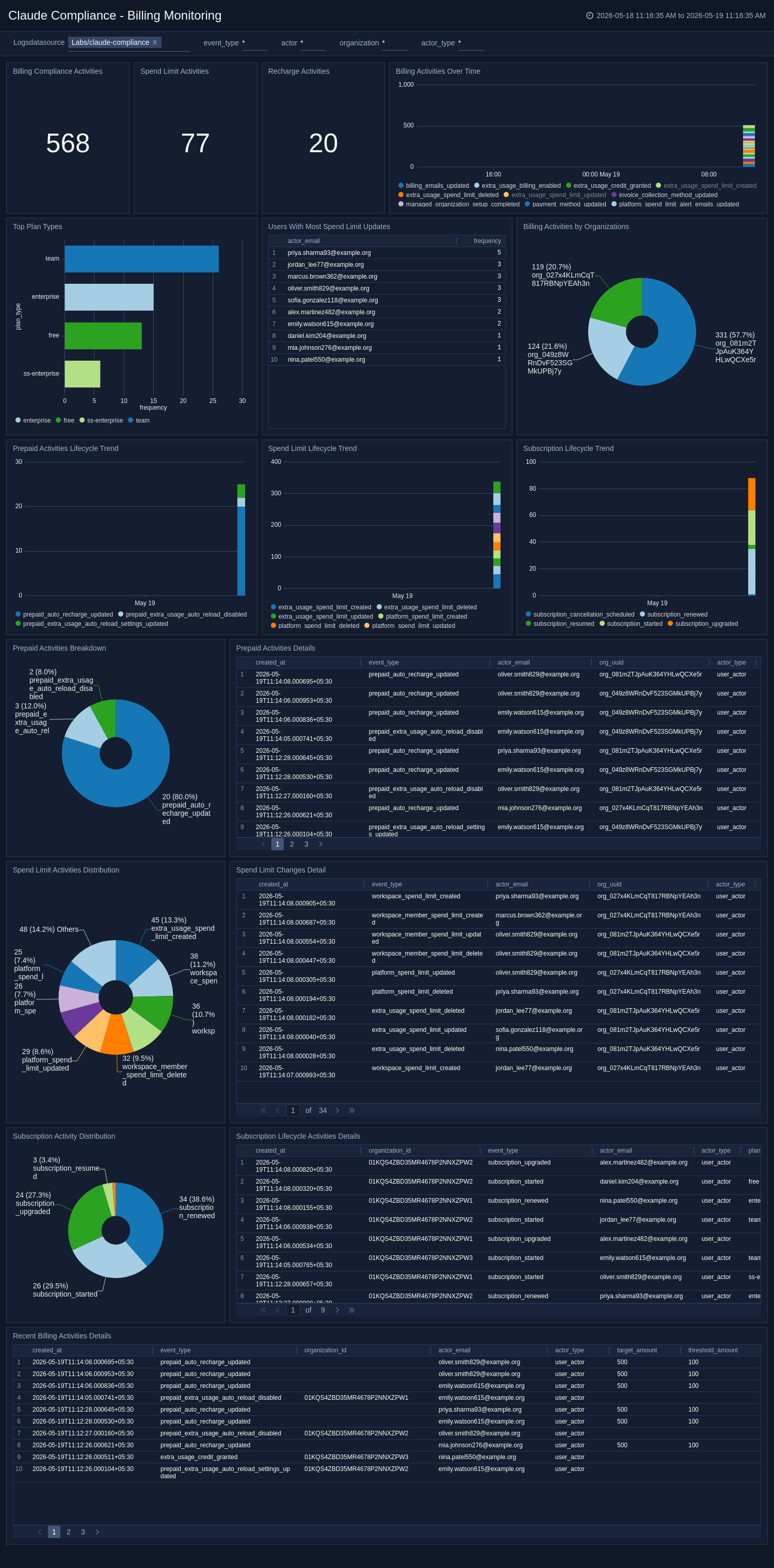
The Claude Compliance - Billing Monitoring dashboard monitors billing-related compliance events, including subscription lifecycle changes, spend limit updates, prepaid activity, and recharge events across your organization. It highlights the top plan types, organizations with the most billing activity, and users making frequent spend limit changes. Trend analysis and detailed event tables provide full audit coverage for financial governance and compliance. Use this dashboard to:
- Detect unauthorized billing changes.
- Track subscription modifications.
- Ensure spend controls are functioning as intended.
API Key Monitoring
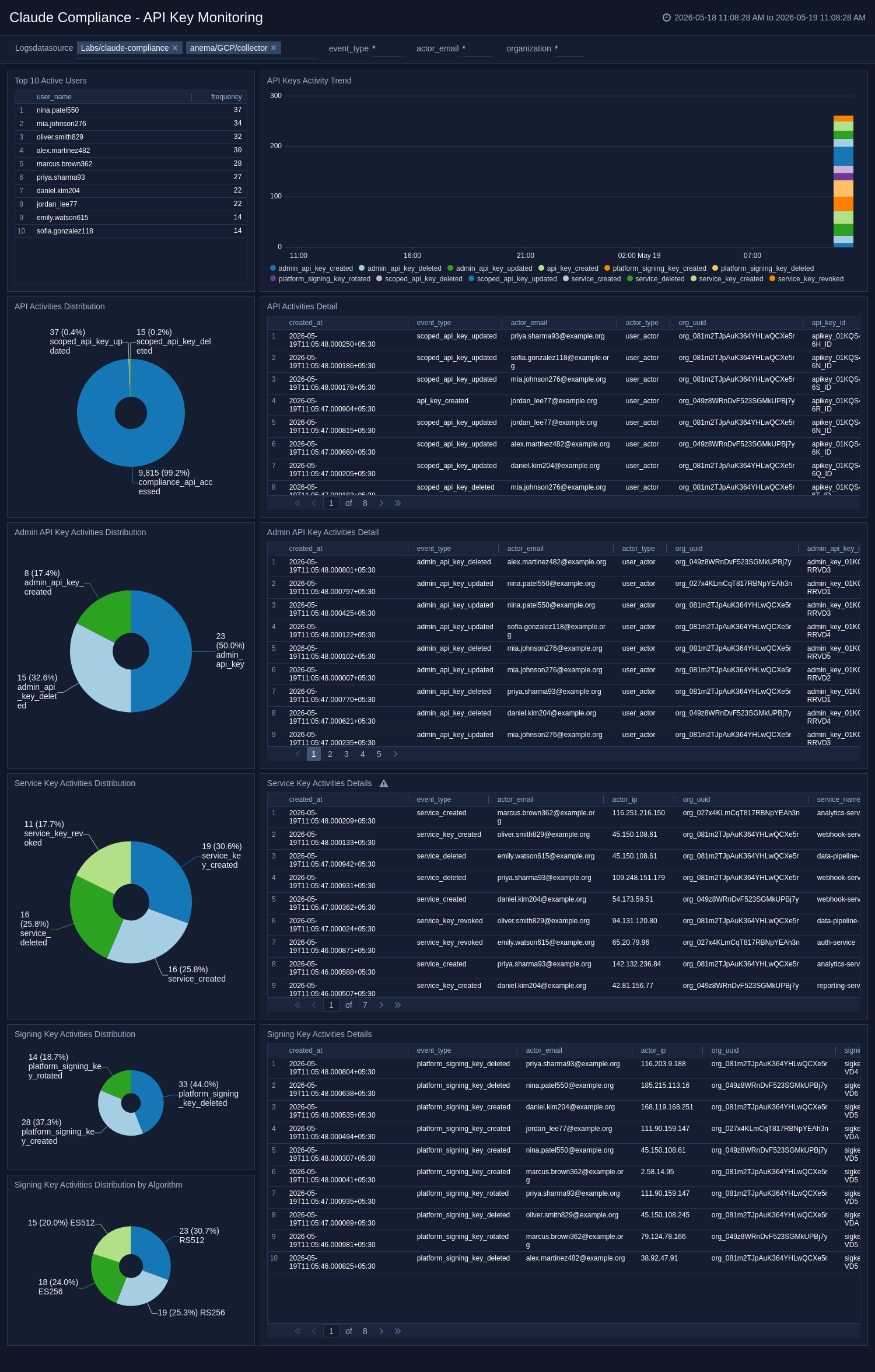
The Claude Compliance - API Key Monitoring dashboard provides visibility into API key lifecycle events across your Claude environment, including creation, deletion, and modification of API, Admin, Service, and Signing keys. It tracks key event trends over time, highlights the most active users, and surfaces detailed event records for audit and investigation purposes. Use this dashboard to:
- Detect unauthorized key activity.
- Monitor privileged admin key usage.
- Ensure key management practices align with your security policies.
Artifacts, Marketplace, and Projects Monitoring
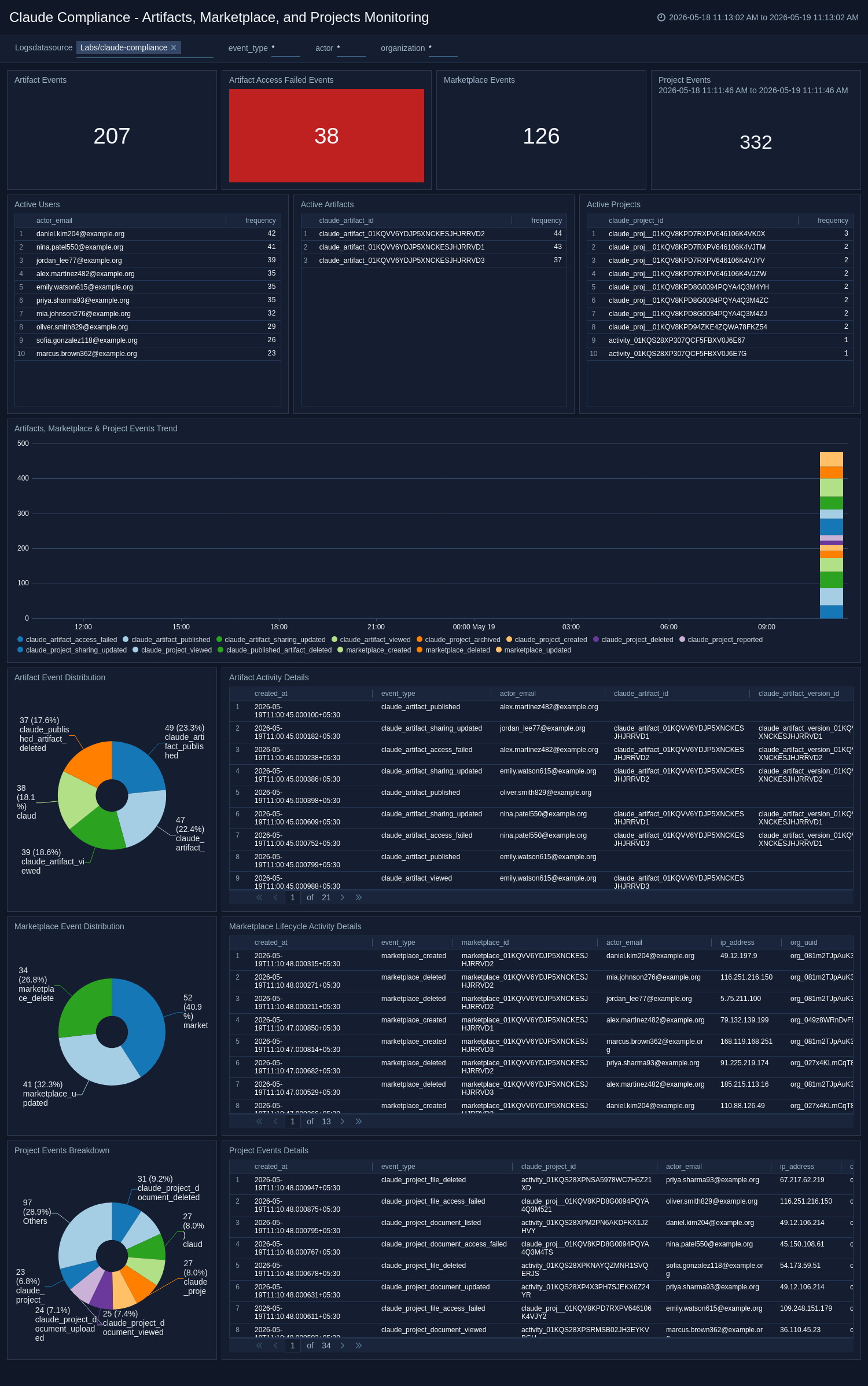
The Claude Compliance - Artifacts, Marketplace, and Projects Monitoring dashboard tracks lifecycle events for Artifacts, Marketplace items, and Projects on the Claude platform, including creation, access, and deletion. It provides trend analysis, event breakdowns, and detailed activity tables to help teams identify unusual access patterns or unauthorized changes. Active artifact, project, and user counts give a real-time snapshot of platform engagement. Use this dashboard to:
- Maintain governance over shared resources.
- Ensure marketplace and project activities align with organizational policies.
Claude Skills and Plugins Monitoring
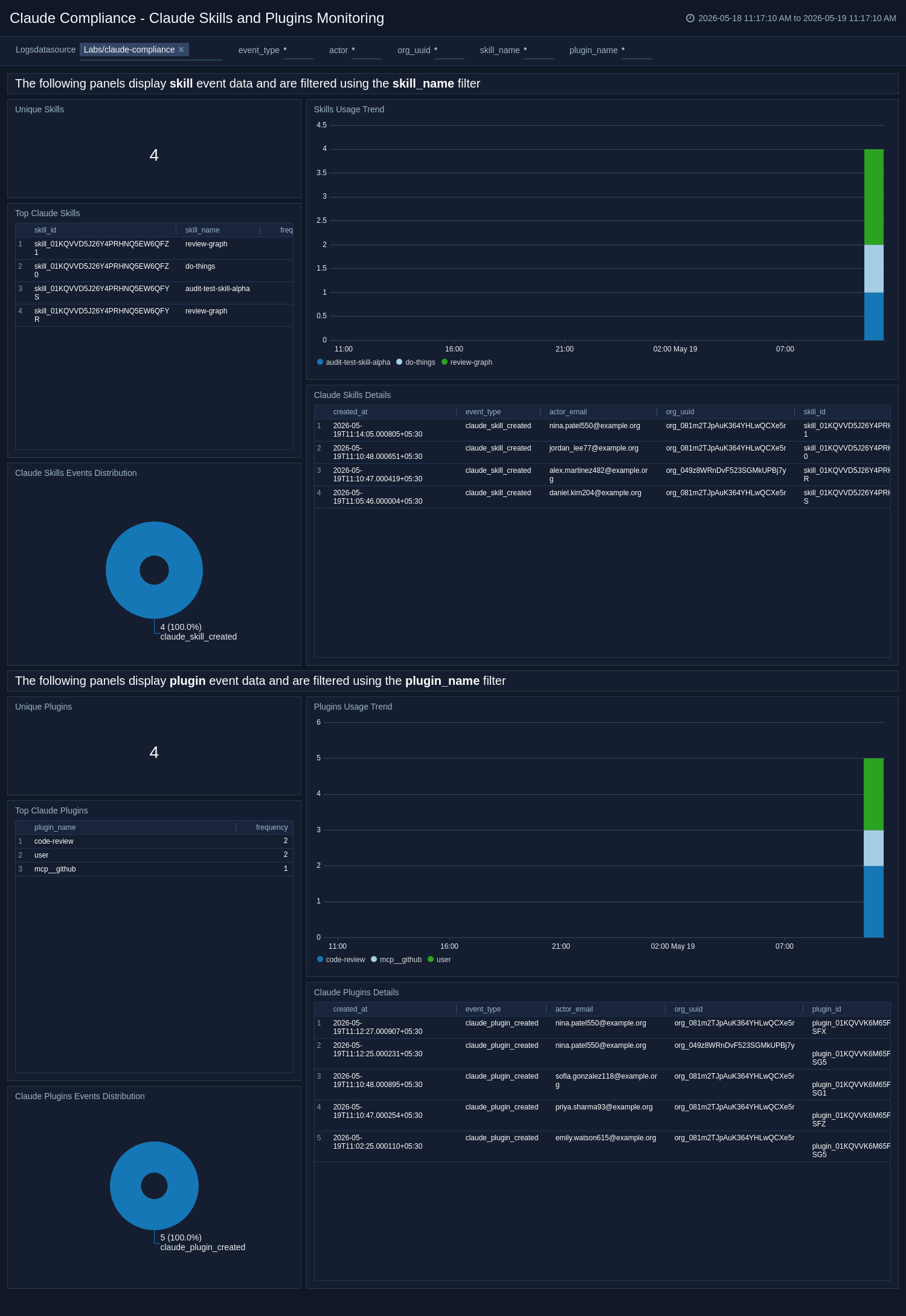
The Claude Compliance - Claude Skills and Plugins Monitoring dashboard provides visibility into the usage and lifecycle of Claude Skills and Plugins across your Claude environment, including invocation trends, event distributions, and top active skills and plugins. It surfaces unique skill and plugin counts, along with detailed activity records, to help teams govern AI capability extensions. Usage trends help identify sudden spikes or drops in plugin or skill activity that may warrant investigation. Use this dashboard to:
- Ensure approved extensions are being used appropriately.
- Detect unauthorized or anomalous AI tool usage.
Claude Usage Monitoring
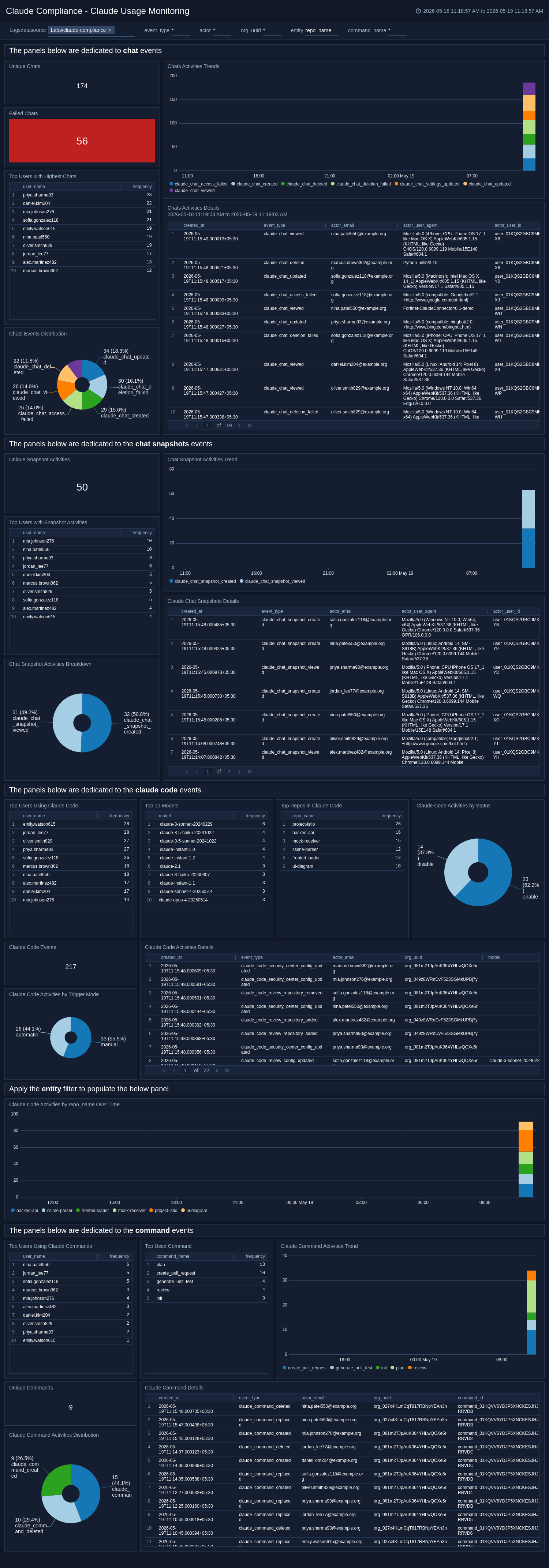
The Claude Compliance - Claude Usage Monitoring dashboard delivers comprehensive visibility into Claude platform usage, covering chat events, chat snapshots, Claude Code activity, and Claude Command executions. It tracks usage trends, top active users, unique interaction counts, failed chats, and model usage distribution to support both operational monitoring and compliance oversight. Dedicated sections for Claude Code provide insight into trigger modes, top repositories, and event statuses across development workflows. Use this dashboard to:
- Enforce acceptable use policies.
- Detect excessive or anomalous usage.
- Maintain a complete audit trail of Claude's interactions.
Compliance API Access Monitoring
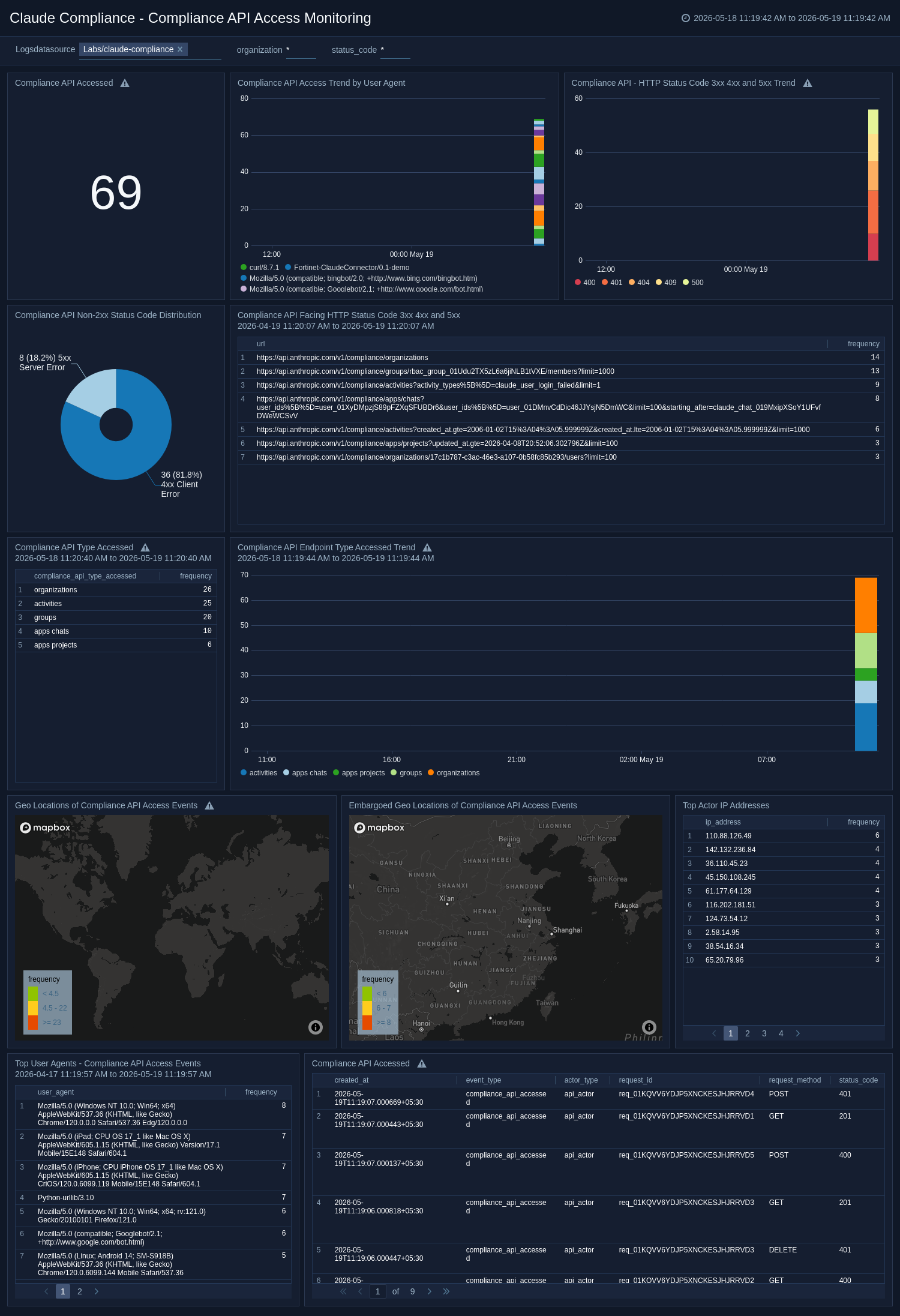
The Claude Compliance - Compliance API Access Monitoring dashboard monitors access to Claude's Compliance API, providing visibility into request trends by user agent, HTTP status code distributions, and geographic origin of API calls. It highlights non-2xx error trends, top actor IP addresses, and the types of API endpoints accessed to help teams detect misuse or unauthorized access attempts. It provides geo-location filtering and surfaced API access from restricted regions for immediate review. Use this dashboard to:
- Ensure Compliance API access is limited to authorized actors.
- Investigate anomalous or error-prone API usage patterns.
Data Access and Exfiltration Monitoring
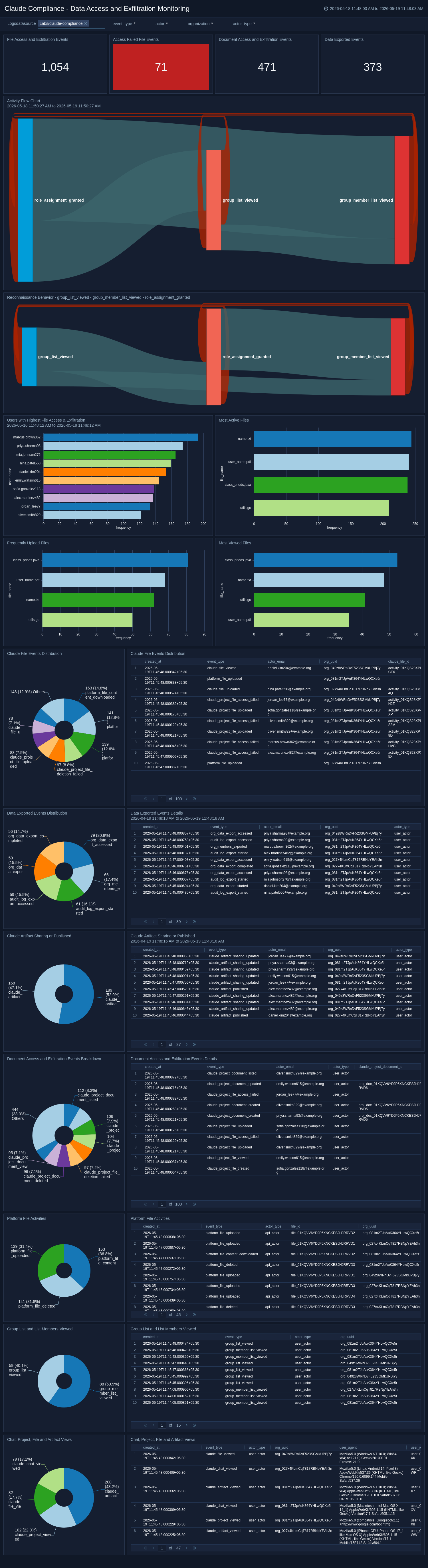
The Claude Compliance - Data Access and Exfiltration Monitoring dashboard provides deep visibility into file, document, and data export activities across the Claude platform helping detect potential data exfiltration or unauthorized access. It tracks file access events, reconnaissance behavior, Claude artifact sharing, and platform-level file activities alongside group and project views. Frequently uploaded and most-viewed file analysis helps identify unusual data movement patterns. Use this dashboard to:
- Monitor data governance compliance.
- Investigate suspicious exfiltration indicators.
- Maintain oversight of sensitive content access and sharing.
Identity, Access, and Authentication Monitoring
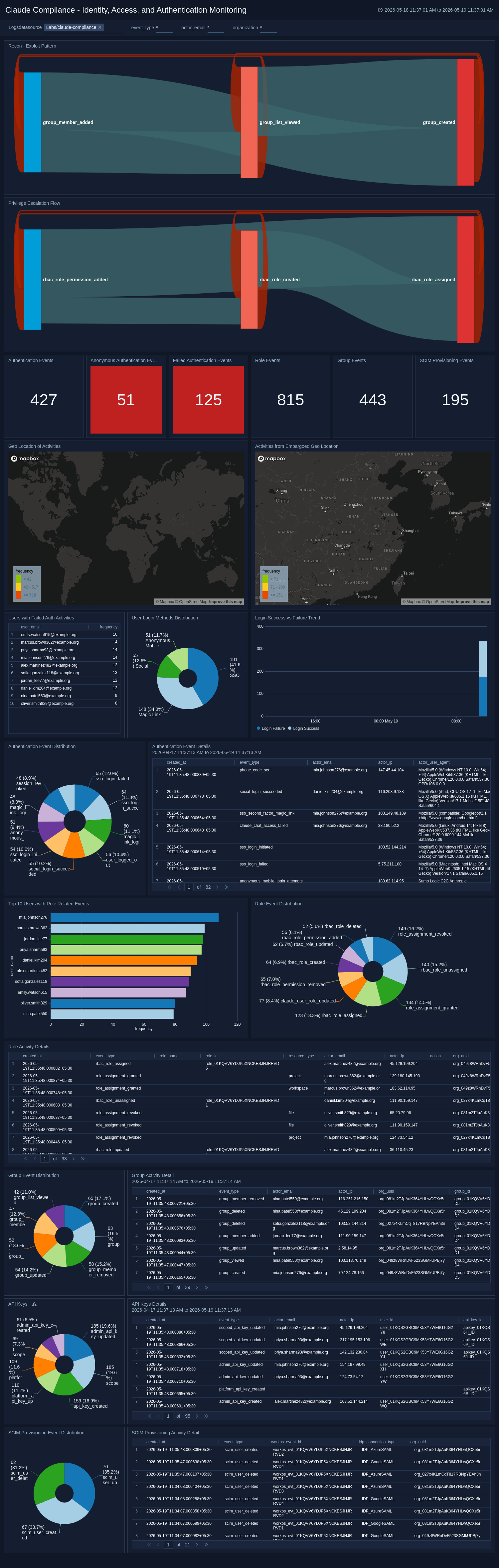
The Claude Compliance - Identity, Access, and Authentication Monitoring dashboard provides comprehensive monitoring of authentication events, role and group changes, SCIM provisioning, and API key activity across your Claude environment. It tracks login success and failure trends, highlights users with failed authentication, and maps activity by geographic location, including embargoed regions. Privilege escalation flows and recon-exploit patterns are surfaced to help security teams identify and respond to identity-based threats. Use this dashboard to:
- Enforce least-privilege access.
- Investigate authentication anomalies.
- Maintain a complete audit trail of identity and access events.
MCP Servers, Integrations, and GitHub Enterprise
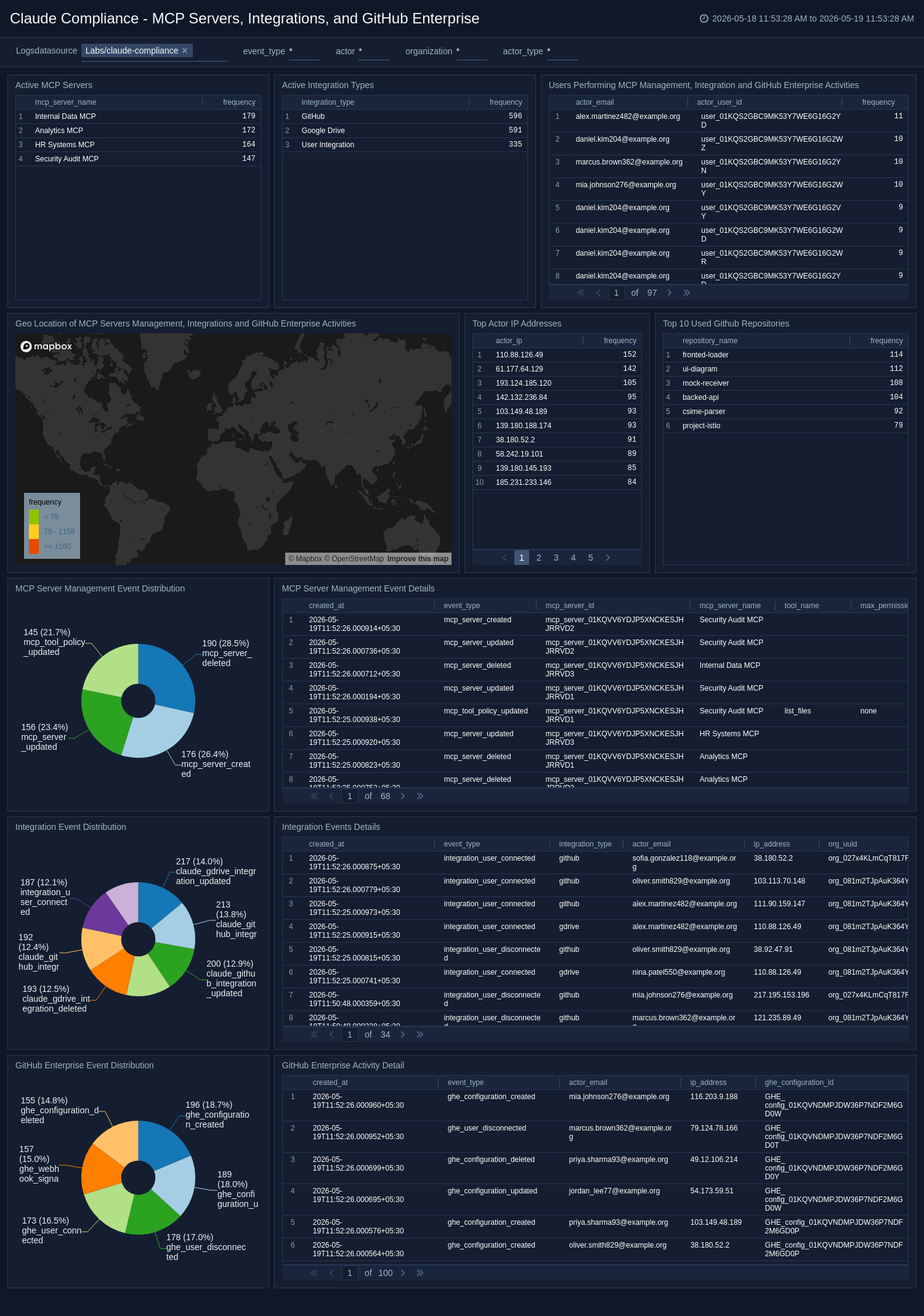
The Claude Compliance - MCP Servers, Integrations, and GitHub Enterprise dashboard monitors management events for MCP Servers, third-party Integrations, and GitHub Enterprise connections within your Claude environment. It tracks active MCP servers, integration types, top GitHub repositories, and the geo-locations of actors performing management actions. Event distribution and detail tables provide full visibility into configuration changes and integration lifecycle activity. Use this dashboard to:
- Govern AI infrastructure extensions.
- Detect unauthorized changes to integrations.
- Ensure GitHub Enterprise connectivity aligns with organizational security standards.
Organization and Policy Configuration
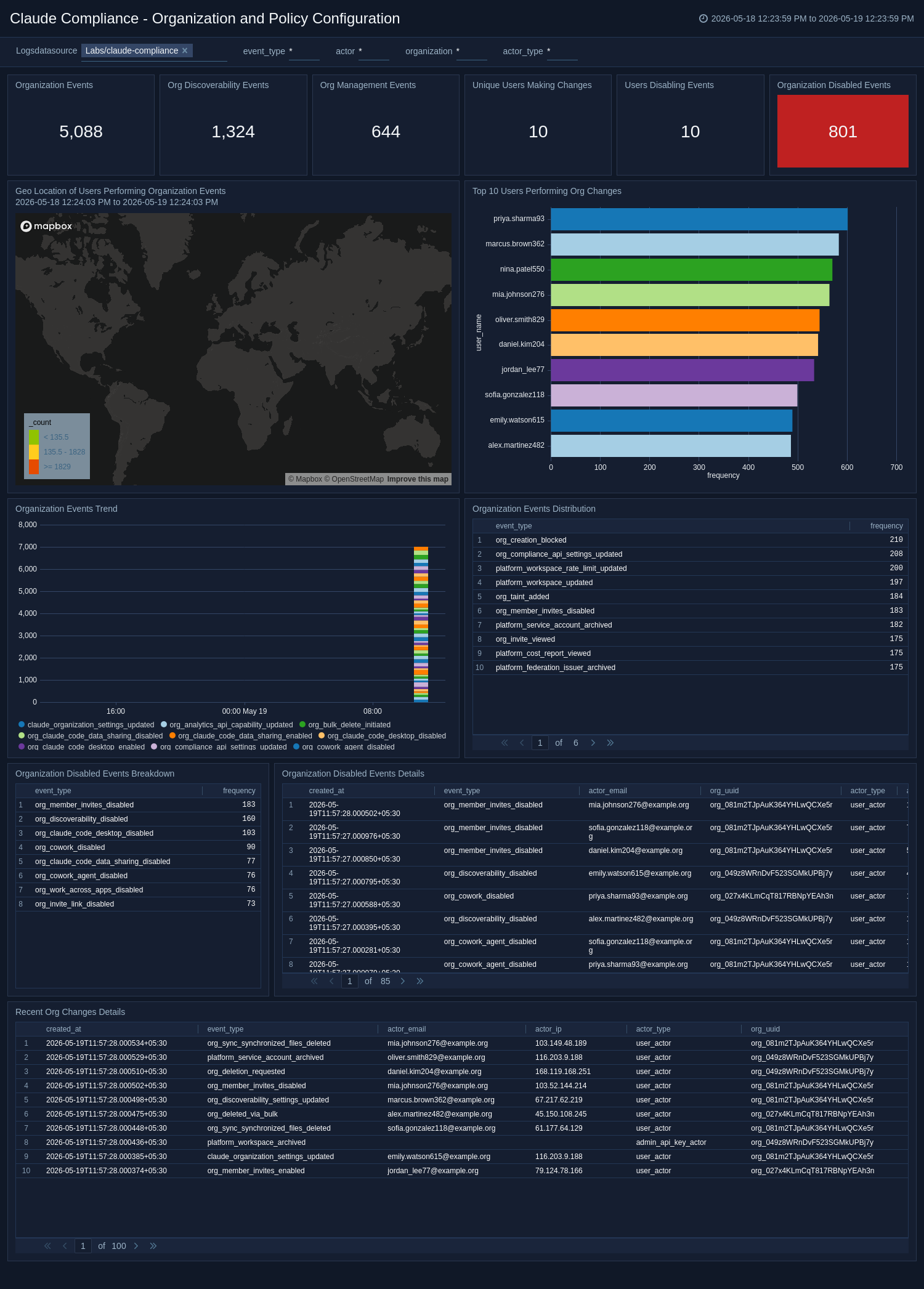
The Claude Compliance - Organization and Policy Configuration dashboard monitors organization-level configuration events, including discoverability changes, org management actions, disabled events, and user policy modifications. It maps the geo-location of users performing org changes, highlights top users making configuration updates, and tracks event trends over time. Detailed event tables and breakdowns support rapid investigation of unauthorized or unexpected organizational changes. Use this dashboard to:
- Ensure configuration governance.
- Detect policy drift.
- Maintain an auditable record of all organization-level administrative activity.
SSO, Directory Sync Monitoring
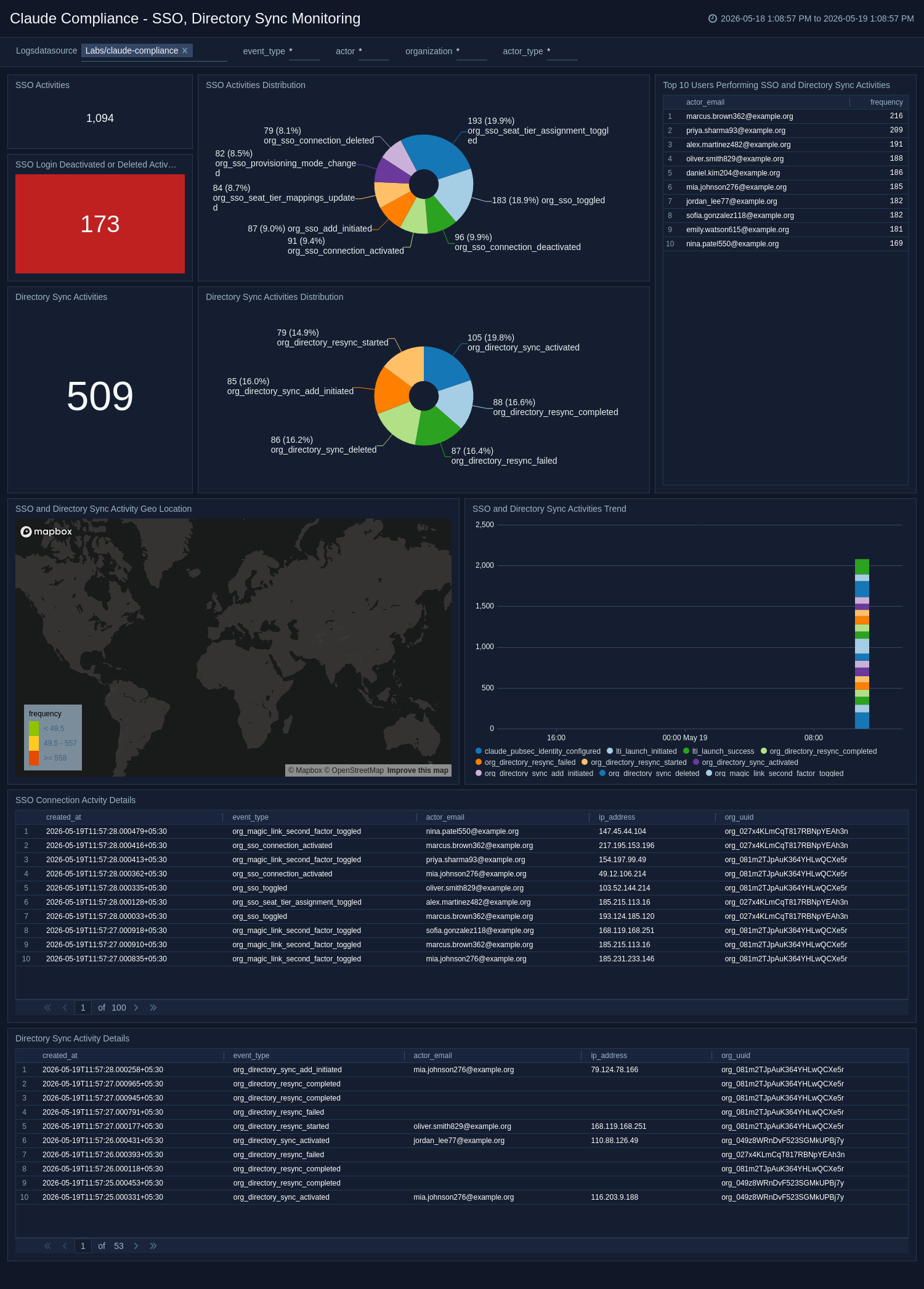
The Claude Compliance - SSO, Directory Sync Monitoring dashboard tracks Single Sign-On (SSO) and Directory Sync events across your Claude environment, including connection activations, deactivations, deletions, and sync lifecycle activity. It provides event distributions, trend analysis, and geographic mapping of SSO and directory sync activities to support identity governance. Top users performing SSO and directory sync changes are highlighted for accountability and anomaly detection. Use this dashboard to:
- Ensure SSO configurations remain secure.
- Detect unauthorized changes to identity providers.
- Maintain compliance with access management policies.
Session Management
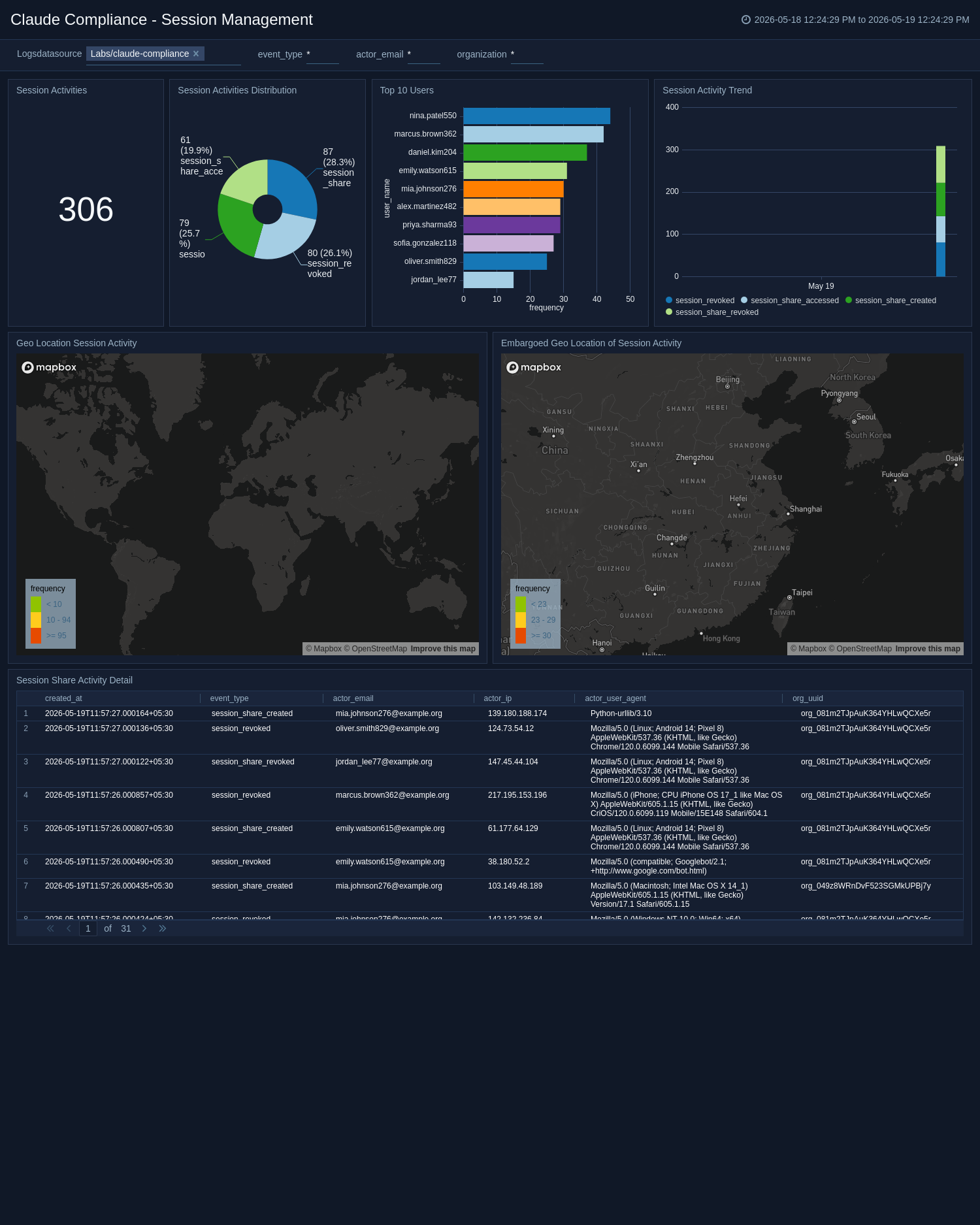
The Claude Compliance - Session Management dashboard monitors user session activity across the Claude platform, including session creation, sharing, and termination events. It visualizes session event distributions, activity trends, and geographic locations of session activity, including events from embargoed regions. A top user's view highlights accounts with the highest session activity for anomaly detection and access governance. Use this dashboard to:
- Detect suspicious session behavior.
- Enforce session policy compliance.
- Investigate unauthorized or geographically anomalous session access.
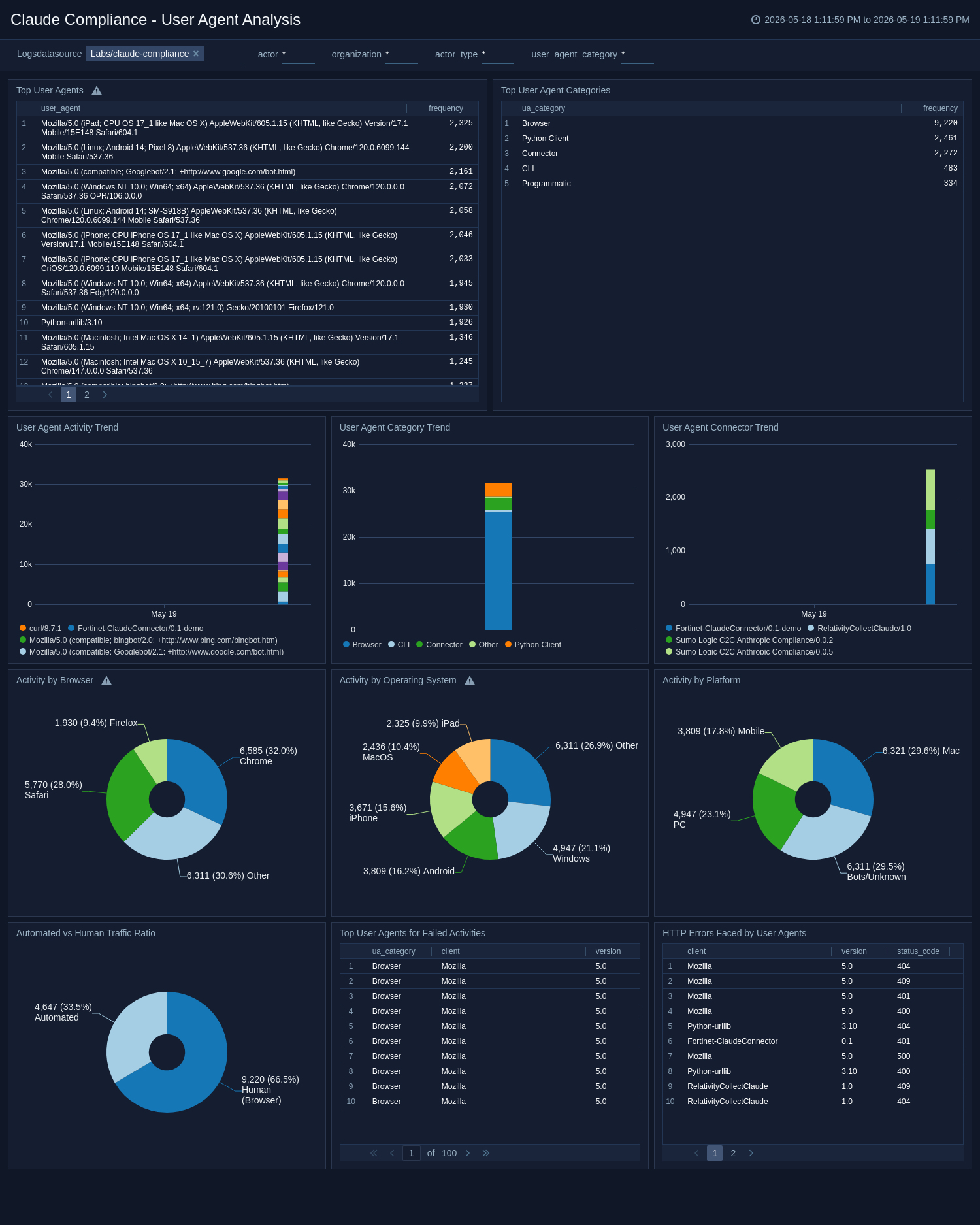
User Agent Analysis
The Claude Compliance - User Agent Analysis dashboard analyzes the user agents accessing your Claude environment, categorizing traffic by browser, operating system, platform, and automated versus human origin. It tracks user-agent activity trends, surfaces the top agents associated with failed activities, and highlights HTTP errors encountered by different client types. Connector and category trend analysis helps teams identify unusual or unauthorized client tooling over time. Use this dashboard to:
- Detect bot activity.
- Investigate suspicious client behavior.
- Ensure that only approved tools and platforms access your Claude environment.
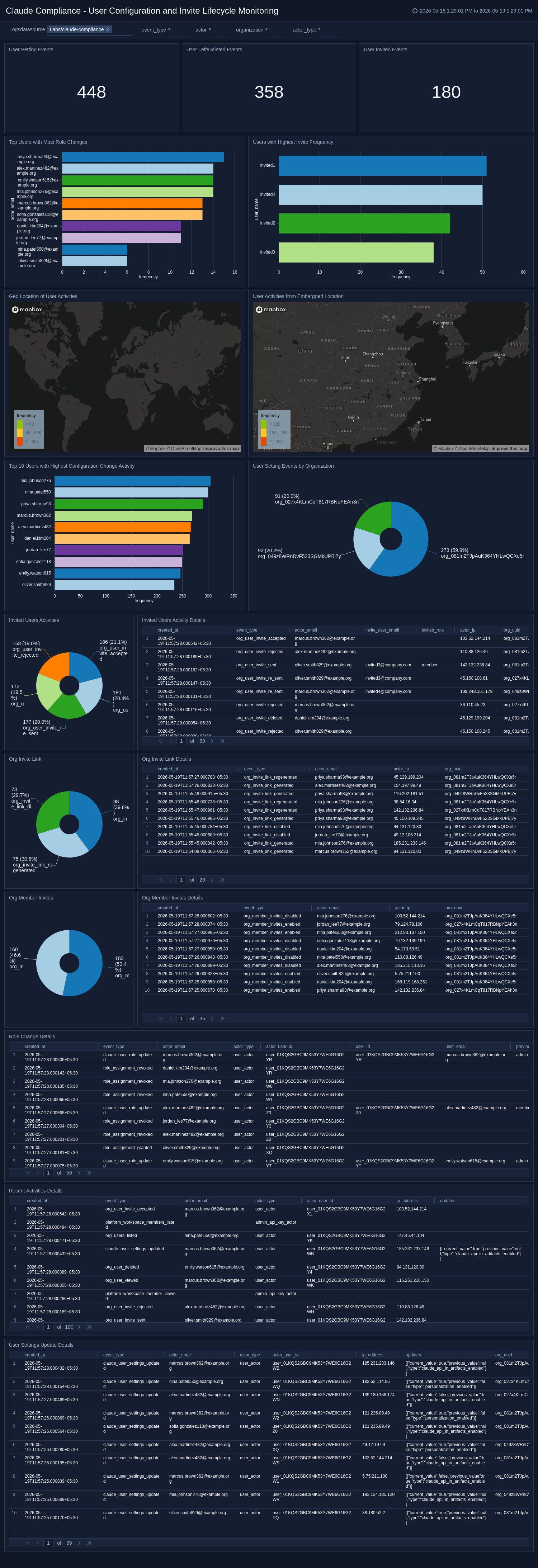
User Configuration and Invite Lifecycle Monitoring
The Claude Compliance - User Configuration and Invite Lifecycle Monitoring dashboard provides full visibility into user configuration changes, invite lifecycle events, role assignments, and organizational membership activity across your Claude environment. It tracks users with the highest frequency of configuration changes, monitors invite link usage, and surfaces geolocation data on user activities, including access from embargoed regions. Detailed tables cover role changes, org member invites, user settings updates, and recent activity for comprehensive audit coverage. Use this dashboard to:
- Govern user onboarding and offboarding processes.
- Detect unauthorized role changes.
- Ensure invite and configuration practices comply with organizational policies.
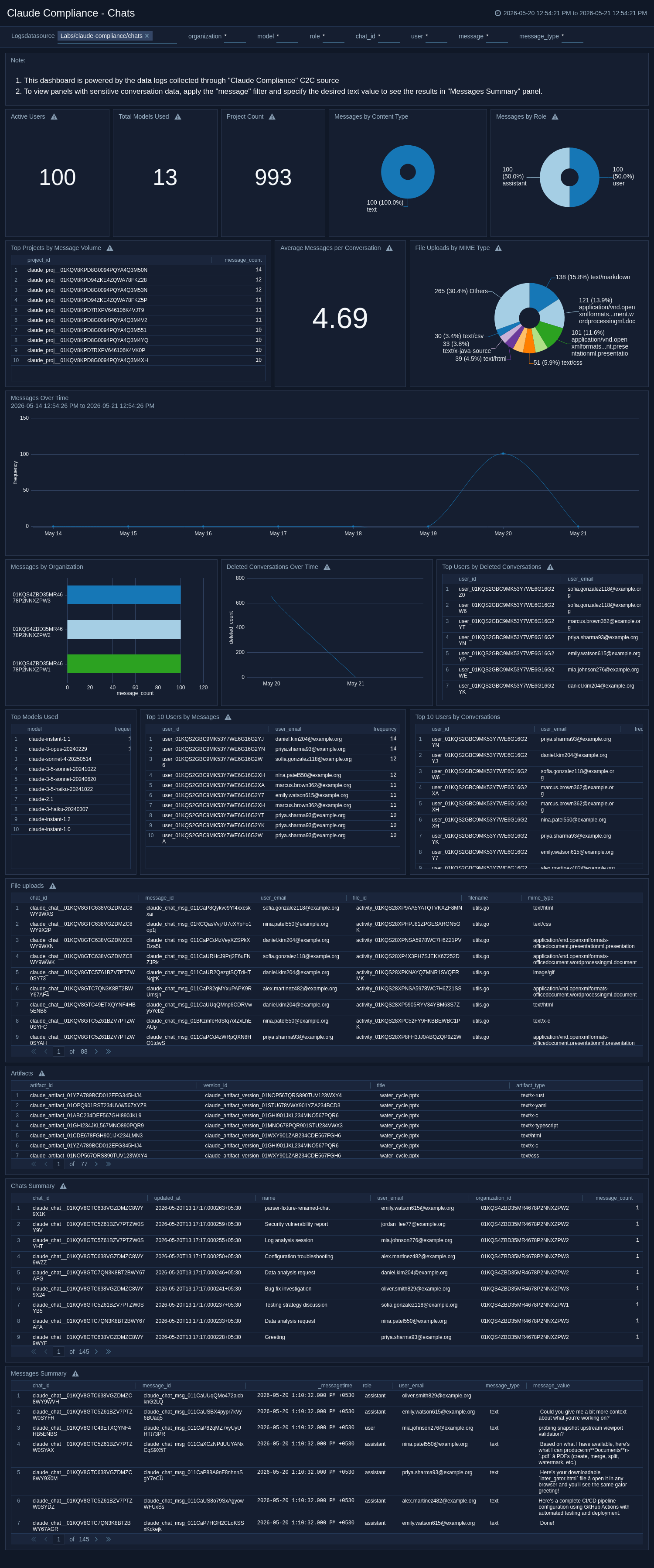
Chats
The Claude Compliance – Chats dashboard provides comprehensive oversight of Claude AI usage across your organization, surfacing key metrics including active users, deployed models, project distribution, and message volume trends. It breaks down interactions by role and content type, ranks top models and users, and provides audit-ready tables for generated artifacts, file uploads, and conversation summaries. Granular message-level data supports deep compliance review and sensitive data detection. Use this dashboard to:
- Ensure transparency and responsible AI use across your organization.
- Support deep compliance review and sensitive data detection.
- Maintain data governance compliance.
Panels with sensitive conversation data require applying the "message" filter with a specified text value to view detailed results, ensuring controlled access to potentially sensitive information.
This dashboard is powered by Sumo Logic Claude Compliance Source.
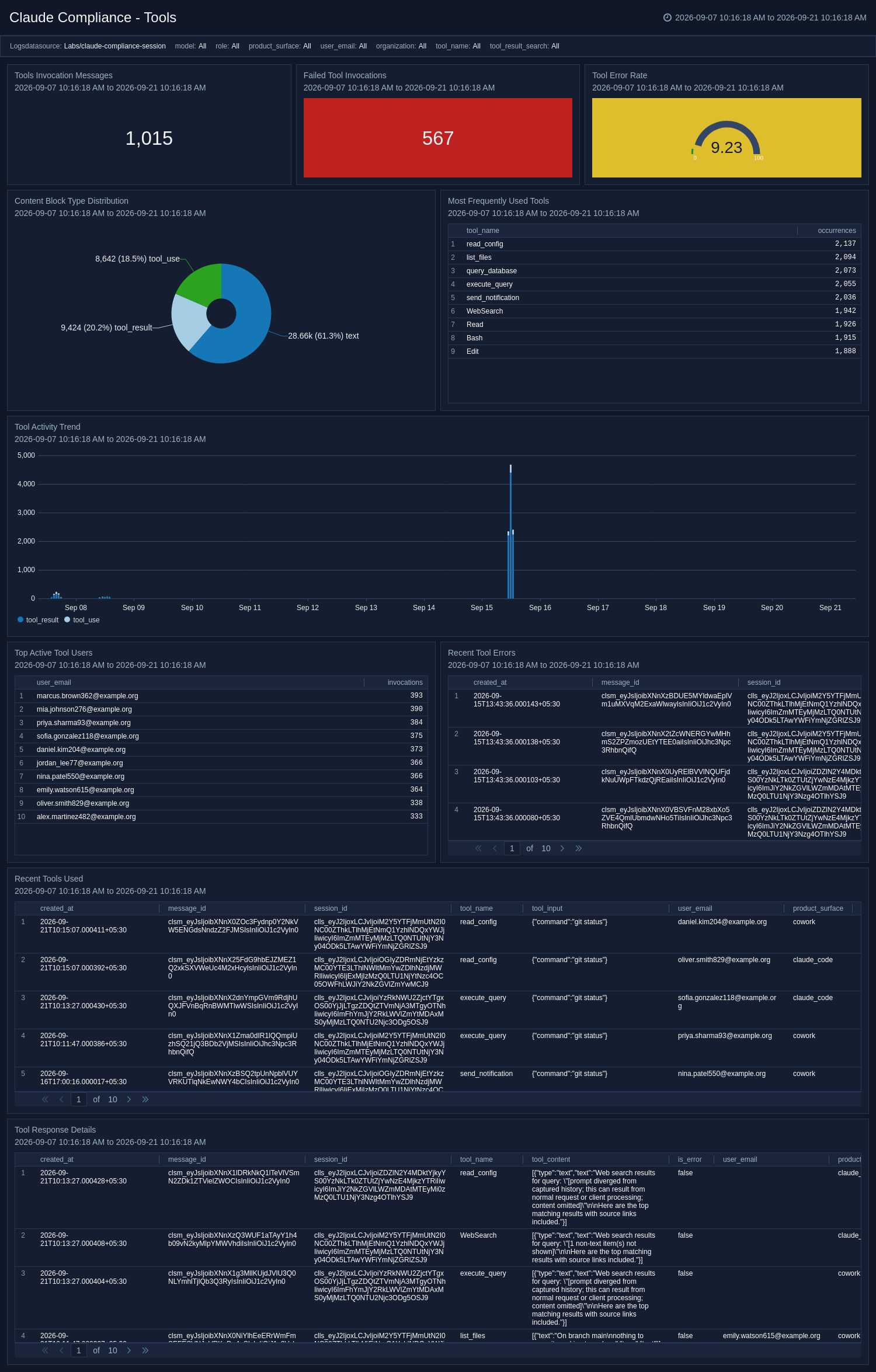
Tools
The Claude Compliance - Tools dashboard provides visibility into tool usage within Claude local sessions, including invocation volume, failed tool executions, error rate, block-type distribution, and frequently used tools. It surfaces recent tool activity, tool response details, and user-level usage patterns to help teams audit how tools are being used during Claude interactions. Use this dashboard to:
- Identify failing, risky, or unexpected tool behavior across local workflows.
- Audit tool invocation volume and error rates.
- Review recent tool activity and response details by user.
This dashboard is powered by Sumo Logic Claude Compliance Source.
Messages
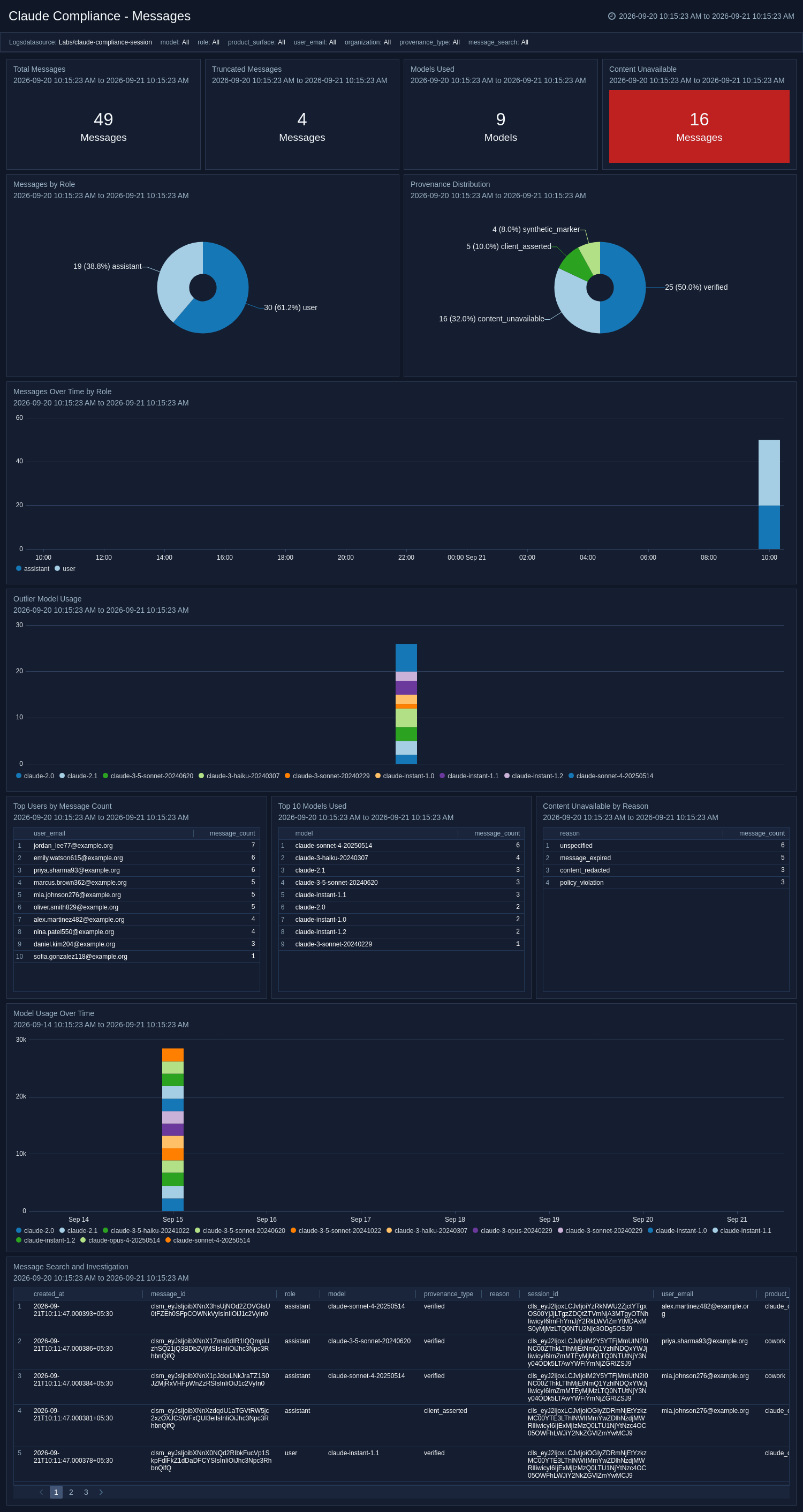
The Claude Compliance - Messages dashboard provides message-level visibility into Claude local session activity across users, models, organizations, and product surfaces. It tracks message volume, role distribution, model usage trends, provenance states, truncated content, and content_unavailable events to support audit and investigation workflows. Search and drill-down panels help teams review message activity, investigate specific keywords, and identify unusual or risky usage patterns across local Claude interactions. Use this dashboard to:
- Investigate message content and keywords across local sessions.
- Track model usage trends and role distribution.
- Identify unusual or risky usage patterns.
This dashboard is powered by Sumo Logic Claude Compliance Source.
Sessions
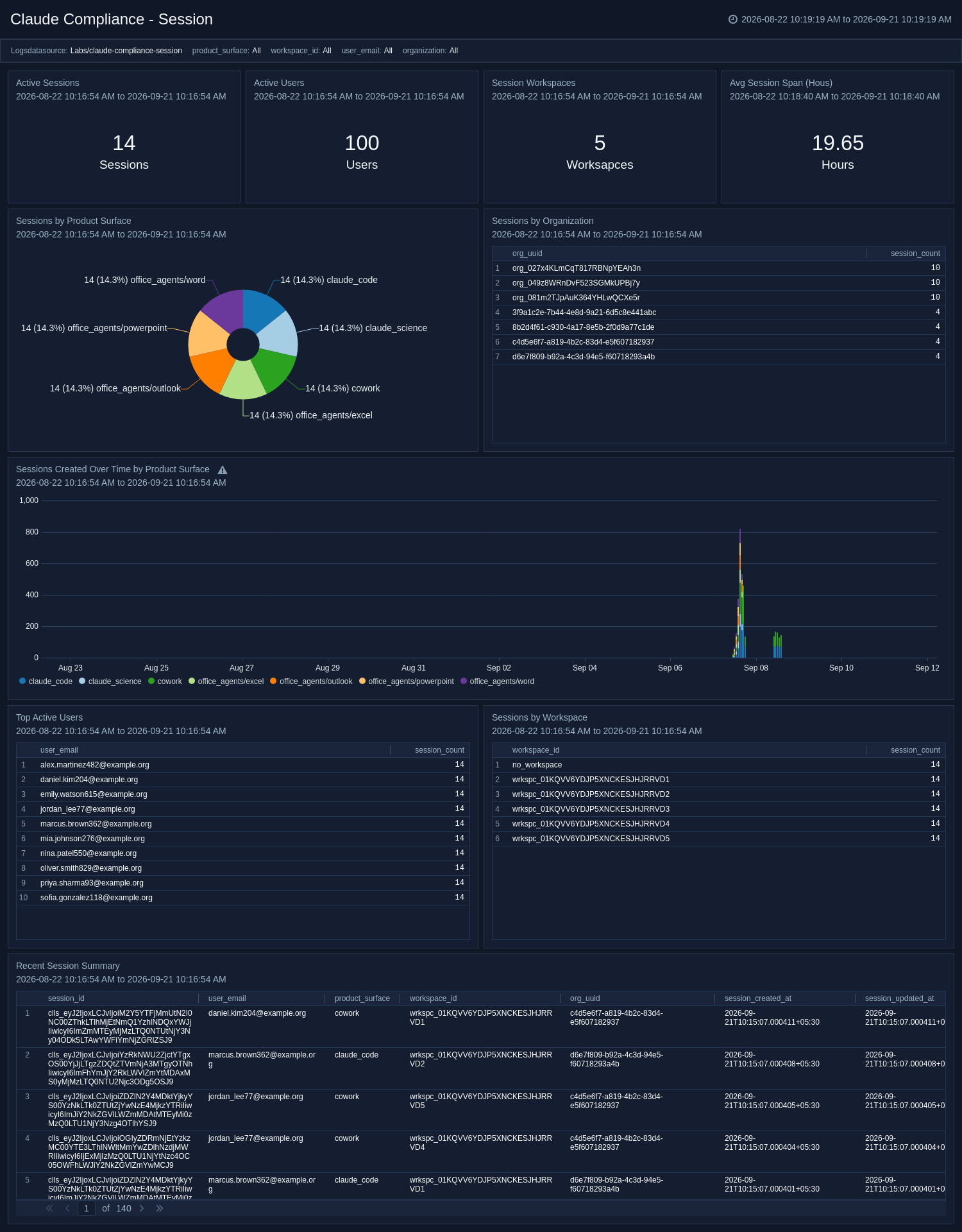
The Claude Compliance - Sessions dashboard provides a session-level view of Claude local session activity across users, workspaces, organizations, and product surfaces. It tracks active sessions, unique users, workspace distribution, average session span, and session creation trends to help teams understand where and how Claude is being used locally. Recent session details and activity breakdowns support governance, usage auditing, and investigation of anomalous session behavior. Use this dashboard to:
- Understand where and how Claude is being used locally.
- Audit session creation trends and workspace distribution.
- Investigate anomalous session behavior.
This dashboard is powered by Sumo Logic Claude Compliance Source.
Create monitors for Claude Compliance app
From your App Catalog:
- From the Sumo Logic navigation, select App Catalog.
- In the Search Apps field, search for and then select your app.
- Make sure the app is installed.
- Navigate to What's Included tab and scroll down to the Monitors section.
- Click Create next to the pre-configured monitors. In the create monitors window, adjust the trigger conditions and notifications settings based on your requirements.
- Scroll down to Monitor Details.
- Under Location click on New Folder.
note
By default, monitor will be saved in the root folder. So to make the maintenance easier, create a new folder in the location of your choice.
- Enter Folder Name. Folder Description is optional.
tip
Using app version in the folder name will be helpful to determine the versioning for future updates.
- Click Create. Once the folder is created, click on Save.
Claude Compliance monitors
| Name | Description | Trigger Type | Alert Condition |
|---|---|---|---|
Claude Compliance - Admin or Platform API Key Created | Detects when an Admin API key or Platform API key is created within the organization. Adversaries or malicious insiders may create API keys to establish persistent, programmatic access to organizational resources. Any key creation event should be reviewed to verify that it was authorized and expected. | Critical | Count > 0 |
Claude Compliance - API Logging Disabled | Detects when Compliance API logging is disabled for an organization. Disabling audit logging is a common defense evasion technique — attackers may disable it to reduce visibility into their activities. Any disabling of compliance API logging should be treated as a high priority and investigated immediately. | Critical | Count > 0 |
Claude Compliance - Claude Organization IP Restriction Deleted | Detects when an IP restriction policy is deleted from an organization. IP allowlisting is a critical access control. Removing IP restrictions may allow an attacker to access Claude resources from previously blocked networks, significantly expanding the attack surface. | Critical | Count > 0 |
Claude Compliance - Compliance Activity From Embargoed Location | Detects compliance-related activities originating from embargoed or geographically restricted locations. Alerts are triggered when compliance actions are performed from regions that are prohibited under regulatory or organizational guidelines. | Critical | Count > 0 |
Claude Compliance - Excessive Failed Authentication User Activities Detected | Detects an abnormal number of failed authentication attempts across multiple authentication mechanisms, including SSO failures and magic link login failures within the Claude platform. Alerts are triggered when failed authentication attempts exceed the threshold within a specific time window, potentially indicating brute force attacks, credential stuffing, or account takeover attempts. | Critical | Count > 5 |
Claude Compliance - Excessive Unauthorized Access Attempts on Compliance API | Detects repeated unauthorized and forbidden access attempts on the Claude Compliance API within a short time window. Alerts are triggered when multiple 401 Unauthorized or 403 Forbidden responses are observed from the same user or IP address, indicating potential credential abuse, brute force attempts, or unauthorized API access activity. | Critical | Count > 5 |
Claude Compliance - Org Deletion & Destructive Activity | Detects any destructive actions, including organization deletions, bulk deletes, user removals, and taint additions within the Claude platform. Alerts are triggered when irreversible deletion or destructive events are performed, indicating potential unauthorized data destruction or malicious insider activity requiring immediate investigation. | Critical | Count > 0 |
Claude Compliance - Outlier in Claude Resource Deletions from User | Detects unusual spikes in resource deletion activity performed by a single user within the Claude platform. Alerts are triggered when a user's deletion activity significantly deviates from their historical baseline, indicating potential insider threat, compromised account, or unauthorized mass deletion of critical resources. | Critical | Count > 1 |
Claude Compliance - Unauthenticated User Activity Detected | Detects suspicious activities or access attempts made by unauthenticated users within the Claude platform. Alerts are triggered when restricted resources are accessed without valid authentication or when unusual patterns are identified in unauthenticated traffic. | Critical | Count > 0 |
Upgrade/Downgrade the Claude Compliance app (Optional)
To update the app, do the following:
Next-Gen App: To install or update the app, you must be an account administrator or a user with Manage Apps, Manage Monitors, Manage Fields, Manage Metric Rules, and Manage Collectors capabilities depending upon the different content types part of the app.
- Select App Catalog.
- In the Search Apps field, search for and then select your app.
Optionally, you can identify apps that can be upgraded in the Upgrade available section. - To upgrade the app, select Upgrade from the Manage dropdown.
- If the upgrade does not have any configuration or property changes, you will be redirected to the Preview & Done section.
- If the upgrade has any configuration or property changes, you will be redirected to the Setup Data page.
- In the Configure section of your respective app, complete the following fields.
- Field Name. If you already have collectors and sources set up, select the configured metadata field name (eg _sourcecategory) or specify other custom metadata (eg: _collector) along with its metadata Field Value.
- Click Next. You will be redirected to the Preview & Done section.
Post-update
Your upgraded app will be installed in the Installed Apps folder and dashboard panels will start to fill automatically.
See our Release Notes changelog for new updates in the app.
To revert the app to a previous version, do the following:
- Select App Catalog.
- In the Search Apps field, search for and then select your app.
- To version down the app, select Revert to < previous version of your app > from the Manage dropdown.
Uninstalling the Claude Compliance app (Optional)
To uninstall the app, do the following:
- Select App Catalog.
- In the 🔎 Search Apps field, run a search for your desired app, then select it.
- Click Uninstall.