Collection Overview
The Collection Overview page provides a centralized view of all child org level collectors within your parent org. It enables all parent users to monitor collectors (Installed, Hosted, and OpenTelemetry) and sources across each child organization from a single interface. Additionally, this also helps you to identify and review collector health events, including stopped or inactive collectors.
To view collector details at the child org level, perform the following steps:
- New UI. In the main Sumo Logic menu select Organizations, and then select Collection Overview. You can also click the Go To... menu at the top of the screen and select Collection Overview.
Classic UI. In the main Sumo Logic menu, select Organizations > Collection Overview.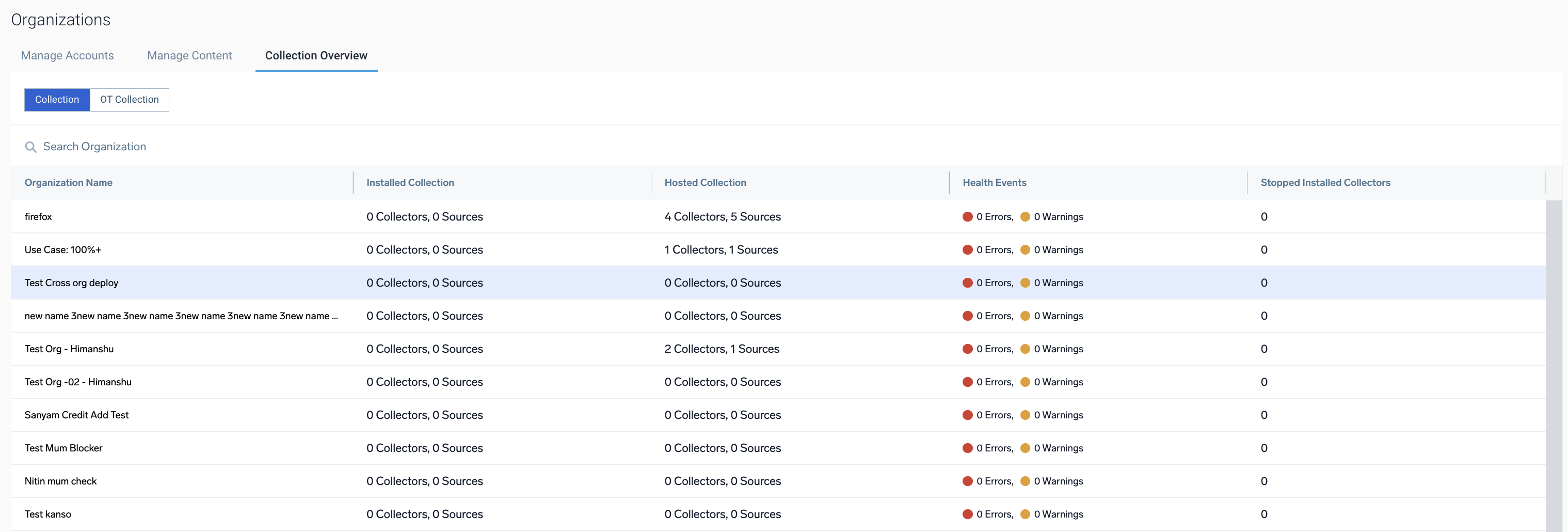
- Navigate to the Collection tab to view details of Installed and Hosted collectors or navigate to the OT Collection tab view details of OpenTelemetry collectors associated with the child orgs.
- Collection. Displays the total number of collectors and sources associated with the child orgs. Additionally, includes insights into the health events and stopped installed collectors for the respective child orgs level.
- OT Collection. Displays the total number of collectors and source templates associated with the child orgs. Additionally, includes insights into the health events and stopped installed collectors for the respective child orgs level.
To drill down into a specific child org's details directly from the Collection Overview page, select Open Organization from the kebab menu for the selected collector. 