 Meet the new
Fix SAML Destination URL Mismatch
A Destination URL mismatch occurs when the Destination value in a Security Assertion Markup Language (SAML) response from your identity provider (IdP) differs from the Assertion Consumer Service (ACS) URL configured in Sumo Logic for single sign-on (SSO). To fix it, set both the ACS URL and the Destination URL in your IdP to the Assertion Consumer URL on the SAML page in Sumo Logic.
Sumo Logic validates the Destination value against the ACS URL as described in Section 3.5.5.2 of the SAML 2.0 Bindings specification. This page explains who is affected and how SSO administrators can fix a mismatch in their IdP.
Sumo Logic is rolling out the validation in two stages.
- November 16, 2026. Users in affected organizations see a warning once per session when they log in. Logins are not blocked.
- January 29, 2027. Sumo Logic rejects logins with a mismatched Destination URL. Users cannot log in until an administrator corrects the IdP configuration.
Availability
| Account Type | Account Level |
|---|---|
| Cloud Flex | Trial, Enterprise |
| Credits | Trial, Essentials, Enterprise Operations, Enterprise Security, Enterprise Suite |
Why Sumo Logic validates the Destination URL
Sumo Logic validates the Destination URL to close a potential security misconfiguration and bring your SSO setup in line with the SAML 2.0 standard. The SAML 2.0 specification requires the recipient of a signed SAML message to verify the Destination value against the location where it received the message. Before this validation, Sumo Logic accepted responses where the two values differed.
Who is affected by a Destination URL mismatch
You are affected if your IdP sends a Destination URL that differs from the Assertion Consumer URL in your Sumo Logic SAML configuration. This can happen when:
- Your organization migrated between Sumo Logic deployments and did not update the IdP.
- Your organization uses a custom or vanity URL that does not exactly match the ACS endpoint.
- Your IdP was set up with an older or slightly different ACS URL.
If you see the warning when you log in and you are not an SSO administrator, forward the message or a screenshot to your SSO or IT administrator. Only they can change the IdP configuration.
How to fix a Destination URL mismatch
Copy the Assertion Consumer URL from Sumo Logic, and then set it as both the ACS URL and the Destination URL in your IdP. You need access to your IdP administration console and to the SAML page in Sumo Logic. Sumo Logic cannot change your IdP settings because Sumo Logic has no administrative access to your IdP.
Step 1: Copy the Assertion Consumer URL from Sumo Logic
- New UI. In the main Sumo Logic menu select Administration, and then under Account Security Settings select SAML. You can also click the Go To... menu at the top of the screen and select SAML.
Classic UI. In the main Sumo Logic menu, select Administration > Security > SAML. - From the Configuration List, select the SAML configuration that your IdP uses.
- Copy the Assertion Consumer URL from the details pane.
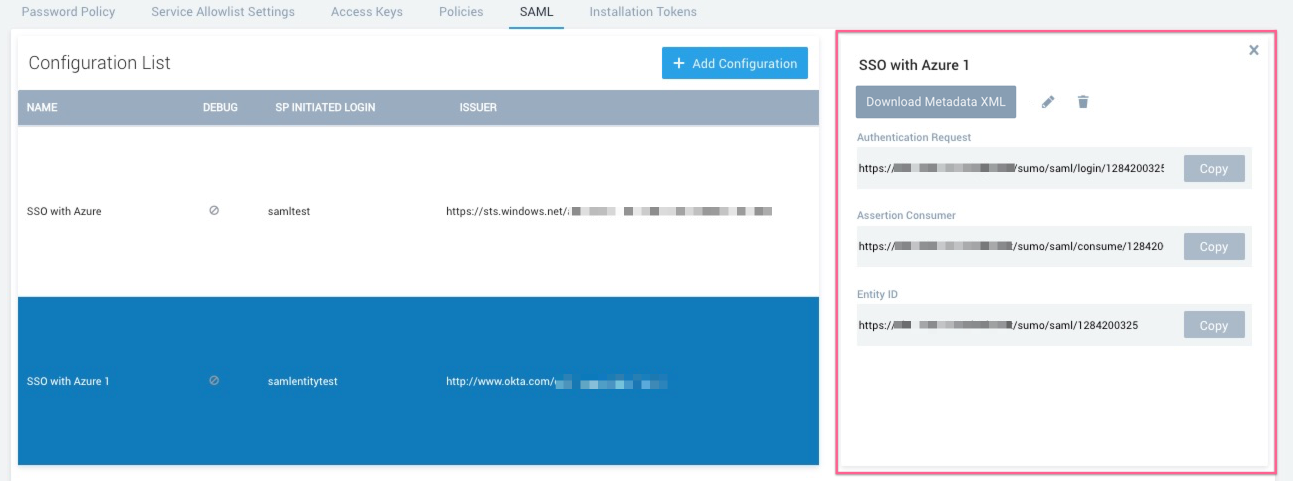
If your organization has more than one SAML configuration, repeat these steps for each one.
Step 2: Update the URLs in your IdP
In your IdP, set the ACS URL and the Destination URL to the Assertion Consumer URL you copied in Step 1. Both values need to be an exact copy of the Assertion Consumer URL and of each other.
Do not add or remove trailing slashes, change letter case, or substitute a custom domain.
Step 3: Confirm the fix
Log in again through your IdP and confirm that the warning no longer appears.
- Log out of Sumo Logic.
- Log in through your IdP.
- Confirm that the warning does not appear.
If the warning still appears, confirm that the ACS URL and Destination URL in your IdP both match the Assertion Consumer URL. You can also turn on Debug Mode in the SAML configuration and log in again. The debug page shows the parsed response data, including the values the IdP sent. For details, see View SAML Debug Information.
FAQ
Can I still log in during the warning period?
Yes. Between November 16, 2026 and January 28, 2027, the warning is informational and does not block logins. Starting January 29, 2027, Sumo Logic rejects logins with a mismatched Destination URL.
Why do I see this warning if I am not an administrator?
Sumo Logic shows the warning once per session to every user in an affected organization so that the issue is visible. Forward the message to your SSO or IT administrator, who can update the IdP configuration.
How do I know what the correct URL is?
The correct URL is the Assertion Consumer value on the SAML page in Sumo Logic. In the new UI, go to Administration > Account Security Settings > SAML, and then select your configuration. In the Classic UI, go to Administration > Security > SAML.
How do I see which Destination value my IdP sends?
Turn on Debug Mode in your SAML configuration and log in again. The debug page shows the parsed response data, including the values your IdP sent.
Can Sumo Logic fix the mismatch for me?
No. Your IdP stores the Destination URL, and Sumo Logic has no administrative access to your IdP. Only your SSO or IT administrator can change it.
How urgent is this change?
Sumo Logic does not block logins before January 29, 2027. A mismatch indicates a security misconfiguration, so fix it as soon as you can.