 Meet the new
 AWS EKS

Version: 1.1
Updated: July 13, 2024
AWS EKS streamlines Kubernetes application deployment, ensuring scalability and security with minimal management overhead. This integration provides comprehensive Kubernetes cluster insights, node and pod management, volume tracking, and configuration updates.
Actions
- Cordon Node (Containment) - By cordoning the impacted worker node, you're informing the scheduler to avoid scheduling pods onto the affected node. This will allow you to remove the node for forensic study without disrupting other workloads.
- Create Network Policy to Isolate Pod (Containment) - Isolate the Pod by creating a Network Policy that denies all ingress and egress traffic to the pod.
- Delete Pod (Containment) - Delete a Pod.
- Describe Cluster (Enrichment) - Describes an Amazon EKS cluster.
- Get Insight (Enrichment) - Returns details about an insight that you specify using its ID.
- Get Network Policy (Enrichment) - Get the specified Network Policy.
- Get Node (Enrichment) - Get Worker Node.
- Get Pod (Enrichment) - Get the specified Pod.
- Identify Pods with Vulnerable Image (Enrichment) - Identify Pods with vulnerable or compromised image and worker nodes.
- List Clusters (Enrichment) - Lists the Amazon EKS clusters in your AWS account in the specified AWS Region.
- List Deployment (Enrichment) - List objects of kind Deployment.
- List Insights (Enrichment) - Returns a list of all insights checked for against the specified cluster.
- List Namespaces (Enrichment) - List objects of kind Namespace.
- List Network Policy (Enrichment) - List objects of kind Network Policy.
- List Nodes (Enrichment) - Returns a list of all Nodes.
- List Persistent Volumes (Enrichment) - Returns a list of Persistent Volumes.
- List Pods (Enrichment) - Returns a list of Pods for all namespaces.
- Read Namespaced Pod Status (Enrichment) - Read the status of the specified Pod.
- Read Node Status (Enrichment) - Read the status of the specified Node.
- UnCordon Node (Containment) - UnCordon the worker node
- Update Cluster Config (Containment) - Updates an Amazon EKS cluster configuration.
External Libraries
Configure AWS EKS in Automation Service and Cloud SOAR
Before you can use this automation integration, you must configure its authentication settings so that the product you're integrating with can communicate with Sumo Logic. For general guidance, see Configure Authentication for Automation Integrations.
How to open the integration's configuration dialog
- Access App Central and install the integration. (You can configure at installation, or after installation with the following steps.)
- Go to the Integrations page.
Classic UI. In the main Sumo Logic menu, select Automation and then select Integrations in the left nav bar.
New UI. In the main Sumo Logic menu, select Automation > Integrations. You can also click the Go To... menu at the top of the screen and select Integrations. - Select the installed integration.
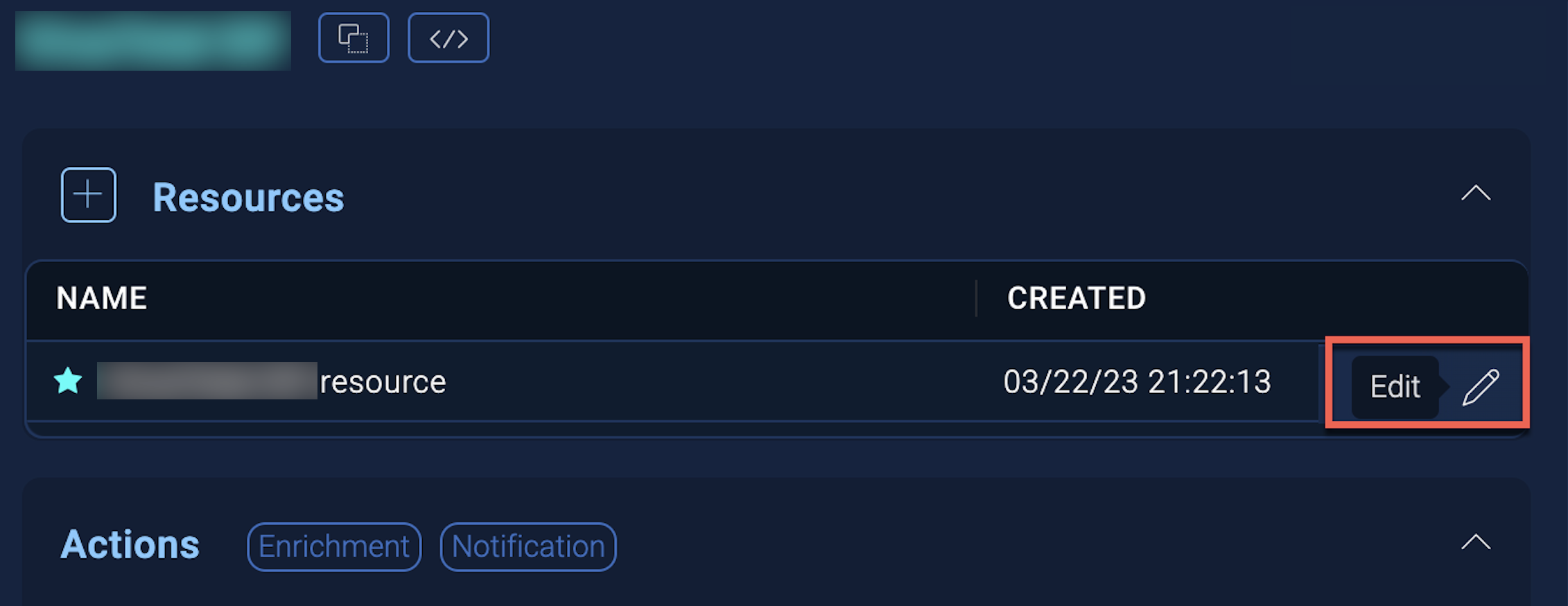
- Hover over the resource name and click the Edit button that appears.
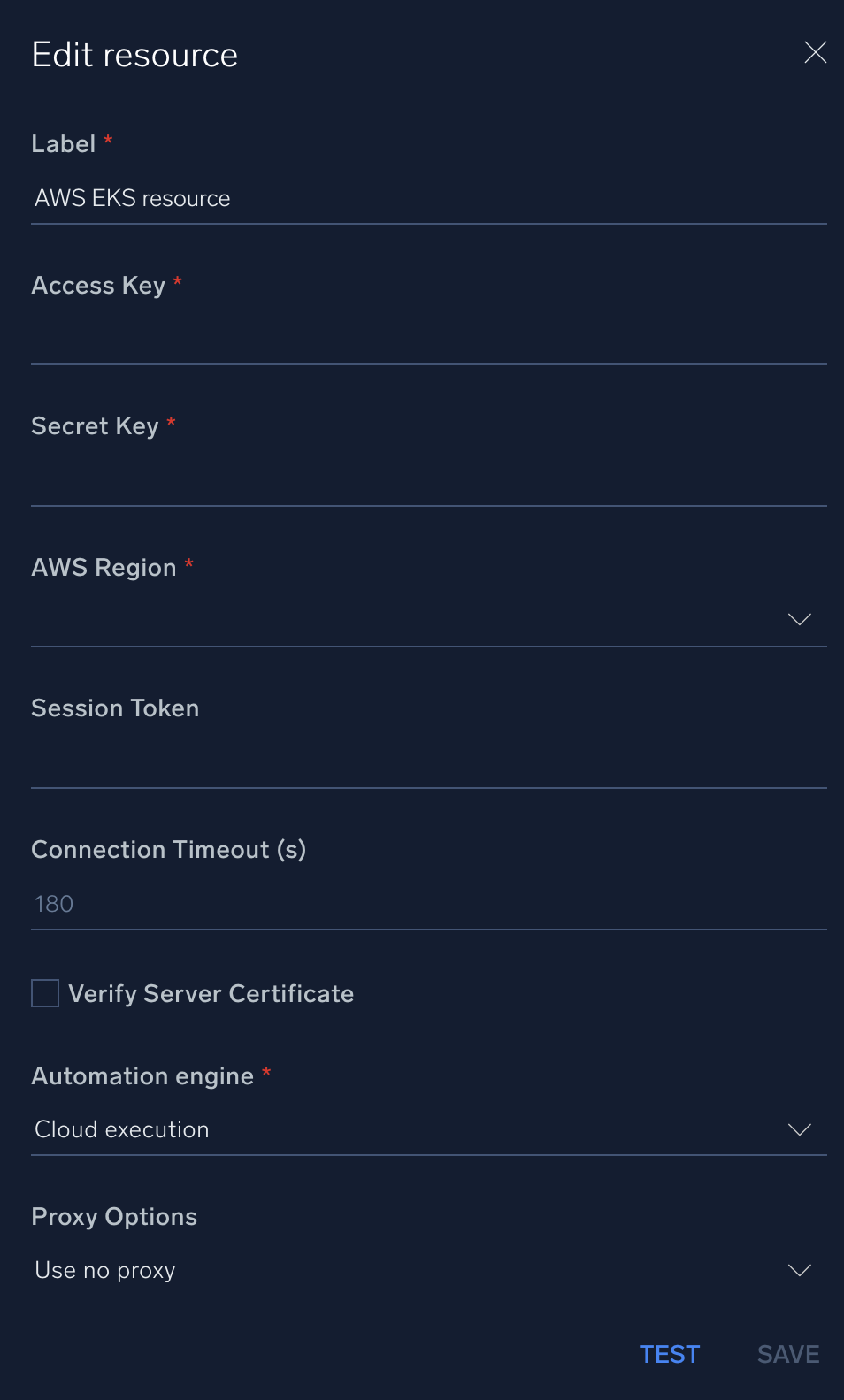
In the configuration dialog, enter information from the product you're integrating with. When done, click TEST to test the configuration, and click SAVE to save the configuration:
-
Label. Enter the name you want to use for the resource.
-
Access Key ID. Enter an AWS access key ID to provide authentication. (Although AWS recommends using IAM roles with temporary security credentials instead of access keys.)
-
Secret Access Key. Enter the secret access key associated with the access key ID.
-
AWS Region. Enter your AWS region.
- Session Token. Enter the session token if you are using temporary credentials.
-
Connection Timeout (s). Set the maximum amount of time the integration will wait for a server's response before terminating the connection. Enter the connection timeout time in seconds (for example,
180). -
Verify Server Certificate. Select to validate the server’s SSL certificate.
-
Automation Engine. Select Cloud execution for this certified integration. Select a bridge option only for a custom integration. See Cloud or Bridge execution.
-
Proxy Options. Select whether to use a proxy. (Applies only if the automation engine uses a bridge instead of cloud execution.)
- Use no proxy. Communication runs on the bridge and does not use a proxy.
- Use default proxy. Use the default proxy for the bridge set up as described in Using a proxy.
- Use different proxy. Use your own proxy service. Provide the proxy URL and port number.
For configuration information specific to AWS integrations, see the AWS integrations section.
For information about AWS EKS, see EKS documentation.
Change Log
| Version | Date | Description |
|---|---|---|
| v1.1 | July 13, 2024 |
|
| v1.0 | April 18, 2024 | Initial release of the AWS EKS integration. |