 Meet the new
 CrowdStrike Falcon

Version: 1.22
Updated: October 01, 2026
The CrowdStrike Falcon is a cloud-native unified security platform that provides endpoint protection, threat intelligence, and cyberattack response.
Integration allows you to pull and update Alerts and Cases, and search Cases/Devices/Alerts.
Actions
- Alerts CrowdStrike Falcon Daemon (Daemon) - Daemon to pull CrowdStrike Alerts.
- Cases Daemon (Daemon) - Daemon to pull CrowdStrike Cases.
- Create Case (Containment) - Create a new Case in CrowdStrike.
- Create Indicators (Containment) - Create the Indicators.
- Device Actions (Containment) - Take various actions on the hosts in your environment.
- Get Browser History (Enrichment) - Get user Browser history.
- Get Case Details (Enrichment) - Get details for a specific CrowdStrike Case.
- Get Endpoint (Enrichment) - Get details on one or more hosts by providing agent IDs.
- Get Indicators (Containment) - Get Indicators By IDs.
- Get User ID By Mail (Enrichment) - Search for a specific User ID with a given email address.
- Get IDP Device Info (Enrichment) - Retrieve detailed information about a devices from IDP. Requires IDP rights and relevant IDP-related API scopes.
- List Cases (Enrichment) - List all Cases in CrowdStrike.
- List Endpoints (Enrichment) - Search for hosts in your environment by platform, hostname, IP.
- On Demand Device Scan (Containment) - Initiate a scan on device by providing the device ID. This action will only work for Windows hosts.
- Query Devices By Filter (Enrichment) - Search for hosts in your environment by platform, hostname, IP, and other criteria.
- Retrieve Alert Details (Enrichment) - Get details for a specific CrowdStrike Alert.
- Search Cases (Enrichment) - Search for Cases by providing an FQL filter, sorting, and paging details.
- Search into Alerts (Enrichment) - Retrieves all Alerts IDs that match a given query.
- Update Alerts (Containment) - Perform actions on Alerts identified by composite ID(s) in request.
- Update Case (Containment) - Update an existing Case in CrowdStrike.
Category
EDR
Configure CrowdStrike Falcon in Automation Service and Cloud SOAR
Before you can use this automation integration, you must configure its authentication settings so that the product you're integrating with can communicate with Sumo Logic. For general guidance, see Configure Authentication for Automation Integrations.
How to open the integration's configuration dialog
- Access App Central and install the integration. (You can configure at installation, or after installation with the following steps.)
- Go to the Integrations page.
Classic UI. In the main Sumo Logic menu, select Automation and then select Integrations in the left nav bar.
New UI. In the main Sumo Logic menu, select Automation > Integrations. You can also click the Go To... menu at the top of the screen and select Integrations. - Select the installed integration.
- Hover over the resource name and click the Edit button that appears.
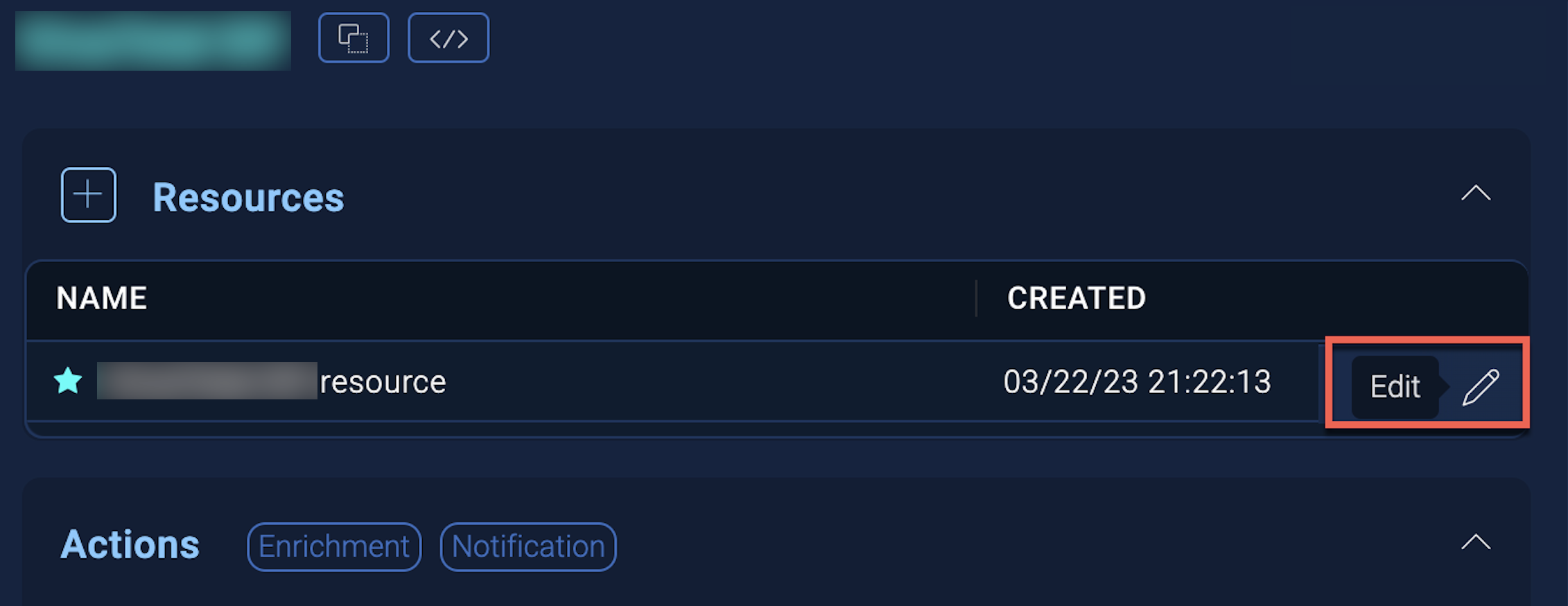
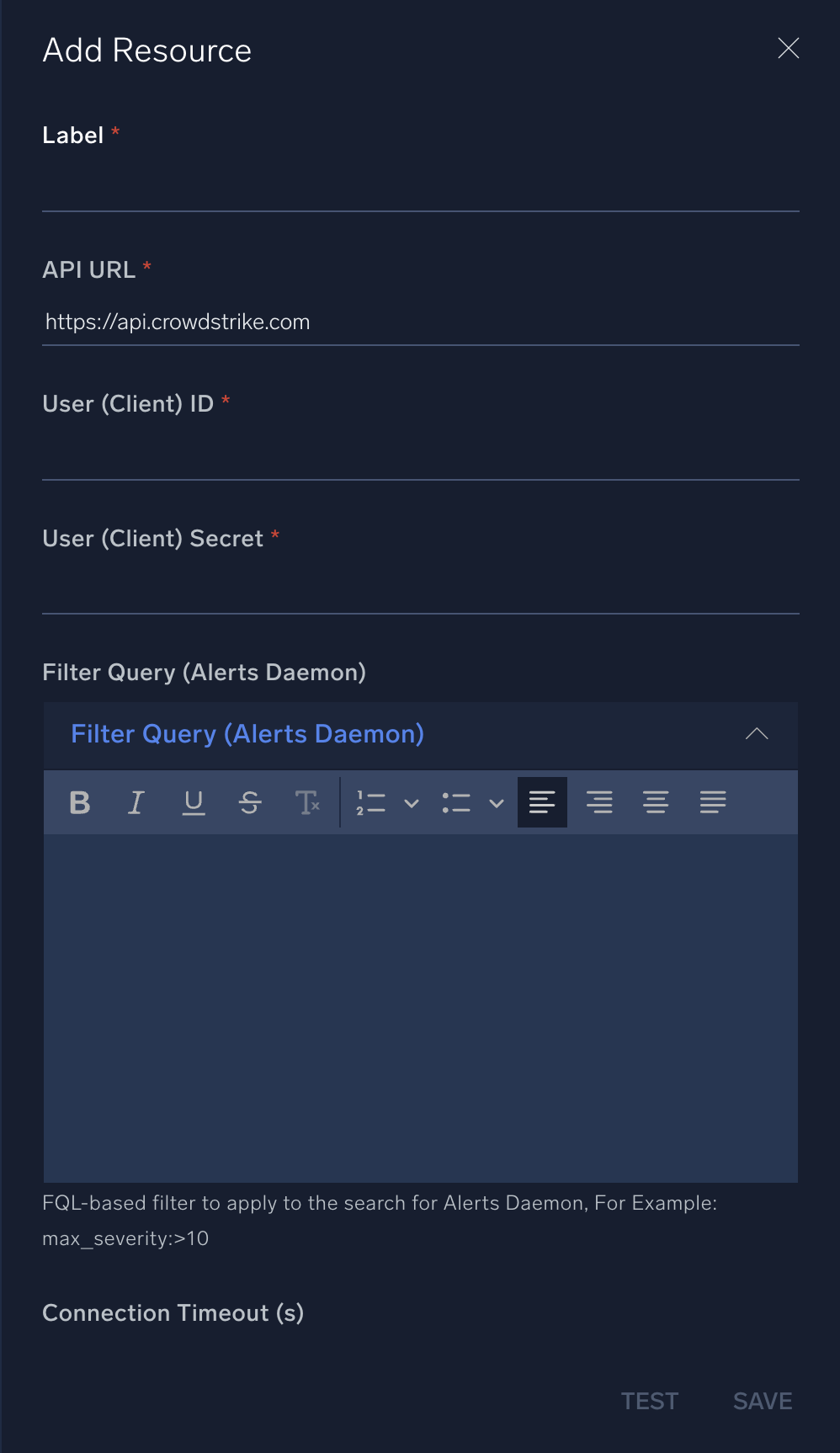
In the configuration dialog, enter information from the product you're integrating with. When done, click TEST to test the configuration, and click SAVE to save the configuration:
-
Label. Enter the name you want to use for the resource.
-
API URL. Enter your CrowdStrike Falcon API URL.
-
User (Client) ID. Enter the unique identifier of the API client. The client ID is visible from the API clients table in the Falcon console.
-
User (Client) Secret. Enter the secret code for the API client, equivalent to a password. The secret is only visible to you at the time the API client is created. After that, it is not retrievable. If your client secret is ever lost, you can reset it to generate a new one.
-
Filter Query (Alerts Daemon). Enter the FQL-based filter to apply to the search for the Alerts daemon, for example,
max_severity:>10 -
Connection Timeout (s). Set the maximum amount of time the integration will wait for a server's response before terminating the connection. Enter the connection timeout time in seconds (for example,
180). -
Verify Server Certificate. Select to validate the server’s SSL certificate.
-
Automation Engine. Select Cloud execution for this certified integration. Select a bridge option only for a custom integration. See Cloud or Bridge execution.
-
Proxy Options. Select whether to use a proxy. (Applies only if the automation engine uses a bridge instead of cloud execution.)
- Use no proxy. Communication runs on the bridge and does not use a proxy.
- Use default proxy. Use the default proxy for the bridge set up as described in Using a proxy.
- Use different proxy. Use your own proxy service. Provide the proxy URL and port number.
For information about CrowdStrike Falcon, see CrowdStrike documentation.
Change Log
| Version | Date | Description |
|---|---|---|
| v1.22 | October 01, 2026 | CrowdStrike deprecated the Incident module. Deprecated incident-related actions and added Case Management actions as replacements.
|
| v1.21 | March 31, 2026 | Upgraded the python3_generic Docker image (Python 3.8) to python3_12_generic (Python 3.12) to address Python 3.8 end-of-life and improve security and performance. |
| v1.20 | Dec 05, 2025 | Added a new action: On Demand Device Scan. |
| v1.19 | Nov 10, 2025 | Updated the query parameter for the Get User ID By Mail action. |
| v1.18 | Sept 30, 2025 | CrowdStrike deprecated Detections-based APIs, and these actions have been replaced with Alerts-based actions to align with the latest API updates. Migrate to the Alerts actions to ensure continued functionality.
|
| v1.17 | July 4, 2025 | Added a new action: Query Devices By Filter. |
| v1.16 | June 5, 2025 | Added a new action: Retrieve Alert Details. |
| v1.15 | June 3, 2025 | Resolved timeout issues across all actions, including daemons and enrichment queries, for improved stability and performance. |
| v1.14 | April 23, 2025 | Refactored the code to improve performance and maintainability. |
| v1.13 | February 21, 2025 | Added a new action: Get IDP Device Info. |
| v1.12 | November 28, 2024 | Added new actions: Update Alerts, Search into Alerts, and Alerts CrowdStrike Falcon Daemon. |
| v1.10 | October 16, 2024 | Added new actions: Create Indicators and Get Indicators. |
| v1.9 | March 4, 2024 | Updated code for compatibility with Python 3.12. |
| v1.8 | July 12, 2023 | Changed fields visibility. |
| v1.5 | March 21, 2023 | Updated the logo. |
| v1.4 | March 7, 2023 | Updated the field hints for the List Endpoints action. |
| v1.3 | February 23, 2023 |
|
| February 17, 2023 | Refactored the integration. | |
| December 30, 2022 | Updated the Detections CrowdStrike Falcon Daemon action to add an FQL-based filter and pagination. | |
| November 10, 2022 | Added a new action: Get Browser History. | |
| July 8, 2022 | Added a new action: Device Actions. | |
| June 3, 2021 | Initial release of the CrowdStrike Falcon integration. | |
| January 31, 2020 | Updated the Get Report Summary action. |
Additional resources
- For CrowdStrike Falcon, Sumo Logic offers the CrowdStrike Threat Intel source to collect your CrowdStrike Falcon data.
- You can also find the CrowdStrike Falcon app in the Sumo Logic App Catalog to analyze and visualize your CrowdStrike Falcon data.