 Meet the new
 Sumo Logic Log Analytics

Version: 1.25
Updated: April 30, 2026
Integration with Sumo Logic platform for logs, metrics, and monitors.
Actions
- Search Sumo Logic (Enrichment) - Query data from Sumo Logic Log Analytics.
- Search Sumo Logic Daemon (Daemon) - Automatically search the Sumo Logic Log Analytics with given query.
- Aggregates Sumo Logic Daemon (Daemon) - Automatically pull Aggregates of Sumo Logic Log Analytics with given query.
- Search Metrics (Enrichment) - Query Metrics from Sumo Logic Log Analytics.
- Search Output Mapping (Enrichment) - Parsing the output of a Search Sumo Logic action.
- Resolve Alert (Notification) - Resolve Alert.
Sumo Logic Log Analytics configuration
Create an access key and copy the resulting Access ID and Access Key. Store the ID and access key (temporally) into a text editor.
The ID and key won't be available again once you close the confirmation screen.
Configure Sumo Logic Log Analytics in Automation Service and Cloud SOAR
Before you can use this automation integration, you must configure its authentication settings so that the product you're integrating with can communicate with Sumo Logic. For general guidance, see Configure Authentication for Automation Integrations.
How to open the integration's configuration dialog
- Access App Central and install the integration. (You can configure at installation, or after installation with the following steps.)
- Go to the Integrations page.
Classic UI. In the main Sumo Logic menu, select Automation and then select Integrations in the left nav bar.
New UI. In the main Sumo Logic menu, select Automation > Integrations. You can also click the Go To... menu at the top of the screen and select Integrations. - Select the installed integration.
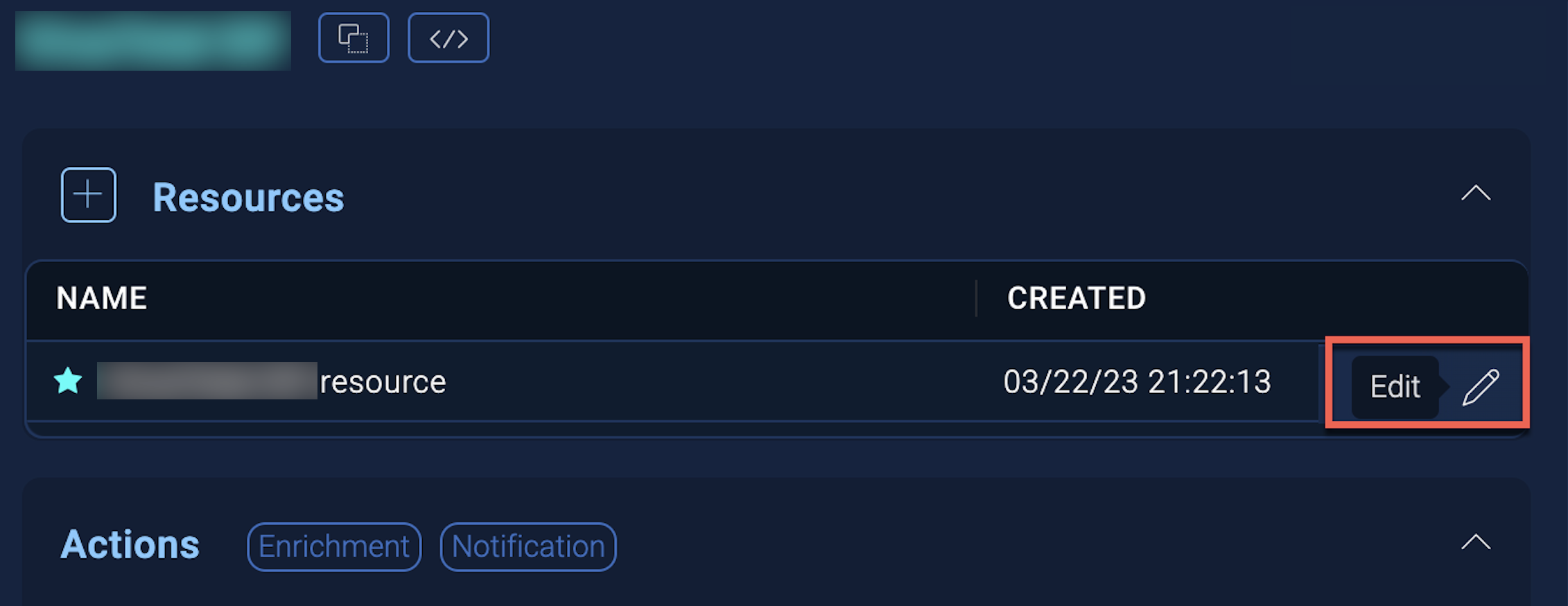
- Hover over the resource name and click the Edit button that appears.
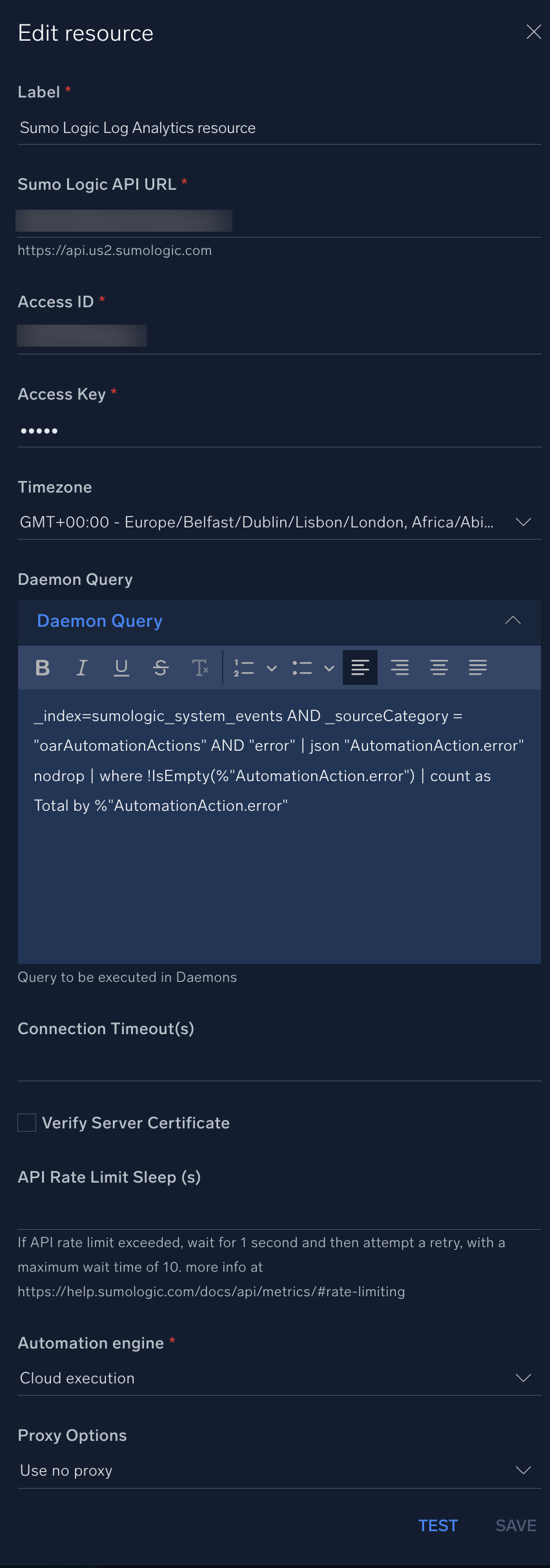
In the configuration dialog, enter information from the product you're integrating with. When done, click TEST to test the configuration, and click SAVE to save the configuration:
-
Label. Enter the name you want to use for the resource.
-
Sumo Logic API URL. Enter the API endpoint URL for your region (for example,
https://api.sumologic.com). -
Access ID. Enter the access ID for your Sumo Logic access key. Select Default as the scope when generating access keys.
-
Access Key. Enter the access key corresponding to your Sumo Logic access ID.
-
Timezone. Select your timezone.
-
Daemon Query. Enter the query to be executed in daemons.
-
Connection Timeout (s). Set the maximum amount of time the integration will wait for a server's response before terminating the connection. Enter the connection timeout time in seconds (for example,
180). -
Verify Server Certificate. Select to validate the server’s SSL certificate.
-
API Rate Limit Sleep (s). Enter the API rate limit in seconds. If the API rate limit exceeded, wait for 1 second and then attempt a retry, with a maximum wait time of 10. More info at Rate limiting.
-
Automation Engine. Select Cloud execution for this certified integration. Select a bridge option only for a custom integration. See Cloud or Bridge execution.
-
Proxy Options. Select whether to use a proxy. (Applies only if the automation engine uses a bridge instead of cloud execution.)
- Use no proxy. Communication runs on the bridge and does not use a proxy.
- Use default proxy. Use the default proxy for the bridge set up as described in Using a proxy.
- Use different proxy. Use your own proxy service. Provide the proxy URL and port number.
Change Log
| Version | Date | Description |
|---|---|---|
| v1.25 | April 30, 2026 | Upgraded the python3_generic Docker image (Python 3.8) to python3_12_generic (Python 3.12) to address Python 3.8 end-of-life and improve security and performance. |
| v1.24 | December 12, 2024 | Fixed an authentication issue in the Search Sumo Logic, Search Sumo Logic Daemon, and Aggregates Sumo Logic Daemon actions. |
| v1.23 | April 5, 2024 |
|
| v1.22 | March 4, 2024 | Updated code for compatibility with Python 3.12. |
| v1.20 | November 28, 2023 | Updated the Search Sumo Logic action, adding Table View as an output for use in notes and tasks. |
| v1.19 | October 31, 2023 |
|
| v1.18 | October 19, 2023 | Updated the Search Sumo Logic action so subqueries can now be executed. |
| v1.17 | October 3, 2023 | Updated the Search Sumo Logic action. |
| v1.16 | September 28, 2023 | Updated the Search Sumo Logic action, updating the default value for the Limit field. |
| v1.15 | September 27, 2023 | Updated the Search Sumo Logic action, adding a Limit field. |
| v1.14 | September 22, 2023 | Updated the Search Metrics action. |
| v1.13 | September 21, 2023 |
|
| v1.9-v1.12 | September 19, 2023 | Updated versioning. |
| v1.8 | September 4, 2023 | Fixed a bug where an error would occur if the timeout was not specified. |
| v1.7 | August 17, 2023 | Updated the Search Sumo Logic action, updating the timestamp. |
| v1.6 | June 28, 2023 |
|
| v1.5 | March 22, 2023 | Updated the integration fields with environmental variables. |
| v1.4 | November 10, 2022 |
|
| July 13, 2022 | Updated the Search Sumo Logic action, updating the output and Field Last Period values. | |
| June 07, 2022 | Updated the Search Sumo Logic action. | |
| May 3, 2022 | Updated the integration and added a new daemon. | |
| April 6, 2021 | Initial release of the Sumo Logic Log Analytics integration. |