windows-configure-source-template
In this step, you will configure the YAML required for Windows collection. Below are the inputs required for configuration:
- Name. Name of the source template.
- Description. Description for the source template.
Logs collection
- Fields/Metadata. You can provide any customer fields to be tagged with the data collected. By default, Sumo Logic tags
_sourceCategorywith the valueotel/windows. - Windows Event. In this section you can select choose among the most widely used Windows event channel for which Windows event log collection will be enabled. You can also provide Custom Event Channels providing any customer event channel for which event logs are to be collected.
- Forward to SIEM. Check the checkbox to forward your data to Cloud SIEM.
Metrics collection
- Metrics. Select the metric scrappers you want to enable. By default, metric collection for CPU, memory, disk, load, file system, network and paging are enabled, and process metric collection is disabled.
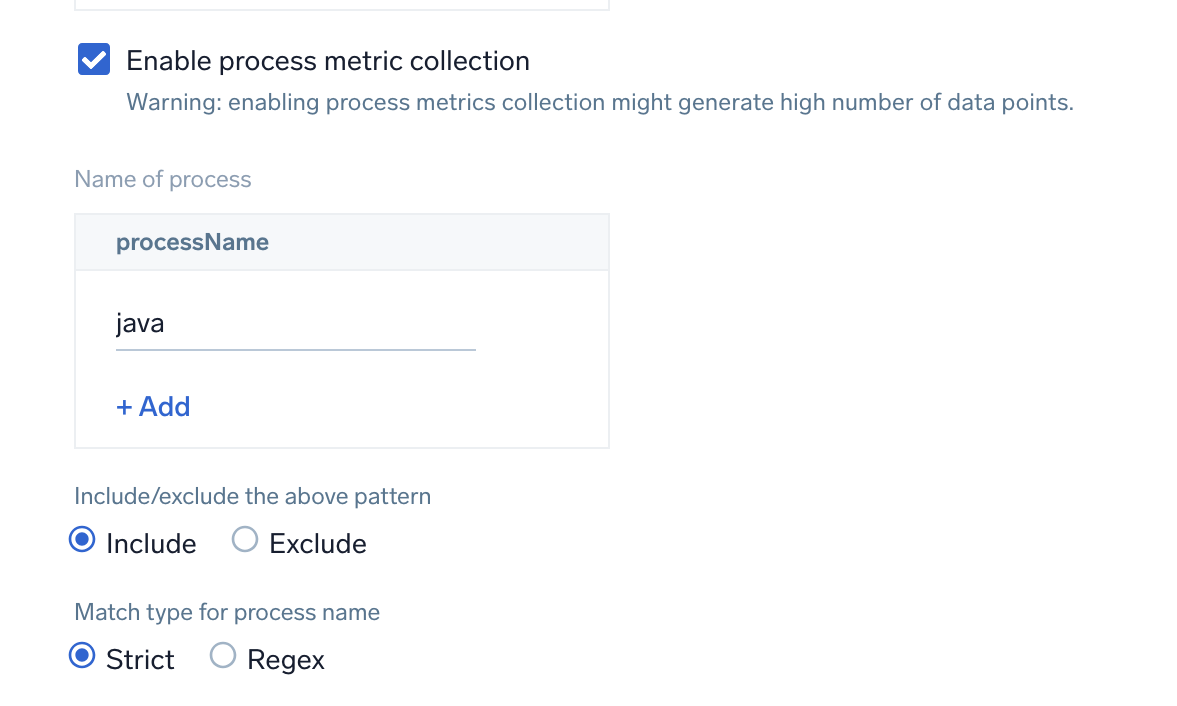
Enable process metric collection (optional)
By default, the collector will not send process metrics to Sumo Logic. This is because the number of processes running on a host can be very large, which would result in a significant increase in Data Points per Minute (DPM).
Click the Enable process metric collection checkbox to collect process-level metrics.
- Name of process. Add the list of process names.
- Include/Exclude the above pattern. Signifies if you want to exclude or include the metrics for the processes listed previously.
- Match type for process name. Select if the process name given should be considered for a strict match with the host machine processes or if it should be considered as regex when matching.
note
If you need to edit the process list in the future, you can do this manually in the OTEL config yaml by adding or removing in the names list under process scrapper.
process:
  include:
    names: [ <process name1>, <process name2> ... ]
    match_type: <strict|regexp>
- Scan Interval. The frequency at which the source is scanned.
- Processing Rules. You can add processing rules for logs/metrics collected. To learn more, refer to Processing Rules. For masking windows event logs, refer to Mask Rules for Windows Source Template.