Detect Patterns with LogReduce
The LogReduce® algorithm uses fuzzy logic and soft matching to group messages with similar structures and common repeated text strings into signatures, providing a quick investigative view, or snapshot, for the keywords or time range provided.
The Signatures tab displays LogReduce results as signatures. A signature is basically a reflection of the logs grouped by LogReduce—not all logs grouped in a signature will exactly match it. Within a signature, fields that vary are displayed with wildcard placeholders (**********) while other fields, such as timestamp (and some URLs) are ignored and replaced with placeholder variables such as $DATE and $URL.
You can refine the results of the LogReduce algorithm to make the outcome more generic or more specific. See Influencing the LogReduce Outcome for more information.
Will my LogReduce search results match my keyword search results?
Generally speaking, no. LogReduce is intended to be a jumping-off point for your analysis. Unlike a keyword search, where you are looking for data related to, say, a specific source or an error message, LogReduce returns signatures that contain messages that may be of interest to you using fuzzy logic. If you are not happy with a signature, you can teach LogReduce how you'd like the results to be made more specific. do not think of a signature as an example of what logs are grouped under it; instead think of a signature as a reflection of what LogReduce thinks you will find interesting if that signature catches your eye. Once you begin digging in to LogReduce results, you will then want to structure a keyword query that delivers precise results.
Running a LogReduce query
When you run a LogReduce query, you can first filter results with a simple string or metadata expression, or you can just type a wildcard (*). Specify a reasonable time period, service, or geographic region. Follow your keyword expression with the logreduce operator to group the resulting logs into meaningful groups of messages called logreduce operator to group the resulting logs into meaningful groups of messages called signatures. When running a LogReduce query, you will often see signatures change as the algorithm sorts through the resulting data and works to determine the best signature assignments for messages.
The logreduce operator cannot be used with group-by functions such as "count by fieldname."
To run a LogReduce query:
- In the search query field, enter a keyword string or a metadata tag (for example,
_sourceCategory="Western Region") to initially filter messages to some category, or you can just type a wildcard (*). - Click the LogReduce button. Results appear in the Signatures column when the search completes and you can do the following:
- Click the Messages tab to see the individual messages for all signatures combined.
- Rate the relevance of signatures by promoting or demoting them under the available Actions.
- Change signatures by clicking the pencil icon.
- Split signatures that should not be grouped by clicking on the split arrows.
- To export the results, click the Export icon. Then click Download to save the file to your computer.
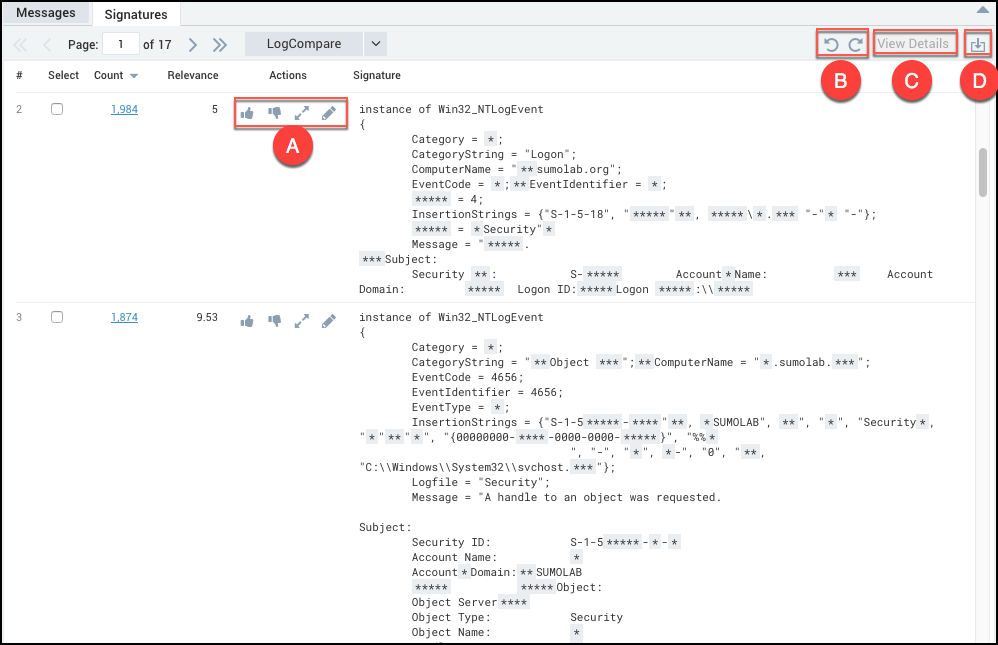
- Promote, Demote, Split, and Edit icons.
- Undo and Redo icons.
- Click to view messages for the selected signature.
- Click to download the LogReduce report.
LogReduce color coding
Promoting a signature causes it to be highlighted yellow, and the up-thumb icon to turn blue. The yellow highlighting disappears when you perform an action on another signature. The up-thumb icon stays blue.
Demoting a signature causes it to be highlighted dark gray, and the down-thumb icon to turn blue. The gray highlighting goes away when you perform an action on another signature. The down-thumb icon stays blue.
Editing or splitting a signature causes it to be highlighted in light gray.
Investigating the Others signature
Messages that Sumo Logic cannot readily group are separated into a distinct signature called Others. These signatures might contain simple, miscellaneous messages that are of low importance, or it might show some anomalous messages that are meaningful. To fully understand Others signatures, a human needs to investigate further.
To investigate the messages in the Others signature:
- Select the check box and click View Details.
- Sumo Logic runs the LogReduce algorithm on the signature with the details operator, and then displays the resulting sub-signatures.
Once a LogReduce query has run with the details operator, you cannot use that query again, for example, in a separate Search tab.