Understand the LogReduce Relevance Column
The summarize operator has been renamed the logreduce operator, to match the LogReduce button on the Messages tab. Both operators will continue to work in search queries as synonyms for a limited time. We recommend that you rewrite saved queries replacing summarize with logreduce.
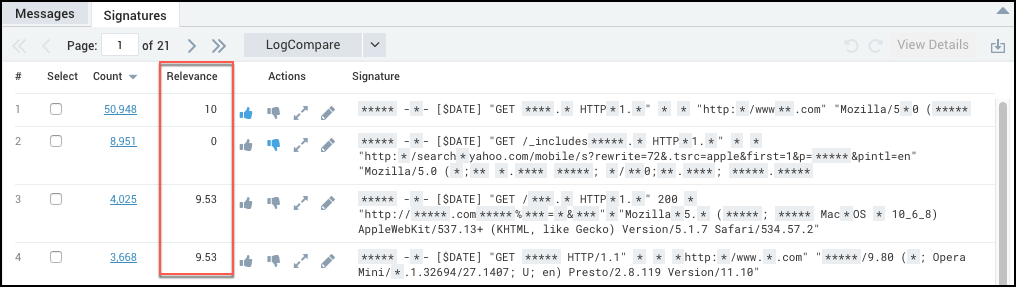
The LogReduce® Relevance column displays a numerical score for a signature, predicting which signatures could be most meaningful to a user. The Relevance value is computed using your history of feedback (Thumbs Up and Thumbs Down) and the instances when you’ve chosen to view the details of signatures.
LogReduce uses the similarity of signature content (the words in a signature) to predict relevance for signatures, even if a signature hasn’t yet been promoted or demoted a specific signature. For example, if a user has promoted a number of signatures that contain the word “database” then new signatures containing “database” will be scored higher.
What do the Relevance values mean?
Relevance ranks signatures on a scale of 0 to 10. Values of 0, 5, and 10 have specific meanings; values falling between these numbers suggest that a signature itself has not been explicitly promoted or demoted, but that it contains terms that have received previous feedback (either positive or negative).
| Scale | Description |
|---|---|
| 10 | Assigned to signatures explicitly given a Thumbs Up. |
| 5 | The default value for signatures that have no content in common with logs that have received feedback (neither positive or negative). Think of 5 as a neutral relevance value for signatures that contain words that LogReduce hasn’t learned how to rank. |
| 0 | Assigned to signatures that were explicitly given a Thumbs Down. |
Changing the display of LogReduce results
LogReduce results are displayed in descending order of the Relevance value by default.
If you prefer to see data sorted by the value in the Count column, click the Count column header to re-sort by Count.