Search Syntax Overview
The Sumo Logic Search Language operates on your entire log repository, no matter how many different log sources you have—in real time. The search query language is intuitive and efficient, allowing you to search terabytes of data and see results in seconds.
Rules
- A query is limited to a maximum of 15,000 characters.
- A word is limited to a maximum of 2,300 characters.
Query Syntax
The basis of Sumo Logic Search is a funnel or "pipeline" concept: beginning from all of your current Sumo Logic data, you enter keywords and operators separated by pipes (|). Each operator acts on the results from the previous operator to further process your results. Results are returned incrementally with the most recent messages displaying first. Additional messages are added progressively to the Messages tab as the search walks backward in time through all of your log data.
The syntax for a typical search query looks something like this:
keyword expression | operator 1 | operator 2 | operator 3
Keyword Expression. For simplicity, we refer to the first term in a search query as a "keyword" expression. In fact, this portion of the query is a very powerful full-text, Boolean search expression. The keyword expression also encompasses metadata searches for fields such as _sourceCategory, _sourceHost and are case-insensitive. For more on full-text search in queries, see Keyword Search Expressions.
Keyword expressions are often referred to as the scope of a query.
Operators. After filtering with an initial full-text search, the operators that follow can parse data into fields, refine results using conditional expressions, and then aggregate and organize results.
Pipe "|" Delimiter
The pipe delimiter is used to separate the keyword expression and each subsequent operator. Each pipe-delimited operator further processes search results from the preceding operator. You can use some operators together within a single pipe (like sum and avg), but they are processed by the specified fields together.
Syntax:
- Follow keyword search expression with a pipe
| - Precede each operator with a pipe
|
Example:
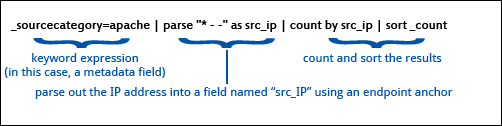
User-Parsed Fields
You can parse or extract values and assign them to an alias, known as a field, to the result. The field is valid only for the current search and does not carry over to new searches. When creating fields, there are a few rules that apply:
-
Field names can contain alphanumeric characters, hyphens, and underscores, but should always start and end with an alphanumeric character. Sumo Logic built-in fields and default aliases always begin with an underscore, such as
_sourceCategory,_sourceHost, or_count_distinct. Here are two examples of queries that generate a field calledsrc_IP:* | parse regex "(?<src_IP>\d{1,3}\.\d{1,3}\.\d{1,3}\.\d{1,3})"_sourceCategory=apache | parse "* " as src_IP
-
Multiple fields can be extracted and named within a single query. For example, the query below creates fields "type" and "user":
_sourceHost=vpn3000 | parse "Group [*] User [*]" as type, user
-
Aggregate operators automatically generate a field name when there isn't one specified. For example, the count operator creates a field called
_count. The sum operator creates a field called_sum. The max operator creates a field called_max, and so forth. -
User-parsed fields should not be named with existing words such as the names of Sumo Logic operators like group or sum.
For information on parsing fields, see Parse field.