 Meet the new
Time Range Expressions
When you are building a search query, you have the option to add a time range expression in the time range field.
The last millisecond of the defined time range is not searched. For example, a time range of 6:15 to 6:30 PM will run as 6:15:00.000 to 6:29:59.999.
General rules
- When entering hours, you can use a 24-hour format, such as 17:32:00, or a 12-hour format, such as 5:32 PM.
- To enter dates, always use a slash (
/) between month, day, and year in this format: mm/dd/yyyy. Sumo Logic does not support dates entered in yyyy/mm/dd notation or yy/mm/dd notation. - The Custom time range picker's quick-adjust control uses its own abbreviations:
h=hours,d=days,w=weeks,m=months. This is a different scale than the relative expression shorthand below, wheremmeans minute. - Time range options can vary depending on the type of account your organization has. Sumo Logic Free accounts allow time ranges up to seven days.
Preset time range expressions
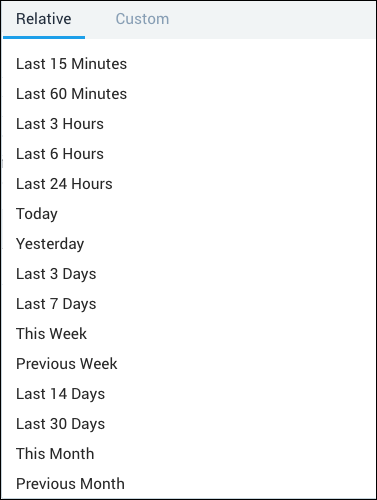
Preset values are available to choose from, with Last 15 Minutes as the default start value and "now" being the implied end time. In cases where more control of the start and end time is required, you can type a time range expression directly into the time range field.
Search time ranges use either the default timezone set in your web browser, or the Default Timezone setting on the Preferences page, if you have set it.
When you create a Scheduled Search, the time range of the search that you save uses the time zone that is set for the Sumo Logic user interface at the time of saving. Changing the Default Timezone setting later does not automatically update existing Scheduled Searches or real-time alerts, so edit and save them again to apply the new time zone.
Relative time range expressions
Either a single relative expression or two relative expressions can be specified.
- If only one expression is present, it is interpreted as the start time, and the end time is automatically set to "now". The token "now" can be entered to mean the current time.
- If two expressions are present, the first one is interpreted as the start time, and the second one is the end time.
Expressions should be prefixed with "-" to indicate that the time resolves to the past. The remainder of the expression contains a number and a time multiplier.
Valid time multipliers are:
sfor secondmfor minutehfor hourdfor day
Future time expressions (for example, now to +15m) are supported and will return results if timestamps for any collected data are set in the future.
The table below contains examples of relative time-range expressions.
| Relative Expression | Definition |
|---|---|
| -1d | From one day (24 hours) ago to now. |
| -1d now | From one day ago to now. |
| -1d -12h | From one day ago to 12 hours ago. |
| -12h -60m | From 12 hours ago to 60 minutes ago. |
| -60m -600s | From 60 minutes ago to 600 seconds ago. |
Absolute time range expressions
While relative expressions are useful, sometimes it is more important to express a specific point in time. If only one time expression is present, it is interpreted as the start time, and the end time is automatically set to "now". If two expressions are present, the first one is interpreted as the start time, the second is interpreted as the end time. If only a date is entered, the time value is implied to be midnight. Again, the token "now" represents the current time. If no year is present in an absolute time expression, the current year is assumed.
To avoid indeterminate values, always enter the year in the format yyyy.
There are many different ways to combine year, month, and days in an absolute time range expression. Search time ranges use either the default date format set in your web browser or the Date Format setting on the Preferences page, if you have set it.
If your browser is set to a locale that uses day/month/year format instead of month/day/year, dates in the Sumo Logic UI are presented in that format. Absolute time range expressions themselves must still use the mm/dd/yyyy slash format described in General rules.
The table below contains examples of absolute time-range expressions.
| Absolute Expression | Definition |
|---|---|
| 04/01 | From the most recent April 1 to now. |
| 04/01/2017 20:32:00 to 04/01/2017 20:35:00 | From April 1, 2017 at 8:32 PM until April 1, 2017 at 8:35 PM. |
| 04/01 04/02 | From midnight April 1 to midnight April 2 of the current year. |
| 04/01/2017 00:00:00 to 04/02/2017 | From midnight April 1, 2017 to midnight April 2, 2017. |
| 04/01/2017 | From midnight April 1, 2017 to now. |
| 04/01/2017 04/02/2017 | From midnight April 1, 2017 to midnight April 2, 2017. |
See also
- Set the Time Range of a Search. Use the Relative, Custom, and Recent time range picker in the Search UI instead of typing an expression.
- Use Receipt Time or Use Searchable Time. Change which timestamp field a search's time range applies to, instead of the default message time.