Sumo Logic Mobot
Mobot (formerly Copilot) is Sumo Logic's AI-powered assistant that accelerates investigations and troubleshooting in logs. Ask questions in plain English and get contextual suggestions that help first responders reach answers faster.
With fast response times and high translation accuracy, Mobot helps users of all skill levels work more efficiently across supported log sources. You interact with it like a chat assistant—ask a question, refine it with follow-ups, adjust filters or time ranges, and see updated queries and visualizations without starting over. Mobot tracks your intent, maintains conversation context, and surfaces helpful suggestions to guide your investigation.
Mobot automatically generates log searches from natural language prompts and helps you investigate performance issues, anomalies, and security threats. It provides step-by-step refinements using AI-derived suggestions to help you reach faster and more accurate resolutions.
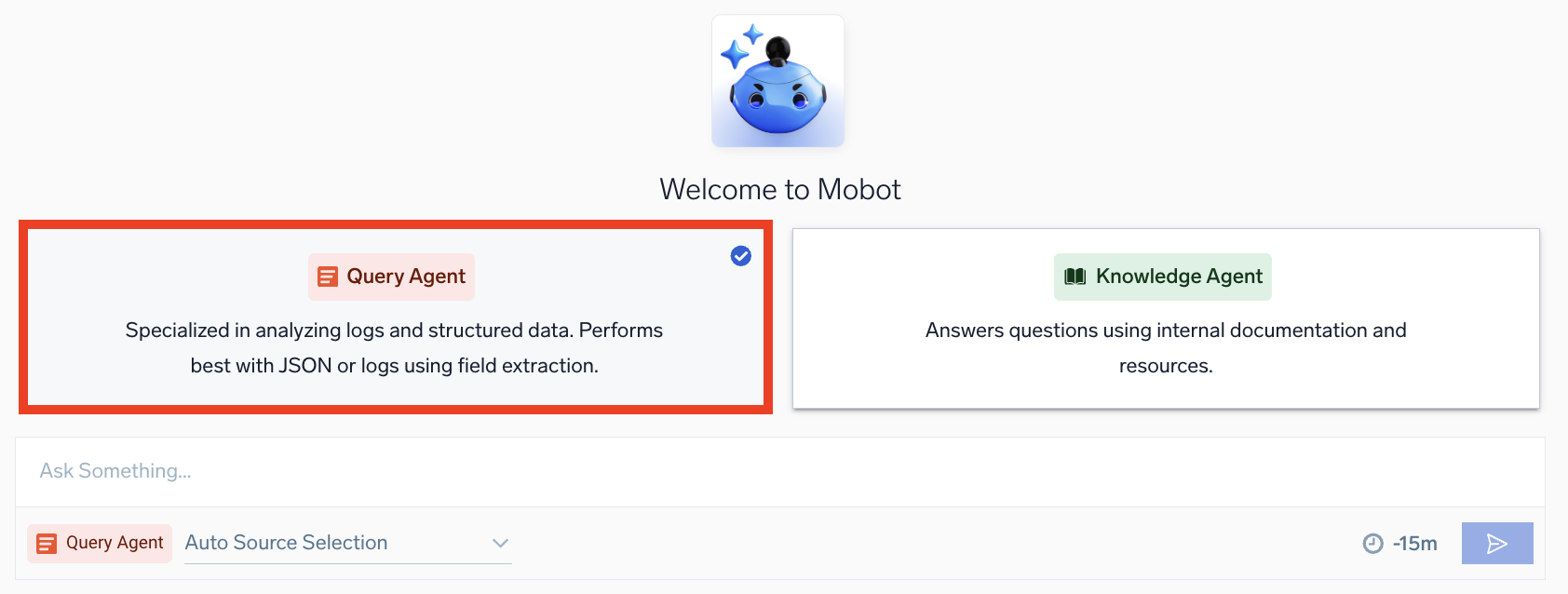
It connects you to two specialized agents that handle different tasks:
- Query Agent translates your natural-language questions into log search queries and helps you refine them step by step.
- Knowledge Agent answers how-to questions about Sumo Logic—anything from setup to troubleshooting, best practices, and more—sourced from our official documentation.
Together, these agents help you troubleshoot faster, explore your data more intuitively, and learn the platform without friction.
Sumo Logic Academy offers free training courses covering these concepts that allow you to practice in a lab environment and level up your knowledge. Check out self-paced and free live instructor-led offerings today! (To access our self-paced courses, first sign in to our learning portal.)
- Self-paced: Mobot Essentials Self Paced
- Instructor-led virtual classes: Workshops: Mobot Essentials
Key capabilities
- Auto-visualization. Generate charts automatically from search results and add them directly to dashboards.
- Broad log compatibility. Works with structured and semi-structured logs. To analyze unstructured logs (like Palo Alto Firewall), you'll need to apply Field Extraction Rules.
- Automatic source detection. Let Mobot choose a data source based on your question, or specify one yourself.
- Clarifications when needed. If your request is ambiguous, Mobot asks follow-up questions to narrow intent.
- Smarter error handling. Get clear messages and actionable suggestions instead of generic errors.
- Dashboard-aware translations (via RAG). Mobot learns from dashboards opened in your org in the last 90 days to better understand your intent and data structure.
- Integrated workflow. See your prompts, refinements, queries, and results all in one interface, with the ability to branch or revisit past conversations.
Who benefits from Mobot?
Mobot is ideal for users across your organization:
- On-call engineers and security teams. Accelerate incident resolution by surfacing key troubleshooting and security insights rapidly.
- Early career professionals. Troubleshoot without needing to learn query syntax, making incident investigations more accessible.
- Practitioners. Speed up workflows with context-aware suggestions for frequent tasks.
- Experts. Get IDE-style assistance for crafting complex queries efficiently.
Which agent should I use?
Not sure where to start? Choose based on what you need:
| Query Agent | Knowledge Agent | |
|---|---|---|
| Purpose | Create and refine log queries | Learn platform features |
| Input | Data questions and analysis requests | How-to and configuration questions |
| Output | Executable queries with live results | Documentation-based answers with links |
| Best for | Troubleshooting, investigating, analyzing trends | Onboarding, setup guidance, learning concepts |
| Example | "Show me 500 errors from the API service" | "How do I set up a CloudTrail collector?" |
Query Agent
Select Query Agent to get help with Sumo Logic log search queries. In this section, you'll learn how to use Query Agent effectively, along with best practices to maximize its benefits.
This short video introduces Query Agent and how it can help you with log search and analysis—perfect for getting a quick overview before diving in.
Query Agent builds on the query translation foundation of the previous Copilot experience with improved accuracy and a conversational workflow. Intent cards summarize your current goal, and suggested follow-up queries offer refinements you can apply with a click. The conversation pane shows your prompts and refinements, with queries rendered directly in the editor alongside live results.
Getting started
To open Mobot, click Mobot in the left nav.
In this video, you'll learn how to turn natural language requests into queries, simplifying data exploration.
Example workflow: Observability
This example shows a typical investigation workflow that takes just a few minutes. You can apply the same patterns to different logs, events, or dimensions.
Ask your initial question
Use natural language to ask what you're looking for. For better results, include the name of the data source you're querying and any related fields or values.
If you don't select a source, Query Agent chooses one automatically based on your question. You can override it by typing the source name directly in your prompt or by choosing it from the Auto Source Selection dropdown.
For example, if you enter a broad question like "Show me AWS CloudTrail errors", your query will translate to Sumo Logic query language (something like (_source="AWS CloudTrail") "error") and an intent card appears in the conversation pane summarizing your goal. Query Agent then surfaces suggested follow-up queries with related refinements you can click. You'll also see an option to open your query in Log Search.
Narrow the scope
After you click a follow-up suggestion or type a refinement, Query Agent refreshes the results and updates the intent card and query to reflect the new focus. With each refinement, Query Agent adjusts the query, applies the changes, and renders a visual chart.
For example, clicking a suggestion like "Show me trend of errors each minute" applies a timeslice to group the results over time.
Drill into causes
As you go, Query Agent presents new suggestions to help you pivot into related questions, such as analyzing trends of event reasons or identifying top namespaces. The intent card expands each time to include the new scope, and results show additional details.
For example, you could refine further by clicking a suggestion like "Show the count of error logs per minute, grouped by error code".
Next steps
In just a few conversational turns, you went from a broad question to a detailed analysis showing error trends grouped by error code over time.
From here, you can continue refining or explore different angles like switching the chart type, opening the query in Log Search, adjusting the time range, editing the query logic, or starting over with a new chat.
Example workflow: Security investigation
The steps below outline a typical conversational interaction pattern for investigating a security incident. You can apply the same approach to different security scenarios.
Ask your initial question
Use natural language to ask what you're looking for. For better results, include the name of the data source you're querying and any related fields or values. If you don't select a source, Query Agent chooses one automatically based on your question.
For example, if you enter "Show me recent user-service logs", Query Agent selects the correct source category and returns recent events. An intent card appears in the conversation pane summarizing your goal. Query Agent then surfaces suggested follow-up queries with related refinements you can click.
Identify patterns
After you click a follow-up suggestion or type a refinement, Query Agent refreshes the results and updates the intent card and query to reflect the new focus. With each refinement, Query Agent adjusts the query, applies the changes, and renders a visual chart.
For example, asking "What's the request volume by service?" would aggregate traffic by service. Query Agent might surface that user-service has 3× higher requests than baseline, while other services remain healthy—suggesting a traffic surge on one service.
Analyze geographic distribution
As you go, Query Agent presents new suggestions to help you pivot into related questions. The intent card expands each time to include the new scope, and results show additional details.
For example, asking "Where are these requests coming from?" aggregates by geography. Query Agent might reveal that 80% of requests originate from France, with elevated activity from China, Netherlands, and India—a geographic clustering pattern consistent with coordinated attacks.
Examine error patterns and sources
Query Agent maintains context from previous questions, so you can continue refining without repeating filters. For example, asking "What status codes are returned by the register API?" shows that over 85% of requests are failing with 503 errors. Following up with "Which IPs are behind these 503 errors?" reveals that two IPs account for over 97% of the failed traffic.
Validate with threat intelligence
You can enrich findings by asking Query Agent to cross-reference with external data. For example, "Check these IPs against threat intel" would reveal if the source IPs are flagged as known malicious actors, confirming whether the incident is an attack or organic load.
Next steps
In just a few conversational turns, we went from an initial alert to confirming a DDoS attack with:
- Identified affected services and APIs
- Traced attack origin to specific geographic regions and IPs
- Validated malicious actors using threat intelligence
- Quantified impact on latency and error rates
From here, you can continue refining or take action like blocking malicious IPs, opening the query in Log Search, adjusting the time range, editing the query logic, or starting over with a new chat.
Working with Query Agent
Time range
By default, Query Agent searches run with a 15-minute time range. If your search does not return any results, consider expanding the time range.
Click the clock icon (see below), select your desired time range from the dropdown, then click the blue search button.
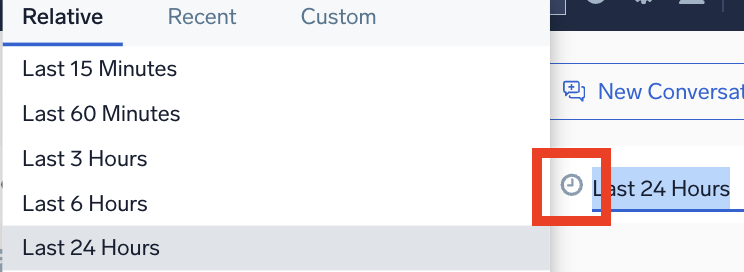
Chart type
Query Agent automatically visualizes your data. For example, a query like "Top ip by geo" triggers a geo lookup and displays results on a map.
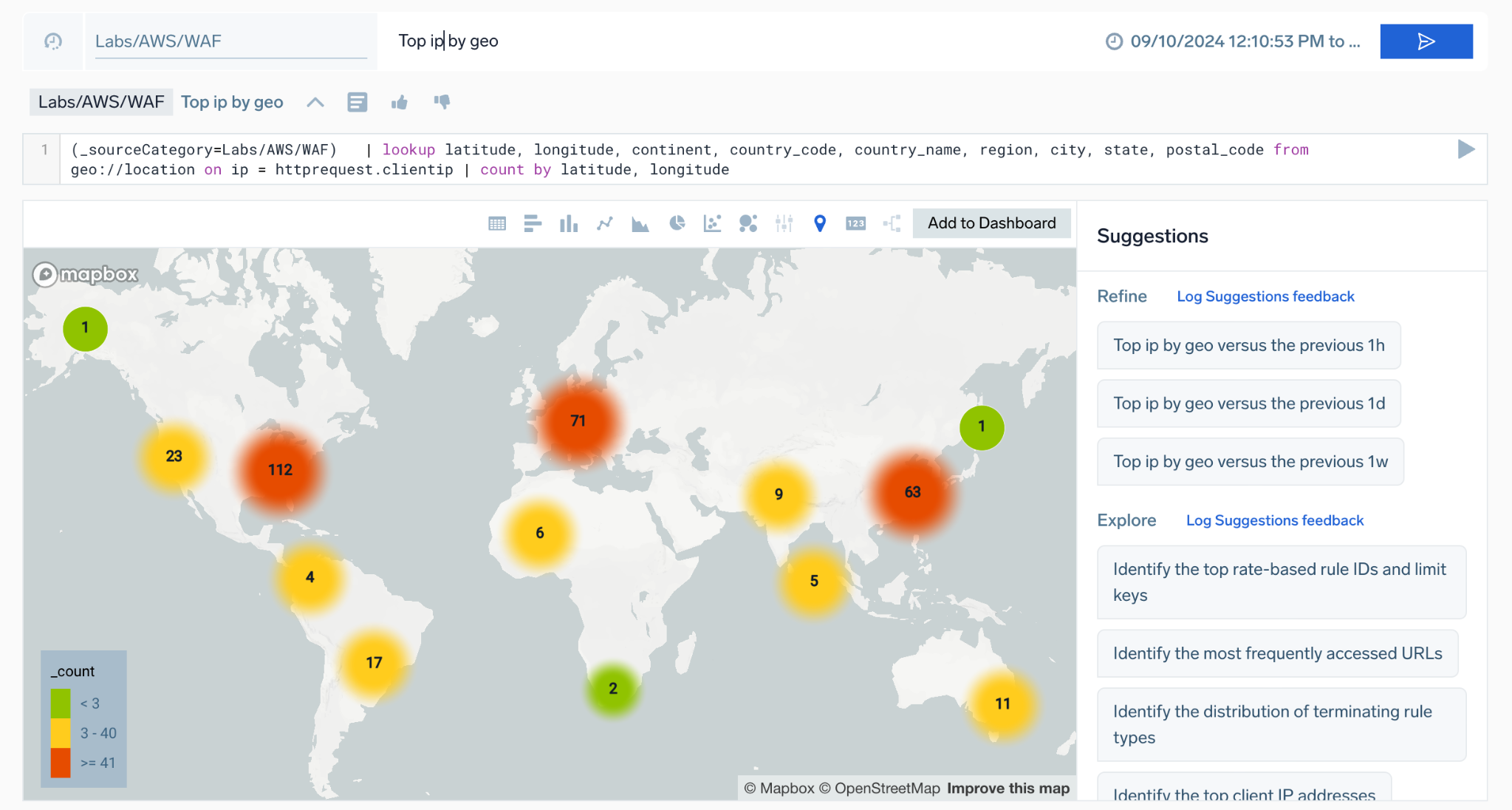
Select your preferred chart type, such as Table, Bar, Column, or Line view to visualize your results. You can also click Add to Dashboard to export an AI-generated dashboard for root cause analysis.

The following rules are used to deduce chart type:
- If both latitude and longitude fields exist, it returns a MAP chart type.
- If there is only one field and one record, it returns an SVP chart type. Example query:
(_sourceCategory=ic/linux/gcp) | count by %"_sourcename" | count - If a
sortoperator is present and there are string fields, it returns a TABLE. Given that there is asortoperator, probably the user is interested incount. Query:(_sourceCategory=ic/linux/gcp) | count by %"_sourcename" | sort by _count - If there is a
_timeslicefield, it returns a LINE chart type if there are numeric fields or a TABLE chart type if there are string fields. - If there is one string field, one numeric field, and record count is less than 6, it returns a PIE chart type. Query:
(_sourceCategory=ic/linux/gcp) | count by %"_sourcename". - If there is one string field, less than 3 numeric fields, and record count is less than 20, it returns a LINE chart.
- If none of the above conditions are met, it defaults to returning a TABLE chart type.
Edit query code
Optionally, you can manually edit your log search query code.
New to Sumo Logic query language? Learn more.
- Click in the code editor field and edit your query.

- Click the search button.
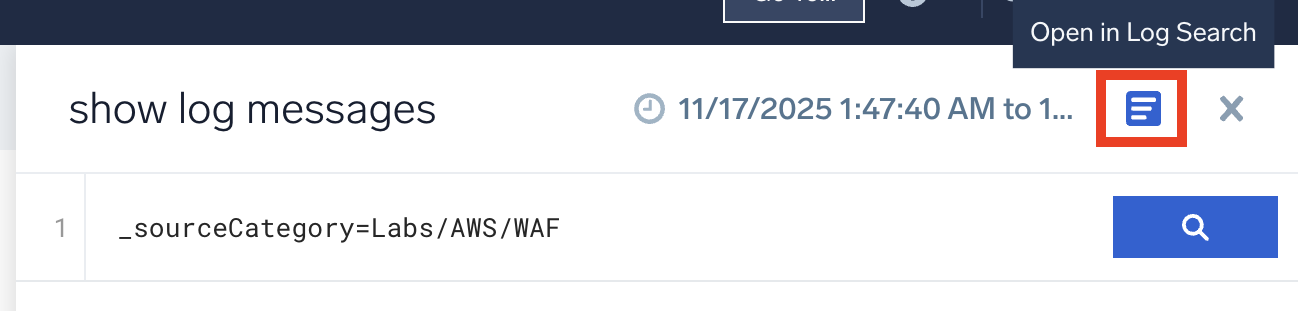
Open in Log Search
Open your query in Log Search to access Sumo Logic's full search functionality. This allows you to continue investigating, refining your query, take action, or save the search for later.
There are two ways to do this:
- From your conversation, click View results.
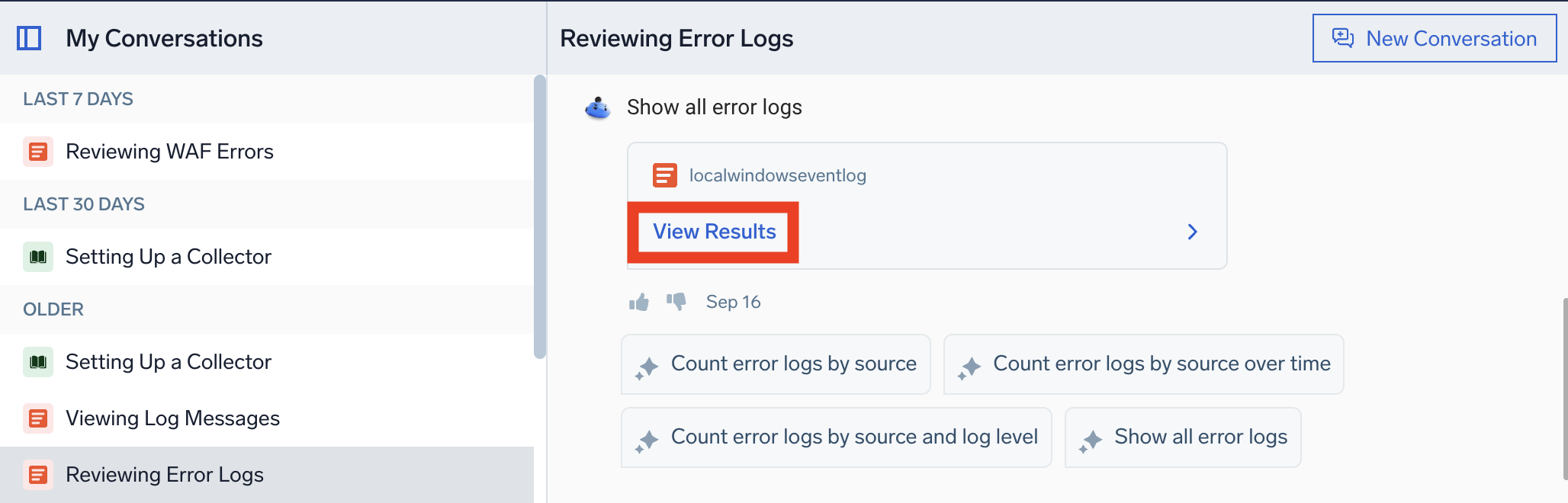
- From the query section, click the Open in Log Search icon.
My Conversations
To resume a conversation, go to the My Conversations list and click on the one you're looking for.
This conversation history feature saves all previous queries and suggestions, allowing you to backtrack and refine your investigation. For example, if a status code analysis yields inconclusive results, you can revisit earlier queries to explore other possibilities. This functionality can also be useful when you're working on multiple incidents at the same time.
Edit conversation title
Query Agent automatically updates conversation titles based on your query. You can also set a custom title by hovering over your conversation in the My Conversations pane, then clicking the "Rename" pencil icon. This helps keep investigations organized and easier to revisit.
New Conversation
To start a fresh exploration, click New Conversation. This clears your current session and allows you to begin with a clean slate.
View Query Agent queries
Account administrators can view queries generated by Query Agent for users in their organization using the search audit index.
Prerequisites:
- You must be an account administrator.
- The search audit index must be enabled for your organization.
To view Query Agent queries:
- Open Log Search.
- Use the following query:
_view=sumologic_search_usage_per_query
| where query_type in ("Query Agent")
| count user_name, query - Set your time range to cover the period when Query Agent queries were run (for example, last 24 hours).
This allows you to audit and review natural language queries submitted to Query Agent along with the generated log search queries.
Tips for better answers
Get the most out of Query Agent by following these tips:
- Talk to it like a conversation. Layer refinements instead of rewriting the whole question. For example, start with "Show me API errors" and then follow up with "group by status code" and "show the last 6 hours".
- Be specific. Combine filters, units, and percentiles in clear language. Instead of "Show me errors", try "Show me 500 errors from the API service, grouped by status code" Query Agent performs better with explicit filters, time ranges, and field names.
- Start with a broad query. Begin with a query like "Show me the most recent logs" to understand the structure and available fields in your logs, then refine from there.
- Ask about data tied to dashboards. Query Agent works best when you reference data sources that already have dashboards built on them. Try asking questions using dashboard panel names or descriptions, even if built on unstructured logs.
- Disambiguate field names. If fields have similar names and cause confusion, explicitly specify the field (for example,
<field_name>) to improve accuracy. - Experiment with phrasing. Try multiple variations of a query to provide context and receive more relevant suggestions.
- Change chart types. When results appear in a table view, change the visualization to a time-series chart (for example, line or area) to see trends more clearly over time.
- Change units in your query. For example, "Convert GB to bytes" or "show in milliseconds."
- Reuse queries from your conversation history. Everything you ask is saved automatically. You can revisit, reuse, or continue where you left off in prior conversations to compare or branch analyses.
- Modify existing queries. Add/remove fields, add
where,sort,avg()clauses, and more. - Guide Query Agent with feedback. If the result isn't right, use natural language. For example, "Don't filter by namespace, instead group by error type" or "Use P90 instead of P50."
- Fix broken queries. Paste a syntactically invalid query and Query Agent will correct it for you.
Specifying time ranges
Query Agent understands relative rolling window time expressions. Use "last X" or "past X" with time units for rolling time windows:
- "within the last 60 minutes"
- "in the last 6 months"
- "over the last 7 days"
- "in the last 24 hours"
- "last 48 hours", "last 90 days", "last 12 months"
- "last week", "last month", "last night" (as rolling ranges)
Example queries
Below are examples of how you can phrase queries:
Basic patterns
Count logs by[field(s)] andGroup logs by[field(s)] produce the same resultSort by[field(s)] [in descending order]Percentage by[field]valuesFind[stat]for[field] (max, min, standard deviation, etc.)Filter by[field]contains[keyword]noteKeyword searches are case-sensitive.
Apply logreduce to logs
Common use cases
-
Detecting malicious activity:
Count logs by action. Sort the results.
Filter results by action contains Malicious. -
Advanced analysis with users and URLs:
Count logs by action, url, user.
Sort the results. Filter results by action contains Malicious. -
Root cause analysis for latency:
Calculate 95th percentile latency by service and API. -
Network activity analysis:
Analyze risk and severity of network activityIdentify top application categories accessed
Cloud SIEM investigation
You are a SecOps engineer who uses Cloud SIEM. You are worried about a signal in Cloud SIEM regarding malicious network activity. You want to investigate network records and be proactive. You are under pressure to complete your investigation quickly. While familiar with Sumo Logic, you do not write log queries every day and could use a little help. Fortunately, all your Cloud SIEM records are in Sumo Logic.
- In Mobot, you type the source for Cloud SIEM network records:
_index=sec_record_network - You know what you are looking for. So, you ask:
Count logs by action. Sort the results.
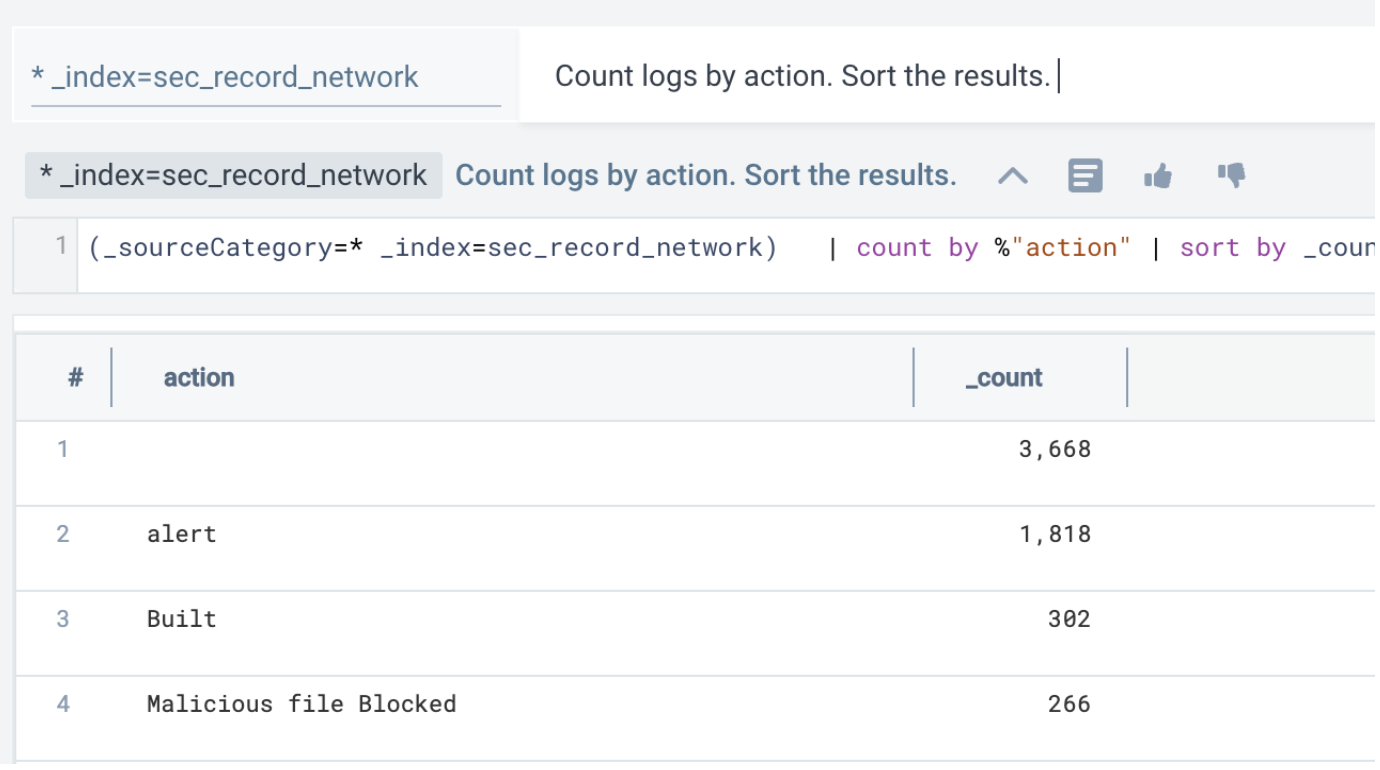
- As soon as you do that, you can look at the suggested follow-up queries, which are curated based on their relevance to this Cloud SIEM source. In this example, we'll pick a suggested query to compare results to the last hour:
Count logs by action. Sort the results. versus the previous 1h
Notice the system translated the suggestion to a log query and rendered results as a bar graph with no user input.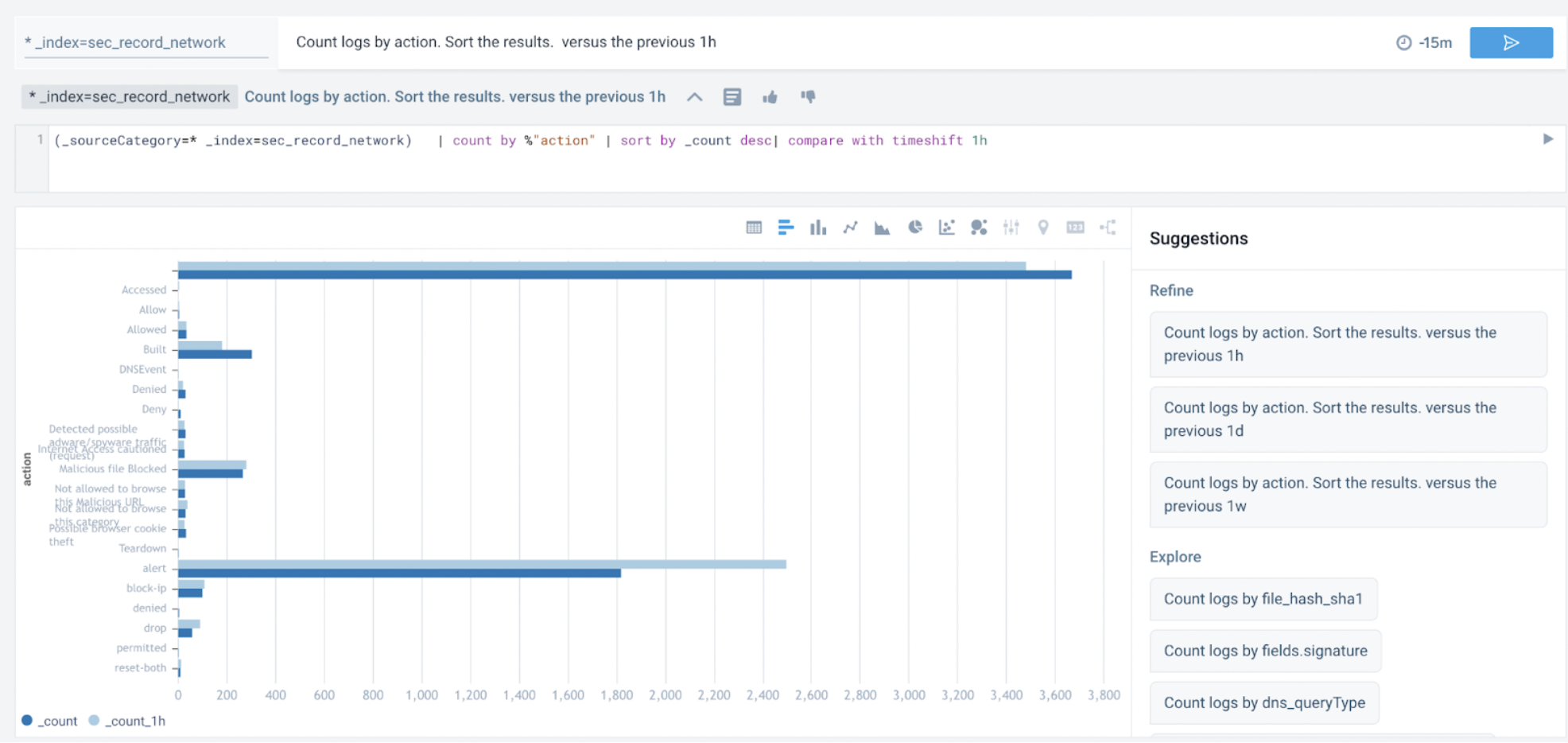
- Switching to table view, you notice "Malicious" in the search results. So, you add in
Filter results by action contains Maliciousto the query:Count logs by action. Sort the results. Filter results by action contains Malicious.
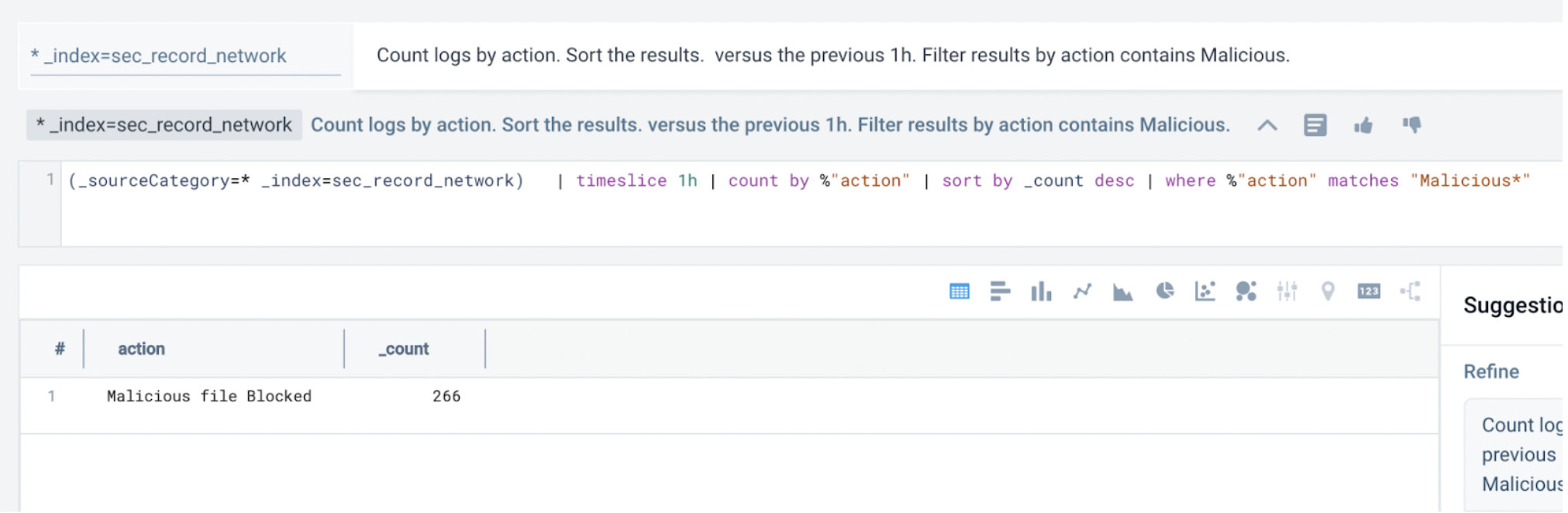 note
noteIf
Maliciousdoesn't work, tryMalicious*. Sumo Logic is case sensitive. - Next, you look for URLs that pertain to the malicious action:
Count logs by action, url, user. Sort the results. Filter results by action contains Malicious.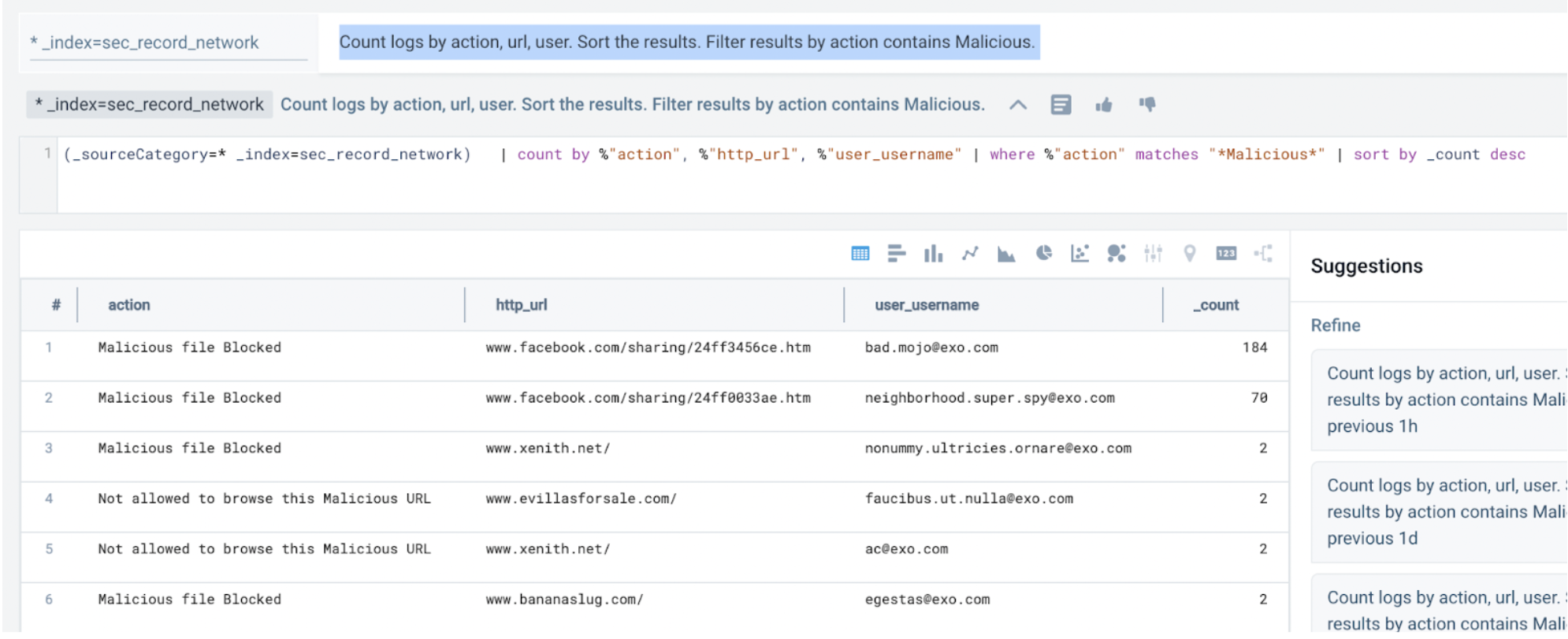
- Even though the activity was blocked, you can investigate the affected users in the endpoint records next.
To summarize, you conclude there is malicious activity originating from certain users who need to be investigated further.
Additional considerations
Compatible log formats
Query Agent querying is compatible with JSON logs, partial JSON logs, and unstructured logs with Field Extraction Rules. It cannot be used to query metrics or trace telemetry.
To retrieve a list of _sourceCategories with JSON data, use the following query:
_sourceCategory=* "{" "}"
| limit 10000 | logreduce keys noaggregate
| count by _sourceCategory, _schema
| where _schema != "unknown"
| sum(_count) by _sourceCategory
If your log query contains a mix of JSON and non-JSON formatting (for example, if a log file is partially JSON), you can isolate the JSON portion by adding a left curly brace ({) to the source expression to trigger Suggestions.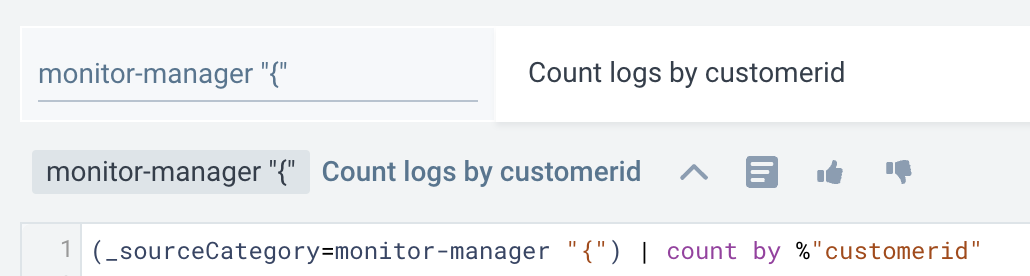
Role Based Access Control
Role Based Access Control (RBAC) is not supported for contextual suggestions and autocompletions. It is possible for a user who is blocked by log search RBAC to view suggestions or completions for unpermitted source expressions. However, they will not be executed by the search.
Search behavior and data tier access
Query Agent follows the same search behavior as standard log search and respects your account’s data configuration, whether you're on Flex pricing or tiered pricing.
Flex pricing
If you're on Flex pricing, all data is stored in a single intelligent layer and pricing is based on the volume of data scanned.
Tiered pricing
If you're on a tiered pricing plan such as Continuous Tier, Frequent Tier, or Infrequent Tier:
- Query Agent searches across continuous data tiers only, unless otherwise specified.
- To query a specific tier, include the
_dataTierfield in your prompt. For example, to search the Infrequent tier:_dataTier=Infrequent
Knowledge Agent
Select Knowledge Agent to get help using Sumo Logic.
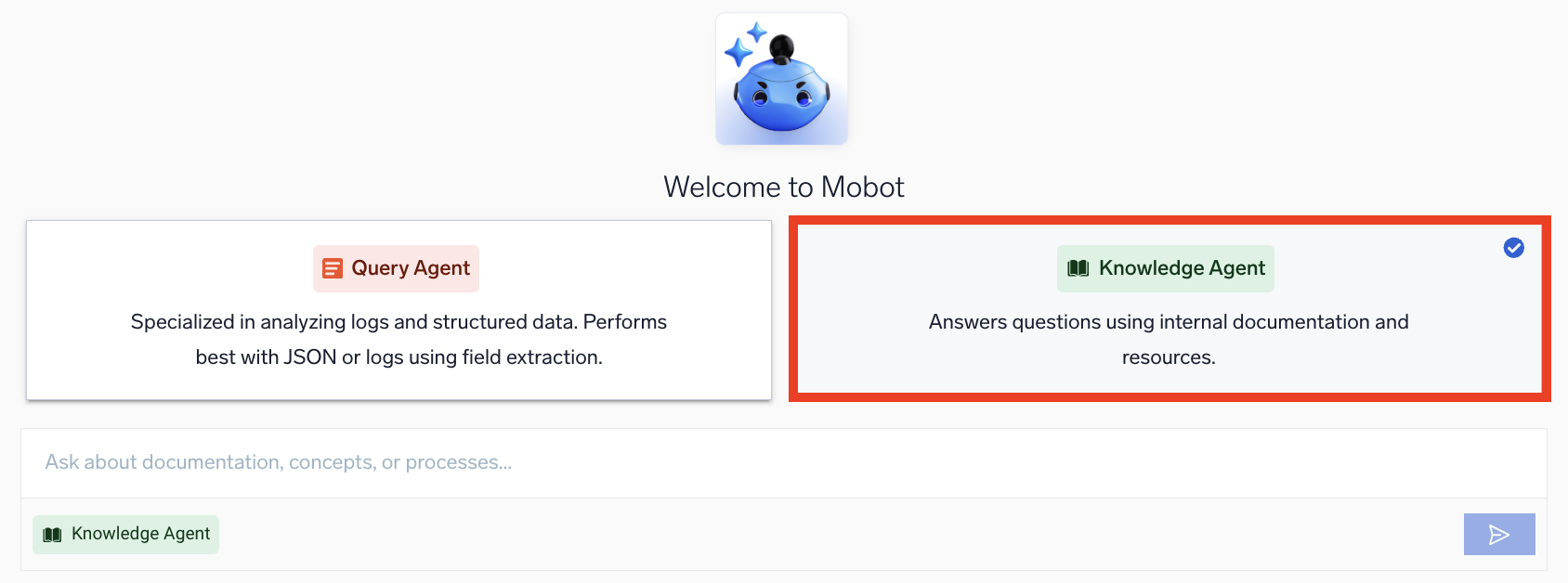
Learn more about Knowledge Agent's key features and capabilities.
Knowledge Agent is your in-platform assistant for learning how to use Sumo Logic. Ask questions about Sumo Logic and get clear answers sourced directly from our official documentation without leaving your workflow. Here are some examples:
- "How do I add a collector for AWS CloudTrail?"
- "What's the difference between a scheduled search and a real-time alert?"
- "Why isn't my collector sending data?"
- "What are the API endpoints for Sumo Logic?"
Knowledge Agent maintains conversation context for 24 hours, so you can ask follow-up questions naturally without starting over.
Tips for better answers
To get the most accurate answers, try the following when asking questions:
- Ask complete questions. Instead of typing "Collectors", try "How do I install a collector on Windows?"
- Provide context for troubleshooting. For example, "I'm getting a 403 error when setting up AWS integration—what could be wrong?"
- Follow up naturally. If the initial answer is close but not quite right, ask follow-up questions like "What about for Azure instead of AWS?"
- Reference specific features. Use proper names when you know them: "How do I use Field Extraction Rules?" works better than "How do I extract fields?"
Security and compliance
Sumo Logic Mobot leverages foundational models provided by Amazon Bedrock, inheriting their robust compliance and security posture. For detailed information, refer to the following Amazon Bedrock security and compliance resources:
Additionally, all aspects of our service, including Mobot, adhere to the security and compliance requirements outlined in our service agreement or in individually negotiated contracts.
- Customer data privacy. Mobot ensures customer data remains private and secure. No customer data or PII is used to train the AI models. Context for AI processing is limited to schema and field samples, reviewed for legal and compliance purposes.
- Rolling data expiration. Some features may store query history temporarily for performance, but data is expired on a rolling basis.
- AI provider. Mobot uses a foundation model served by Amazon Bedrock. The provider has no access to your data.
FAQ
General
What is Sumo Logic Mobot?
Mobot is an AI assistant integrated into the Sumo Logic Log Analytics Platform. It enables natural language queries and contextual troubleshooting, helping users extract actionable insights from logs. Mobot does not process or share your log data with any third party.
Can I use Mobot to analyze unstructured logs?
Yes, Mobot can extract relevant insights from unstructured logs, provided Field Extraction Rules (FERs) are applied. It also supports semi-structured logs (JSON + unstructured payloads).
Does Mobot save search history?
Yes, Mobot retains conversation and search history, allowing you to resume investigations with context and continuity.
What role does AI play in Mobot?
Mobot uses AI to interpret natural language queries and recommend search results or query refinements, streamlining log analysis.
How can I opt out of Mobot?
If you prefer not to use Mobot, contact our support team. Your account will be updated accordingly.
Security and privacy
Do Dojo AI agents access customer data?
Mobot (including Query Agent and Knowledge Agent) does not process or analyze customer log data. Schema and field samples are used to provide context to the AI, but your log content is not read or stored by the model.
What specific types of customer data or PII does the AI process? Does it filter out PII/sensitive information?
Mobot processes schema and field samples to provide context to the AI. While field values can contain PII or confidential data (for example, email addresses or IP addresses), these values are used solely to enable insights and are protected under strict compliance and security reviews.
Is customer data/PII used to train AI models?
No, customer data or PII is not used for training AI models. Mobot operates using a foundation model served via Amazon Bedrock, ensuring your data remains private and secure.
How long does the AI store customer information or PII, and when and how is it deleted?
Certain features may rely on query history stored on a rolling basis for performance optimization. Data is systematically expired to maintain privacy.
For example, our alerts feature log anomaly detection and build ML models from 60 days of logs. To accomplish this, we retrain the model once a week. In this example, each week, we add one week of new data while expiring the oldest week of data. Rolling data windows are done to avoid fetching 60 days of data for every training run.
Is any user or org data sent outside our environment?
No. All processing happens within your region's cluster. RAG context is scoped to dashboards in your own org—no cross-org data leakage.
Does a fourth party have access to Mobot customer data?
No. Mobot uses foundation models securely hosted through Amazon Bedrock. When customer data is processed:
- Customer inputs and outputs are treated as Customer Content under AWS terms.
- AWS does not use Customer Content to train models or improve Amazon Bedrock.
- AWS may access Customer Content only as necessary to provide the service or comply with applicable law.
- Third-party model providers (such as Anthropic) do not have access to customer inputs or outputs.
- Customer inputs and outputs are not shared with model providers and are not used to train external models.
Customer data processed through Mobot remains within Sumo Logic's secure environment and is used only to deliver results for that customer.
Technical
Does Mobot use any open-source library, GenAI providers, or cloud providers?
For Generative AI, Mobot uses a foundation model served by Amazon Bedrock. Classical ML features leverage open-source Python libraries approved by Sumo Logic.
What is the type of AI being used?
Mobot is an ensemble of Generative AI (GenAI) and classical machine learning (ML) techniques. For example, classical ML is used for anomaly detection in alerts.
Is there a human in the loop for Mobot?
Yes, the on-call developer or security engineer troubleshooting an incident is the expected user. They interact with Mobot using natural language questions or through contextual suggestions.
Does Sumo Logic hold any AI-specific certifications or accreditations?
Sumo Logic is currently reviewing AI compliance within a rapidly evolving regulatory landscape, including ISO 42001, which is designed to help organizations implement AI responsibly.
All Sumo Logic AI capabilities operate within our existing industry-recognized security and compliance framework, including FedRAMP Moderate, SOC 2 Type 2, HIPAA, PCI DSS 4.0.1, and ISO 27001:2022. These attestations govern the confidentiality, integrity, and protection of customer data across our platform, including AI features.
Availability of specific AI capabilities may vary by deployment region based on compliance boundary requirements.
How are reviews conducted on the Mobot model?
The generative AI model used by Mobot is licensed and securely hosted via Amazon Bedrock, meaning it is not directly accessible by Sumo Logic, customers, or third parties.
Each major capability added to Mobot undergoes legal, compliance, and application security reviews. These reviews coincide with new releases that expand insights or process new types of data.
Which Mobot capabilities are available in FED deployments?
The current GA versions of Mobot, including Query Agent and Knowledge Agent, are available in the FED deployment.
Query Agent
What's the impact on Query Agent latency?
Typical end-to-end response time remains under 2 seconds for most queries. Very large result sets or percentile calculations over broad ranges may take up to 5 seconds. During Beta, full query generation may take 6 to 7 seconds, but Mobot streams the first token (intent interpretation) within 2 seconds.
What are the current Query Agent limitations?
- For dashboard-aware translations via RAG, Mobot's source expression must share at least one common key-value pair with your dashboard queries. For example,
_sourcecategory=abcd "error"will match a dashboard query like_sourcecategory=abcd | count, but won't match_source=abcd | countbecause there's no shared key-value pair. - RAG only considers dashboards that have been opened in the last 90 days when interpreting your query.
- Very large or highly complex queries may time out or trigger structured fallback responses.
- The conversational experience is available for log-based searches only. Metrics and Metric Searches are not supported in this Beta.
- Mobot cannot currently refer to the output of a log search directly in subsequent queries. Each follow-up must be expressed in terms of query refinements rather than referencing previous results. This is an important limitation to be aware of when constructing multi-turn conversations.
How do I debug a failed Query Agent translation?
If a translation fails, Mobot generates a contextual error message tailored to the situation. The message includes the generated query, explains why it failed, and suggests how to fix it (for example, Try narrowing your time window or Simplify your filter expression).
Here are some common cases:
- No or delayed results. Give Mobot a few seconds to process complex refinements.
- Output too broad. Add more context (for example, specify a client or namespace).
- Unexpected numbers. If results look off, be more explicit. For example, ask
show in millisecondsorconvert to secondsto adjust units, or sayshow P90/switch back to P50 over 1 minuteto refine percentiles.
Knowledge Agent
Does Knowledge Agent use my data to train external models?
Mobot and Knowledge Agent run on Amazon Bedrock, an approved and secure subprocessor that complies with Sumo Logic's privacy, security, and data-handling standards.
No customer data is ever used for model training. All processing happens within the secure boundaries of Sumo Logic's architecture, maintaining the same high level of data protection customers already trust.
Is my data safe when I use Knowledge Agent?
Yes. Knowledge Agent only processes what you provide during your session, and this data remains inside Sumo Logic's secure environment. Nothing is sent to external LLM providers for training or storage.
How does Knowledge Agent ensure accuracy?
Knowledge Agent pulls directly from Sumo Logic's official product documentation. Responses are always grounded in our published help content, making them accurate, citable, and aligned with the latest platform behavior.
No information is generated from unreliable external sources.
Can Knowledge Agent answer questions outside Sumo Logic's documentation?
No. Knowledge Agent is intentionally scoped to use Sumo Logic's internal documentation and resources only. This ensures answers remain trustworthy and consistent with product behavior.
Feedback
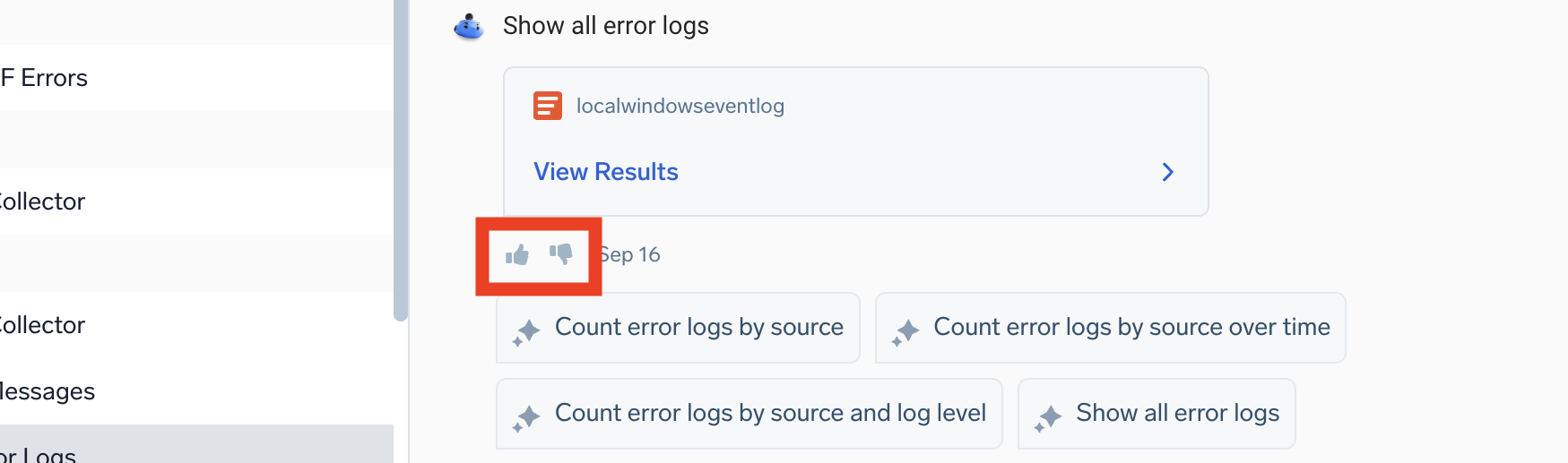
We want your feedback! Let us know what you think by clicking the thumbs up icon to verify your query or the thumbs down icon to tell us how we can improve.
Opting out
To opt out of Mobot, contact our Support team.
Additional resources
- Search Query Language
- Dashboards
- Dojo AI overview. Learn about Dojo AI, the collective system of Sumo Logic agents and assistants, including Mobot’s agents (Query Agent and Knowledge Agent), Cloud SIEM security agent, platform agents, and more coming soon.