Search Across Child Orgs (MSSPs)
You can run a log search query in the selected child org under a parent org. All the results obtained from this search will have the data identified from the selected child org.
Only users with the Manage Organizations or View Organizations role capability can conduct search across child orgs.
Follow the steps below to perform a child org-level search:
- New UI. In the main Sumo Logic menu, select Logs > Log Search. You can also click the Go To... menu at the top of the screen and select Log Search.
Classic UI. Go to the Log Search page. - Click the
 button to select the child org where you want to query. You can either select one child org or multiple child orgs.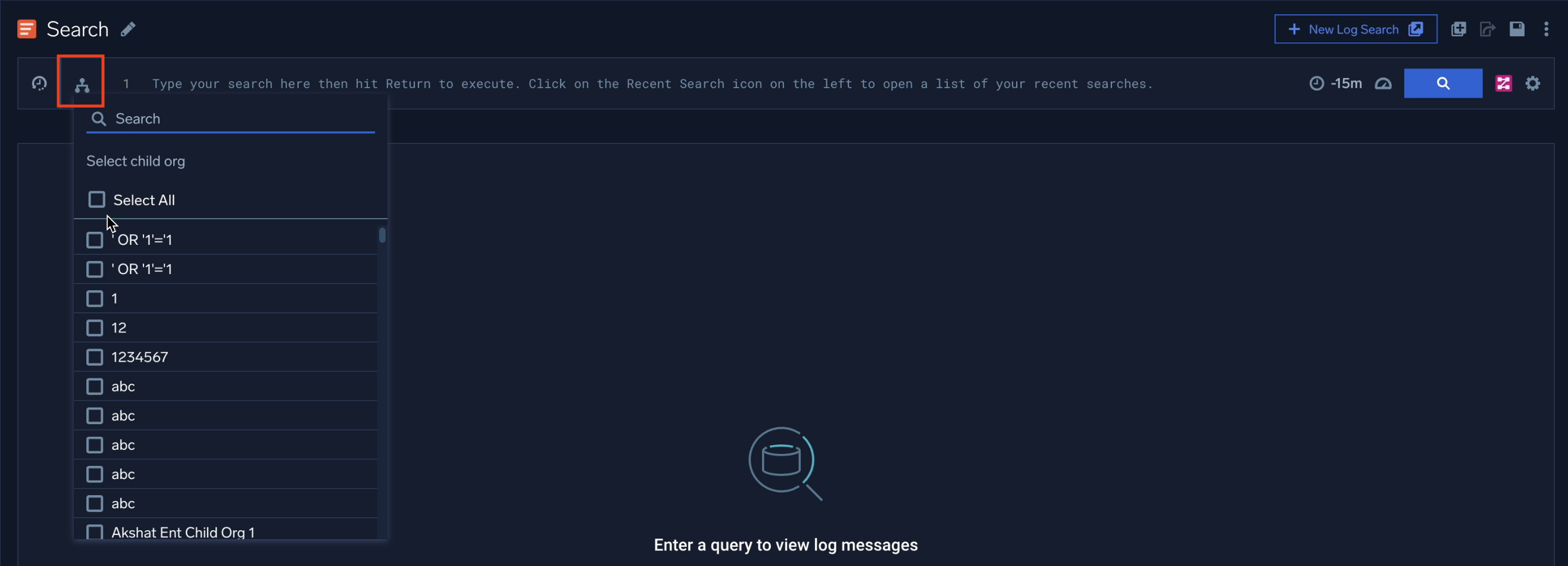
- Enter the required query and click the search button to obtain the search results.
note
Make sure you use an aggregator and
_orgIDfor multi-child org queries. For example,* | count by _orgIdor* | count by _orgId | sum (_count).
There can be two possible errors while running the multi-child org queries:
- Partial success. This occurs when you run a query across all child orgs, and while some child orgs successfully execute, one or more encounter failures. Despite the failures, aggregate results from the successfully executed child orgs will be displayed. To resolve the failure, refer to the audit logs (
_index=sumologic_system_events) for detailed information on the failure query. - Error. This occurs when you run a query across all child orgs, and all child orgs encounter failures with no child orgs returning the successful result. To resolve the failure, refer to the audit logs (
_index=sumologic_system_events) for detailed information on the failure query.
- All the searches that run via the child org in the parent org would be billed under the child org account.
- Audit logs for the completed searches would appear under the child org logs.
- Raw messages and facets are supported only for one child org query and not for multiple chid orgs query.
- By default, new users (email format:
<username>+parent-api-user-<orgID>@<domain>) will be created with Administrator role. To manage a parent org user’s access within a child org, the child org administrator can modify the parent org user role and RBAC (role-based access control) configurations in the child org.
Enable Auto Parse Mode to allow automatic field extraction from your JSON log messages when you run a search. For more details, refer to the Dynamic Parsing.
For more information about the Log Search, refer to Search Basics.
To view your log data in a dashboard, refer to Create a Dashboard for Child Orgs (MSSPs).