Threat Intelligence Vendor Switch
This article provides guidance on our switching from the legacy _sumo_global_feed_cs source supplied by CrowdStrike to the SumoLogic_ThreatIntel source supplied by Intel 471.
Switching to the Intel 471 global threat feed from CrowdStrike will introduce differences in the threat indicator content. Namely, the raw field from the lookup operator, and the raw_threat field from the threatip operator will contain different JSON-formatted fields. Sophisticated, security-centric Sumo Logic platform queries sometimes use these fields for searches and dashboards.
Importantly, the intel vendors themselves control what appears in these "raw" fields, and each vendor prioritizes different aspects of the intel they provide. For example, CrowdStrike often includes CVEs where applicable, whereas Intel 471 bundles geo-IP data with some of its entries. CrowdStrike reports the publication timestamp of its indicators, whereas Intel 471 reports the recommended expiration timestamp. As such, Sumo Logic strongly encourages customers to review their searches and dashboards for "raw" field handling, and to modify them appropriately.
Customers can experiment with the Intel 471 feed by referencing the sumo://threat/i471 lookup table as a parameter to the lookup search operator. (It isn't possible to do the same for threatip, though its raw_threat field is the same as the lookup operator's raw field.)
Sumo Logic's native security applications will be updated to support this vendor change. To take advantage of the new Intel 471 feed, customers only need to update queries in their custom apps. For examples of queries using the lookup operator, see the dashboards in the Threat Intel Quick Analysis app.
How do I know if I need to update a search or dashboard?
If your queries reference json field=raw or parse field=raw (or raw_threat, in the case of the threatip operator), you are extracting vendor-specific data that might need to be updated.
How can I translate CrowdStrike-specific fields to Intel 471-specific fields?
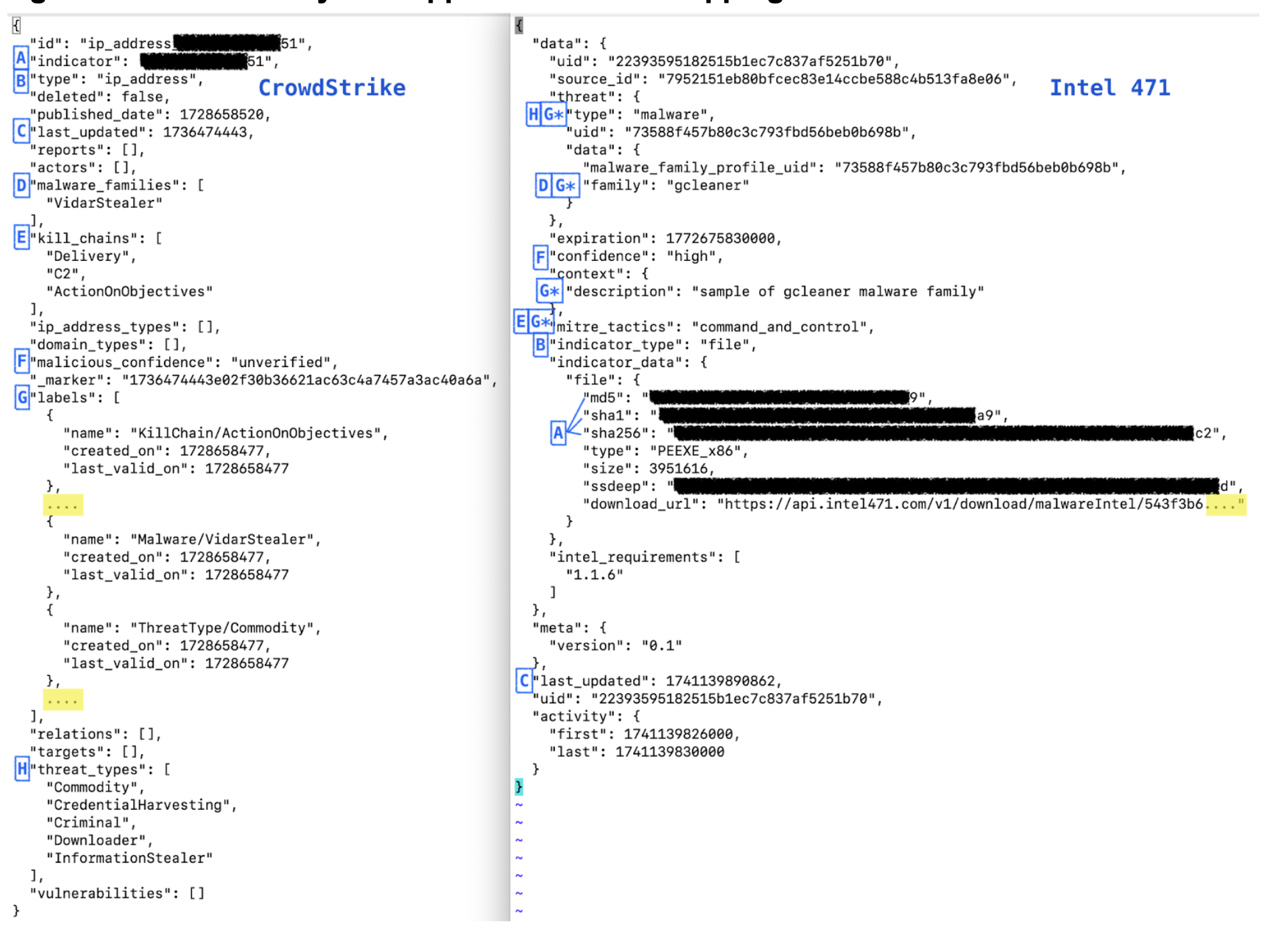
In many cases, it may not be possible to translate CrowdStrike-specific fields to Intel 471-specific fields, as the two vendors emphasize different aspects of indicators of compromise. However, the table below provides approximate mappings to help you start adapting your queries.
Approximate field mappings
As a starting point to analyze field mapping, examine the following translations:
| CrowdStrike | Intel 471 | Translation notes |
|---|---|---|
indicator | data.indicator_data.* For example: data.indicator_data.addressdata.indicator_data.file.md5data.indicator_data.file.sha1data.indicator_data.file.sha256data.indicator_data.url | Depends on the type. Every Intel 471 file hash record includes all hash types. Intel 471 also includes geoip data for IP addresses under data.indicator_data.geo_ip. |
kill_chains | data.mitre_tactics | |
labels[*].name | data.threat.typedata.threat.data.familydata.context.descriptiondata.mitre_tactics | CrowdStrike's labels are redundant with other sections in the CrowdStrike record. |
last_updated | last_updated | CrowdStrike's timestamps are in epoch seconds whereas Intel 471's are in milliseconds. |
malicious_confidence | data.confidence | |
malware_families | data.threat.data.family | |
threat_types | data.threat.type | |
type | data.indicator_type | |
| (none) | data.expiration | Intel 471 only. In milliseconds. |
JSON side-by-side approximate field mappings
Migrate to the new source
Perform the steps in the following sections to migrate to the SumoLogic_ThreatIntel source.
hasThreatMatch rule syntax
You may need to make changes in these scenarios:
- If you have rules with
hasThreatMatchsyntax that explicitly point to the legacy_sumo_global_feed_cssource, change them to point toSumoLogic_ThreatIntelsource. For example:- Change this:
hasThreatMatch([srcDevice_ip], confidence > 50 AND source="_sumo_global_feed_cs") - To this:
hasThreatMatch([srcDevice_ip], confidence > 50 AND source="SumoLogic_ThreatIntel")
- Change this:
lookup operator
In most cases, no change is needed if you use the lookup search operator to point to sumo://threat/cs (the legacy _sumo_global_feed_cs source) instead of sumo://threat/i471 instead (the new SumoLogic_ThreatIntel source). For examples, see the dashboards in the Threat Intel Quick Analysis app. See Threat Intel Optimization for guidance on using those queries.
You may need to make changes in these scenarios:
- If you parse the
rawfield returned from thelookupoperation, you will see different fields when you use the newSumoLogic_ThreatIntelsource. To avoid problems with fields not returning data, use a nodrop clause when you useparse field=raworjson field=raw. In the following excerpt from a query,nodropis added at the end of the line wherejson field=rawis called:| lookup type, actor, raw, threatlevel as malicious_confidence from sumo://threat/cs on threat=src_ip
| json field=raw "labels[*].name" as label_name nodrop
threatip search operator
If you use the threatip search operator, no change is needed.