Meet the new
 Windows Active Directory Inventory Receiver
The Windows Active Directory Inventory receiver for the Sumo Logic OpenTelemetry Collector collects inventory data from Active Directory using Windows ADSI (Active Directory Service Interfaces) COM APIs. This includes information such as computer names, usernames, email addresses, and location information.
Sumo Logic Cloud SIEM uses information from Windows Active Directory Inventory to enrich log data, providing additional context and building a more complete profile of your network. For example, linking a location to the servers, workstations, and users in that location.
The following information is collected by default:
- Username
- Email address
- Department
- Manager
- Security group membership (memberOf)
Prerequisites
- Operating system. Windows Server (2016 or later). The receiver uses Windows ADSI COM APIs and only runs on Windows.
- Domain membership. Install the collector on a machine that is a Domain Controller or a member of the Active Directory domain you want to inventory.
- Sumo Logic OpenTelemetry Collector. Installed and registered on the Windows machine.
- Permissions. Ensure the account running the collector service has read access to the Active Directory objects you want to query.
Install a single Active Directory Inventory receiver to collect inventory data from your entire AD domain.
Configuration
Add the active_directory_inv receiver to your collector configuration file (for example, conf.d/ad-inventory.yaml).
Receiver parameters
| Parameter | Description | Default | Required |
|---|---|---|---|
base_dn | Base Distinguished Name to search from. Defines the root of the AD subtree to query. | Yes | |
attributes | List of LDAP attribute names to collect for each object. | [name, mail, department, manager, memberOf] | No |
poll_interval | How often to query Active Directory for inventory data. | 24h | No |
Base DN format
The base_dn must be a valid Distinguished Name. Examples:
DC=corp,DC=example,DC=com
OU=Users,DC=corp,DC=example,DC=com
CN=Users,DC=corp,DC=example,DC=com
Example configuration
receivers:
  active_directory_inv:
    base_dn: "DC=corp,DC=example,DC=com"
    attributes: [name, mail, department, manager, memberOf]
    poll_interval: 24h

processors:
  resource/ad_inventory:
    attributes:
      - key: _sourceCategory
        value: ad_inventory
        action: insert

service:
  pipelines:
    logs/ad_inventory:
      receivers:
        - active_directory_inv
      processors:
        - resource/ad_inventory
      exporters:
        - sumologic
Minimal configuration
If you only need default attributes collected every 24 hours:
receivers:
  active_directory_inv:
    base_dn: "DC=corp,DC=example,DC=com"
Scoping to a specific OU
To collect inventory from a specific Organizational Unit only:
receivers:
  active_directory_inv:
    base_dn: "OU=Engineering,DC=corp,DC=example,DC=com"
    attributes: [name, mail, department, manager, memberOf]
    poll_interval: 12h
Cloud SIEM enrichment fields
To use the inventory data for Cloud SIEM enrichment, add the required SIEM fields to the pipeline:
processors:
  resource/ad_inventory_siem:
    attributes:
      - key: _siemVendor
        value: Microsoft
        action: insert
      - key: _siemProduct
        value: Windows
        action: insert
      - key: _siemForward
        value: "true"
        action: insert
      - key: _siemDataType
        value: Inventory
        action: insert
Include this processor in your pipeline:
service:
  pipelines:
    logs/ad_inventory:
      receivers:
        - active_directory_inv
      processors:
        - resource/ad_inventory_siem
      exporters:
        - sumologic
Apply the configuration
After saving your configuration file, restart the Sumo Logic OpenTelemetry Collector service:
Restart-Service -Name OtelcolSumo
Output format
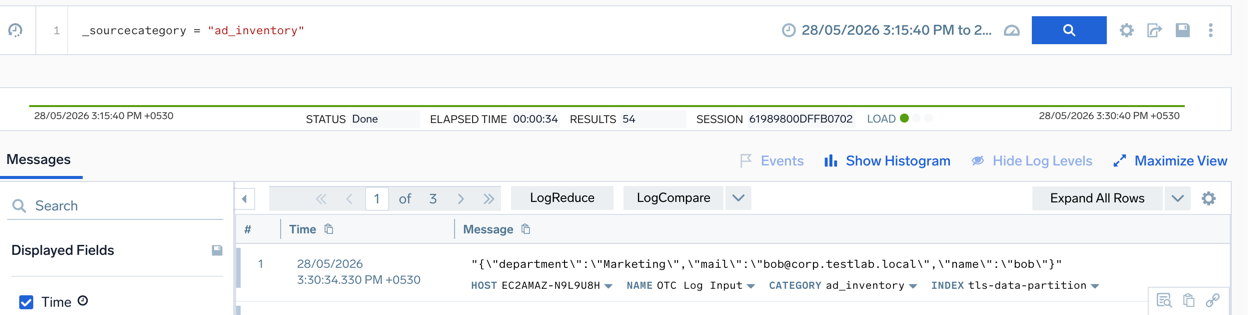
The receiver emits one log record per Active Directory object found under the configured base_dn. Each log record body contains a JSON string with the requested attributes:
{"department":"Engineering","mail":"alice@corp.example.com","memberOf":["CN=DevOps,OU=Groups,DC=corp,DC=example,DC=com"],"name":"alice"}
Attributes that are not set on an object are omitted from the JSON output. Multi-valued attributes (such as memberOf) are returned as arrays.
Behavior notes
The first poll fires only after the configured poll_interval elapses. It does not run immediately when the receiver starts.
The following notes describe important behavioral characteristics and operational considerations of the receiver:
- Container objects (such as OUs) also emit log records with sparse attributes.
- The receiver traverses the full subtree under the configured
base_dn. - If the
base_dndoes not exist or is unreachable, the receiver logs an error and retries on the next poll interval.
Collect additional attributes
You can extend the default attribute list to collect additional Active Directory properties. Use the LDAP attribute names:
receivers:
  active_directory_inv:
    base_dn: "DC=corp,DC=example,DC=com"
    attributes: [name, mail, department, manager, memberOf, title, telephoneNumber, physicalDeliveryOfficeName, company]
    poll_interval: 24h
Common LDAP attributes include:
| Attribute | Description |
|---|---|
name | Display name |
mail | Email address |
department | Department |
manager | Distinguished Name of the user's manager |
memberOf | Security and distribution groups |
title | Job title |
telephoneNumber | Phone number |
physicalDeliveryOfficeName | Office location |
company | Company name |
sAMAccountName | Logon name (pre-Windows 2000) |
userPrincipalName | User principal name (UPN) |
Verify data in Sumo Logic
After the first poll interval elapses, verify that inventory data is flowing into Sumo Logic:
- Go to your Sumo Logic instance and open the Log Search page.
- Run a query using the source category you configured:
_sourceCategory=ad_inventory
- You should see log records containing JSON objects with your configured Active Directory attributes.