---
id: root-cause-agent-preview
title: Root Cause Agent
description: Root Cause Agent, agentic AI investigator, investigates Sumo Logic alerts on demand and returns evidence-backed root causes based on relevant telemetry across your logs and metrics.
keywords:
- mobot
- dojoai
- root cause agent
- agentic ai
- alerts
- ai investigation
- incident investigation
- root cause analysis
- devops
- sre
slug: /help/docs/alerts/monitors/root-cause-agent-preview/
canonical: https://www.sumologic.com/help/docs/alerts/monitors/root-cause-agent-preview/
---
import useBaseUrl from '@docusaurus/useBaseUrl';
Private Preview
:::info
This feature is in Private Preview. For more information, contact your Sumo Logic account representative.
:::
Sumo Logic's Root Cause Agent is an agentic AI investigator for monitor alerts. DevOps and SRE teams can start an investigation directly from the alert details page, and the agent gathers relevant telemetry on its own, follows the signal across your logs and metrics, and posts its findings to the **AI Investigation** tab.
Monitors and alert rules are deterministic — they fire when a predefined threshold or condition is met. The Root Cause Agent is agentic: it takes the alert as a starting point, investigates across available signals, forms a hypothesis, and explains why it believes a particular cause is responsible. The monitor tells you something happened; the agent helps investigate why. It is complementary to monitoring, not a replacement for it.
The Root Cause Agent performs three distinct jobs:
* **On-demand investigation**. Start an investigation from the alert details page to get an evidence-backed root cause without manually digging through logs and metrics.
* **AI verdict**. What it believes the root cause is, or a clear statement that it could not conclude.
* **Key findings**. The steps that led there, each backed by the query that produced it.
* **Recommended actions**. Suggested next steps for you to act on.
* **Conversational follow-up (via Mobot)**. Lets you continue the investigation in [Mobot](/docs/search/mobot/), with the full context of the AI investigation already loaded.
* **Audit trail**. Logs every query the agent runs to the Sumo Logic audit index, so you can review exactly what it did and how it reached its verdict.
The Root Cause Agent provides the following functionality:
* [Run a root cause analysis](#run-a-root-cause-analysis)
* [Continuing the investigation in Mobot](#continue-investigating-in-mobot)
## Run a root cause analysis
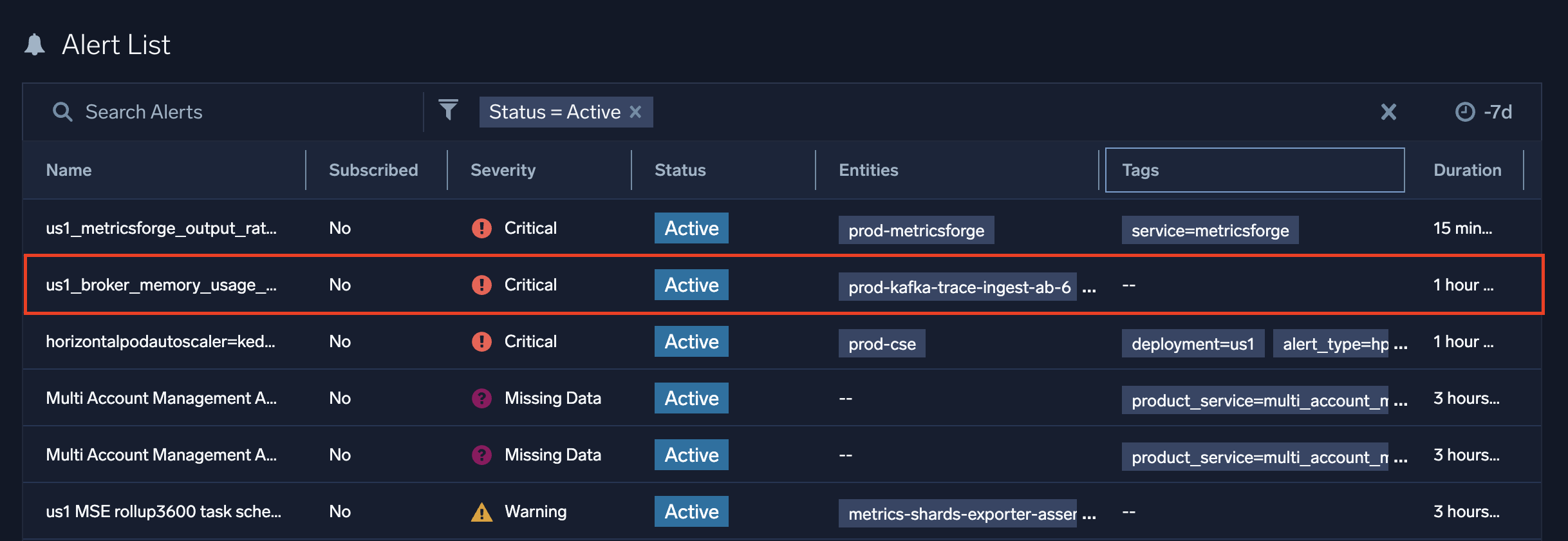
You start an investigation from the alert details page. The Root Cause Agent runs one investigation per alert and posts its findings to the **AI Investigation** tab of the [alert response page](/docs/alerts/monitors/alert-response/).
1. From your left navigation, click **Alerts**.
1. Click on any row to open an alert's response page. For example:
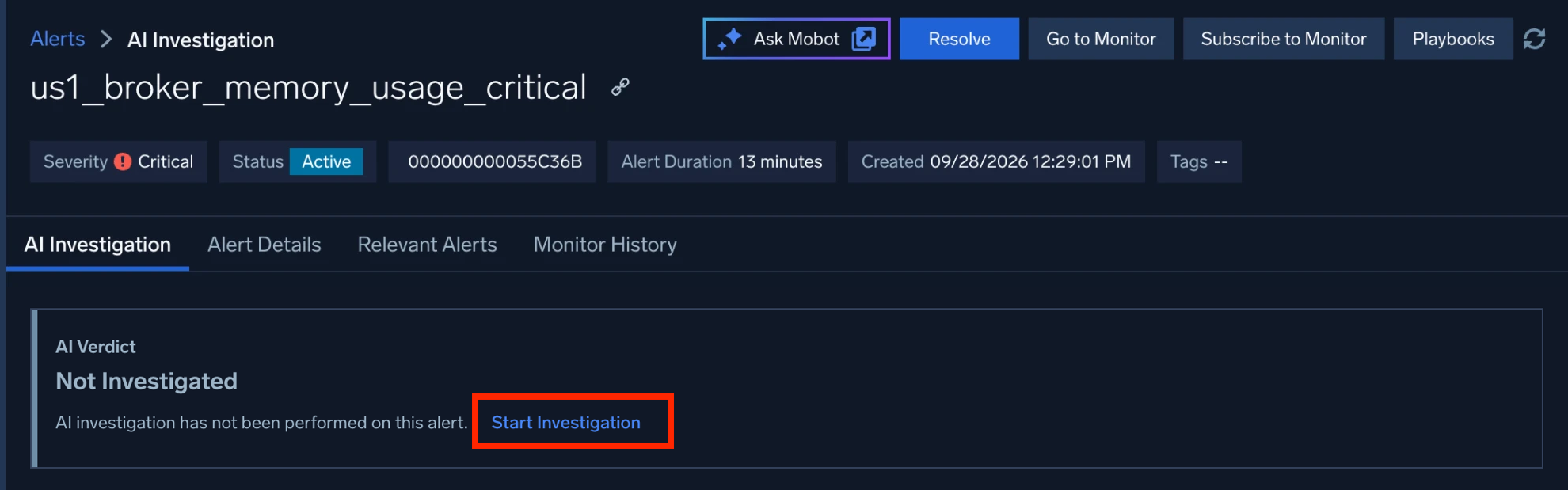
 1. Select the **AI Investigation** tab, then click **Start Investigation**.
The agent runs in the background and updates the tab when complete.
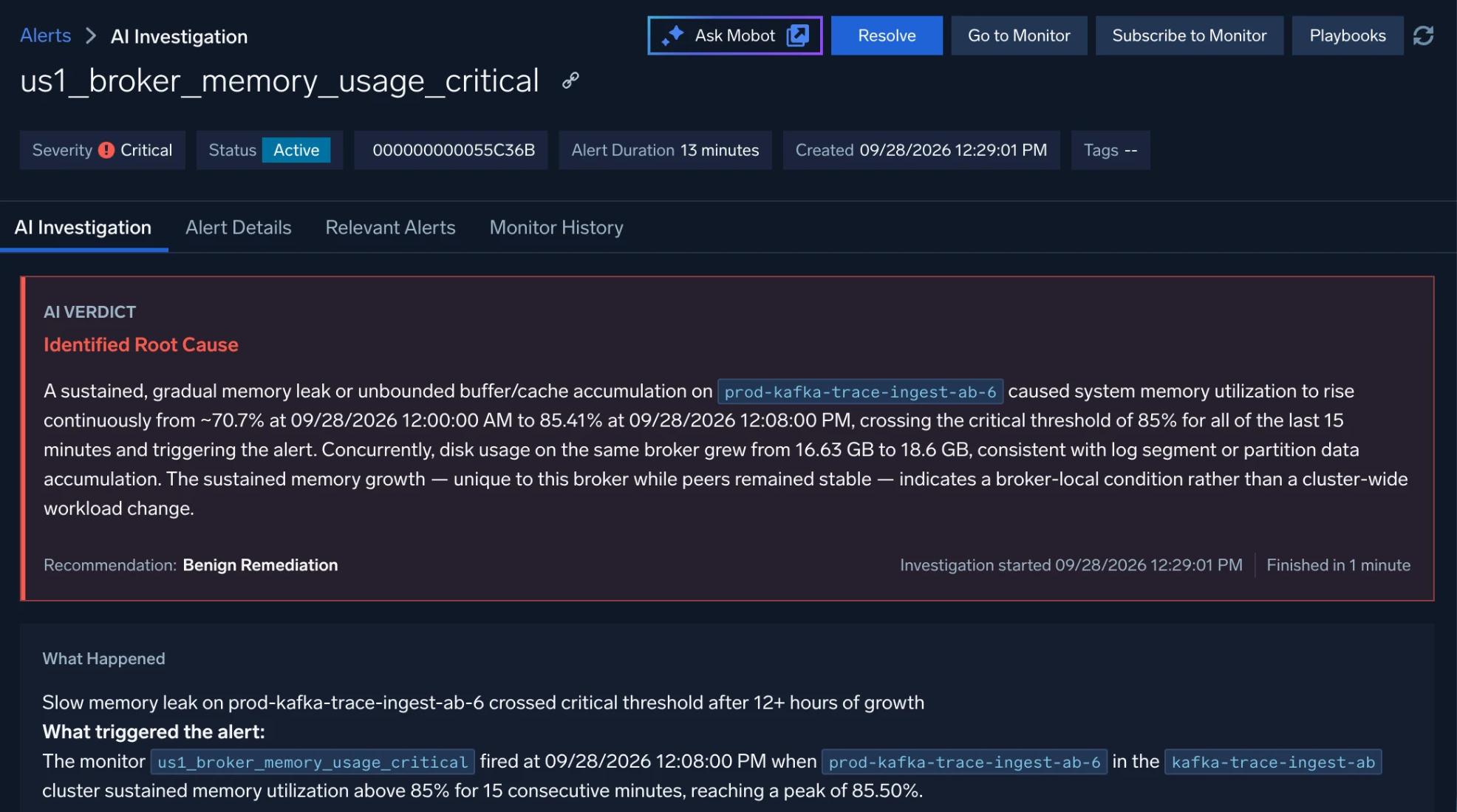 The **AI Investigation** tab includes the following sections.
### AI Verdict
A box showing the verdict alongside a plain-language explanation of the root cause, and a **Recommendation** line for a suggested next action.
| Verdict | Meaning |
|:--|:--|
| **Identified Root Cause** | The agent reached a conclusion it is confident in, with supporting evidence. |
| **In progress** | The investigation is still running. |
| **Inconclusive** | The agent found relevant signal but could not reach a conclusion it is confident in. This can happen when findings point in conflicting directions, or the deciding data sits in a source the agent cannot reach. |
| **False positive** | The alert did not represent a real problem in the system. |
The agent surfaces a root cause only when it is confident in the conclusion. If it is not, it returns **Inconclusive** rather than a lower-confidence guess.
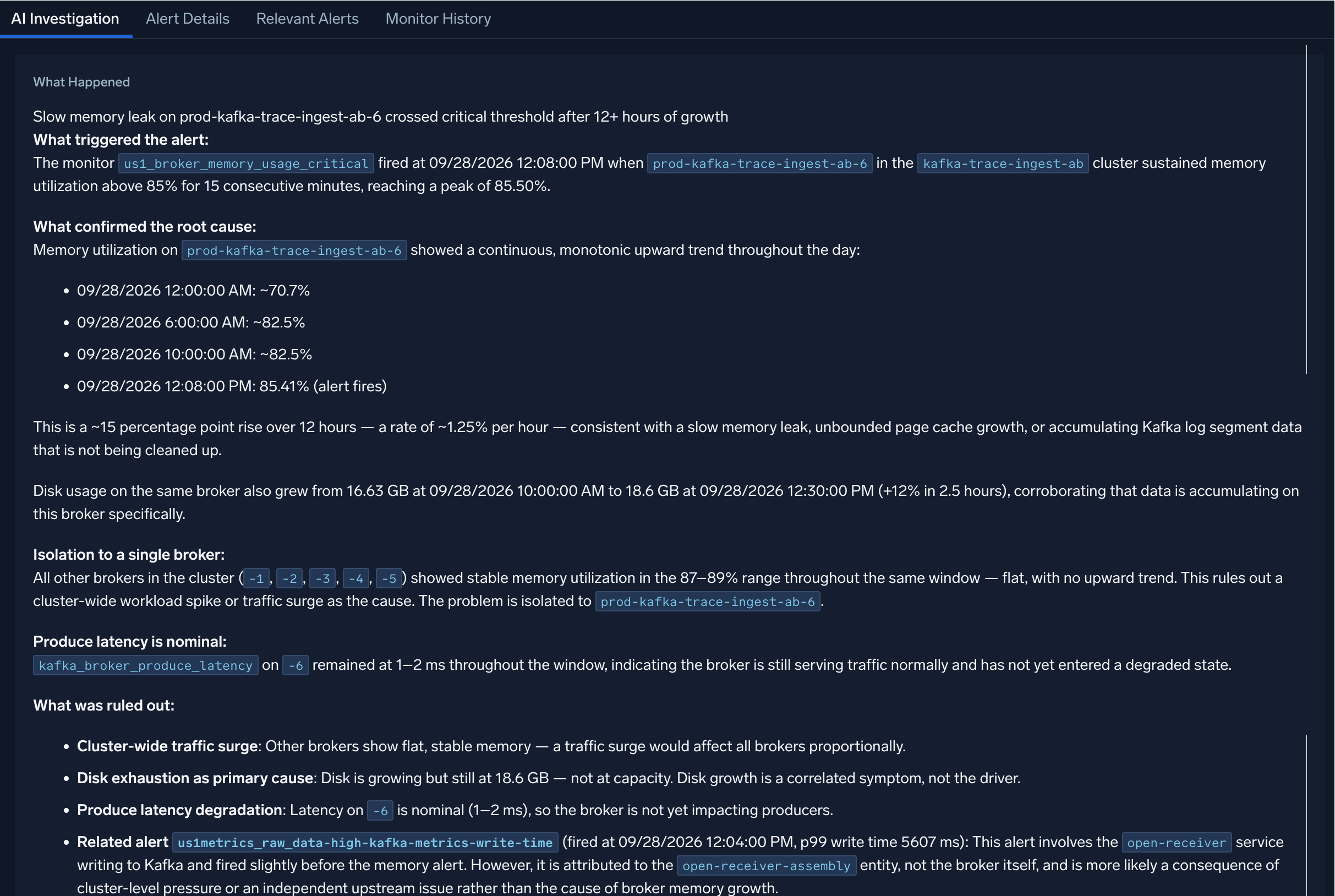
### What Happened
An expandable section describing what happened, the conditions that confirmed the root cause, what was ruled out, and other relevant context. The subsections vary based on the type of investigation.
 ### Key Findings
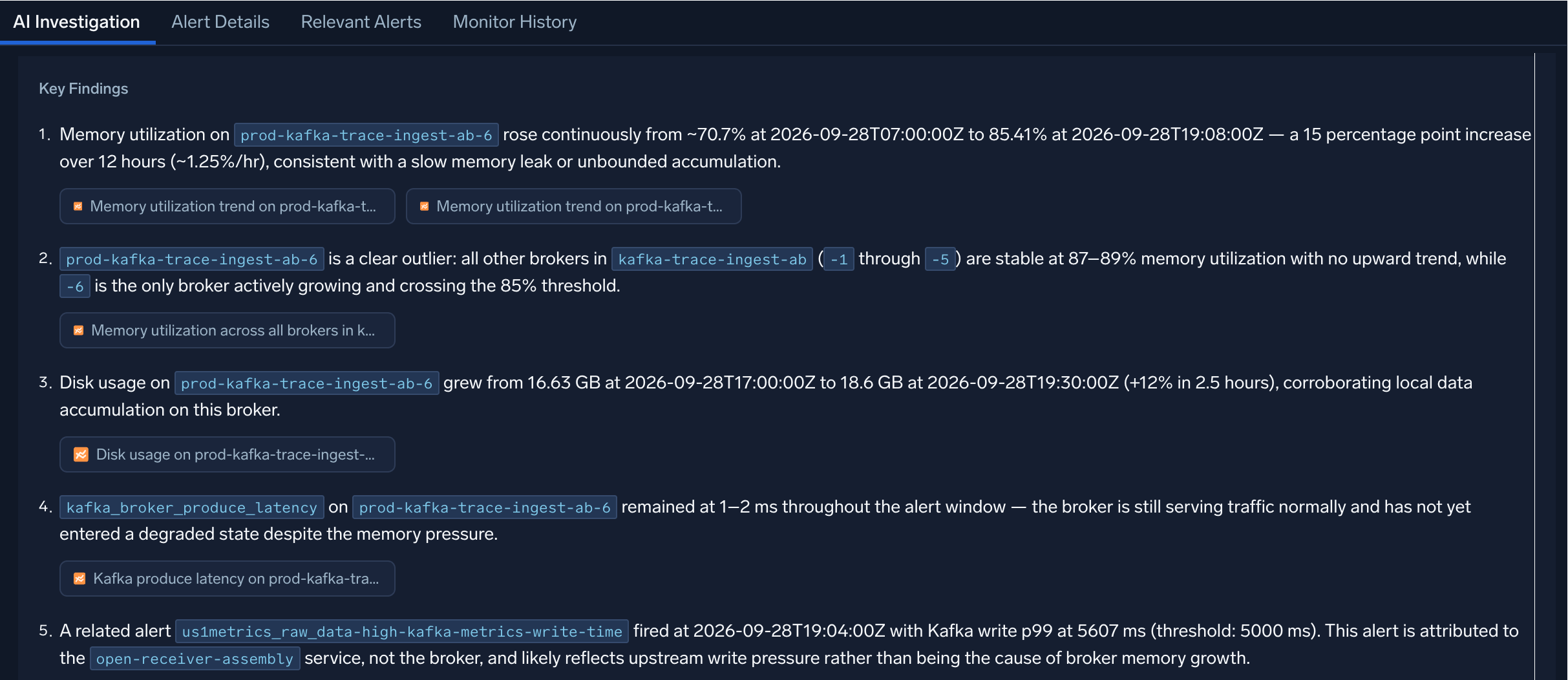
The main points the investigation uncovered, each with a short title and a plain-language explanation of what it means and how it was established. Each finding includes a link to the query that produced it.
 ### Recommended Actions
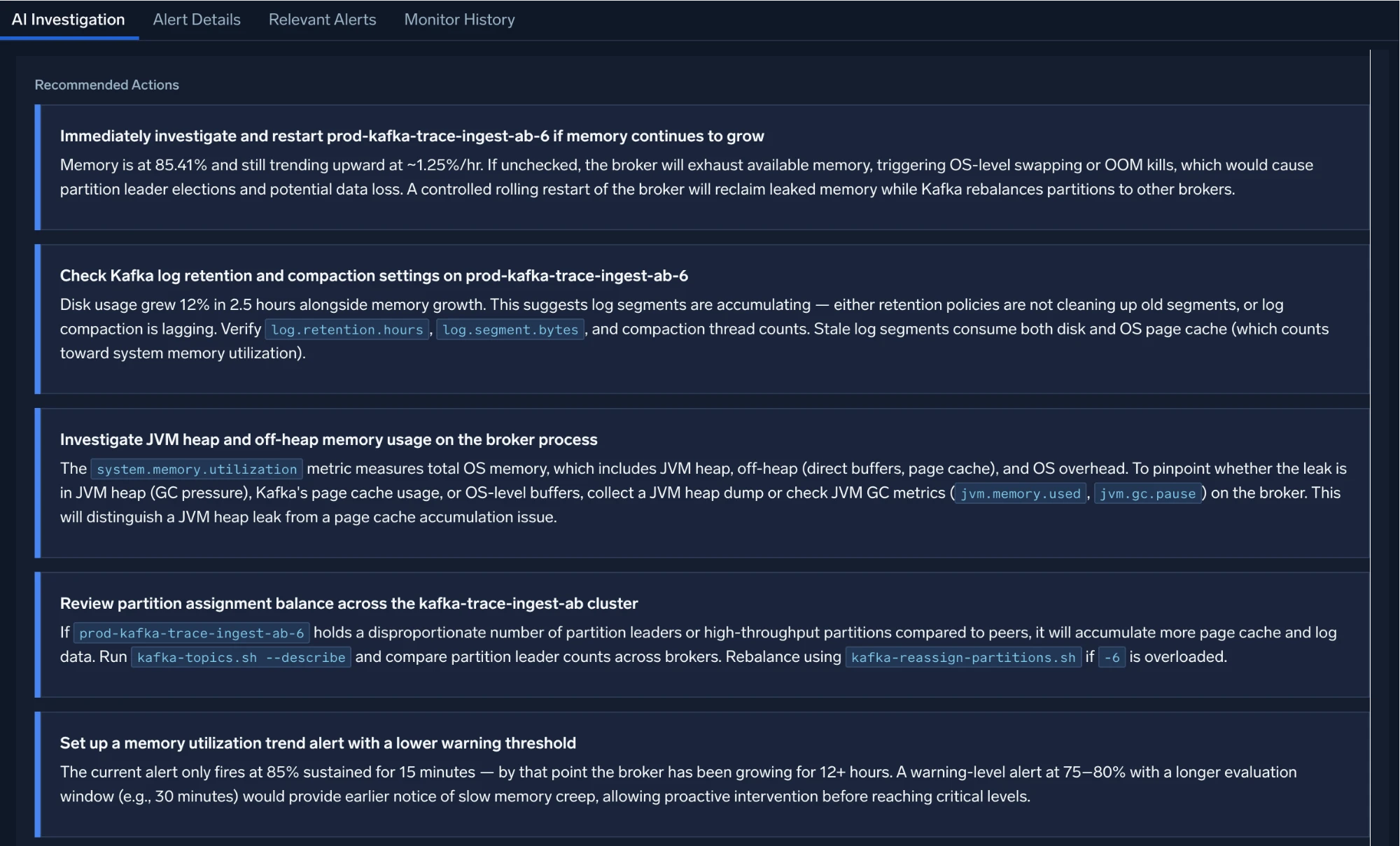
A list of suggested actions, each with a title and explanation. These are recommendations for you to act on. The agent does not run them.
 ### Continue investigating in Mobot
From here, you can continue the investigation conversationally in [Mobot](/docs/search/mobot/), with the full context of the investigation already loaded.
Click one of the suggested follow-up questions to autopopulate it in Mobot.
 Alternatively, click **Ask Mobot** at the top of the alert page.
When Mobot opens, it shows all AI investigation details. From here, ask a follow-up question specific to the alert you're investigating.
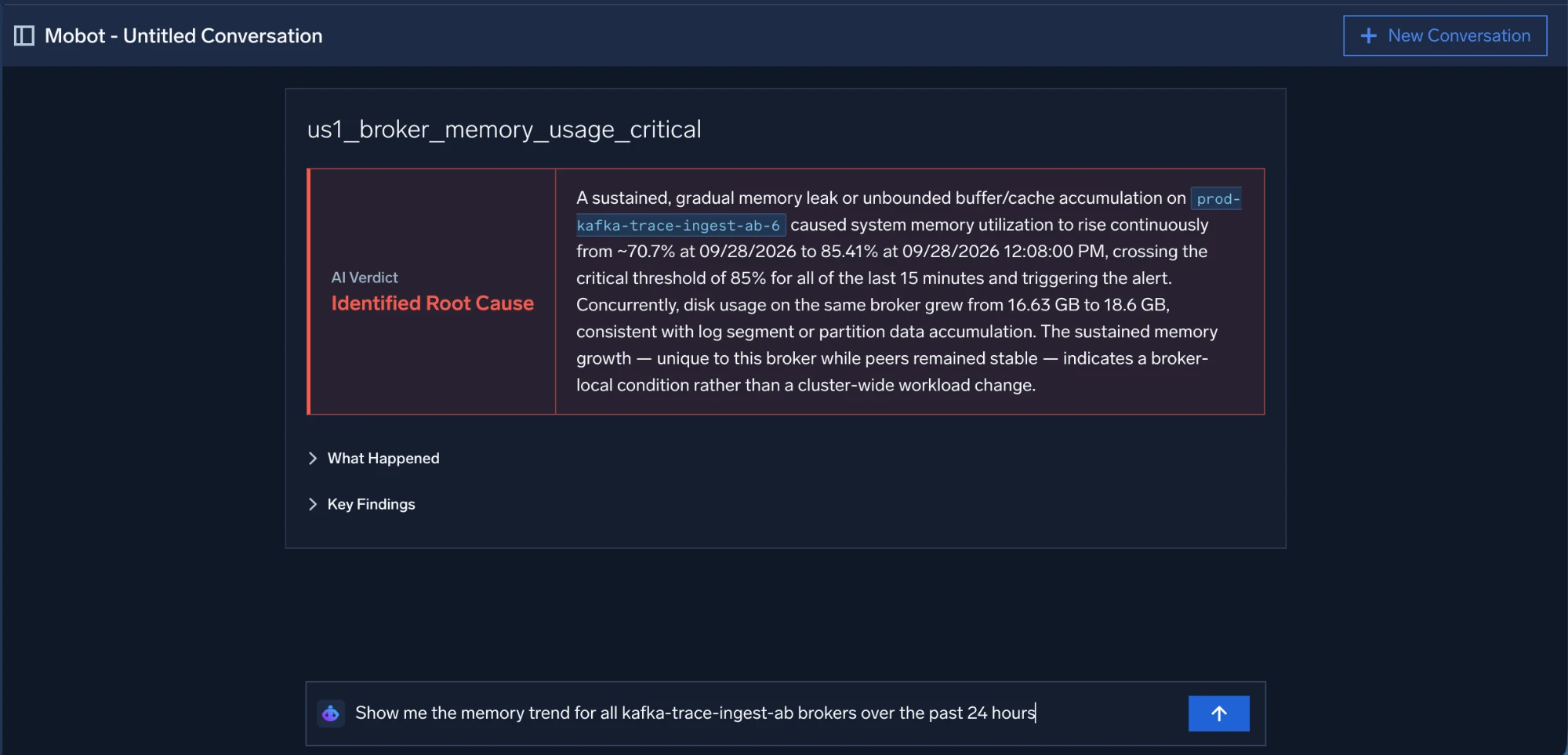 Expand **Key Findings** and click a chip to see the query behind it.
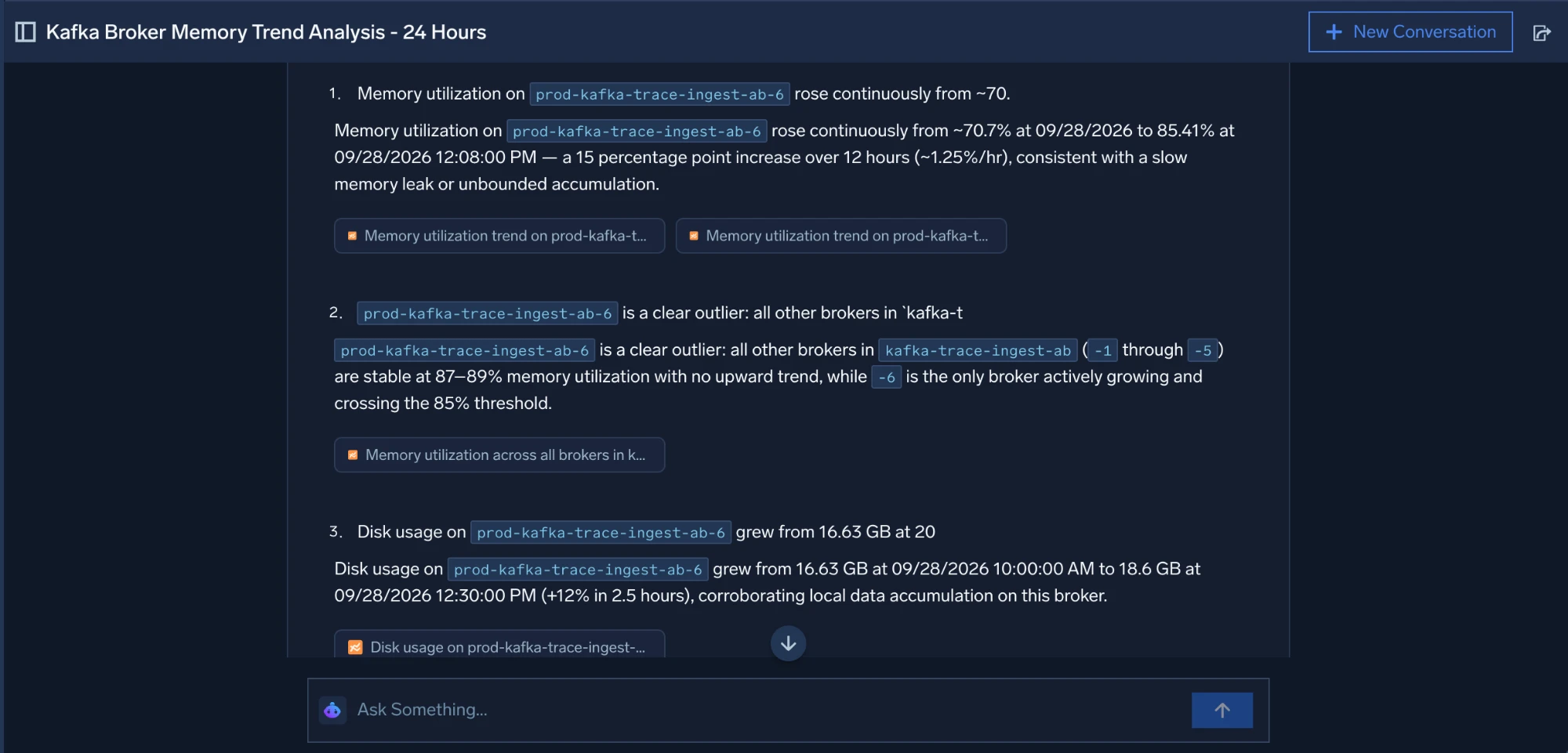 Here are more examples to get you started. For the most useful responses, ask questions specific to the alert you are investigating.
* `Give me a summary of what happened during this incident`
* `What services were affected?`
* `Show me logs related to the root cause`
* `Are there other alerts that correlate with this one?`
After each response, Mobot retains the context of your investigation and presents suggested follow-up questions. At any point, click **Open Alert** to return to the alert's details page.
## Limitations
The following apply during Private Preview:
* **Remediation execution**. The agent investigates and recommends. It does not take corrective action on your systems.
* **Traces and APM-based investigation**. Investigation runs across logs and metrics. Distributed trace reasoning and service map awareness are not part of Private Preview.
* **Deduplication of investigations**. If the same incident arrives through more than one alert, you may see more than one investigation.
* **Automatic investigation**. During Private Preview, investigations are started manually. Automatic investigation triggered on alert firing is planned for a later phase.
* **External alerts**. Private Preview covers alerts from Sumo Logic monitors. Investigation from external alerting systems is planned for a future phase.
* **Alerts**. Limit of 10 alerts investigated per minute.
Some limits are not tied to the preview phase:
* **Not conclusive on every alert**. A meaningful share of investigations return **Inconclusive** by design. See [AI Verdict](#ai-verdict).
* **Only as good as the telemetry it can reach**. If the deciding data is not in Sumo Logic, the agent cannot see it.
* **Does not replace your on-call**. It compresses the first phase of triage. The engineer still owns the decision.
## FAQ
### What is the Sumo Logic Root Cause Agent?
The Root Cause Agent is part of [Sumo Logic DojoAI](/docs/get-started/ai-machine-learning/#dojoai). It applies agentic AI reasoning to observability triage — investigating monitor alerts on demand, gathering evidence across logs and metrics, and returning an evidence-backed root cause. When deeper analysis is needed, you continue the same investigation conversationally in [Mobot](/docs/search/mobot/), DojoAI's chat interface.
### How is this different from asking a chat assistant about my alerts?
A chat assistant is a surface you type into. The Root Cause Agent is an investigator you launch from the alert details page. You start an investigation, the agent gathers evidence across your logs and metrics, and the findings appear on the **AI Investigation** tab. From there, you can continue the investigation conversationally in Mobot.
### How is this different from the SOC Analyst Agent?
Both are agentic investigators in DojoAI, aimed at different workflows. The [SOC Analyst Agent](/docs/cse/get-started-with-cloud-siem/soc-analyst-agent) triages Cloud SIEM insights for security teams and returns a malicious, suspicious, or benign verdict. The Root Cause Agent triages monitor alerts for DevOps and SRE teams, investigates across logs and metrics, and returns a root cause. Both let you continue the investigation in Mobot.
### How is this different from Sumo Logic monitors?
Monitors and alert rules are deterministic: they fire when a predefined threshold or condition is met. The Root Cause Agent is agentic: it takes the alert as a starting point, investigates across available signals, forms a hypothesis, and explains why it believes a particular cause is responsible. The monitor tells you something happened; the agent helps investigate why. It complements monitoring; it does not replace it.
### How does the agent avoid inventing a root cause?
Two ways. First, the confidence policy: if the agent cannot reach a conclusion it can defend, it returns **Inconclusive** rather than a plausible-sounding guess. Second, every finding shows the query behind it, so you can verify or disprove it in one click.
### Does it run automatically, or do I trigger it?
During Private Preview, you start investigations on demand from the **AI Investigation** tab on the alert details page. Automatic investigation — triggered the moment a monitor fires, without requiring engineer action — is planned for a later phase.
### Can I use it from Slack?
Slack support is planned for a later phase. Private Preview covers on-demand investigation from the alert details page and asking Mobot in conversation.
### Can it investigate alerts that did not originate in Sumo Logic?
Not during Private Preview, which covers alerts from Sumo Logic monitors. Investigation from external alerting systems is planned for a later phase.
### Can I connect my own tools and data sources?
Not during Private Preview. Connecting external context and telemetry sources — such as AWS CloudWatch, GitHub, PagerDuty, feature flag tools, and additional telemetry platforms — is planned for a later phase. Contact your account team for availability.
### What permissions does the agent use?
The agent operates with read-only access to your logs and metrics data. It investigates and recommends, but does not take corrective action on your systems.
Each investigation is recorded as an audit event in the Sumo Logic audit index, which you can search to track agent activity. Agent-level governance covering permissions, roles, and scoping is planned for a future release. Compliance and security reviews go through the standard review path with your account team.
### Can I audit what the agent did during an investigation?
Yes. Each investigation is recorded as an audit event in the Sumo Logic audit index.
### How is it priced?
Pricing and packaging are being finalized. Your account team will have details before general availability.
### Is my data used to train AI models?
No. Customer data is not used to train shared models.
### Which deployments is it available in?
Availability is rolling out per deployment. Check with your account team for yours.
## Additional resources
* [Example Prompts for Mobot](/docs/search/mobot/example-prompts). Find more example prompts here to continue your root cause observability investigation.
* [Sumo Logic | DojoAI](https://www.sumologic.com/solutions/dojo-ai). Learn about DojoAI, Sumo Logic's multi-agent AI platform, and the other specialized agents alongside the Root Cause Agent.
* [AI and Machine Learning with Sumo Logic](/docs/get-started/ai-machine-learning). How Sumo Logic's AI agents fit alongside Mobot, the SOC Analyst Agent, and the Sumo Logic MCP server.
* [Alert Response](/docs/alerts/monitors/alert-response/). The alert page that hosts the AI Investigation tab.
* [Mobot](/docs/search/mobot/). The conversational interface for Sumo Logic's AI agents.
* [SOC Analyst Agent](/docs/cse/get-started-with-cloud-siem/soc-analyst-agent). The security counterpart to the Root Cause Agent — investigates Cloud SIEM insights for security teams.