---
id: convert-sigma-rules
title: Convert Sigma Rules
sidebar_label: Convert Sigma Rules
description: Learn how to convert rules from Sigma format into Cloud SIEM.
slug: /help/docs/cse/rules/convert-sigma-rules/
canonical: https://www.sumologic.com/help/docs/cse/rules/convert-sigma-rules/
---
import useBaseUrl from '@docusaurus/useBaseUrl';
[Sigma](https://sigmahq.io/) is a generic and open signature format for SIEM systems that allows security teams to write detection rules once in Sigma and convert them to different SIEM query languages. Security engineers can automatically translate their Sigma detection rules into Sumo Logic Cloud SIEM rule syntax through a [Sigma CLI](https://github.com/SigmaHQ/sigma-cli/blob/main/README.md) plugin, eliminating the manual effort of rewriting rules and accelerating the migration of existing Sigma rule libraries to Cloud SIEM. The translated rules detect the same threats and behaviors as the original Sigma rules with high fidelity.
## Sumo Logic backend for Sigma
The pySigma backend for Sumo Logic converts Sigma detection rules into Cloud SIEM rule JSON, ready for import via the CSE API. It includes field mappings for 70+ log sources, automatic entity selector assignment, MITRE ATT&CK tag mapping, and confidence scoring.
- Sigma plugin directory: https://sigmahq.io/docs/digging-deeper/backends.html#sumologic
- PyPI package: https://pypi.org/project/pysigma-backend-sumologic/
- Source code and documentation: https://github.com/SumoLogic/pySigma-backend-sumologic
## Install the Sumo Logic backend
**Option 1** — Install via Sigma CLI (recommended if you already have Sigma CLI installed):
```bash
sigma plugin install sumologic
```
**Option 2** — Install via pip (also installs Sigma CLI if not already present):
```bash
pip install sigma-cli pysigma-backend-sumologic
```
## Sigma resources
* [Sigma Rule Repository](https://github.com/SigmaHQ/sigma/blob/master/README.md) - Contains the Sigma detection ruleset defined in YAML.
* [pySigma](https://github.com/SigmaHQ/pySigma/blob/main/README.md) - A Python SDK that translates Sigma rules into other query languages.
* [Sigma CLI](https://github.com/SigmaHQ/sigma-cli/blob/main/README.md) - A command-line tool for converting Sigma rules.
* [Sigma backends](https://sigmahq.io/docs/digging-deeper/backends) - Overview of available backend plugins with links to their repositories.
* [Poetry](https://python-poetry.org/docs/) - Sigma uses Poetry to package and distribute its code bases.
## Overview of converting Sigma rules into Cloud SIEM rule format
For full documentation, see the [pySigma Sumo Logic backend](https://github.com/SumoLogic/pySigma-backend-sumologic).
:::tip
For a general overview of how to convert Sigma rules to a backend, see [Converting Sigma Rules](https://sigmahq.io/docs/guide/getting-started.html#converting-sigma-rules).
:::
Following is a brief overview of how to convert your Sigma rules into Cloud SIEM rule format:
1. [Install the Sumo Logic backend](#install-the-sumo-logic-backend).
1. Create a repository to store your Sigma rules.
1. Create rules in Sigma rule format and place them into your repository. For sample rules, see the [Sigma Rule Repository](https://github.com/SigmaHQ/sigma/blob/master/README.md).
For example, here is a `test-rule.yml` file in Sigma format:
```yaml
title: Suspicious PowerShell Execution
status: experimental
description: Detects PowerShell execution from the command line.
tags:
- attack.execution
- attack.t1059.001
logsource:
category: process_creation
product: windows
detection:
selection:
CommandLine|contains: 'powershell'
condition: selection
level: medium
```
1. Use Sigma CLI to convert your Sigma rule to Cloud SIEM format.
For example, run the following to convert a single rule:
```bash
sigma convert -t sumologic_cse_rule -p sumologic_cse test-rule.yml -o test-rule.json
```
To convert a directory of rules into a single file:
```bash
sigma convert -t sumologic_cse_rule -p sumologic_cse -s ./rules/ -o rules.json
```
The `-s` (`--skip-unsupported`) option skips rules that can't be converted and continues with the rest. Without it, the conversion stops at the first unsupported rule and no file is written. If you omit `-o`, the JSON is printed to the console.
1. The conversion generates a JSON file that defines the rule in Cloud SIEM rule format. The following output is abbreviated:
```json
{
"rules": [
{
"content_type": "RULE",
"enabled": true,
"is_prototype": true,
"name": "Suspicious PowerShell Execution",
"description_expression": "Detects PowerShell execution from the command line.\n\nLog Source:\n- Category: process_creation\n- Product: windows",
"expression": "commandLine matches /.*powershell.*/",
"entity_selectors": [
{"entity_type": "_hostname", "expression": "device_hostname"},
{"entity_type": "_username", "expression": "user_username"},
{"entity_type": "_process", "expression": "baseImage"}
],
"score_mapping": {"default": 3, "type": "constant", "field": null, "mapping": []},
"tags": ["_mitreAttackTactic:TA0002", "_mitreAttackTechnique:T1059.001"],
"category": "Execution",
"conversion_metadata": {
"sigma_status": "experimental",
"mapping_confidence": {"overall_score": 0.691, "threshold_used": 0.25, "blocked": false}
}
}
]
}
```
1. Before importing, review the `conversion_metadata.mapping_confidence.warnings` of each converted rule. For example, a warning that a log source has no vendor/product mapping means the rule has no `metadata_vendor` or `metadata_product` filter and may match records from other log sources.
1. Import the JSON rule file into Sumo Logic using the [Cloud SIEM API](/docs/api/cloud-siem-enterprise/) or UI.
To [import the JSON file using the UI](/docs/cse/rules/about-cse-rules/#import-a-rule):
1. Access the rules list view.
[**New UI**](/docs/get-started/sumo-logic-ui). In the main Sumo Logic menu select **Cloud SIEM > Rules**. You can also click the **Go To...** menu at the top of the screen and select **Rules**.
[**Classic UI**](/docs/get-started/sumo-logic-ui-classic). In the top menu select **Content > Rules**.
1. Click the **Import** button.
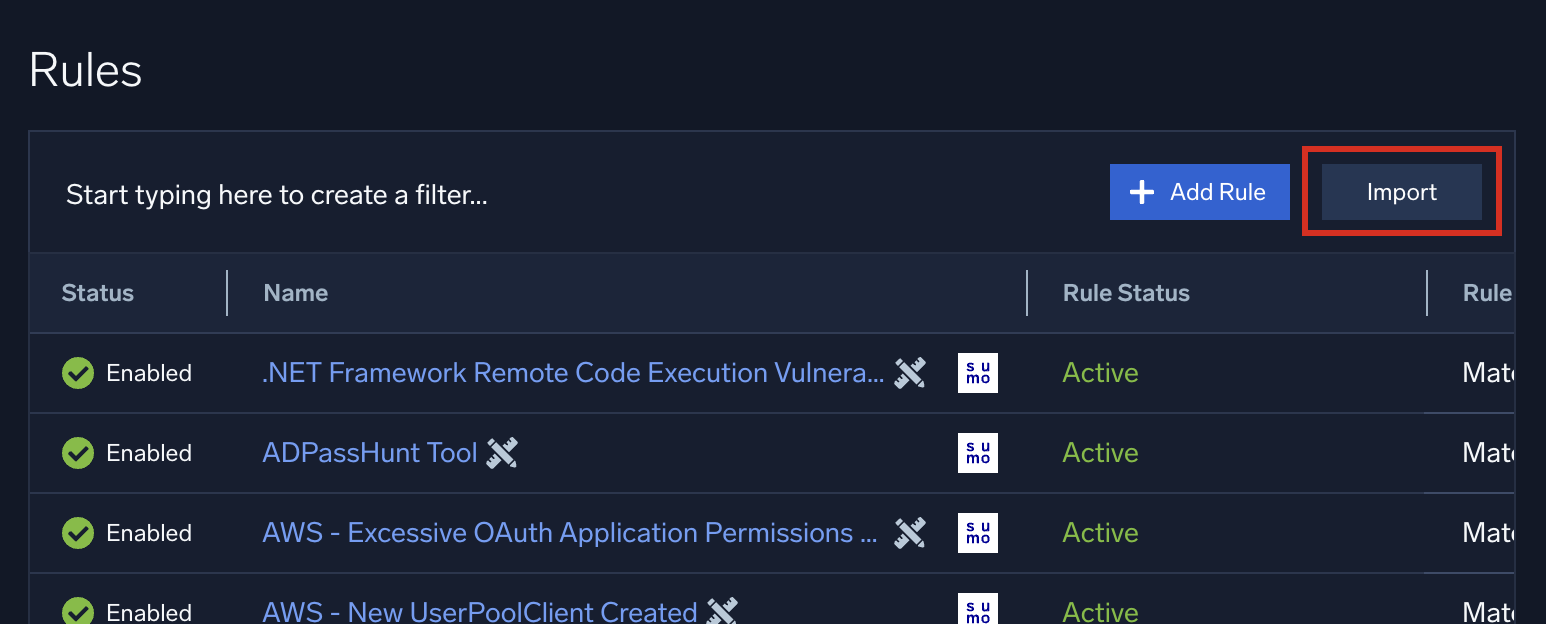 1. Select the JSON file generated by the conversion.
## How Sigma rule attributes are converted
* **Severity**. The Sigma `level` maps to the rule score: `critical`=8, `high`=6, `medium`=3, `low`=1, `informational`=1. Rules without a level get a score of 3.
* **Status**. The Sigma `status` sets `enabled` and `is_prototype`. `stable` rules are enabled and not prototypes; `test` and `experimental` rules are enabled as prototypes; `deprecated` and `unsupported` rules are disabled. Rules without a status are enabled and not prototypes.
* **MITRE ATT&CK tags**. Sigma `attack.*` tags map to Cloud SIEM tags. For example, `attack.execution` becomes `_mitreAttackTactic:TA0002` and `attack.t1059.001` becomes `_mitreAttackTechnique:T1059.001`.
* **Entity selectors**. Entity selectors are assigned automatically based on the log source category. For example, process creation rules get hostname, username, and process selectors.
* **Confidence scoring**. Each field mapping receives a confidence score from 0 to 1. If the lowest score falls below the threshold (default 0.25), conversion of that rule is blocked, and the error message lists the fields that failed and the threshold needed to allow the conversion.
## Conversion options
Pass options to the backend with `-O key=value`. For example:
```bash
sigma convert -t sumologic_cse_rule -p sumologic_cse -O min_confidence=0.0 test-rule.yml
```
| Option | Default | Description |
|:--|:--|:--|
| `min_confidence` | `0.25` | Minimum mapping confidence score required to convert a rule. Set to `0.0` to disable the threshold. |
| `rule_source` | `user` | Value of the `rule_source` field on converted rules. |
| `include_conversion_timestamp` | `true` | Include a `conversion_timestamp` in the conversion metadata. Set to `false` for reproducible output that's easier to compare between runs. |
| `include_confidence_metadata` | `true` | Include `mapping_confidence` in the conversion metadata. |
| `fail_on_unmapped_logsource` | `false` | Block conversion of rules whose log source has no vendor/product mapping. |
For the full list of options and known limitations, see the [pySigma Sumo Logic backend documentation](https://github.com/SumoLogic/pySigma-backend-sumologic#configuration-options).
1. Select the JSON file generated by the conversion.
## How Sigma rule attributes are converted
* **Severity**. The Sigma `level` maps to the rule score: `critical`=8, `high`=6, `medium`=3, `low`=1, `informational`=1. Rules without a level get a score of 3.
* **Status**. The Sigma `status` sets `enabled` and `is_prototype`. `stable` rules are enabled and not prototypes; `test` and `experimental` rules are enabled as prototypes; `deprecated` and `unsupported` rules are disabled. Rules without a status are enabled and not prototypes.
* **MITRE ATT&CK tags**. Sigma `attack.*` tags map to Cloud SIEM tags. For example, `attack.execution` becomes `_mitreAttackTactic:TA0002` and `attack.t1059.001` becomes `_mitreAttackTechnique:T1059.001`.
* **Entity selectors**. Entity selectors are assigned automatically based on the log source category. For example, process creation rules get hostname, username, and process selectors.
* **Confidence scoring**. Each field mapping receives a confidence score from 0 to 1. If the lowest score falls below the threshold (default 0.25), conversion of that rule is blocked, and the error message lists the fields that failed and the threshold needed to allow the conversion.
## Conversion options
Pass options to the backend with `-O key=value`. For example:
```bash
sigma convert -t sumologic_cse_rule -p sumologic_cse -O min_confidence=0.0 test-rule.yml
```
| Option | Default | Description |
|:--|:--|:--|
| `min_confidence` | `0.25` | Minimum mapping confidence score required to convert a rule. Set to `0.0` to disable the threshold. |
| `rule_source` | `user` | Value of the `rule_source` field on converted rules. |
| `include_conversion_timestamp` | `true` | Include a `conversion_timestamp` in the conversion metadata. Set to `false` for reproducible output that's easier to compare between runs. |
| `include_confidence_metadata` | `true` | Include `mapping_confidence` in the conversion metadata. |
| `fail_on_unmapped_logsource` | `false` | Block conversion of rules whose log source has no vendor/product mapping. |
For the full list of options and known limitations, see the [pySigma Sumo Logic backend documentation](https://github.com/SumoLogic/pySigma-backend-sumologic#configuration-options).