---
id: openllmetry
title: OpenLLMetry
sidebar_label: OpenLLMetry - OpenTelemetry Collector or OTLP/HTTP Source
description: Learn about the Sumo Logic OpenTelemetry app for OpenLLMetry.
slug: /help/docs/integrations/aiml/opentelemetry/openllmetry/
canonical: https://www.sumologic.com/help/docs/integrations/aiml/opentelemetry/openllmetry/
---
import useBaseUrl from '@docusaurus/useBaseUrl';
import Tabs from '@theme/Tabs';
import TabItem from '@theme/TabItem';

}) OpenLLMetry is an open-source observability framework designed to provide visibility into applications built using Large Language Models (LLMs), Vector databases, AI Frameworks, and Protocol (MCP). Built on top of OpenTelemetry standards, it enables developers and operations teams to collect and analyze telemetry data such as traces, metrics, and application-specific events generated during interactions.
With OpenLLMetry, you can monitor the complete lifecycle of LLM requests, including prompt execution, model responses, latency, token usage, and errors. It also helps track how different components—such as LLM providers, APIs, vector databases, frameworks, and supporting services—interact within AI/ML applications.
By capturing these insights, OpenLLMetry helps you troubleshoot issues faster, optimize performance, and gain deeper visibility into AI/ML systems and LLM-powered workflows.
## Setup
The OpenLLMetry SDK (Traceloop) uses the standard OpenTelemetry protocol, allowing you to use any OpenTelemetry collector. This provides flexibility to connect to any observability backend of your choice, such as Sumo Logic.
It supports SDKs in different languages [Python](https://traceloop.com/docs/openllmetry/getting-started-python), [Golang](https://traceloop.com/docs/openllmetry/getting-started-go), [Next.js](https://traceloop.com/docs/openllmetry/getting-started-nextjs), [Nodejs](https://traceloop.com/docs/openllmetry/getting-started-ts), and [Ruby](https://traceloop.com/docs/openllmetry/getting-started-ruby).
You can collect the data in two ways, either by setting up the destination as **OpenTelemetry collector** or as **OTLP/HTTP source**.
### Set up the destination as OpenTelemetry collector
1. [Install the Sumo Logic OpenTelemetry collector](/docs/send-data/opentelemetry-collector/) with the default configuration.
2. Install the OpenLLMetry SDK on host.
```bash
pip install traceloop-sdk
```
3. Set environment for collector otlp endpoint.
```bash
export TRACELOOP_BASE_URL="http://localhost:4318"
```
4. Instrument your application for OpenLLMetry.
```python
from traceloop.sdk import Traceloop
Traceloop.init()
```
### Set up the destination as the OTLP/HTTP source
1. [Install](/docs/send-data/hosted-collectors/configure-hosted-collector/) the Sumo Logic hosted collector.
1. [Create Sumo Logic OTLP/HTTP Source](/docs/send-data/hosted-collectors/http-source/otlp/#create-an-otlphttpsource) under Hosted Collector.
1. Click the **Show URL** option against your selected source on your OTLP/HTTP source page.
OpenLLMetry is an open-source observability framework designed to provide visibility into applications built using Large Language Models (LLMs), Vector databases, AI Frameworks, and Protocol (MCP). Built on top of OpenTelemetry standards, it enables developers and operations teams to collect and analyze telemetry data such as traces, metrics, and application-specific events generated during interactions.
With OpenLLMetry, you can monitor the complete lifecycle of LLM requests, including prompt execution, model responses, latency, token usage, and errors. It also helps track how different components—such as LLM providers, APIs, vector databases, frameworks, and supporting services—interact within AI/ML applications.
By capturing these insights, OpenLLMetry helps you troubleshoot issues faster, optimize performance, and gain deeper visibility into AI/ML systems and LLM-powered workflows.
## Setup
The OpenLLMetry SDK (Traceloop) uses the standard OpenTelemetry protocol, allowing you to use any OpenTelemetry collector. This provides flexibility to connect to any observability backend of your choice, such as Sumo Logic.
It supports SDKs in different languages [Python](https://traceloop.com/docs/openllmetry/getting-started-python), [Golang](https://traceloop.com/docs/openllmetry/getting-started-go), [Next.js](https://traceloop.com/docs/openllmetry/getting-started-nextjs), [Nodejs](https://traceloop.com/docs/openllmetry/getting-started-ts), and [Ruby](https://traceloop.com/docs/openllmetry/getting-started-ruby).
You can collect the data in two ways, either by setting up the destination as **OpenTelemetry collector** or as **OTLP/HTTP source**.
### Set up the destination as OpenTelemetry collector
1. [Install the Sumo Logic OpenTelemetry collector](/docs/send-data/opentelemetry-collector/) with the default configuration.
2. Install the OpenLLMetry SDK on host.
```bash
pip install traceloop-sdk
```
3. Set environment for collector otlp endpoint.
```bash
export TRACELOOP_BASE_URL="http://localhost:4318"
```
4. Instrument your application for OpenLLMetry.
```python
from traceloop.sdk import Traceloop
Traceloop.init()
```
### Set up the destination as the OTLP/HTTP source
1. [Install](/docs/send-data/hosted-collectors/configure-hosted-collector/) the Sumo Logic hosted collector.
1. [Create Sumo Logic OTLP/HTTP Source](/docs/send-data/hosted-collectors/http-source/otlp/#create-an-otlphttpsource) under Hosted Collector.
1. Click the **Show URL** option against your selected source on your OTLP/HTTP source page.
 1. Use any of the following address type to configure the instrumentation code:
- **Presigned URL**
- Copy and save the complete URL with embedded authentication.
1. Use any of the following address type to configure the instrumentation code:
- **Presigned URL**
- Copy and save the complete URL with embedded authentication.
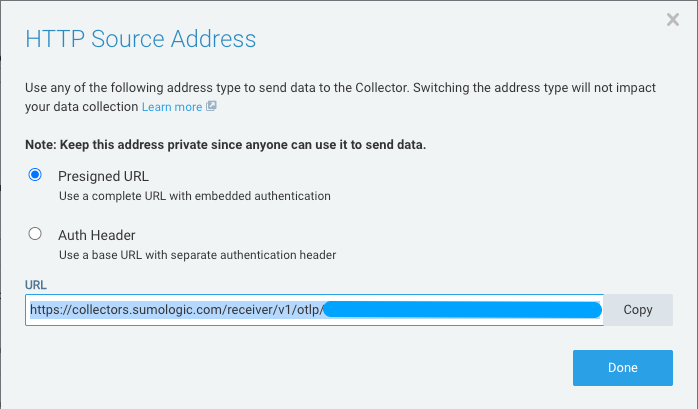 - Enter the copied URL in the traces instrumentation code:
```python
OTLP_ENDPOINT="https://collectors.sumologic.com/receiver/v1/otlp/"
Traceloop.init(
app_name="http-trace-demo",
api_endpoint=OTLP_ENDPOINT,
)
```
or
```python
OTLP_ENDPOINT="https://collectors.sumologic.com/receiver/v1/otlp//v1/traces"
Traceloop.init(
app_name="http-trace-demo",
api_endpoint=OTLP_ENDPOINT,
)
```
- **Auth Header**
- Copy the header and base URL details to use the base URL with separate authentication header.
- Enter the copied URL in the traces instrumentation code:
```python
OTLP_ENDPOINT="https://collectors.sumologic.com/receiver/v1/otlp/"
Traceloop.init(
app_name="http-trace-demo",
api_endpoint=OTLP_ENDPOINT,
)
```
or
```python
OTLP_ENDPOINT="https://collectors.sumologic.com/receiver/v1/otlp//v1/traces"
Traceloop.init(
app_name="http-trace-demo",
api_endpoint=OTLP_ENDPOINT,
)
```
- **Auth Header**
- Copy the header and base URL details to use the base URL with separate authentication header.
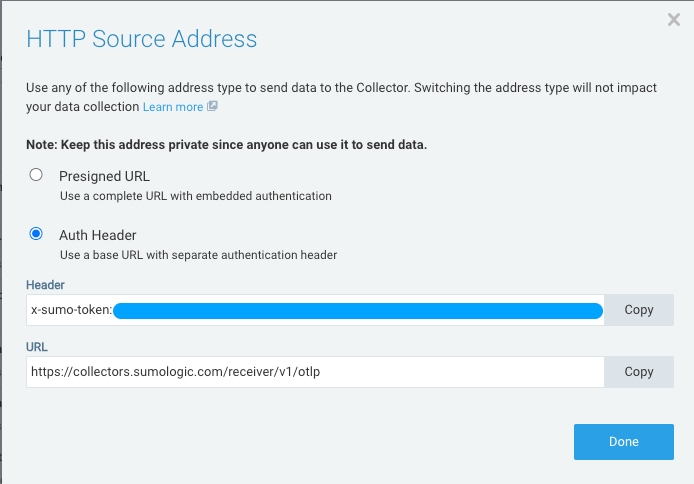 - Enter the header and base URL details in the trace instrumentation code:
```python
HTTP_SOURCE_TOKEN = ""
OTEL_EXPORTER_OTLP_ENDPOINT="https://collectors.sumologic.com/receiver/v1/otlp"
Traceloop.init(
app_name="http-trace-with-auth-header-demo",
api_endpoint=OTEL_EXPORTER_OTLP_ENDPOINT,
headers={"x-sumo-token": HTTP_SOURCE_TOKEN},
disable_batch=True
)
```
:::info
For logs and metrics, refer to the URL format in [Data Differentiation](/docs/send-data/hosted-collectors/http-source/otlp/#data-differentiation).
:::
## Instrument sample application for OpenLLMetry
The following sample code demonstrates a practical implementation of Chroma as a vector database.
### Prerequisites
Before running the code, install the required libraries:
```python
pip install chromadb sentence-transformers traceloop-sdk
```
- **Chroma**: Used to store and query document embeddings for semantic search.
- **SentenceTransformers**: Generates embeddings using the model `all-MiniLM-L6-v2`.
- **OpenLLMetry**(Traceloop): Adds observability to the workflow by tracing tasks using OpenTelemetry.
### How it works
This example demonstrates a practical implementation of a vector search system using the Chroma with a local embedding model.
#### Step 1: Initialize tracing
The application initializes **Traceloop** to enable observability and trace the workflow and tasks during execution.
The **OpenLLMetry SDK(Traceloop)** is configured to export telemetry data using the **OpenTelemetry protocol(OTLP)**.
The following two configurations are supported:
- For **OpenTelemetry collector**, the endpoint connects to `http://localhost:4318`, and the Sumo Logic exporter forwards the collected data to the SaaS platform.
- For **OTLP/HTTP source**, the endpoint connects to `https://collectors.sumologic.com/receiver/v1/otlp`.
#### Step 2: Load the embedding model
- The embedding model `all-MiniLM-L6-v2` is loaded using **SentenceTransformers**.
- This model converts text into vector embeddings that can be used for semantic search and similarity comparison.
#### Step 3: Create a vector collection
- A collection named `company_data` is created in **Chroma**.
- This collection stores documents and their corresponding vector embeddings.
#### Step 4: Store documents
- Sample documents describing companies are added to the collection.
- Each document is automatically converted into a vector embedding using the embedding model.
#### Step 5: Perform a semantic query
When you submit a question:
- The query is converted into an embedding.
- Chroma performs a similarity search against the stored document embeddings.
#### Step 6: Return relevant results
The system returns the top matching documents that are semantically similar to the query. This enables efficient retrieval of relevant information based on meaning rather than exact keyword matches.
### Demonstration code for OpenTelemetry collector
- Enter the header and base URL details in the trace instrumentation code:
```python
HTTP_SOURCE_TOKEN = ""
OTEL_EXPORTER_OTLP_ENDPOINT="https://collectors.sumologic.com/receiver/v1/otlp"
Traceloop.init(
app_name="http-trace-with-auth-header-demo",
api_endpoint=OTEL_EXPORTER_OTLP_ENDPOINT,
headers={"x-sumo-token": HTTP_SOURCE_TOKEN},
disable_batch=True
)
```
:::info
For logs and metrics, refer to the URL format in [Data Differentiation](/docs/send-data/hosted-collectors/http-source/otlp/#data-differentiation).
:::
## Instrument sample application for OpenLLMetry
The following sample code demonstrates a practical implementation of Chroma as a vector database.
### Prerequisites
Before running the code, install the required libraries:
```python
pip install chromadb sentence-transformers traceloop-sdk
```
- **Chroma**: Used to store and query document embeddings for semantic search.
- **SentenceTransformers**: Generates embeddings using the model `all-MiniLM-L6-v2`.
- **OpenLLMetry**(Traceloop): Adds observability to the workflow by tracing tasks using OpenTelemetry.
### How it works
This example demonstrates a practical implementation of a vector search system using the Chroma with a local embedding model.
#### Step 1: Initialize tracing
The application initializes **Traceloop** to enable observability and trace the workflow and tasks during execution.
The **OpenLLMetry SDK(Traceloop)** is configured to export telemetry data using the **OpenTelemetry protocol(OTLP)**.
The following two configurations are supported:
- For **OpenTelemetry collector**, the endpoint connects to `http://localhost:4318`, and the Sumo Logic exporter forwards the collected data to the SaaS platform.
- For **OTLP/HTTP source**, the endpoint connects to `https://collectors.sumologic.com/receiver/v1/otlp`.
#### Step 2: Load the embedding model
- The embedding model `all-MiniLM-L6-v2` is loaded using **SentenceTransformers**.
- This model converts text into vector embeddings that can be used for semantic search and similarity comparison.
#### Step 3: Create a vector collection
- A collection named `company_data` is created in **Chroma**.
- This collection stores documents and their corresponding vector embeddings.
#### Step 4: Store documents
- Sample documents describing companies are added to the collection.
- Each document is automatically converted into a vector embedding using the embedding model.
#### Step 5: Perform a semantic query
When you submit a question:
- The query is converted into an embedding.
- Chroma performs a similarity search against the stored document embeddings.
#### Step 6: Return relevant results
The system returns the top matching documents that are semantically similar to the query. This enables efficient retrieval of relevant information based on meaning rather than exact keyword matches.
### Demonstration code for OpenTelemetry collector
OpenTelemetry collector
```python
import chromadb
from chromadb.utils import embedding_functions
from traceloop.sdk import Traceloop
from traceloop.sdk.decorators import workflow, task
Traceloop.init(app_name="openllmetry-trace-demo")
# Local embedding model (runs locally)
hf_ef = embedding_functions.SentenceTransformerEmbeddingFunction(
model_name="all-MiniLM-L6-v2"
)
@task(name="create_collection")
def create_collection():
client = chromadb.Client()
collection = client.get_or_create_collection(
name="company_data",
embedding_function=hf_ef
)
collection.add(
documents=[
"Sumologic provides software intelligence and observability solutions.",
"OpenAI develops artificial intelligence models.",
"AWS provides cloud infrastructure services."
],
ids=["1", "2", "3"]
)
return collection
@task(name="query_collection")
def query_collection(question):
collection = create_collection()
results = collection.query(
query_texts=[question],
n_results=2
)
return results
@workflow(name="chromadb_search")
def search_company_info():
question = "What does Sumologic do?"
return query_collection(question)
if __name__ == "__main__":
print(search_company_info())
```
#### Trace overview
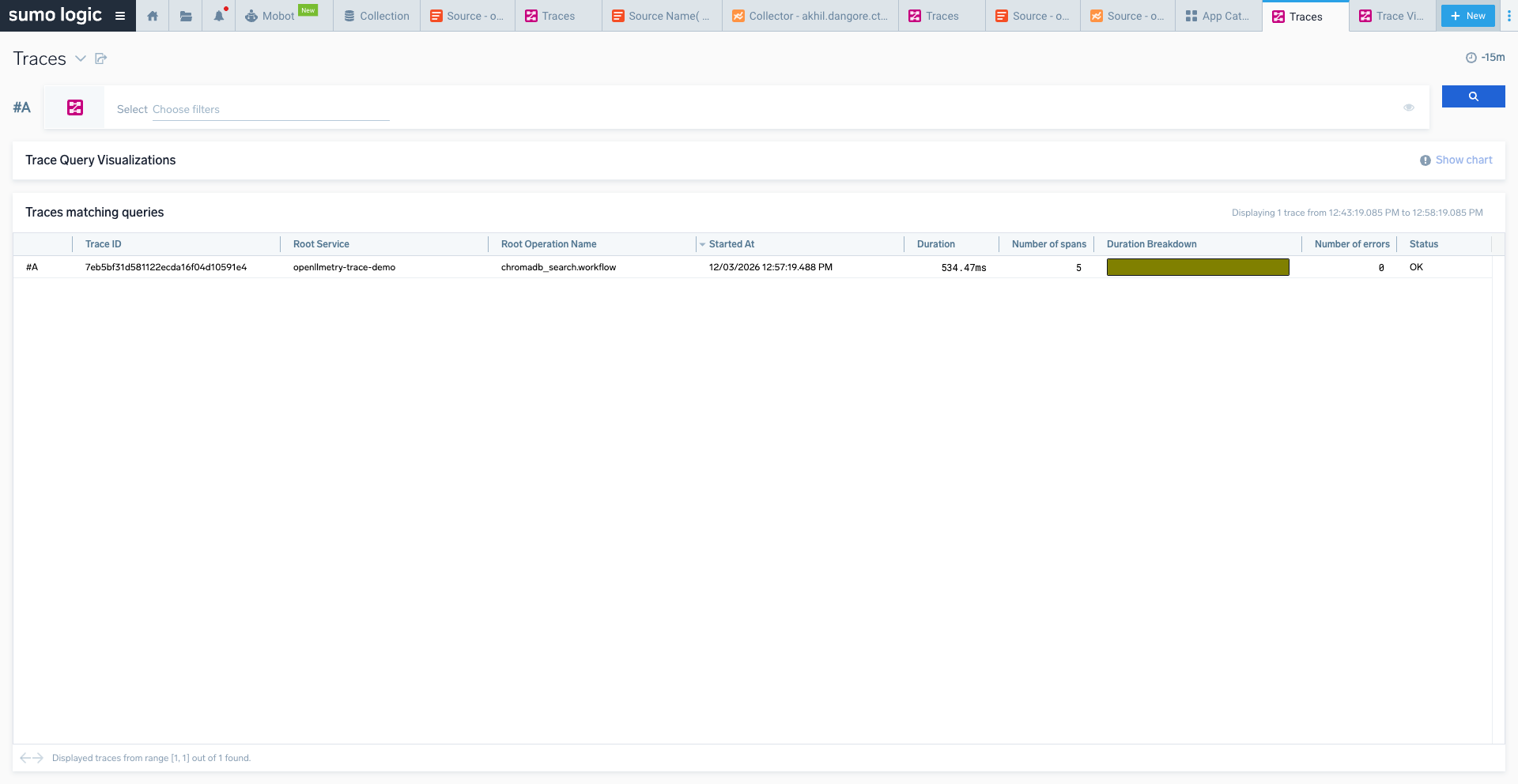 #### Trace view detail
 ### Demonstration code for OTLP/HTTP source with Auth-Header
OTLP/HTTP source-auth header
```python
import chromadb
from chromadb.utils import embedding_functions
from traceloop.sdk import Traceloop
from traceloop.sdk.decorators import workflow, task
HTTP_SOURCE_TOKEN = ""
OTEL_EXPORTER_OTLP_ENDPOINT="https://collectors.sumologic.com/receiver/v1/otlp"
Traceloop.init(
app_name="http-trace-with-auth-header-demo",
api_endpoint=OTEL_EXPORTER_OTLP_ENDPOINT,
headers={"x-sumo-token": HTTP_SOURCE_TOKEN},
disable_batch=True
)
# Local embedding model (runs locally)
hf_ef = embedding_functions.SentenceTransformerEmbeddingFunction(
model_name="all-MiniLM-L6-v2"
)
@task(name="create_collection")
def create_collection():
client = chromadb.Client()
collection = client.get_or_create_collection(
name="company_data",
embedding_function=hf_ef
)
collection.add(
documents=[
"Sumologic provides software intelligence and observability solutions.",
"OpenAI develops artificial intelligence models.",
"AWS provides cloud infrastructure services."
],
ids=["1", "2", "3"]
)
return collection
@task(name="query_collection")
def query_collection(question):
collection = create_collection()
results = collection.query(
query_texts=[question],
n_results=2
)
return results
@workflow(name="chromadb_search")
def search_company_info():
question = "What does Sumologic do?"
return query_collection(question)
if __name__ == "__main__":
print(search_company_info())
```
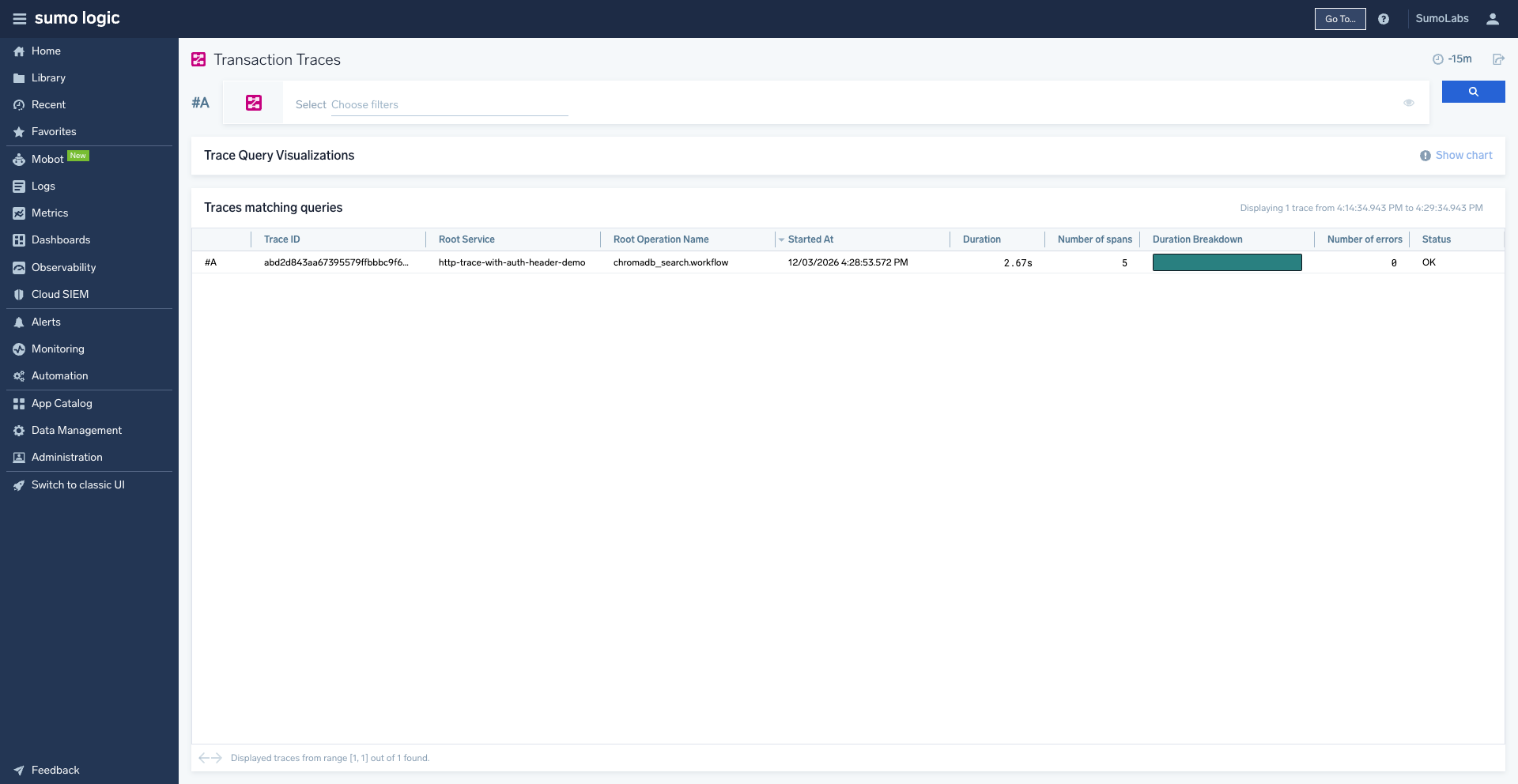
#### Trace overview
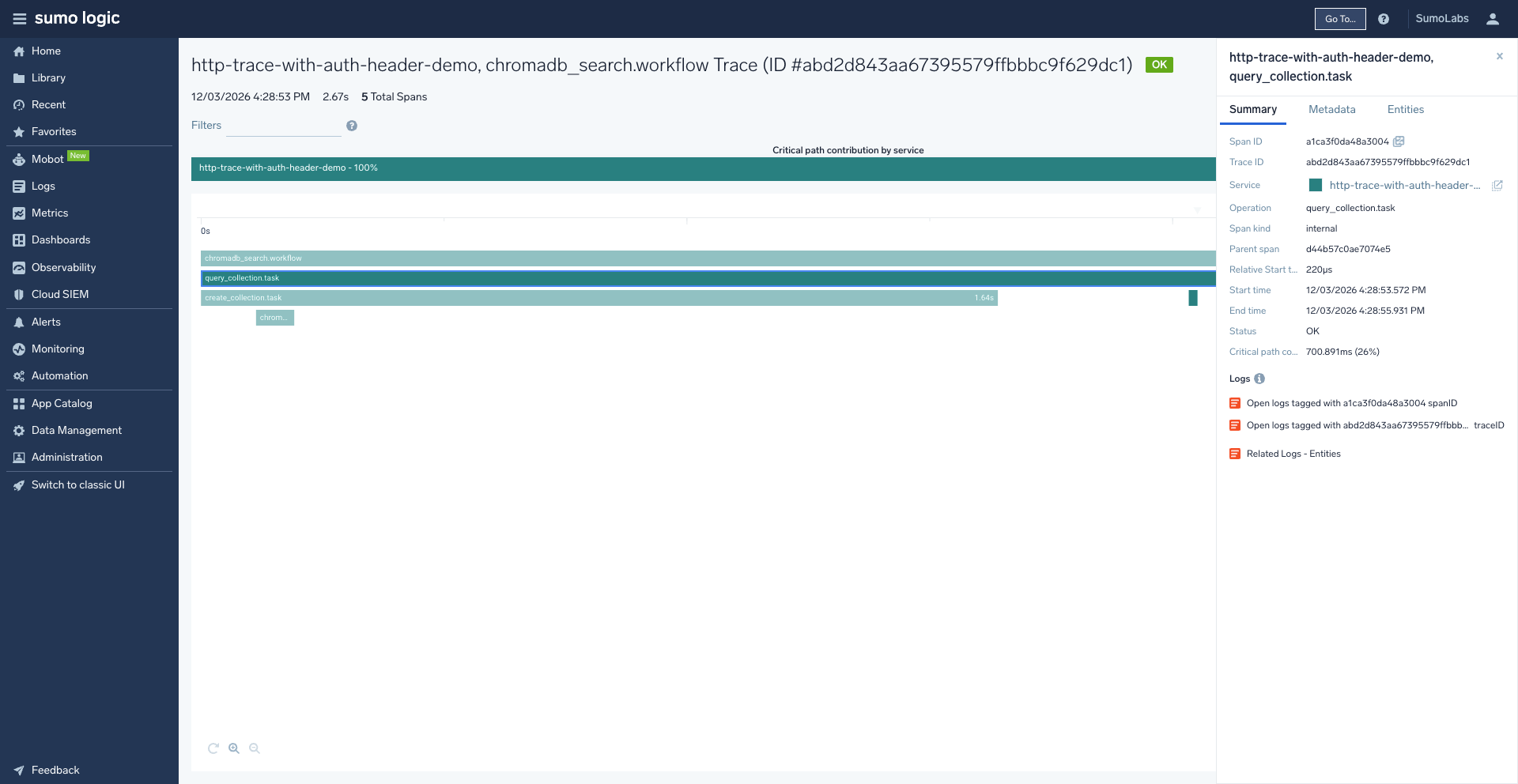
 #### Trace view detail