---
id: amazon-overview
title: Amazon Overview
description: The Sumo Logic app for Amazon Overview provides a unified view of your AWS infrastructure with key metrics and logs from multiple AWS services in a single dashboard.
slug: /help/docs/integrations/amazon-aws/amazon-overview/
canonical: https://www.sumologic.com/help/docs/integrations/amazon-aws/amazon-overview/
---
import useBaseUrl from '@docusaurus/useBaseUrl';
}) **Amazon Overview**
[Amazon Web Services (AWS)](https://aws.amazon.com/) provides secure, scalable cloud computing services and solutions. The Sumo Logic app for Amazon Overview gives you a unified view of your entire AWS infrastructure by aggregating key metrics and logs from multiple AWS services into consolidated dashboards.
The Sumo Logic Amazon Overview app dashboards provide visibility into your overall AWS environment:
* Monitor activity across all AWS services, including resource activity and geographic distribution of incoming requests.
* Track performance metrics for Application Load Balancer (ALB), Classic Load Balancer (ELB), and Network Load Balancer (NLB), including requests served, errors, healthy/unhealthy hosts, and TLS negotiation errors.
* View EC2 CPU utilization and free memory metrics.
* Monitor RDS CPU utilization and freeable memory.
* Track ElastiCache CPU utilization and freeable memory.
* View Lambda invocations and errors.
* Monitor DynamoDB requests by table and errors.
* Track API Gateway requests by API name and errors.
* Monitor SNS notifications delivered and failed.
* Track SQS messages received and empty receives.
* View ECS average CPU and memory utilization.
## Installing the Amazon Overview app
To install the app:
1. Select **App Catalog**.
1. In the 🔎 **Search Apps** field, run a search for your desired app, then select it.
1. Click **Install App**.
:::note
Sometimes this button says **Add Integration**.
:::
1. Click **Next**.
1. Look for the dialog confirming that your app was installed successfully.
**Amazon Overview**
[Amazon Web Services (AWS)](https://aws.amazon.com/) provides secure, scalable cloud computing services and solutions. The Sumo Logic app for Amazon Overview gives you a unified view of your entire AWS infrastructure by aggregating key metrics and logs from multiple AWS services into consolidated dashboards.
The Sumo Logic Amazon Overview app dashboards provide visibility into your overall AWS environment:
* Monitor activity across all AWS services, including resource activity and geographic distribution of incoming requests.
* Track performance metrics for Application Load Balancer (ALB), Classic Load Balancer (ELB), and Network Load Balancer (NLB), including requests served, errors, healthy/unhealthy hosts, and TLS negotiation errors.
* View EC2 CPU utilization and free memory metrics.
* Monitor RDS CPU utilization and freeable memory.
* Track ElastiCache CPU utilization and freeable memory.
* View Lambda invocations and errors.
* Monitor DynamoDB requests by table and errors.
* Track API Gateway requests by API name and errors.
* Monitor SNS notifications delivered and failed.
* Track SQS messages received and empty receives.
* View ECS average CPU and memory utilization.
## Installing the Amazon Overview app
To install the app:
1. Select **App Catalog**.
1. In the 🔎 **Search Apps** field, run a search for your desired app, then select it.
1. Click **Install App**.
:::note
Sometimes this button says **Add Integration**.
:::
1. Click **Next**.
1. Look for the dialog confirming that your app was installed successfully.
}) **Post-installation**
Once your app is installed, it will appear in your **Personal** folder or the folder that you specified. From here, you can share it with other users in your organization. Dashboard panels will automatically start to fill with data matching the time range query received since you created the panel. Results won't be available immediately, but within about 20 minutes, you'll see completed graphs and maps.
## Viewing the Amazon Overview dashboards
The Sumo Logic app for Amazon Overview provides preconfigured dashboards that give you a unified view of your AWS infrastructure. These dashboards aggregate key metrics and logs from multiple AWS services, helping you monitor performance, track resource utilization, and identify issues across your entire AWS environment.
### AWS Account Overview
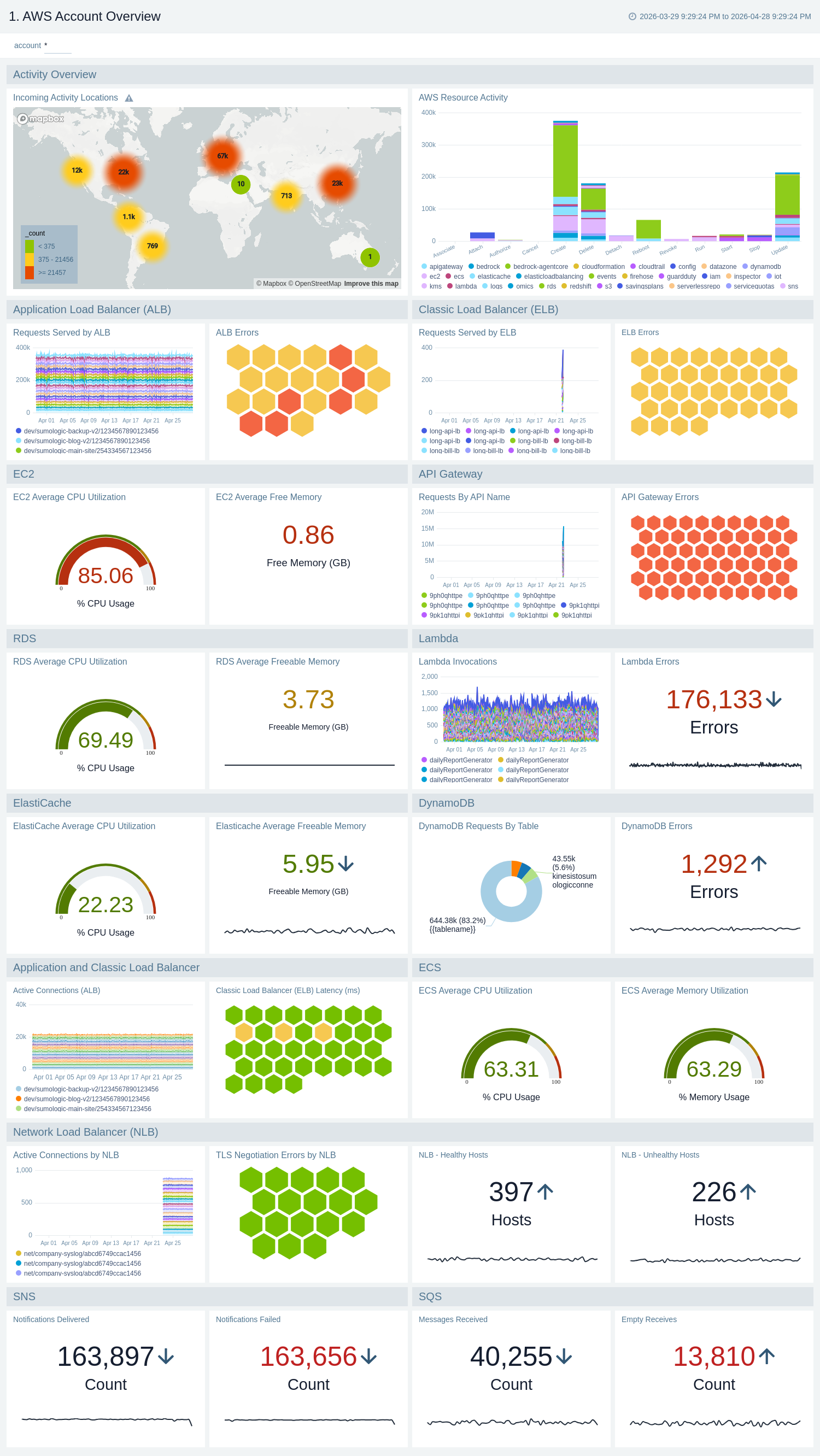
The **Amazon Overview - AWS Account Overview** dashboard provides a comprehensive view of your AWS account activity and resource performance across all services.
Use this dashboard to:
* Get a high-level view of your entire AWS infrastructure from a single dashboard.
* Monitor incoming activity locations and AWS resource activity.
* Track load balancer performance, including requests served, errors, and active connections across ALB, ELB, and NLB.
* Monitor compute resource utilization for EC2, ECS, and Lambda.
* View database performance metrics for RDS, DynamoDB, and ElastiCache.
* Track messaging service health for SNS and SQS.
* Monitor API Gateway requests and errors.
**Post-installation**
Once your app is installed, it will appear in your **Personal** folder or the folder that you specified. From here, you can share it with other users in your organization. Dashboard panels will automatically start to fill with data matching the time range query received since you created the panel. Results won't be available immediately, but within about 20 minutes, you'll see completed graphs and maps.
## Viewing the Amazon Overview dashboards
The Sumo Logic app for Amazon Overview provides preconfigured dashboards that give you a unified view of your AWS infrastructure. These dashboards aggregate key metrics and logs from multiple AWS services, helping you monitor performance, track resource utilization, and identify issues across your entire AWS environment.
### AWS Account Overview
The **Amazon Overview - AWS Account Overview** dashboard provides a comprehensive view of your AWS account activity and resource performance across all services.
Use this dashboard to:
* Get a high-level view of your entire AWS infrastructure from a single dashboard.
* Monitor incoming activity locations and AWS resource activity.
* Track load balancer performance, including requests served, errors, and active connections across ALB, ELB, and NLB.
* Monitor compute resource utilization for EC2, ECS, and Lambda.
* View database performance metrics for RDS, DynamoDB, and ElastiCache.
* Track messaging service health for SNS and SQS.
* Monitor API Gateway requests and errors.
 ### AWS Region Overview
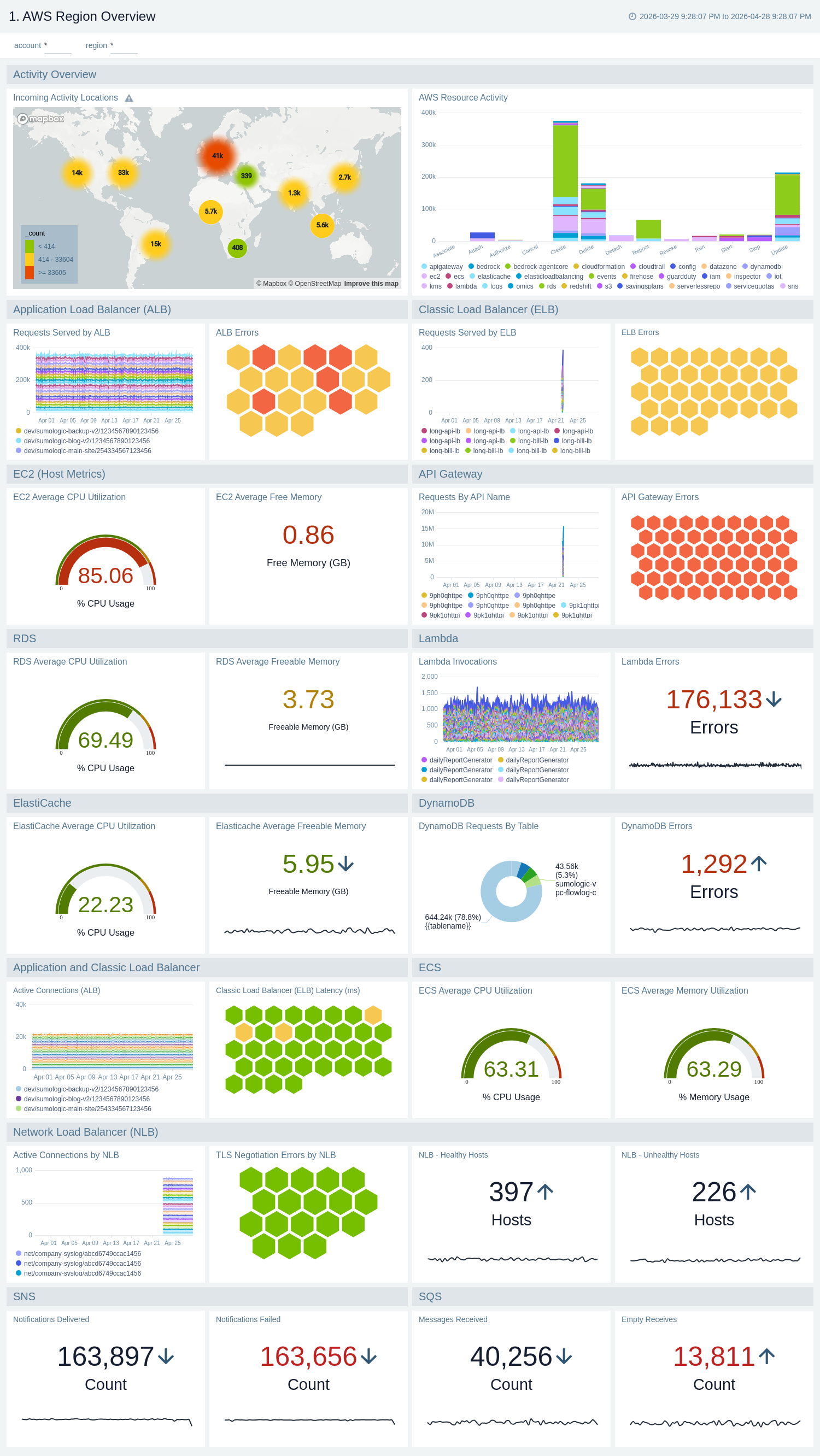
The **Amazon Overview - AWS Region Overview** dashboard provides detailed information about your AWS infrastructure filtered by region.
Use this dashboard to:
* View AWS resource activity and performance metrics for a specific region.
* Compare service performance across different regions.
* Identify region-specific issues with load balancers, compute, databases, or messaging services.
* Monitor regional resource utilization trends.
### AWS Region Overview
The **Amazon Overview - AWS Region Overview** dashboard provides detailed information about your AWS infrastructure filtered by region.
Use this dashboard to:
* View AWS resource activity and performance metrics for a specific region.
* Compare service performance across different regions.
* Identify region-specific issues with load balancers, compute, databases, or messaging services.
* Monitor regional resource utilization trends.
 ## Uninstalling the Amazon Overview app (Optional)
import AppUninstall from '../../reuse/apps/app-uninstall.md';
## Uninstalling the Amazon Overview app (Optional)
import AppUninstall from '../../reuse/apps/app-uninstall.md';