---
id: jfrog-artifactory-opentelemetry
title: JFrog Artifactory - OpenTelemetry Collector
sidebar_label: JFrog Artifactory - OTel Collector
description: Learn about the Sumo Logic OpenTelemetry app for JFrog Artifactory.
slug: /help/docs/integrations/app-development/opentelemetry/jfrog-artifactory-opentelemetry/
canonical: https://www.sumologic.com/help/docs/integrations/app-development/opentelemetry/jfrog-artifactory-opentelemetry/
---
import useBaseUrl from '@docusaurus/useBaseUrl';
import Tabs from '@theme/Tabs';
import TabItem from '@theme/TabItem';
})
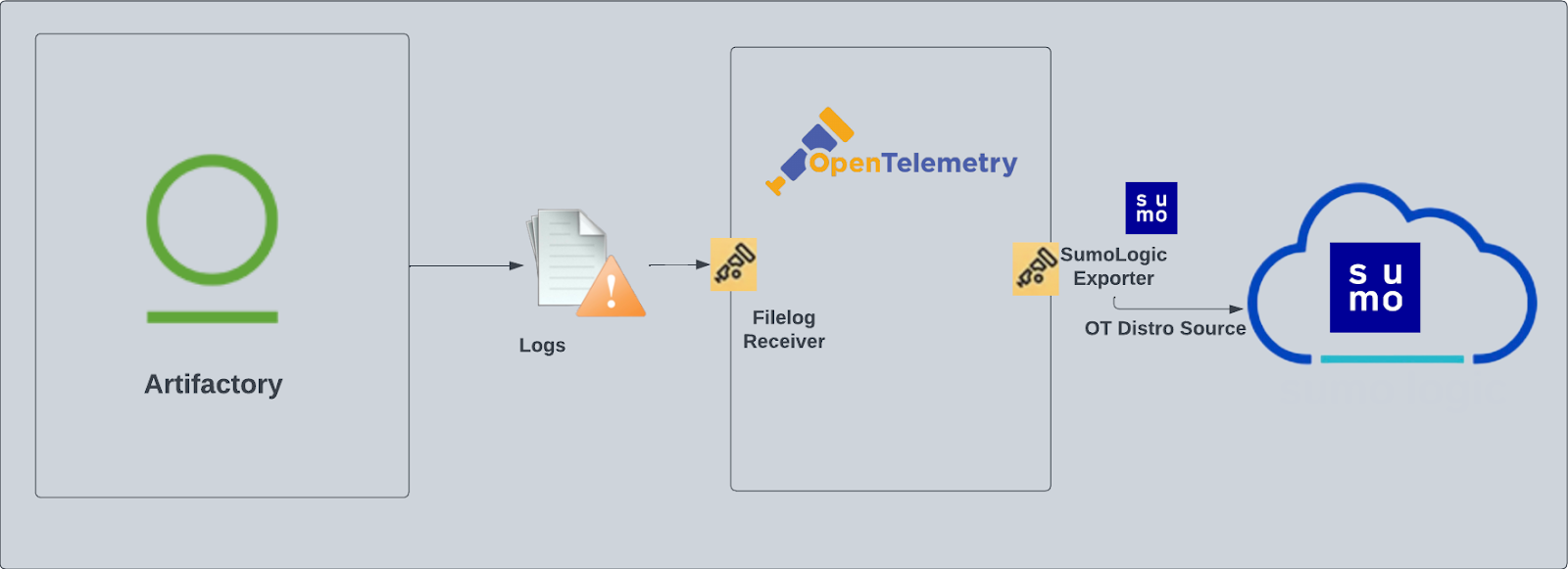
}) The Sumo Logic app for Artifactory provides insight into your [JFrog Artifactory](https://jfrog.com/artifactory/) binary repository. The app provides preconfigured Dashboards that include an Overview of your system, Traffic, Requests and Access, Download Activity, Cache Deployment Activity, and Non-Cached Deployment Activity. Artifactory logs are sent to Sumo Logic through OpenTelemetry [filelog receiver](https://github.com/open-telemetry/opentelemetry-collector-contrib/tree/main/receiver/filelogreceiver).
The Sumo Logic app for Artifactory provides insight into your [JFrog Artifactory](https://jfrog.com/artifactory/) binary repository. The app provides preconfigured Dashboards that include an Overview of your system, Traffic, Requests and Access, Download Activity, Cache Deployment Activity, and Non-Cached Deployment Activity. Artifactory logs are sent to Sumo Logic through OpenTelemetry [filelog receiver](https://github.com/open-telemetry/opentelemetry-collector-contrib/tree/main/receiver/filelogreceiver).
 :::info
This app includes [built-in monitors](#jfrog-artifactory-alerts). For details on creating custom monitors, refer to the [Create monitors for JFrog Artifactory app](#create-monitors-for-jfrog-artifactory-app).
:::
## Fields creation in Sumo Logic for Artifactory
Following are the Tags which will be created as part of Artifactory app install if not already present.
* `sumo.datasource`. Has fixed value of **artifactory**.
## Prerequisites
This section provides instructions for configuring log collection for Artifactory for the Sumo Logic app.
The Sumo Logic app for Artifactory collects data from the following logs:
- `artifactory.log`. The main Artifactory log file that contains data on Artifactory server activity.
- `access.log`. The security log containing important information about accepted and denied requests, configuration changes, and password reset requests. The originating IP address for each event is also recorded.
- `request.log`. Generic HTTP traffic information similar to the Apache HTTPd request log.
- `traffic.log`. A log that contains information about site traffic and file sizes.
For more details about Artifactory logs, refer to [JFrog Logging](https://www.jfrog.com/confluence/display/RTF/Artifactory+Log+Files) and [Artifactory Log Files](https://www.jfrog.com/confluence/display/RTF6X/Artifactory+Log+Files#ArtifactoryLogFiles-RequestLog).
Sumo Logic reads logs in the directory `/var/opt/jfrog/artifactory/logs`:
- `artifactory.log`
- `access.log`
- `request.log`
- `traffic.*.log`
To activate the `traffic.log` file, add the following parameter to your `artifactory.system.properties` file, located under `$ARTIFACTORY/etc`:
```
artifactory.traffic.collectionActive=true
```
A restart is required for traffic collection to take effect.
import LogsCollectionPrereqisites from '../../../reuse/apps/logs-collection-prereqisites.md';
For Windows systems, log files which are collected should be accessible by the SYSTEM group. Use the following set of PowerShell commands if the SYSTEM group does not have access.
```
$NewAcl = Get-Acl -Path ""
# Set properties
$identity = "NT AUTHORITY\SYSTEM"
$fileSystemRights = "ReadAndExecute"
$type = "Allow"
# Create new rule
$fileSystemAccessRuleArgumentList = $identity, $fileSystemRights, $type
$fileSystemAccessRule = New-Object -TypeName System.Security.AccessControl.FileSystemAccessRule -ArgumentList $fileSystemAccessRuleArgumentList
# Apply new rule
$NewAcl.SetAccessRule($fileSystemAccessRule)
Set-Acl -Path "" -AclObject $NewAcl
```
## Collection configuration and app installation
import ConfigAppInstall from '../../../reuse/apps/opentelemetry/config-app-install.md';
### Step 1: Set up Collector
import SetupColl from '../../../reuse/apps/opentelemetry/set-up-collector.md';
:::info
This app includes [built-in monitors](#jfrog-artifactory-alerts). For details on creating custom monitors, refer to the [Create monitors for JFrog Artifactory app](#create-monitors-for-jfrog-artifactory-app).
:::
## Fields creation in Sumo Logic for Artifactory
Following are the Tags which will be created as part of Artifactory app install if not already present.
* `sumo.datasource`. Has fixed value of **artifactory**.
## Prerequisites
This section provides instructions for configuring log collection for Artifactory for the Sumo Logic app.
The Sumo Logic app for Artifactory collects data from the following logs:
- `artifactory.log`. The main Artifactory log file that contains data on Artifactory server activity.
- `access.log`. The security log containing important information about accepted and denied requests, configuration changes, and password reset requests. The originating IP address for each event is also recorded.
- `request.log`. Generic HTTP traffic information similar to the Apache HTTPd request log.
- `traffic.log`. A log that contains information about site traffic and file sizes.
For more details about Artifactory logs, refer to [JFrog Logging](https://www.jfrog.com/confluence/display/RTF/Artifactory+Log+Files) and [Artifactory Log Files](https://www.jfrog.com/confluence/display/RTF6X/Artifactory+Log+Files#ArtifactoryLogFiles-RequestLog).
Sumo Logic reads logs in the directory `/var/opt/jfrog/artifactory/logs`:
- `artifactory.log`
- `access.log`
- `request.log`
- `traffic.*.log`
To activate the `traffic.log` file, add the following parameter to your `artifactory.system.properties` file, located under `$ARTIFACTORY/etc`:
```
artifactory.traffic.collectionActive=true
```
A restart is required for traffic collection to take effect.
import LogsCollectionPrereqisites from '../../../reuse/apps/logs-collection-prereqisites.md';
For Windows systems, log files which are collected should be accessible by the SYSTEM group. Use the following set of PowerShell commands if the SYSTEM group does not have access.
```
$NewAcl = Get-Acl -Path ""
# Set properties
$identity = "NT AUTHORITY\SYSTEM"
$fileSystemRights = "ReadAndExecute"
$type = "Allow"
# Create new rule
$fileSystemAccessRuleArgumentList = $identity, $fileSystemRights, $type
$fileSystemAccessRule = New-Object -TypeName System.Security.AccessControl.FileSystemAccessRule -ArgumentList $fileSystemAccessRuleArgumentList
# Apply new rule
$NewAcl.SetAccessRule($fileSystemAccessRule)
Set-Acl -Path "" -AclObject $NewAcl
```
## Collection configuration and app installation
import ConfigAppInstall from '../../../reuse/apps/opentelemetry/config-app-install.md';
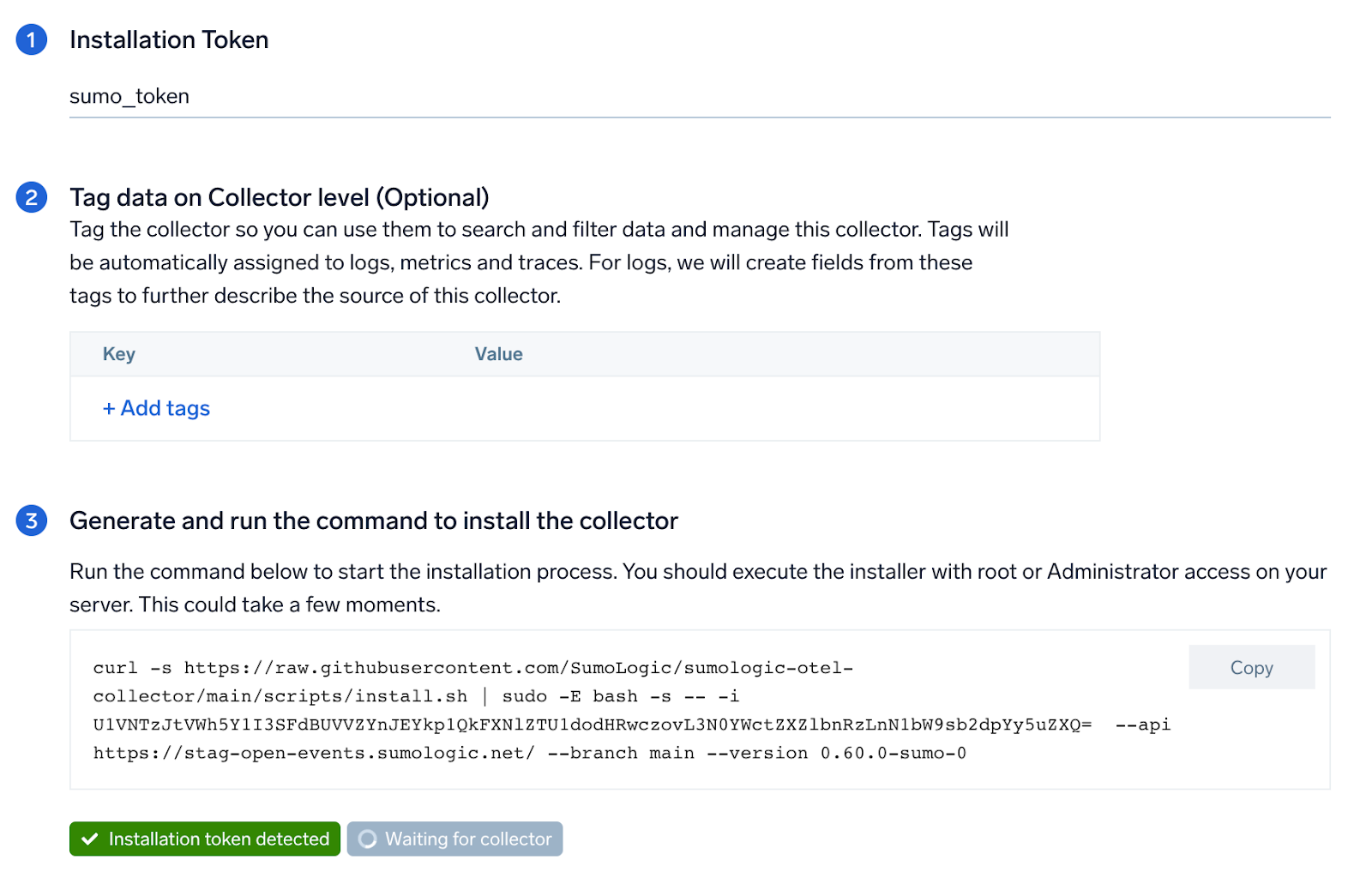
### Step 1: Set up Collector
import SetupColl from '../../../reuse/apps/opentelemetry/set-up-collector.md';
 ### Step 2: Configure integration
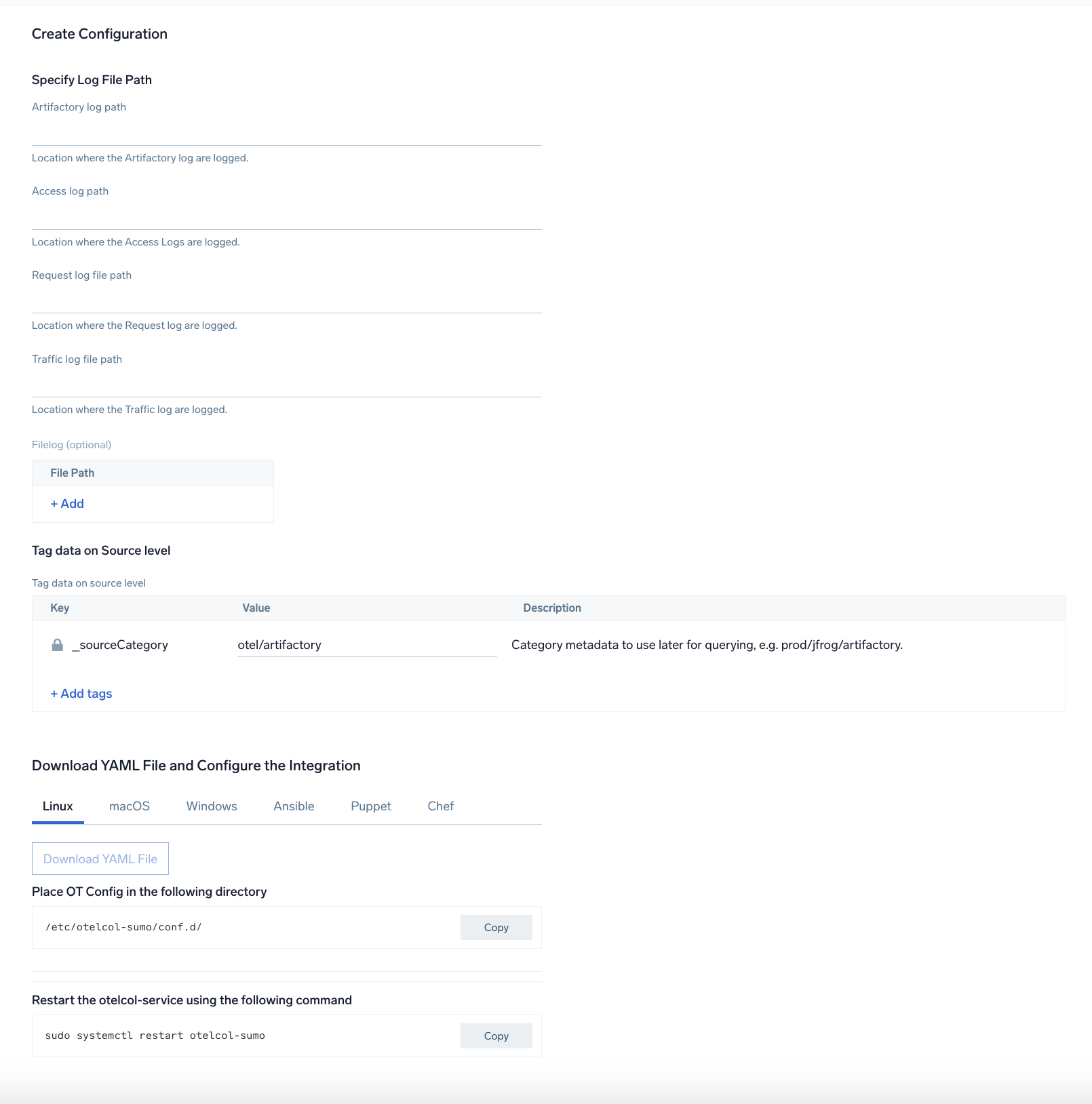
In this step, you will configure the yaml required for the Artifactory Collection.
Path of the different log file configured to capture Artifactory logs is needed to be given here:
- `artifactory.log`
- `access.log`
- `request.log`
- `traffic.*.log`
You can add any custom fields which you want to tag along with the data ingested in sumo.
Click on the **Download YAML File** button to get the yaml file.
import CollectorVersionNote from '../../../reuse/apps/opentelemetry/collector-version-note.md';
### Step 2: Configure integration
In this step, you will configure the yaml required for the Artifactory Collection.
Path of the different log file configured to capture Artifactory logs is needed to be given here:
- `artifactory.log`
- `access.log`
- `request.log`
- `traffic.*.log`
You can add any custom fields which you want to tag along with the data ingested in sumo.
Click on the **Download YAML File** button to get the yaml file.
import CollectorVersionNote from '../../../reuse/apps/opentelemetry/collector-version-note.md';
 ### Step 3: Send logs to Sumo Logic
import LogsIntro from '../../../reuse/apps/opentelemetry/send-logs-intro.md';
1. Copy the yaml file to `/etc/otelcol-sumo/conf.d/` folder in the Artifactory instance that needs to be monitored.
2. Restart the collector using:
```sh
sudo systemctl restart otelcol-sumo
```
1. Copy the yaml file to `C:\ProgramData\Sumo Logic\OpenTelemetry Collector\config\conf.d` folder in the machine that needs to be monitored.
2. Restart the collector using:
```sh
Restart-Service -Name OtelcolSumo
```
1. Copy the yaml file to `/etc/otelcol-sumo/conf.d/` folder in the Artifactory instance that needs to be monitored.
2. Restart the otelcol-sumo process using:
```sh
otelcol-sumo --config /etc/otelcol-sumo/sumologic.yaml --config "glob:/etc/otelcol-sumo/conf.d/*.yaml"
```
import ChefNoEnv from '../../../reuse/apps/opentelemetry/chef-without-env.md';
import AnsibleNoEnv from '../../../reuse/apps/opentelemetry/ansible-without-env.md';
import PuppetNoEnv from '../../../reuse/apps/opentelemetry/puppet-without-env.md';
import LogsOutro from '../../../reuse/apps/opentelemetry/send-logs-outro.md';
## Sample log messages
```bash title="Sample Log Messages in Non-Kubernetes environments"
2023-45-16 11:45:44,171 [a8bgdia2di2g80kh] [ACCEPTED DEPLOY] hortonworks-cache:org/apache/hadoop/hadoop-project/2.6.0-cdh5.4.4-SNAPSHOT/maven-metadata.xml for client : admin/195.186.216.125.
```
## Sample queries
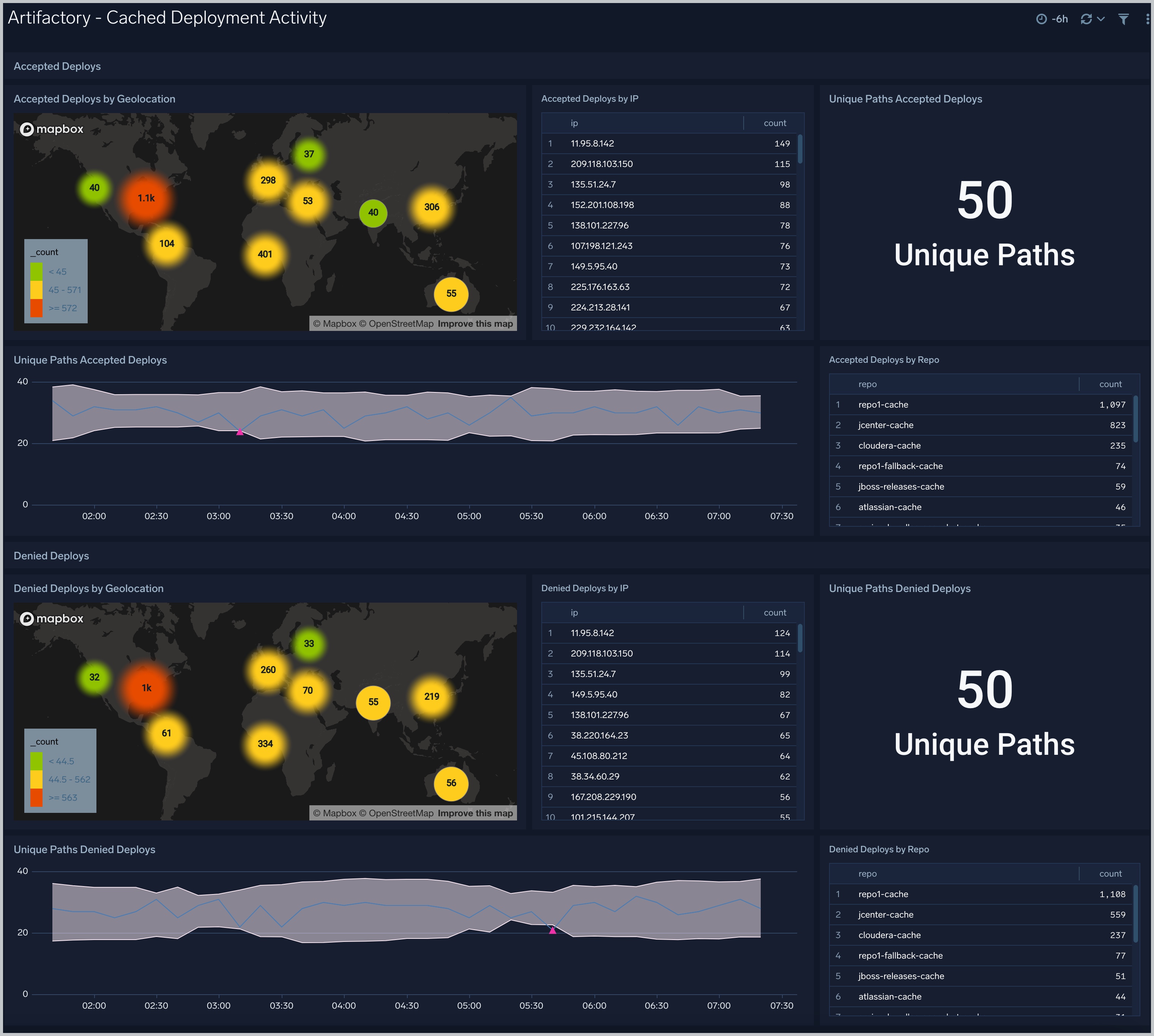
This sample Query is from the **Artifactory - Cached Deployment Activity** > **Accepted Deploys by Geolocation** panel.
```sumo title="Query String"
" %"sumo.datasource"=artifactory "ACCEPTED DEPLOY" "-cache"
|parse "[*] [*] *" as trace_id, event_type, user_info
| parse regex field=user_info "(?:(?[^:]*):(?[^\s]*))?\s+(?[\w\s:]+)?\s+(?[^\/]+)\/(?\d{1,3}\.\d{1,3}\.\d{1,3}\.\d{1,3})\."
| where event_type = "ACCEPTED DEPLOY" and repo matches "*-cache"
| count by ip | sort _count
| lookup longitude, latitude from geo://location on ip = ip
"
```
## Viewing JFrog Artifactory Dashboards
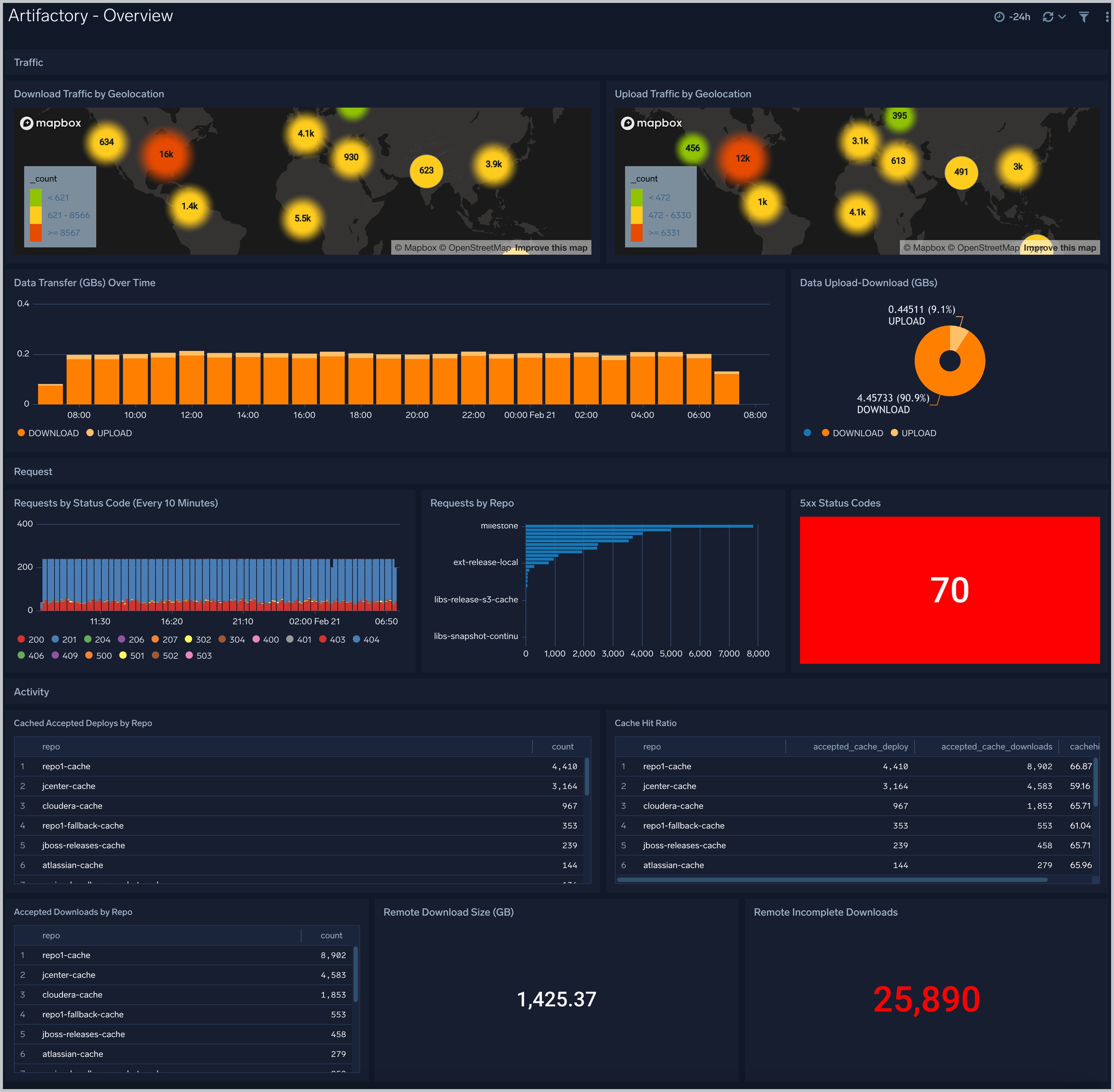
### Artifactory - Overview
### Step 3: Send logs to Sumo Logic
import LogsIntro from '../../../reuse/apps/opentelemetry/send-logs-intro.md';
1. Copy the yaml file to `/etc/otelcol-sumo/conf.d/` folder in the Artifactory instance that needs to be monitored.
2. Restart the collector using:
```sh
sudo systemctl restart otelcol-sumo
```
1. Copy the yaml file to `C:\ProgramData\Sumo Logic\OpenTelemetry Collector\config\conf.d` folder in the machine that needs to be monitored.
2. Restart the collector using:
```sh
Restart-Service -Name OtelcolSumo
```
1. Copy the yaml file to `/etc/otelcol-sumo/conf.d/` folder in the Artifactory instance that needs to be monitored.
2. Restart the otelcol-sumo process using:
```sh
otelcol-sumo --config /etc/otelcol-sumo/sumologic.yaml --config "glob:/etc/otelcol-sumo/conf.d/*.yaml"
```
import ChefNoEnv from '../../../reuse/apps/opentelemetry/chef-without-env.md';
import AnsibleNoEnv from '../../../reuse/apps/opentelemetry/ansible-without-env.md';
import PuppetNoEnv from '../../../reuse/apps/opentelemetry/puppet-without-env.md';
import LogsOutro from '../../../reuse/apps/opentelemetry/send-logs-outro.md';
## Sample log messages
```bash title="Sample Log Messages in Non-Kubernetes environments"
2023-45-16 11:45:44,171 [a8bgdia2di2g80kh] [ACCEPTED DEPLOY] hortonworks-cache:org/apache/hadoop/hadoop-project/2.6.0-cdh5.4.4-SNAPSHOT/maven-metadata.xml for client : admin/195.186.216.125.
```
## Sample queries
This sample Query is from the **Artifactory - Cached Deployment Activity** > **Accepted Deploys by Geolocation** panel.
```sumo title="Query String"
" %"sumo.datasource"=artifactory "ACCEPTED DEPLOY" "-cache"
|parse "[*] [*] *" as trace_id, event_type, user_info
| parse regex field=user_info "(?:(?[^:]*):(?[^\s]*))?\s+(?[\w\s:]+)?\s+(?[^\/]+)\/(?\d{1,3}\.\d{1,3}\.\d{1,3}\.\d{1,3})\."
| where event_type = "ACCEPTED DEPLOY" and repo matches "*-cache"
| count by ip | sort _count
| lookup longitude, latitude from geo://location on ip = ip
"
```
## Viewing JFrog Artifactory Dashboards
### Artifactory - Overview
 import JfrogOv from '../../../reuse/apps/jfrog/artifactory-overview.md';
### Artifactory - Cached Deployment Activity
import JfrogOv from '../../../reuse/apps/jfrog/artifactory-overview.md';
### Artifactory - Cached Deployment Activity
 import JfrogCache from '../../../reuse/apps/jfrog/artifactory-cached.md';
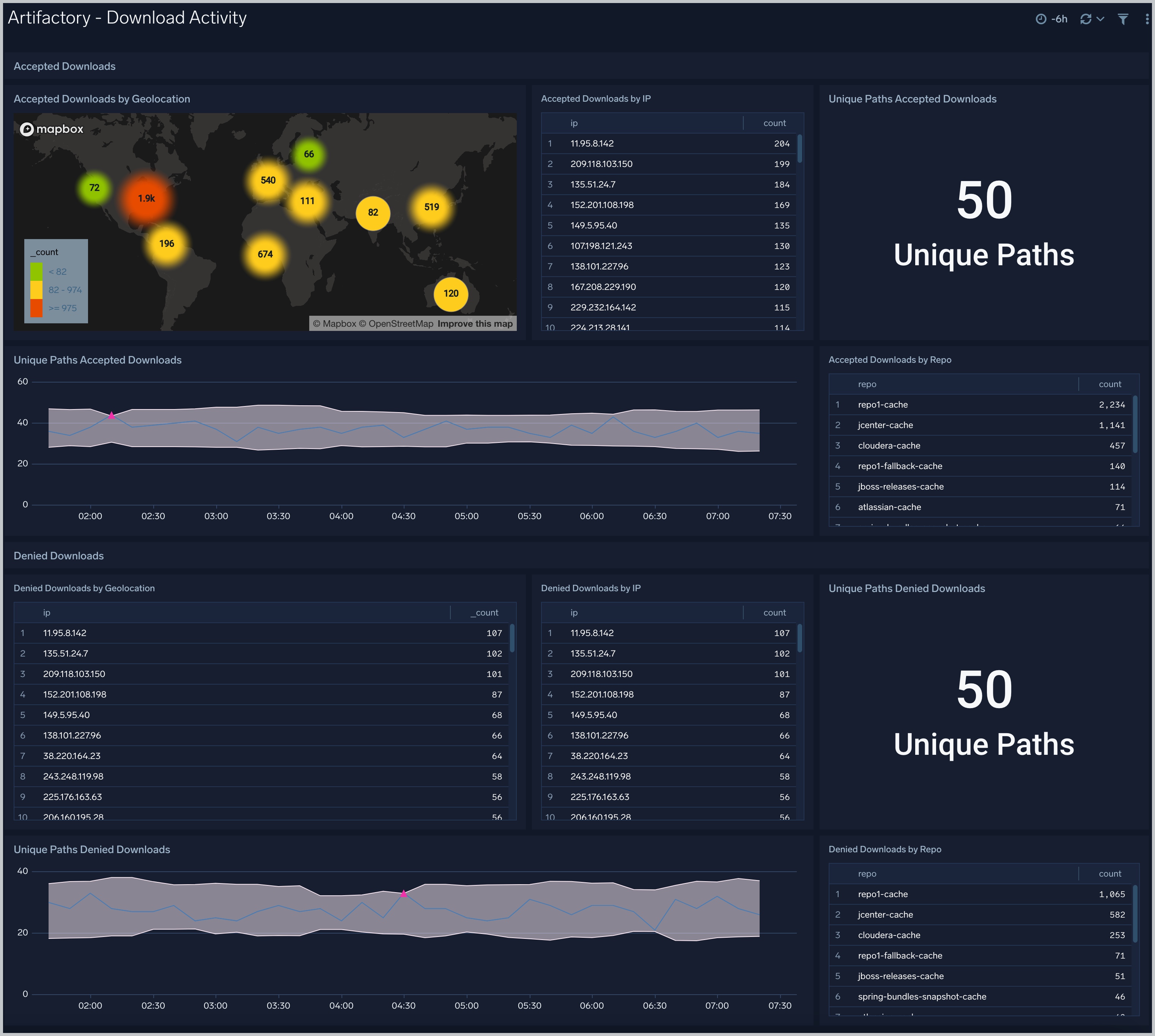
### Artifactory - Download Activity
import JfrogCache from '../../../reuse/apps/jfrog/artifactory-cached.md';
### Artifactory - Download Activity
 import JfrogDl from '../../../reuse/apps/jfrog/artifactory-download.md';
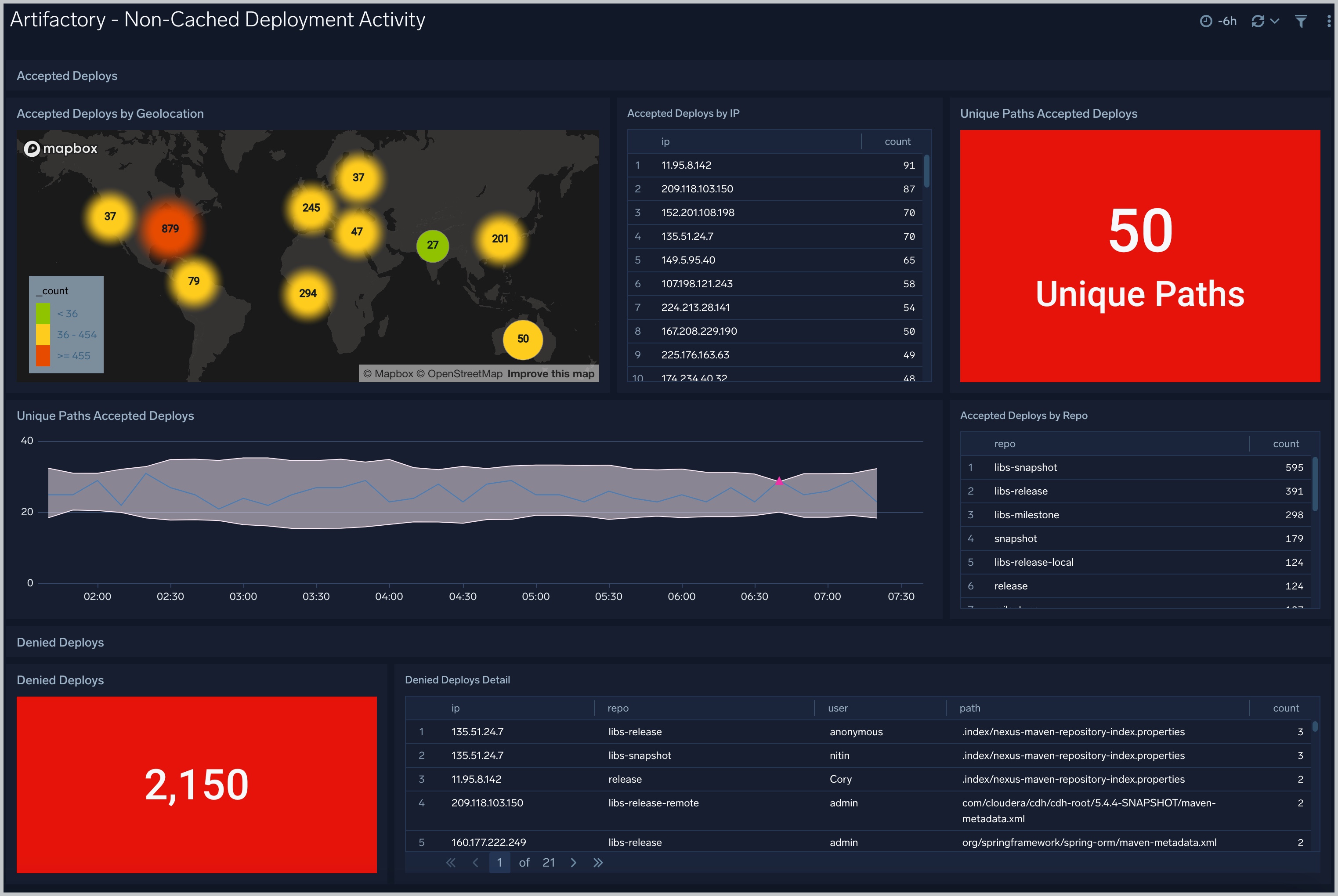
### Artifactory - Non-Cached Deployment Activity
import JfrogDl from '../../../reuse/apps/jfrog/artifactory-download.md';
### Artifactory - Non-Cached Deployment Activity
 import JfrogNon from '../../../reuse/apps/jfrog/artifactory-noncached.md';
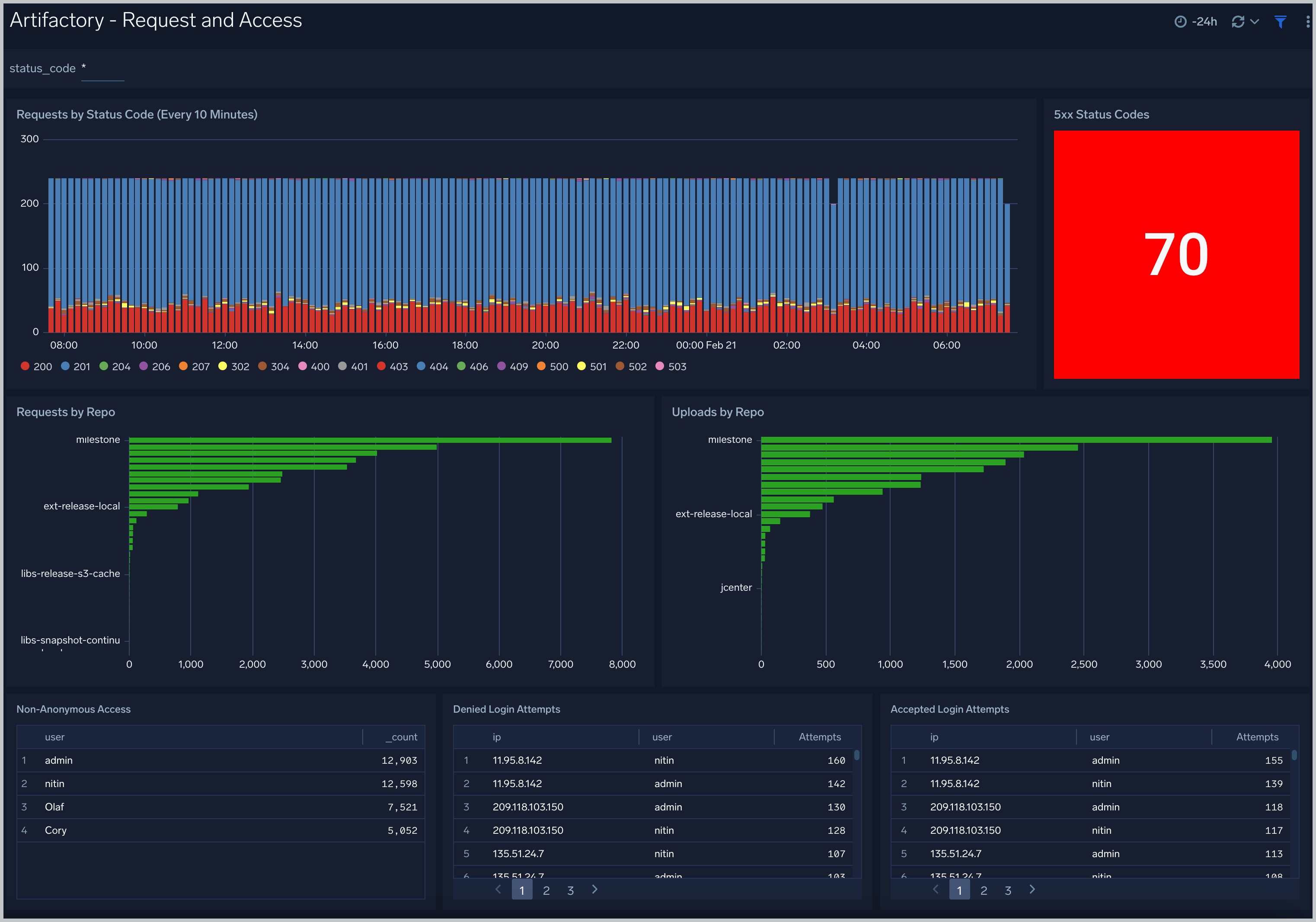
### Artifactory - Request and Access
import JfrogNon from '../../../reuse/apps/jfrog/artifactory-noncached.md';
### Artifactory - Request and Access
 import JfrogReq from '../../../reuse/apps/jfrog/artifactory-request-access.md';
### Artifactory - Traffic
import JfrogReq from '../../../reuse/apps/jfrog/artifactory-request-access.md';
### Artifactory - Traffic
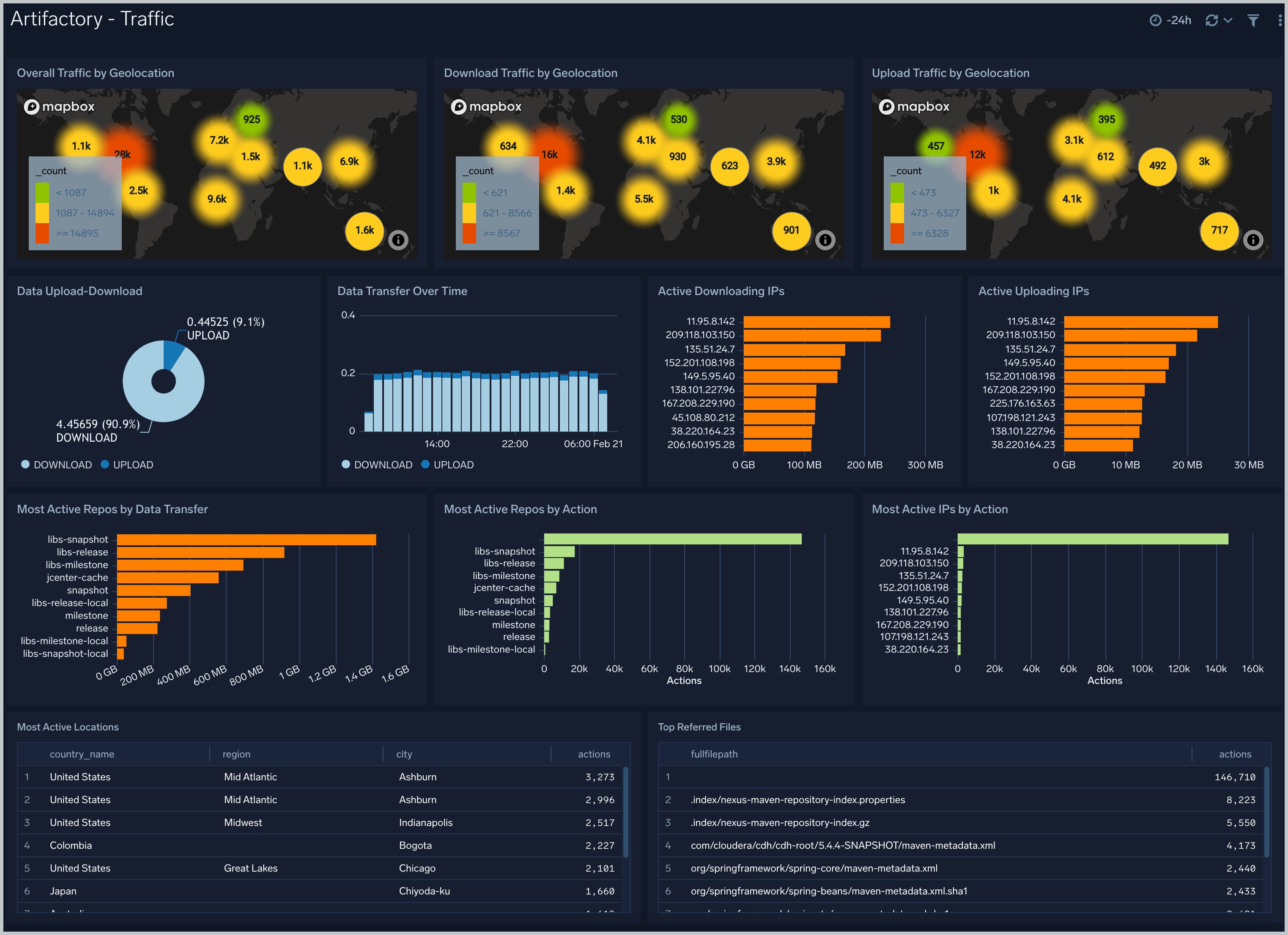 import JfrogTr from '../../../reuse/apps/jfrog/artifactory-traffic.md';
## Create monitors for JFrog Artifactory app
import CreateMonitors from '../../../reuse/apps/create-monitors.md';
### JFrog Artifactory alerts
| Name | Description | Alert Condition | Recover Condition |
|:--|:--|:--|:--|
| `Artifactory - Excessive Denied Login Attempts` | This alert is triggered when there are multiple denied login attempts from the same IP or user. | Count > 5 | Count \<= 5 |
| `Artifactory - High 4xx Status Codes` | This alert is triggered when there's a high number of HTTP 4xx error responses. | Count > 10 | Count \<= 10 |
| `Artifactory - High 5xx Status Codes` | This alert is triggered when there's a high number of HTTP 5xx error responses. | Count > 10 | Count \<= 10 |
| `Artifactory - High Denied Deploys to Cached Repos` | This alert is triggered when there's a high number of denied deploy attempts to cached repositories. | Count > 5 | Count \<= 5 |
| `Artifactory - High Denied Deploys to Non-Cached Repos` | This alert is triggered when there's a spike in denied deploy attempts to non-cached repositories. | Count > 5 | Count \<= 5 |
| `Artifactory - High Denied Downloads` | This alert is triggered when there's a high number of denied download attempts. | Count > 5 | Count \<= 5 |
| `Artifactory - Slow HTTP Response Times` | This alert is triggered when Artifactory response times are high. | Count > 5 | Count \<= 5 |
import JfrogTr from '../../../reuse/apps/jfrog/artifactory-traffic.md';
## Create monitors for JFrog Artifactory app
import CreateMonitors from '../../../reuse/apps/create-monitors.md';
### JFrog Artifactory alerts
| Name | Description | Alert Condition | Recover Condition |
|:--|:--|:--|:--|
| `Artifactory - Excessive Denied Login Attempts` | This alert is triggered when there are multiple denied login attempts from the same IP or user. | Count > 5 | Count \<= 5 |
| `Artifactory - High 4xx Status Codes` | This alert is triggered when there's a high number of HTTP 4xx error responses. | Count > 10 | Count \<= 10 |
| `Artifactory - High 5xx Status Codes` | This alert is triggered when there's a high number of HTTP 5xx error responses. | Count > 10 | Count \<= 10 |
| `Artifactory - High Denied Deploys to Cached Repos` | This alert is triggered when there's a high number of denied deploy attempts to cached repositories. | Count > 5 | Count \<= 5 |
| `Artifactory - High Denied Deploys to Non-Cached Repos` | This alert is triggered when there's a spike in denied deploy attempts to non-cached repositories. | Count > 5 | Count \<= 5 |
| `Artifactory - High Denied Downloads` | This alert is triggered when there's a high number of denied download attempts. | Count > 5 | Count \<= 5 |
| `Artifactory - Slow HTTP Response Times` | This alert is triggered when Artifactory response times are high. | Count > 5 | Count \<= 5 |