---
id: jmx-opentelemetry
title: Java Management Extensions (JMX) - OpenTelemetry Collector
sidebar_label: JMX - OTel Collector
description: The Sumo Logic app for Java Management Extensions (JMX) allows you to analyze and gain insights about Java applications.
slug: /help/docs/integrations/app-development/opentelemetry/jmx-opentelemetry/
canonical: https://www.sumologic.com/help/docs/integrations/app-development/opentelemetry/jmx-opentelemetry/
---
import useBaseUrl from '@docusaurus/useBaseUrl';
import Tabs from '@theme/Tabs';
import TabItem from '@theme/TabItem';
}) Java Management Extensions (JMX) is a standard component of the Java Platform. JMX gives developers a standard and simple way to manage resources, including services, devices, and applications. JMX is dynamic, so you can manage and monitor resources as soon as they are created, implemented, or installed.
The Sumo Logic app for JMX allows you to analyze and gain insights about Java applications. The dashboards provide a quick glance at various deployment metrics like memory, GC performance, and thread behavior, so you can troubleshoot unexpected behavior in your Java environment and the applications running in it.
:::info
This app includes [built-in monitors](#jmx-alerts). For details on creating custom monitors, refer to [Create monitors for JMX app](#create-monitors-for-jmx-app).
:::
## Metrics types
The Sumo Logic app for JMX collects metrics from Java applications via the [JMX Receiver for OpenTelemetry](https://github.com/open-telemetry/opentelemetry-collector-contrib/tree/main/receiver/jmxreceiver).
The following types of metrics are collected from JMX:
* Garbage Collection
* Memory
* Memory Pool
* Threads
* ClassLoader
For more information on different metrics collected, refer to the [JMX receiver docs](https://github.com/open-telemetry/opentelemetry-java-contrib/blob/main/jmx-metrics/docs/target-systems/jvm.md).
### Sample metrics query
```sql
sumo.datasource=jmx metric=jvm.memory.heap.used
```
## Fields creation in Sumo Logic for JMX
* `sumo.datasource`. Has fixed value of `jmx`.
* `jmx.endpoint`. The endpoint in the form of `localhost:port` used by JMX Metric Gatherer.
## Prerequisites
The JMX Receiver uses the OpenTelemetry JMX Metric Gatherer. For more details, [see their docs](https://github.com/open-telemetry/opentelemetry-collector-contrib/tree/main/receiver/jmxreceiver#details).
* Download the jar from [releases](https://github.com/open-telemetry/opentelemetry-java-contrib/releases) and place it in `/opt/` or in `C:\ProgramData`. Remember the path of the jar, which you'll use to configure the JMX app.
* Make sure the see the `opentelemetry-java-contrib-jmx-metrics` version is supported in the OpenTelemetry version you are using by going through the [releases](https://github.com/open-telemetry/opentelemetry-collector-contrib/releases) section and searching for jmxreceiver in that page. You can also check [supported jars code](https://github.com/open-telemetry/opentelemetry-collector-contrib/blob/main/receiver/jmxreceiver/supported_jars.go#L33).
* JMX Metric Gatherer metric extension supports Java 8+, though SASL is only supported where `com.sun.security.sasl.Provider` is available.
* Configure your java application to enable JMX. In most cases, you'll need to set below system variables in your applications's startup script.
```sh
-Dcom.sun.management.jmxremote.port=11099
-Dcom.sun.management.jmxremote.authenticate=false
```
* If you want to set up authentication, set the below system variables:
```sh
-Dcom.sun.management.jmxremote.authenticate=true
-Dcom.sun.management.jmxremote.password.file=/jmx.password
-Dcom.sun.management.jmxremote.access.file=/jmx.access
```
:::info
Below are docs for popular Java applications:
* [Active MQ](https://activemq.apache.org/jmx)
* [Kafka](https://kafka.apache.org/documentation/#remote_jmx)
* [Apache Tomcat](https://tomcat.apache.org/tomcat-9.0-doc/monitoring.html#Enabling_JMX_Remote)
* [Cassandra](https://cassandra.apache.org/doc/4.1/cassandra/operating/security.html#jmx-access)
* [HBase](https://hbase.apache.org/metrics.html)
* [Solr](https://solr.apache.org/guide/8_3/using-jmx-with-solr.html#configuring-jmx)
* [Zookeeper](https://zookeeper.apache.org/doc/r3.4.2/zookeeperJMX.html#ch_starting)
:::
## Collection configuration and app installation
import ConfigAppInstall from '../../../reuse/apps/opentelemetry/config-app-install.md';
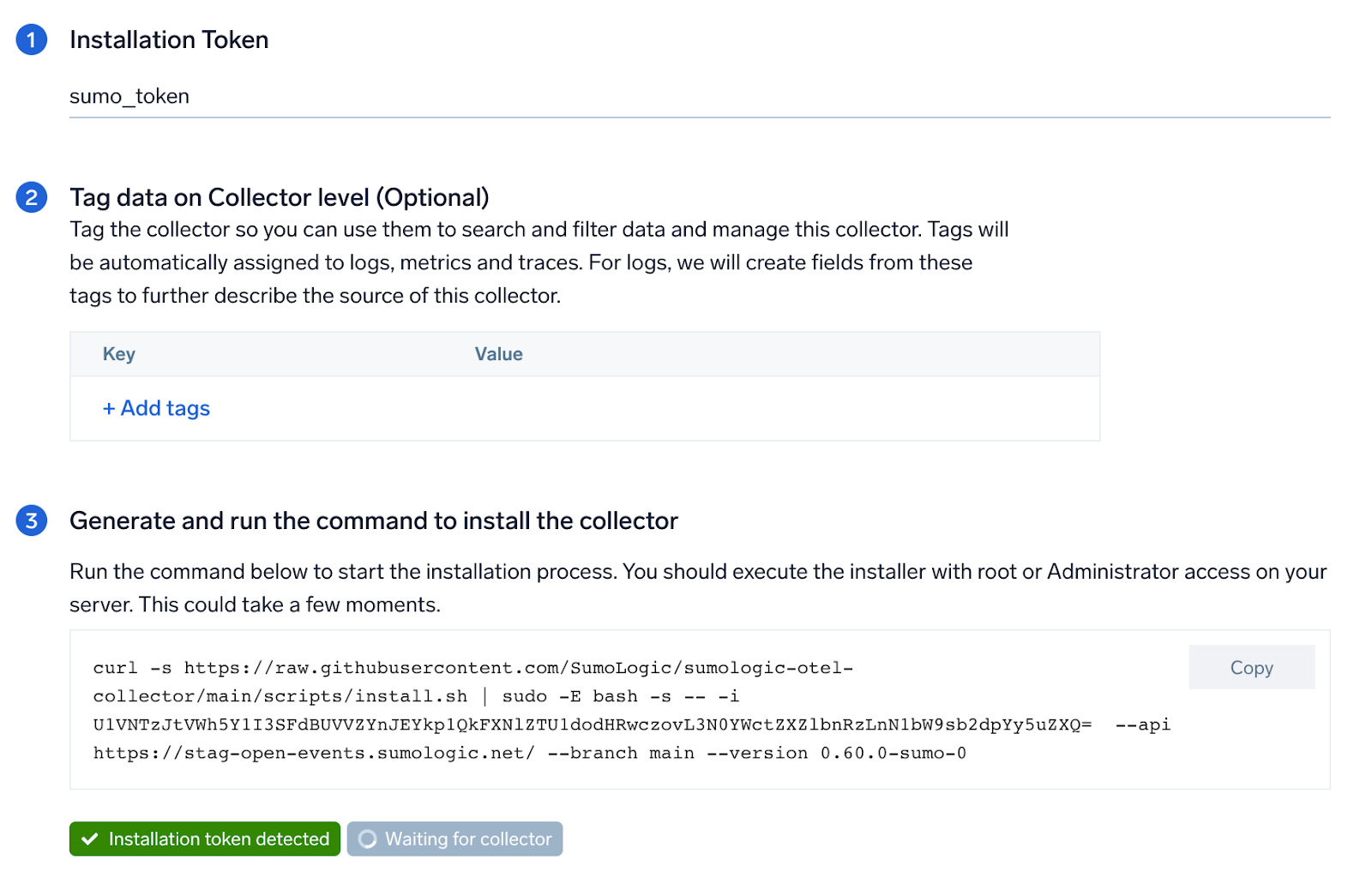
### Step 1: Set up OpenTelemetry Collector
import SetupColl from '../../../reuse/apps/opentelemetry/set-up-collector.md';
Java Management Extensions (JMX) is a standard component of the Java Platform. JMX gives developers a standard and simple way to manage resources, including services, devices, and applications. JMX is dynamic, so you can manage and monitor resources as soon as they are created, implemented, or installed.
The Sumo Logic app for JMX allows you to analyze and gain insights about Java applications. The dashboards provide a quick glance at various deployment metrics like memory, GC performance, and thread behavior, so you can troubleshoot unexpected behavior in your Java environment and the applications running in it.
:::info
This app includes [built-in monitors](#jmx-alerts). For details on creating custom monitors, refer to [Create monitors for JMX app](#create-monitors-for-jmx-app).
:::
## Metrics types
The Sumo Logic app for JMX collects metrics from Java applications via the [JMX Receiver for OpenTelemetry](https://github.com/open-telemetry/opentelemetry-collector-contrib/tree/main/receiver/jmxreceiver).
The following types of metrics are collected from JMX:
* Garbage Collection
* Memory
* Memory Pool
* Threads
* ClassLoader
For more information on different metrics collected, refer to the [JMX receiver docs](https://github.com/open-telemetry/opentelemetry-java-contrib/blob/main/jmx-metrics/docs/target-systems/jvm.md).
### Sample metrics query
```sql
sumo.datasource=jmx metric=jvm.memory.heap.used
```
## Fields creation in Sumo Logic for JMX
* `sumo.datasource`. Has fixed value of `jmx`.
* `jmx.endpoint`. The endpoint in the form of `localhost:port` used by JMX Metric Gatherer.
## Prerequisites
The JMX Receiver uses the OpenTelemetry JMX Metric Gatherer. For more details, [see their docs](https://github.com/open-telemetry/opentelemetry-collector-contrib/tree/main/receiver/jmxreceiver#details).
* Download the jar from [releases](https://github.com/open-telemetry/opentelemetry-java-contrib/releases) and place it in `/opt/` or in `C:\ProgramData`. Remember the path of the jar, which you'll use to configure the JMX app.
* Make sure the see the `opentelemetry-java-contrib-jmx-metrics` version is supported in the OpenTelemetry version you are using by going through the [releases](https://github.com/open-telemetry/opentelemetry-collector-contrib/releases) section and searching for jmxreceiver in that page. You can also check [supported jars code](https://github.com/open-telemetry/opentelemetry-collector-contrib/blob/main/receiver/jmxreceiver/supported_jars.go#L33).
* JMX Metric Gatherer metric extension supports Java 8+, though SASL is only supported where `com.sun.security.sasl.Provider` is available.
* Configure your java application to enable JMX. In most cases, you'll need to set below system variables in your applications's startup script.
```sh
-Dcom.sun.management.jmxremote.port=11099
-Dcom.sun.management.jmxremote.authenticate=false
```
* If you want to set up authentication, set the below system variables:
```sh
-Dcom.sun.management.jmxremote.authenticate=true
-Dcom.sun.management.jmxremote.password.file=/jmx.password
-Dcom.sun.management.jmxremote.access.file=/jmx.access
```
:::info
Below are docs for popular Java applications:
* [Active MQ](https://activemq.apache.org/jmx)
* [Kafka](https://kafka.apache.org/documentation/#remote_jmx)
* [Apache Tomcat](https://tomcat.apache.org/tomcat-9.0-doc/monitoring.html#Enabling_JMX_Remote)
* [Cassandra](https://cassandra.apache.org/doc/4.1/cassandra/operating/security.html#jmx-access)
* [HBase](https://hbase.apache.org/metrics.html)
* [Solr](https://solr.apache.org/guide/8_3/using-jmx-with-solr.html#configuring-jmx)
* [Zookeeper](https://zookeeper.apache.org/doc/r3.4.2/zookeeperJMX.html#ch_starting)
:::
## Collection configuration and app installation
import ConfigAppInstall from '../../../reuse/apps/opentelemetry/config-app-install.md';
### Step 1: Set up OpenTelemetry Collector
import SetupColl from '../../../reuse/apps/opentelemetry/set-up-collector.md';
 ### Step 2: Configure integration
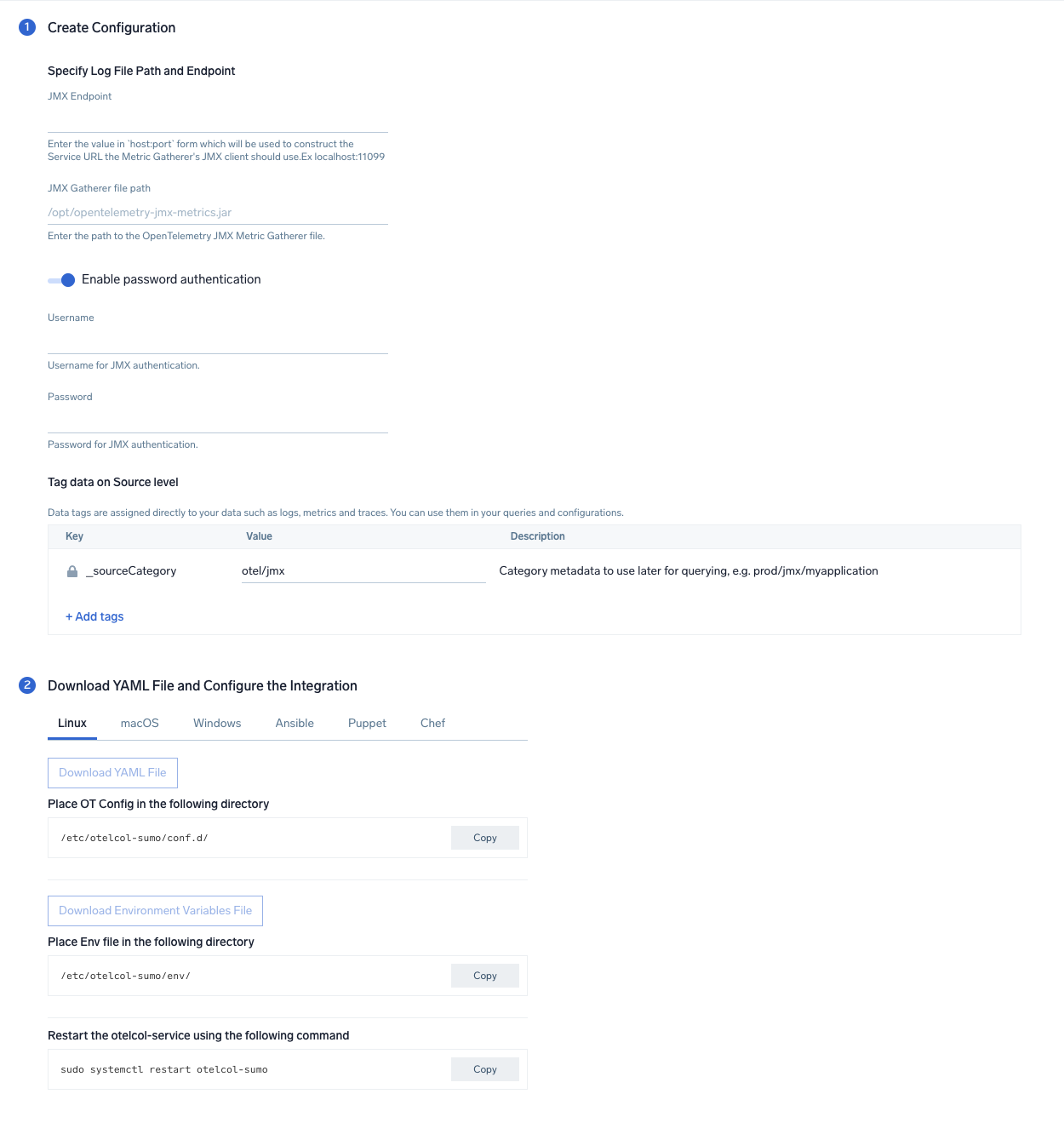
In this step, we'll configure the yaml required for JMX Collection.
Below is the input required:
- **JMX Endpoint**. Enter the value in `host:port` form which will be used to construct the Service URL, the Metric Gatherer's JMX client should use.
- **JMX Gatherer file path**. Enter the path to the OpenTelemetry JMX Metric Gatherer file configured in the prerequisites section.
- **Enable password authentication**. Toggle this if you are using password based jmx authentication.
- **Username**. Username for JMX authentication, if applicable.
- **Password**. Password for JMX authentication, if applicable.
Click on the **Download YAML File** button to get the yaml file.
import CollectorVersionNote from '../../../reuse/apps/opentelemetry/collector-version-note.md';
import EnvVarOpt from '../../../reuse/apps/opentelemetry/env-var-optional.md';
### Step 2: Configure integration
In this step, we'll configure the yaml required for JMX Collection.
Below is the input required:
- **JMX Endpoint**. Enter the value in `host:port` form which will be used to construct the Service URL, the Metric Gatherer's JMX client should use.
- **JMX Gatherer file path**. Enter the path to the OpenTelemetry JMX Metric Gatherer file configured in the prerequisites section.
- **Enable password authentication**. Toggle this if you are using password based jmx authentication.
- **Username**. Username for JMX authentication, if applicable.
- **Password**. Password for JMX authentication, if applicable.
Click on the **Download YAML File** button to get the yaml file.
import CollectorVersionNote from '../../../reuse/apps/opentelemetry/collector-version-note.md';
import EnvVarOpt from '../../../reuse/apps/opentelemetry/env-var-optional.md';
 ### Step 3: Send logs and metrics to Sumo Logic
import LogsIntro from '../../../reuse/apps/opentelemetry/send-logs-intro.md';
1. Copy the yaml to the`/etc/otelcol-sumo/conf.d/` folder for the Java application which needs to be monitored.
2. Restart the collector using:
```sh
sudo systemctl restart otelcol-sumo
```
1. Copy the yaml to the `C:\ProgramData\Sumo Logic\OpenTelemetry Collector\config\conf.d` folder in the machine that needs to be monitored.
2. Restart the collector using:
```sh
Restart-Service -Name OtelcolSumo
```
1. Copy the yaml to the `/etc/otelcol-sumo/conf.d/` folder in the Java application which needs to be monitored.
2. Restart the otelcol-sumo process using the below command:
```sh
otelcol-sumo --config /etc/otelcol-sumo/sumologic.yaml --config "glob:/etc/otelcol-sumo/conf.d/*.yaml"
```
import ChefEnv from '../../../reuse/apps/opentelemetry/chef-with-env.md';
import AnsEnv from '../../../reuse/apps/opentelemetry/ansible-with-env.md';
import PuppetEnv from '../../../reuse/apps/opentelemetry/puppet-with-env.md';
import LogsOutro from '../../../reuse/apps/opentelemetry/send-logs-outro.md';
:::note
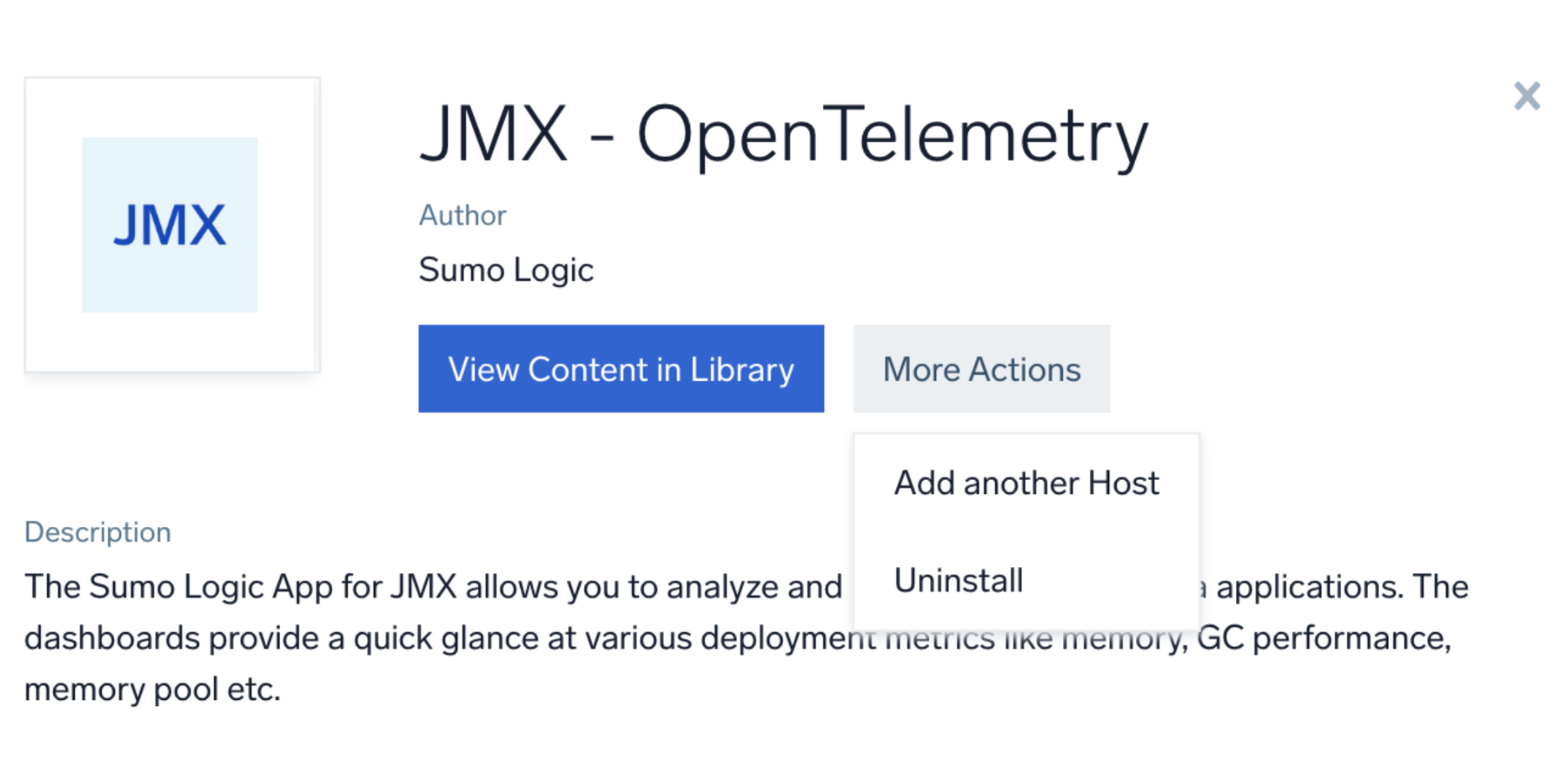
If you have multiple Java processes running on the same host, then you need to select **Add another Host** option under **More Actions** when installing an app to generate a new YAML configuration file for each of the Java process.
### Step 3: Send logs and metrics to Sumo Logic
import LogsIntro from '../../../reuse/apps/opentelemetry/send-logs-intro.md';
1. Copy the yaml to the`/etc/otelcol-sumo/conf.d/` folder for the Java application which needs to be monitored.
2. Restart the collector using:
```sh
sudo systemctl restart otelcol-sumo
```
1. Copy the yaml to the `C:\ProgramData\Sumo Logic\OpenTelemetry Collector\config\conf.d` folder in the machine that needs to be monitored.
2. Restart the collector using:
```sh
Restart-Service -Name OtelcolSumo
```
1. Copy the yaml to the `/etc/otelcol-sumo/conf.d/` folder in the Java application which needs to be monitored.
2. Restart the otelcol-sumo process using the below command:
```sh
otelcol-sumo --config /etc/otelcol-sumo/sumologic.yaml --config "glob:/etc/otelcol-sumo/conf.d/*.yaml"
```
import ChefEnv from '../../../reuse/apps/opentelemetry/chef-with-env.md';
import AnsEnv from '../../../reuse/apps/opentelemetry/ansible-with-env.md';
import PuppetEnv from '../../../reuse/apps/opentelemetry/puppet-with-env.md';
import LogsOutro from '../../../reuse/apps/opentelemetry/send-logs-outro.md';
:::note
If you have multiple Java processes running on the same host, then you need to select **Add another Host** option under **More Actions** when installing an app to generate a new YAML configuration file for each of the Java process.
 :::
## Viewing JMX dashboards
All dashboards have a set of filters that you can apply to the entire dashboard. Use these filters to drill down and examine the data to a granular level.
- You can change the time range for a dashboard or panel by selecting a predefined interval from a drop-down list, choosing a recently used time range, or specifying custom dates and times. [Learn more](/docs/dashboards/set-custom-time-ranges/).
- You can use template variables to drill down and examine the data on a granular level. For more information, see [Filtering Dashboards with Template Variables](/docs/dashboards/filter-template-variables/).
### Overview
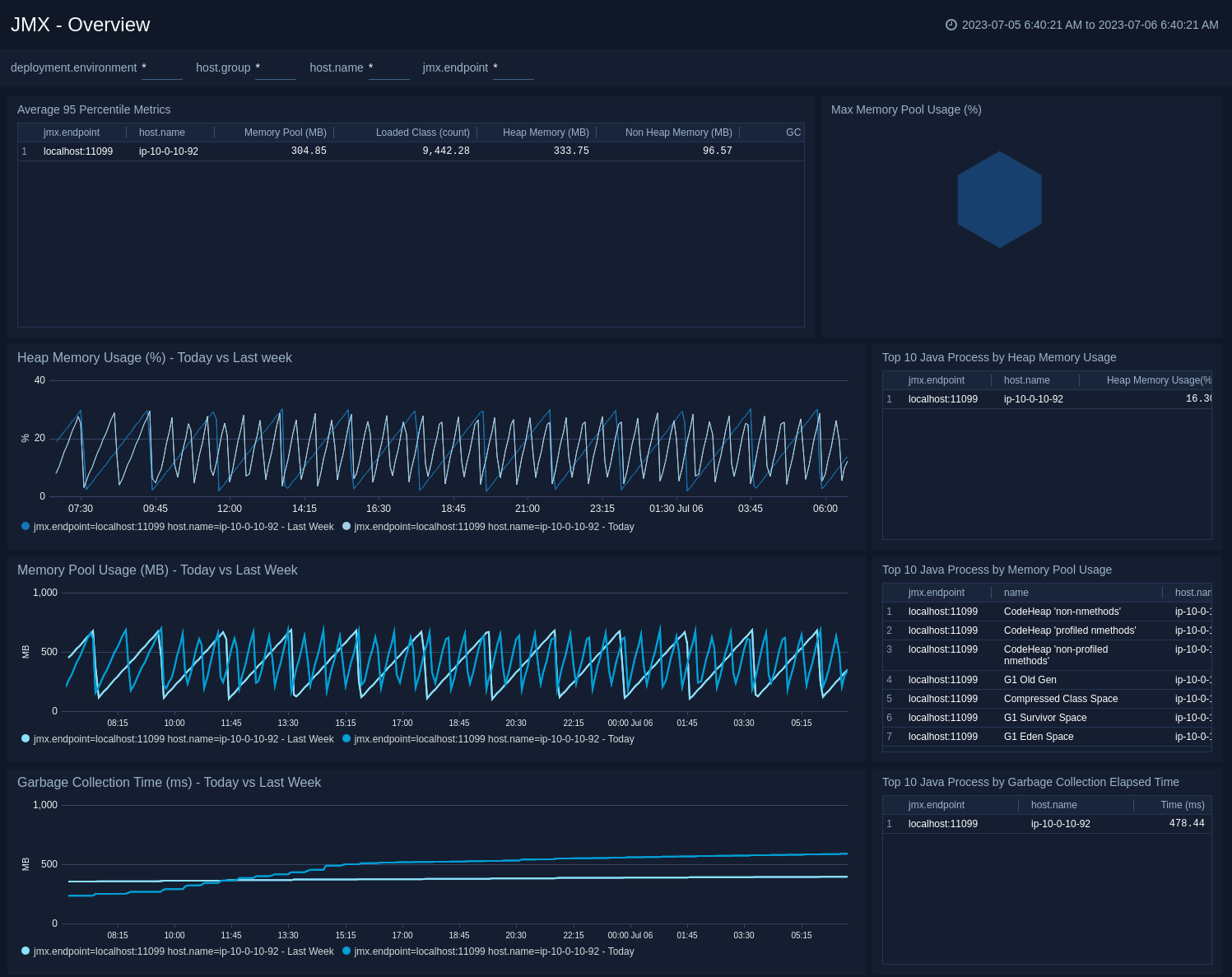
The **JMX - Overview** dashboard provides a quick summary of Heap Memory, Memory Pool and Garbage Collection time by different java processes.
Use this dashboard to:
* Identify the java processes using maximum heap memory and memory pool.
* Monitor the Percentage Heap Usage and Percentage Memory Pool Usage to avoid OOM errors.
* Compare the Heap Memory, Memory Pool and Garbage Collection time with last week's trends.
:::
## Viewing JMX dashboards
All dashboards have a set of filters that you can apply to the entire dashboard. Use these filters to drill down and examine the data to a granular level.
- You can change the time range for a dashboard or panel by selecting a predefined interval from a drop-down list, choosing a recently used time range, or specifying custom dates and times. [Learn more](/docs/dashboards/set-custom-time-ranges/).
- You can use template variables to drill down and examine the data on a granular level. For more information, see [Filtering Dashboards with Template Variables](/docs/dashboards/filter-template-variables/).
### Overview
The **JMX - Overview** dashboard provides a quick summary of Heap Memory, Memory Pool and Garbage Collection time by different java processes.
Use this dashboard to:
* Identify the java processes using maximum heap memory and memory pool.
* Monitor the Percentage Heap Usage and Percentage Memory Pool Usage to avoid OOM errors.
* Compare the Heap Memory, Memory Pool and Garbage Collection time with last week's trends.
 ### Memory
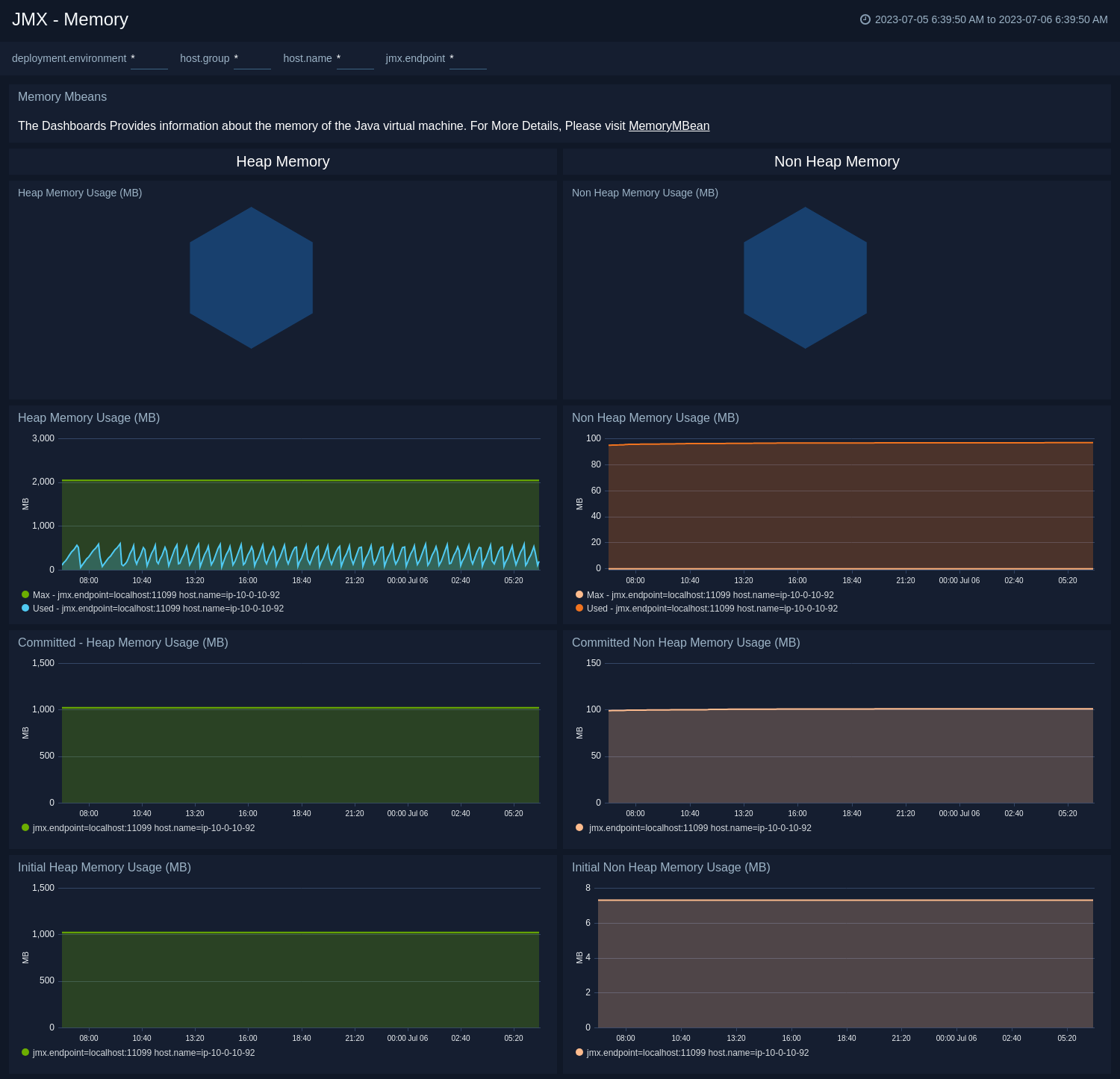
The **JMX - Memory** dashboard shows the percentage of the heap and non-heap memory used, physical and swap memory usage of your java virtual machine.
Use this dashboard to:
* Gain insights into Heap and Non-Heap memory usage.
* Identify the Max Heap and Initial Heap size configured for your application to set the appropriate memory switches.
### Memory
The **JMX - Memory** dashboard shows the percentage of the heap and non-heap memory used, physical and swap memory usage of your java virtual machine.
Use this dashboard to:
* Gain insights into Heap and Non-Heap memory usage.
* Identify the Max Heap and Initial Heap size configured for your application to set the appropriate memory switches.
 ### Garbage Collector
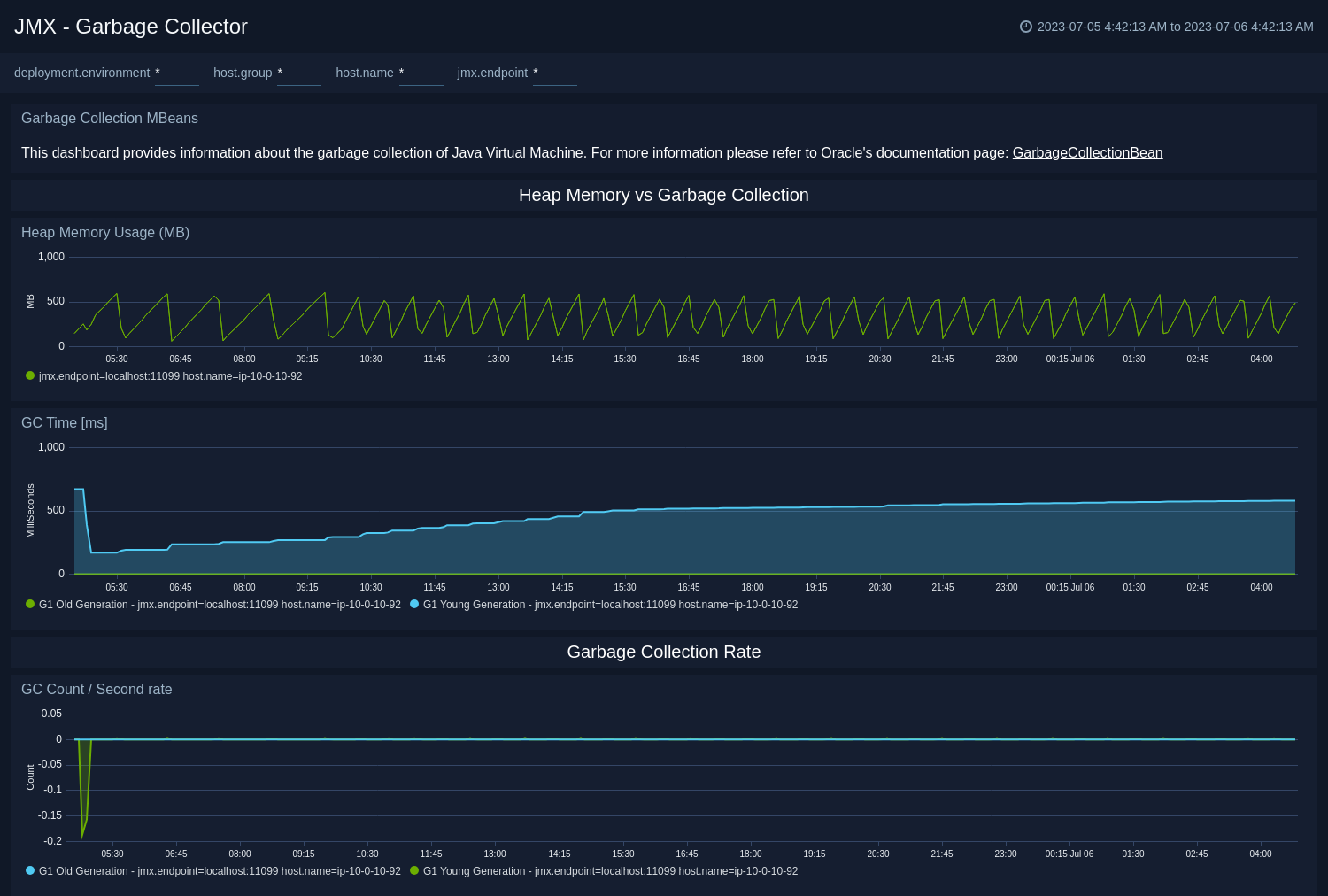
The **JMX - Garbage Collector** dashboard shows key Garbage Collector statistics like the duration of the last GC run, objects collected, threads used, and memory cleared in the last GC run of your java virtual machine.
Use this dashboard to:
* Understand the garbage collection time. If the time keeps on increasing, you may have more CPU usage.
* Understand the number of objects collected across memory pools and its impact on the Heap memory.
### Garbage Collector
The **JMX - Garbage Collector** dashboard shows key Garbage Collector statistics like the duration of the last GC run, objects collected, threads used, and memory cleared in the last GC run of your java virtual machine.
Use this dashboard to:
* Understand the garbage collection time. If the time keeps on increasing, you may have more CPU usage.
* Understand the number of objects collected across memory pools and its impact on the Heap memory.
 ### Class Loading and Threads
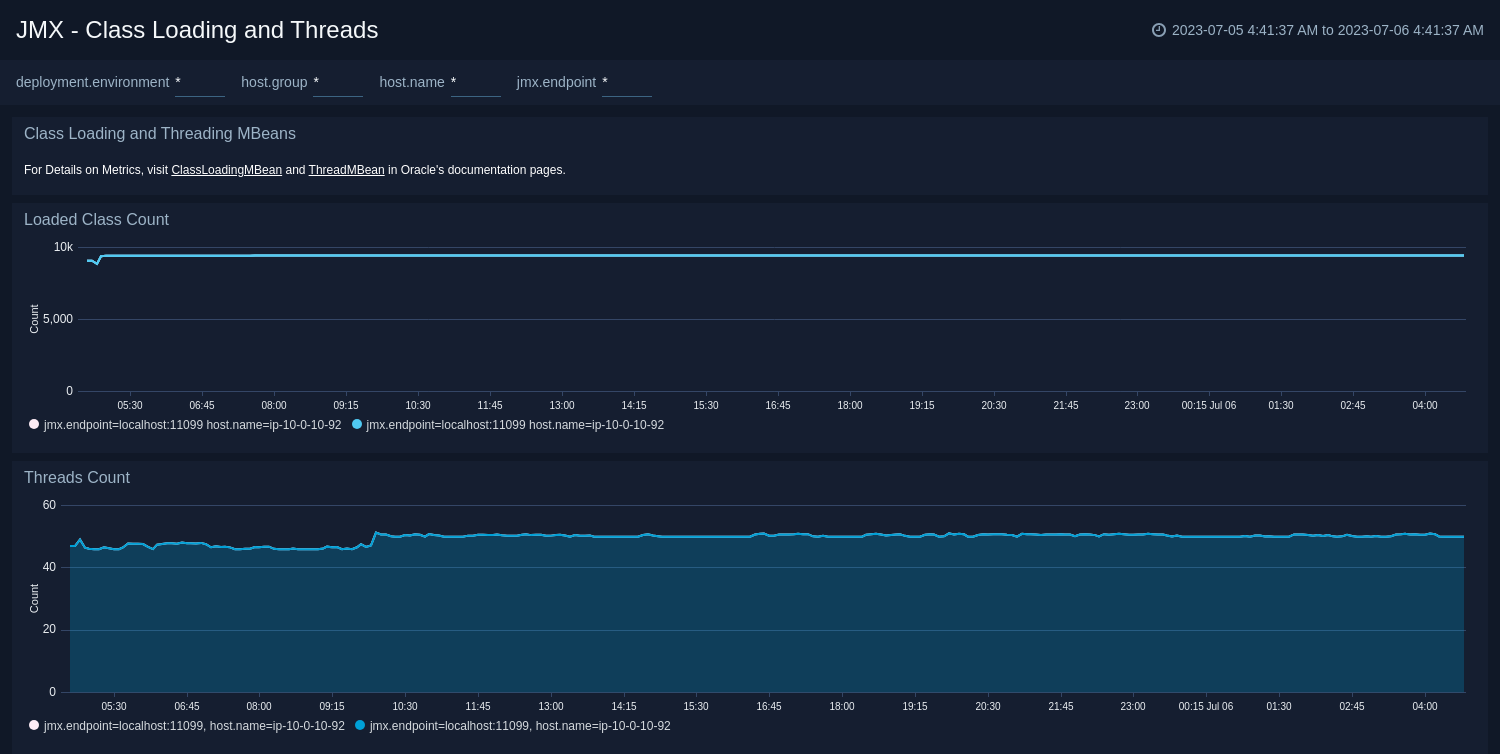
The **JMX - Class Loading and Threads** dashboard shows key information about the number and type of threads deadlocked, peak, and GC threads of your Java virtual machine running on the deployment. Use this dashboard to identify the abnormal spikes in Threads and Loaded Classes.
### Class Loading and Threads
The **JMX - Class Loading and Threads** dashboard shows key information about the number and type of threads deadlocked, peak, and GC threads of your Java virtual machine running on the deployment. Use this dashboard to identify the abnormal spikes in Threads and Loaded Classes.
 ### Memory Pool
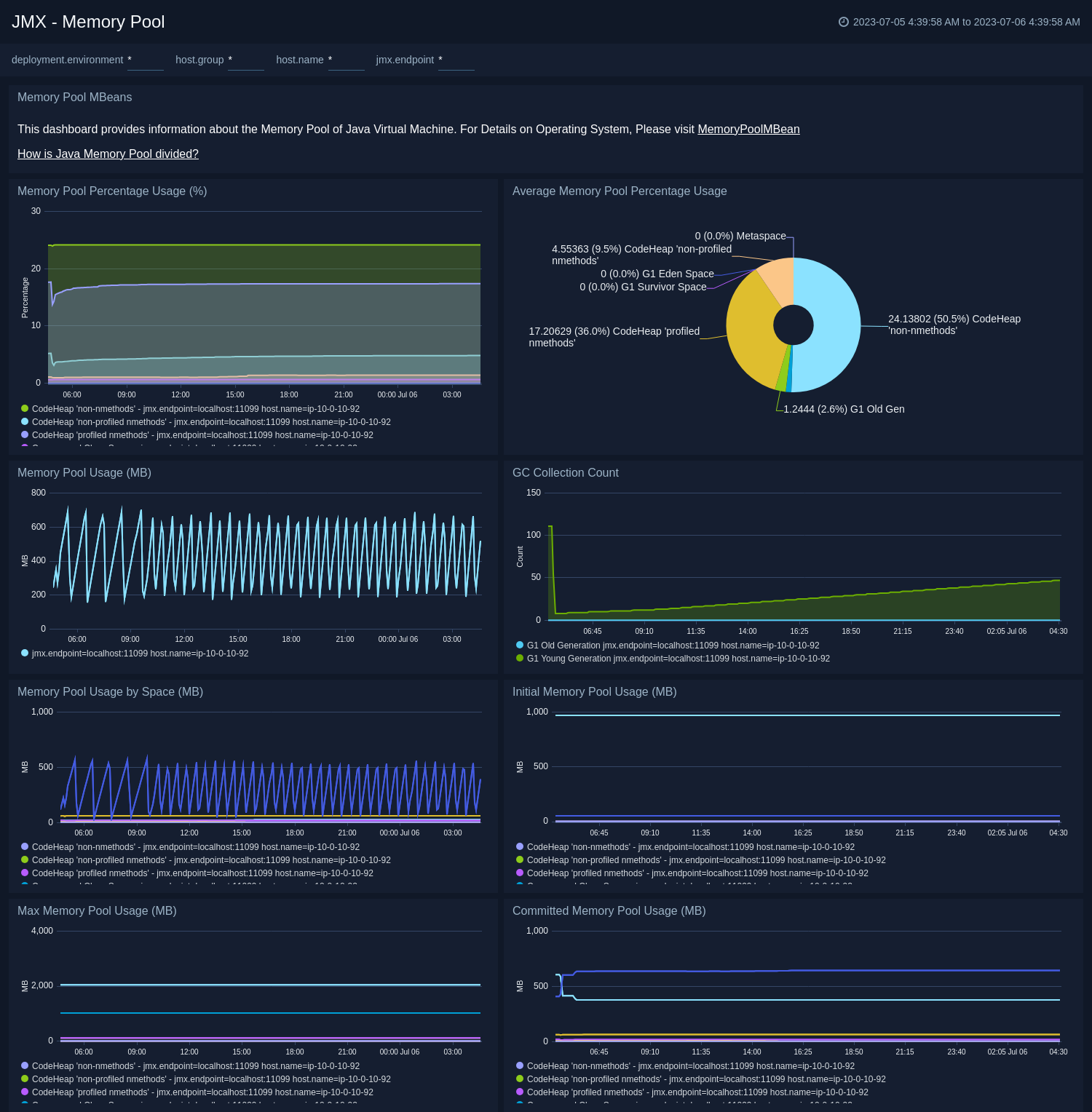
The **JMX - Memory Pool** dashboard provides key information about the memory pool usage, peak usage, collection usage, garbage collection across various memory pools of your Java virtual machine.
Use this dashboard to:
* Gain insights into memory usage across different memory pools.
* Gain insights into garbage collection impact on different memory pools.
### Memory Pool
The **JMX - Memory Pool** dashboard provides key information about the memory pool usage, peak usage, collection usage, garbage collection across various memory pools of your Java virtual machine.
Use this dashboard to:
* Gain insights into memory usage across different memory pools.
* Gain insights into garbage collection impact on different memory pools.
 ## Create monitors for JMX app
import CreateMonitors from '../../../reuse/apps/create-monitors.md';
### JMX alerts
| Alert Name | Alert Description and conditions | Alert Condition | Recover Condition |
|:--|:--|:--|:--|
| `JMX - High Heap Memory Usage Alert` | This alert gets triggered when heap memory usage exceeds threshold. | Count < 20 | Count >= 20 |
| `JMX - High Memory Pool Usage Alert` | This alert gets triggered when memory pool usage exceeds threshold. | Count < 20 | Count >= 20 |
| `JMX - High Non Heap Memory Usage Alert` | This alert gets triggered when non heap memory usage exceeds threshold. | Count < 20 | Count >= 20 |
| `JMX - High Number Of Classes Loaded Alert` | This alert gets triggered when high number of classes are loaded. | Count > 1000 | Count \<= 1000 |
## Create monitors for JMX app
import CreateMonitors from '../../../reuse/apps/create-monitors.md';
### JMX alerts
| Alert Name | Alert Description and conditions | Alert Condition | Recover Condition |
|:--|:--|:--|:--|
| `JMX - High Heap Memory Usage Alert` | This alert gets triggered when heap memory usage exceeds threshold. | Count < 20 | Count >= 20 |
| `JMX - High Memory Pool Usage Alert` | This alert gets triggered when memory pool usage exceeds threshold. | Count < 20 | Count >= 20 |
| `JMX - High Non Heap Memory Usage Alert` | This alert gets triggered when non heap memory usage exceeds threshold. | Count < 20 | Count >= 20 |
| `JMX - High Number Of Classes Loaded Alert` | This alert gets triggered when high number of classes are loaded. | Count > 1000 | Count \<= 1000 |