---
title: 1Password
description: ''
slug: /help/docs/integrations/automation-integrations/1password/
canonical: https://www.sumologic.com/help/docs/integrations/automation-integrations/1password/
---
import useBaseUrl from '@docusaurus/useBaseUrl';
 ***Version: 1.4
Updated: Sep 22, 2026***
[1Password's](https://1password.com/) User Management API using OAuth2 authentication. It supports user management operations including listing, retrieving, suspending, and reactivating users.
## Actions
* **List Users** *(Enrichment)* - Retrieves a list of all users in the 1Password account.
* **Get User** *(Enrichment)* - Retrieves detailed information about a specific user.
* **Suspend User** *(Containment)* - Suspends a user account in 1Password.
* **Reactivate User** *(Containment)* - Reactivates a previously suspended user account.
## 1Password configuration
1. Login to your 1Password Portal.
2. Go to **Integrations** > **Create OAuth2 Client**.
3. Enter the name of the OAuth2 client, for example, `Cloud SOAR Integration`.
4. In the **Redirect URI** field, for example, `https:///auth/callback`.
5. Click **Create** to create the OAuth2 client.
6. After the client is created, note down the **Client ID** and **Client Secret**.
7. Make sure the OAuth2 client has the following permissions:
* `Get users`
* `List users`
* `Suspend users`
* `Reactivate users`
8. Find the **Account UUID**.
## Configure 1Password in Automation Service and Cloud SOAR
import IntegrationsAuth from '../../reuse/integrations-authentication.md';
import IntegrationCertificate from '../../reuse/automation-service/integration-certificate.md';
import IntegrationEngine from '../../reuse/automation-service/integration-engine.md';
import IntegrationLabel from '../../reuse/automation-service/integration-label.md';
import IntegrationProxy from '../../reuse/automation-service/integration-proxy.md';
import IntegrationTimeout from '../../reuse/automation-service/integration-timeout.md';
*
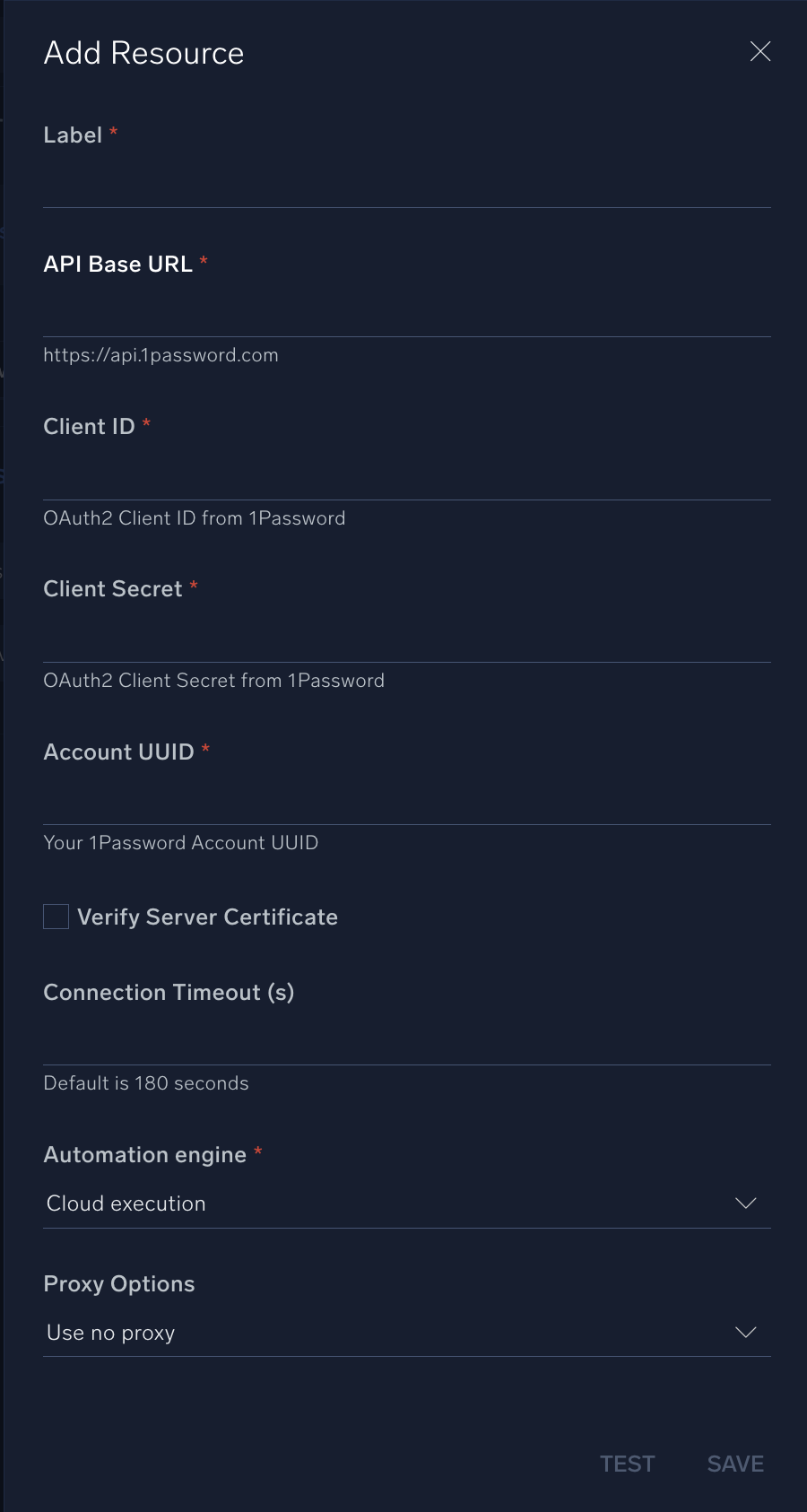
* **API Base URL**. Enter your 1Password API URL, for example, `https://api.1password.com`
* **Client ID**. Enter the Client ID.
* **Client Secret**. Enter the Client Secret.
* **Account UUID**. Enter the Account UUID.
*
*
*
*
***Version: 1.4
Updated: Sep 22, 2026***
[1Password's](https://1password.com/) User Management API using OAuth2 authentication. It supports user management operations including listing, retrieving, suspending, and reactivating users.
## Actions
* **List Users** *(Enrichment)* - Retrieves a list of all users in the 1Password account.
* **Get User** *(Enrichment)* - Retrieves detailed information about a specific user.
* **Suspend User** *(Containment)* - Suspends a user account in 1Password.
* **Reactivate User** *(Containment)* - Reactivates a previously suspended user account.
## 1Password configuration
1. Login to your 1Password Portal.
2. Go to **Integrations** > **Create OAuth2 Client**.
3. Enter the name of the OAuth2 client, for example, `Cloud SOAR Integration`.
4. In the **Redirect URI** field, for example, `https:///auth/callback`.
5. Click **Create** to create the OAuth2 client.
6. After the client is created, note down the **Client ID** and **Client Secret**.
7. Make sure the OAuth2 client has the following permissions:
* `Get users`
* `List users`
* `Suspend users`
* `Reactivate users`
8. Find the **Account UUID**.
## Configure 1Password in Automation Service and Cloud SOAR
import IntegrationsAuth from '../../reuse/integrations-authentication.md';
import IntegrationCertificate from '../../reuse/automation-service/integration-certificate.md';
import IntegrationEngine from '../../reuse/automation-service/integration-engine.md';
import IntegrationLabel from '../../reuse/automation-service/integration-label.md';
import IntegrationProxy from '../../reuse/automation-service/integration-proxy.md';
import IntegrationTimeout from '../../reuse/automation-service/integration-timeout.md';
*
* **API Base URL**. Enter your 1Password API URL, for example, `https://api.1password.com`
* **Client ID**. Enter the Client ID.
* **Client Secret**. Enter the Client Secret.
* **Account UUID**. Enter the Account UUID.
*
*
*
*
 For information about 1Password, see [1Password documentation](https://support.1password.com/).
## Category
Identity and Access Management
## Change Log
| Version | Date | Description |
|:--|:--|:--|
| v1.4 | Sep 22, 2026 | Migrated to 1Password v1 APIs, improved integration stability, and added filtering support to the **List Users** action. |
| v1.3 | June 18, 2026 | Updated the integration to allow 1Password to identify API calls from the Sumo Logic integration in their logs for easier tracking and troubleshooting. |
| v1.2 | April 8, 2026 | Upgraded the `python3_generic` Docker image (Python 3.8) to `python3_12_generic` (Python 3.12) to address Python 3.8 end-of-life and improve security and performance. |
| v1.1 | Mar 17, 2026 | Initial release of the 1Password integration. |
## Additional resources
For 1Password, Sumo Logic offers the [1Password source](/docs/send-data/hosted-collectors/cloud-to-cloud-integration-framework/1password-source/) and the [1Password app](/docs/integrations/saas-cloud/1password/) to collect and visualize your 1Password data.
For information about 1Password, see [1Password documentation](https://support.1password.com/).
## Category
Identity and Access Management
## Change Log
| Version | Date | Description |
|:--|:--|:--|
| v1.4 | Sep 22, 2026 | Migrated to 1Password v1 APIs, improved integration stability, and added filtering support to the **List Users** action. |
| v1.3 | June 18, 2026 | Updated the integration to allow 1Password to identify API calls from the Sumo Logic integration in their logs for easier tracking and troubleshooting. |
| v1.2 | April 8, 2026 | Upgraded the `python3_generic` Docker image (Python 3.8) to `python3_12_generic` (Python 3.12) to address Python 3.8 end-of-life and improve security and performance. |
| v1.1 | Mar 17, 2026 | Initial release of the 1Password integration. |
## Additional resources
For 1Password, Sumo Logic offers the [1Password source](/docs/send-data/hosted-collectors/cloud-to-cloud-integration-framework/1password-source/) and the [1Password app](/docs/integrations/saas-cloud/1password/) to collect and visualize your 1Password data.