---
title: Akenza
description: ''
slug: /help/docs/integrations/automation-integrations/akenza/
canonical: https://www.sumologic.com/help/docs/integrations/automation-integrations/akenza/
---
import useBaseUrl from '@docusaurus/useBaseUrl';
 ***Version: 1.2
Updated: April 8, 2026***
**Akenza** is leading the Internet of Things toward broad applicability by reducing technical complexity and empowering companies to create their own smart applications.
## Actions
* **Get Organization** (*Enrichment*) - Get organization details.
* **Create Workspace** (*Containment*) - Create workspace.
* **List Workspaces** (*Enrichment*) - List workspaces.
* **Get Workspace** (*Enrichment*) - Get workspace details.
* **Delete Workspace** (*Containment*) - Remove workspace.
* **Create Device Type** (*Containment*) - Create new device type.
* **List Device Types** (*Enrichment*) - List device types.
* **Get Device Type** (*Enrichment*) - Get device type.
* **Delete Device Type** (*Containment*) - remove device type.
* **List Data Flows** (*Enrichment*) - List data flows on device.
* **Query Data Device** (*Enrichment*) - Query device data.
## Akenza configuration
1. Log in to the Akenza platform with your email and password and follow the link for configuration.
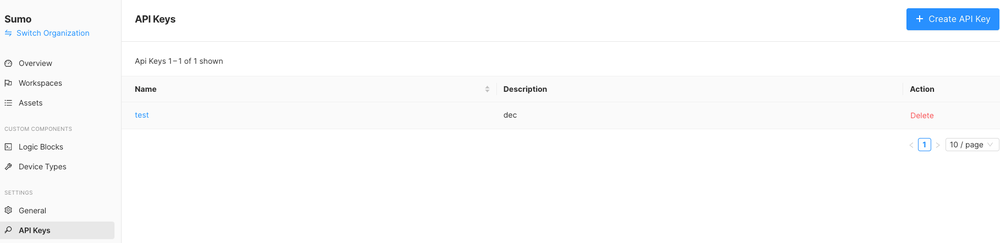
1. Create an [API key](https://docs.akenza.io/akenza.io/get-started/reference/api-documentation#api-keys) in the Akenza UI by locating an API key and clicking on the button **Generate API Key**.
***Version: 1.2
Updated: April 8, 2026***
**Akenza** is leading the Internet of Things toward broad applicability by reducing technical complexity and empowering companies to create their own smart applications.
## Actions
* **Get Organization** (*Enrichment*) - Get organization details.
* **Create Workspace** (*Containment*) - Create workspace.
* **List Workspaces** (*Enrichment*) - List workspaces.
* **Get Workspace** (*Enrichment*) - Get workspace details.
* **Delete Workspace** (*Containment*) - Remove workspace.
* **Create Device Type** (*Containment*) - Create new device type.
* **List Device Types** (*Enrichment*) - List device types.
* **Get Device Type** (*Enrichment*) - Get device type.
* **Delete Device Type** (*Containment*) - remove device type.
* **List Data Flows** (*Enrichment*) - List data flows on device.
* **Query Data Device** (*Enrichment*) - Query device data.
## Akenza configuration
1. Log in to the Akenza platform with your email and password and follow the link for configuration.
1. Create an [API key](https://docs.akenza.io/akenza.io/get-started/reference/api-documentation#api-keys) in the Akenza UI by locating an API key and clicking on the button **Generate API Key**.
 ## Configure Akenza in Automation Service and Cloud SOAR
import IntegrationsAuth from '../../reuse/integrations-authentication.md';
import IntegrationCertificate from '../../reuse/automation-service/integration-certificate.md';
import IntegrationEngine from '../../reuse/automation-service/integration-engine.md';
import IntegrationLabel from '../../reuse/automation-service/integration-label.md';
import IntegrationProxy from '../../reuse/automation-service/integration-proxy.md';
import IntegrationTimeout from '../../reuse/automation-service/integration-timeout.md';
*
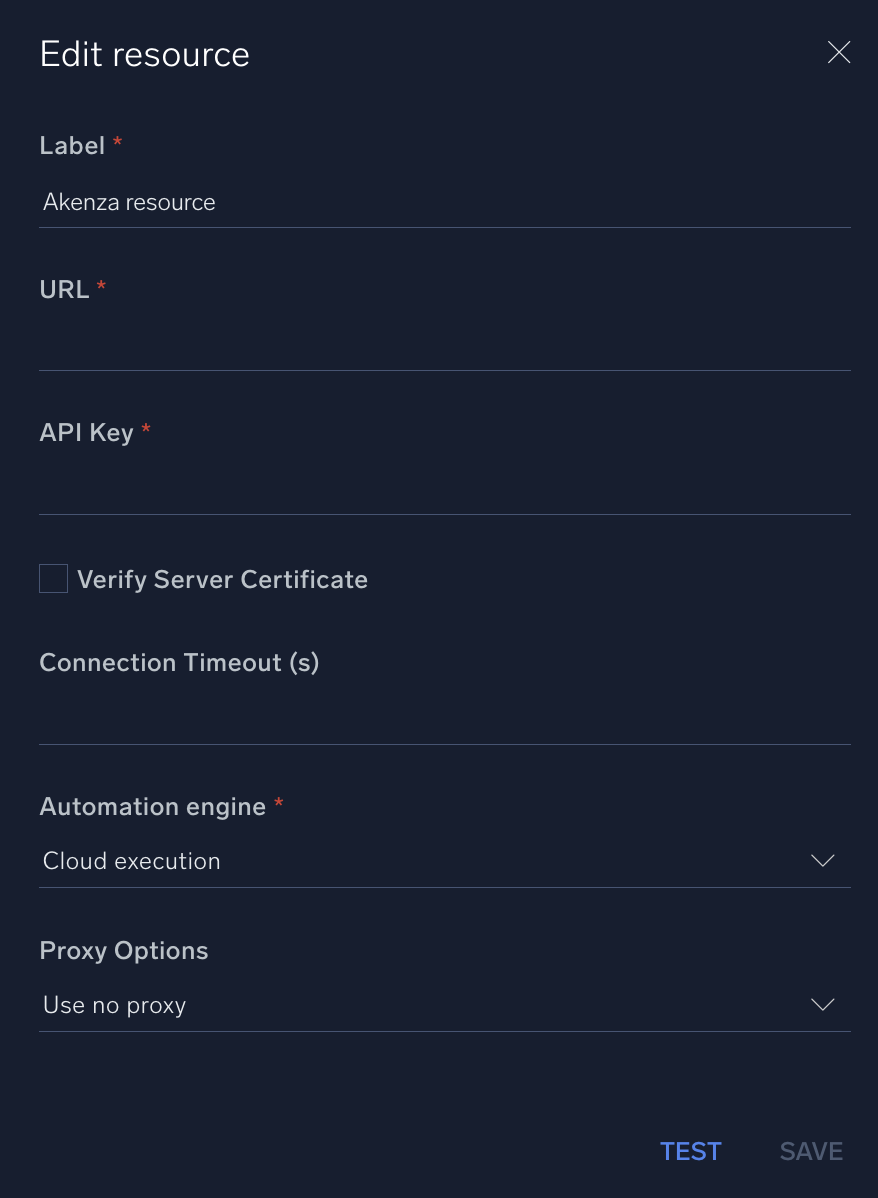
* **URL**. Enter the Akenza API URL. The default value is `https://api.akenza.io`
* **API Key**. Enter the API key you created [above](#akenza-configuration).
*
*
*
*
## Configure Akenza in Automation Service and Cloud SOAR
import IntegrationsAuth from '../../reuse/integrations-authentication.md';
import IntegrationCertificate from '../../reuse/automation-service/integration-certificate.md';
import IntegrationEngine from '../../reuse/automation-service/integration-engine.md';
import IntegrationLabel from '../../reuse/automation-service/integration-label.md';
import IntegrationProxy from '../../reuse/automation-service/integration-proxy.md';
import IntegrationTimeout from '../../reuse/automation-service/integration-timeout.md';
*
* **URL**. Enter the Akenza API URL. The default value is `https://api.akenza.io`
* **API Key**. Enter the API key you created [above](#akenza-configuration).
*
*
*
*
 For information about Akenza, see [Akenza documentation](https://docs.akenza.io/akenza.io/get-started/reference/api-documentation).
## Change Log
| Version | Date | Description |
|:--|:--|:--|
| v1.2 | April 8, 2026 | Upgraded the `python3_generic` Docker image (Python 3.8) to `python3_12_generic` (Python 3.12) to address Python 3.8 end-of-life and improve security and performance. |
| v1.1 | July 18, 2023 | Removed leading and trailing spaces from the integration. |
| | December 14, 2022 | Initial release of the Akenza integration. |
For information about Akenza, see [Akenza documentation](https://docs.akenza.io/akenza.io/get-started/reference/api-documentation).
## Change Log
| Version | Date | Description |
|:--|:--|:--|
| v1.2 | April 8, 2026 | Upgraded the `python3_generic` Docker image (Python 3.8) to `python3_12_generic` (Python 3.12) to address Python 3.8 end-of-life and improve security and performance. |
| v1.1 | July 18, 2023 | Removed leading and trailing spaces from the integration. |
| | December 14, 2022 | Initial release of the Akenza integration. |