---
title: AlienVault OTX
description: ''
slug: /help/docs/integrations/automation-integrations/alienvault-otx/
canonical: https://www.sumologic.com/help/docs/integrations/automation-integrations/alienvault-otx/
---
import useBaseUrl from '@docusaurus/useBaseUrl';
 ***Version: 1.12
Updated: Sep 04, 2023***
Enrich incident evidence with threat intelligence data from AlienVault OTX.
## Actions
* **Domain Info** (*Enrichment*) - Gather information of specific domain.
* **Domain Reputation** (*Enrichment*) - Gather the reputation score of a specific domain.
* **File Info** (*Enrichment*) - Gather information on a specific file.
* **File Reputation** (*Enrichment*) - Gather the reputation score of a specific file.
* **Geo Locate Domain Info** (*Enrichment*) - Geographically locate a specific domain.
* **IP Reputation** (*Enrichment*) - Gather the reputation score for a specific IP address.
* **Page Links** (*Enrichment*) - Gather page link information.
* **Reverse DNS** (*Enrichment*) - Gather reverse DNS information.
* **Scan URL** (*Enrichment*) - Scan a specific URL.
* **URL Info** (*Enrichment*) - Gather information on a specific URL.
* **URL Reputation** (*Enrichment*) - Gather the reputation score for a specific URL.
* **Whois Lookup** (*Enrichment*) - Gather Whois information.
## External Libraries
* [AlienVault OTX](https://github.com/AlienVault-OTX/OTX-Python-SDK/blob/master/LICENSE)
## Category
Threat Intelligence-Reputation
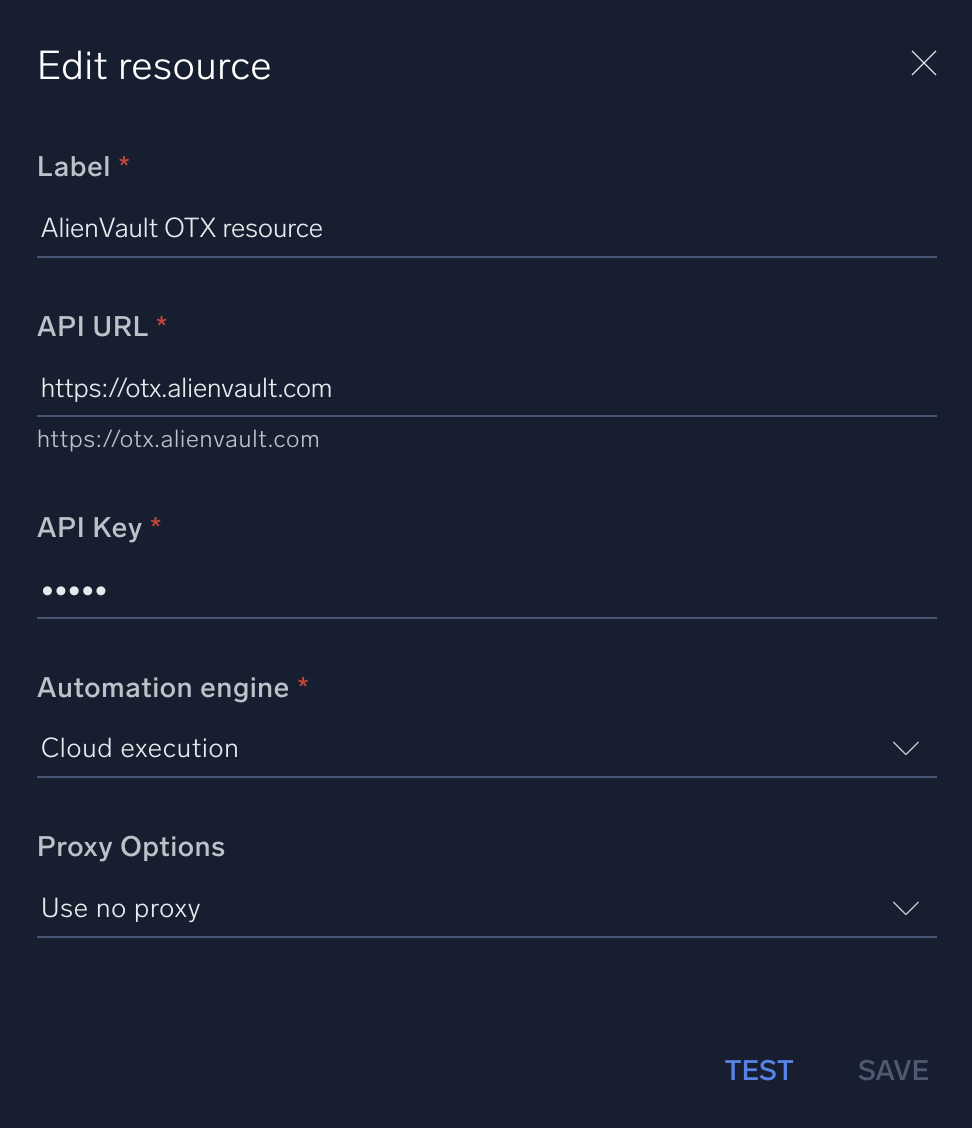
## Configure AlienVault in Automation Service and Cloud SOAR
import IntegrationsAuth from '../../reuse/integrations-authentication.md';
import IntegrationCertificate from '../../reuse/automation-service/integration-certificate.md';
import IntegrationEngine from '../../reuse/automation-service/integration-engine.md';
import IntegrationLabel from '../../reuse/automation-service/integration-label.md';
import IntegrationProxy from '../../reuse/automation-service/integration-proxy.md';
import IntegrationTimeout from '../../reuse/automation-service/integration-timeout.md';
*
* **API URL**. Enter your AlienVault OTX API URL. The default value is `https://otx.alienvault.com`
* **API Key**. Enter your [AlienVault OTX API key](https://cybersecurity.att.com/documentation/usm-anywhere/user-guide/otx/otx-key.htm).
*
*
***Version: 1.12
Updated: Sep 04, 2023***
Enrich incident evidence with threat intelligence data from AlienVault OTX.
## Actions
* **Domain Info** (*Enrichment*) - Gather information of specific domain.
* **Domain Reputation** (*Enrichment*) - Gather the reputation score of a specific domain.
* **File Info** (*Enrichment*) - Gather information on a specific file.
* **File Reputation** (*Enrichment*) - Gather the reputation score of a specific file.
* **Geo Locate Domain Info** (*Enrichment*) - Geographically locate a specific domain.
* **IP Reputation** (*Enrichment*) - Gather the reputation score for a specific IP address.
* **Page Links** (*Enrichment*) - Gather page link information.
* **Reverse DNS** (*Enrichment*) - Gather reverse DNS information.
* **Scan URL** (*Enrichment*) - Scan a specific URL.
* **URL Info** (*Enrichment*) - Gather information on a specific URL.
* **URL Reputation** (*Enrichment*) - Gather the reputation score for a specific URL.
* **Whois Lookup** (*Enrichment*) - Gather Whois information.
## External Libraries
* [AlienVault OTX](https://github.com/AlienVault-OTX/OTX-Python-SDK/blob/master/LICENSE)
## Category
Threat Intelligence-Reputation
## Configure AlienVault in Automation Service and Cloud SOAR
import IntegrationsAuth from '../../reuse/integrations-authentication.md';
import IntegrationCertificate from '../../reuse/automation-service/integration-certificate.md';
import IntegrationEngine from '../../reuse/automation-service/integration-engine.md';
import IntegrationLabel from '../../reuse/automation-service/integration-label.md';
import IntegrationProxy from '../../reuse/automation-service/integration-proxy.md';
import IntegrationTimeout from '../../reuse/automation-service/integration-timeout.md';
*
* **API URL**. Enter your AlienVault OTX API URL. The default value is `https://otx.alienvault.com`
* **API Key**. Enter your [AlienVault OTX API key](https://cybersecurity.att.com/documentation/usm-anywhere/user-guide/otx/otx-key.htm).
*
*
 For information about AlienVault, see [AlienVault documentation](https://cybersecurity.att.com/documentation/).
## Change Log
| Version | Date | Description |
|:--|:--|:--|
| v1.12 | September 4, 2023 | Changed the **Scan URL** action field type from list to text. |
| v1.11 | August 23, 2023 | Refactored the integration. |
| v1.8 | June 29, 2023 | Renamed the integration from AlienVault OTX OIF to AlienVault OTX. |
| v1.7 | June 15, 2023 | Updated the integration with environmental variables. |
| v1.4 | March 3, 2023 |
For information about AlienVault, see [AlienVault documentation](https://cybersecurity.att.com/documentation/).
## Change Log
| Version | Date | Description |
|:--|:--|:--|
| v1.12 | September 4, 2023 | Changed the **Scan URL** action field type from list to text. |
| v1.11 | August 23, 2023 | Refactored the integration. |
| v1.8 | June 29, 2023 | Renamed the integration from AlienVault OTX OIF to AlienVault OTX. |
| v1.7 | June 15, 2023 | Updated the integration with environmental variables. |
| v1.4 | March 3, 2023 | - Updated the **IP Reputation** action.
- Updated the integration fields label.
|
| v1.3 | January 25 | Added the environment class. |
| v1.2 | July 19, 2022 | - Changed the API key field type to password.
- Changed the logo.
|
| | October 3, 2019 | Initial release of the AlienVault OTX integration. |