---
title: Automox
description: ''
slug: /help/docs/integrations/automation-integrations/automox/
canonical: https://www.sumologic.com/help/docs/integrations/automation-integrations/automox/
---
import useBaseUrl from '@docusaurus/useBaseUrl';
 ***Version: 1.2
Updated: April 27, 2026***
Automox is a cloud-native patching platform that automates patch management across Windows, macOS, Linux, and third-party software including Adobe, Java, Firefox, Chrome, and Windows.
## Actions
* **List Devices** (*Enrichment*) - Retrieve a detailed list of all devices for the authenticated user.
* **List Organizations** (*Enrichment*) - Retrieve a detailed list of all organizations for the authenticated user.
* **List Users** (*Enrichment*) - Retrieve a list of all users with access to an organization.
* **List Server Groups** (*Enrichment*) - Retrieve all server group objects for the authenticated user.
* **List Tasks** (*Enrichment*) - List all tasks for an organization, with the ability to filter and sort results.
* **Run Command** (*Containment*) - Force a device to Scan, Patch, or Reboot for immediate execution.
* **Submit CSV File** (*Containment*) - Upload a vulnerability report to Automox.
* **Submit CSV File** (*Containment*) - Upload a vulnerability report to Automox.
* **Update Task** (*Containment*) - Change the state of a task.
## Automox configuration
Follow these steps to [get your API key from Automox](https://docs.automox.com/product/Product_Documentation/Settings/Managing_Keys.htm):
1. Select **Keys** from the menu.
***Version: 1.2
Updated: April 27, 2026***
Automox is a cloud-native patching platform that automates patch management across Windows, macOS, Linux, and third-party software including Adobe, Java, Firefox, Chrome, and Windows.
## Actions
* **List Devices** (*Enrichment*) - Retrieve a detailed list of all devices for the authenticated user.
* **List Organizations** (*Enrichment*) - Retrieve a detailed list of all organizations for the authenticated user.
* **List Users** (*Enrichment*) - Retrieve a list of all users with access to an organization.
* **List Server Groups** (*Enrichment*) - Retrieve all server group objects for the authenticated user.
* **List Tasks** (*Enrichment*) - List all tasks for an organization, with the ability to filter and sort results.
* **Run Command** (*Containment*) - Force a device to Scan, Patch, or Reboot for immediate execution.
* **Submit CSV File** (*Containment*) - Upload a vulnerability report to Automox.
* **Submit CSV File** (*Containment*) - Upload a vulnerability report to Automox.
* **Update Task** (*Containment*) - Change the state of a task.
## Automox configuration
Follow these steps to [get your API key from Automox](https://docs.automox.com/product/Product_Documentation/Settings/Managing_Keys.htm):
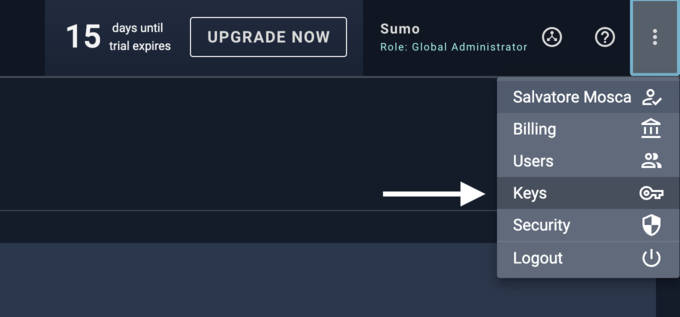
1. Select **Keys** from the menu.
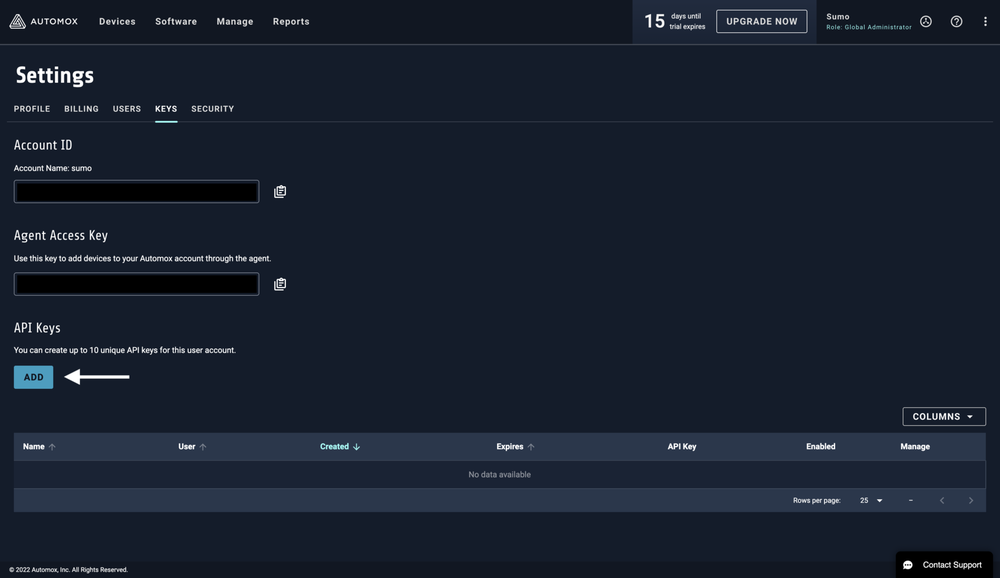
 1. Click the **ADD** button to add a new API key.
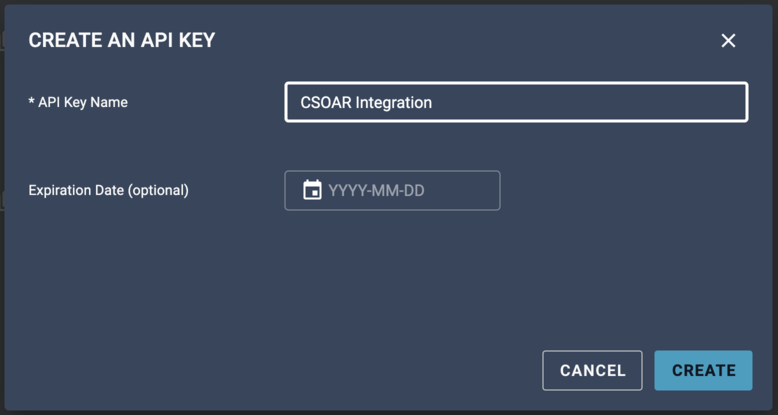
 1. Choose a name for this key and then click the button to generate the new key.
 1. Copy the API key.
 ## Configure Automox in Automation Service and Cloud SOAR
import IntegrationsAuth from '../../reuse/integrations-authentication.md';
import IntegrationCertificate from '../../reuse/automation-service/integration-certificate.md';
import IntegrationEngine from '../../reuse/automation-service/integration-engine.md';
import IntegrationLabel from '../../reuse/automation-service/integration-label.md';
import IntegrationProxy from '../../reuse/automation-service/integration-proxy.md';
import IntegrationTimeout from '../../reuse/automation-service/integration-timeout.md';
*
* **URL**. Enter your Automox site URL. The default value is `https://console.automox.com`
* **API Key**. Enter the API key you [copied earlier](#automox-configuration).
*
*
*
*
## Configure Automox in Automation Service and Cloud SOAR
import IntegrationsAuth from '../../reuse/integrations-authentication.md';
import IntegrationCertificate from '../../reuse/automation-service/integration-certificate.md';
import IntegrationEngine from '../../reuse/automation-service/integration-engine.md';
import IntegrationLabel from '../../reuse/automation-service/integration-label.md';
import IntegrationProxy from '../../reuse/automation-service/integration-proxy.md';
import IntegrationTimeout from '../../reuse/automation-service/integration-timeout.md';
*
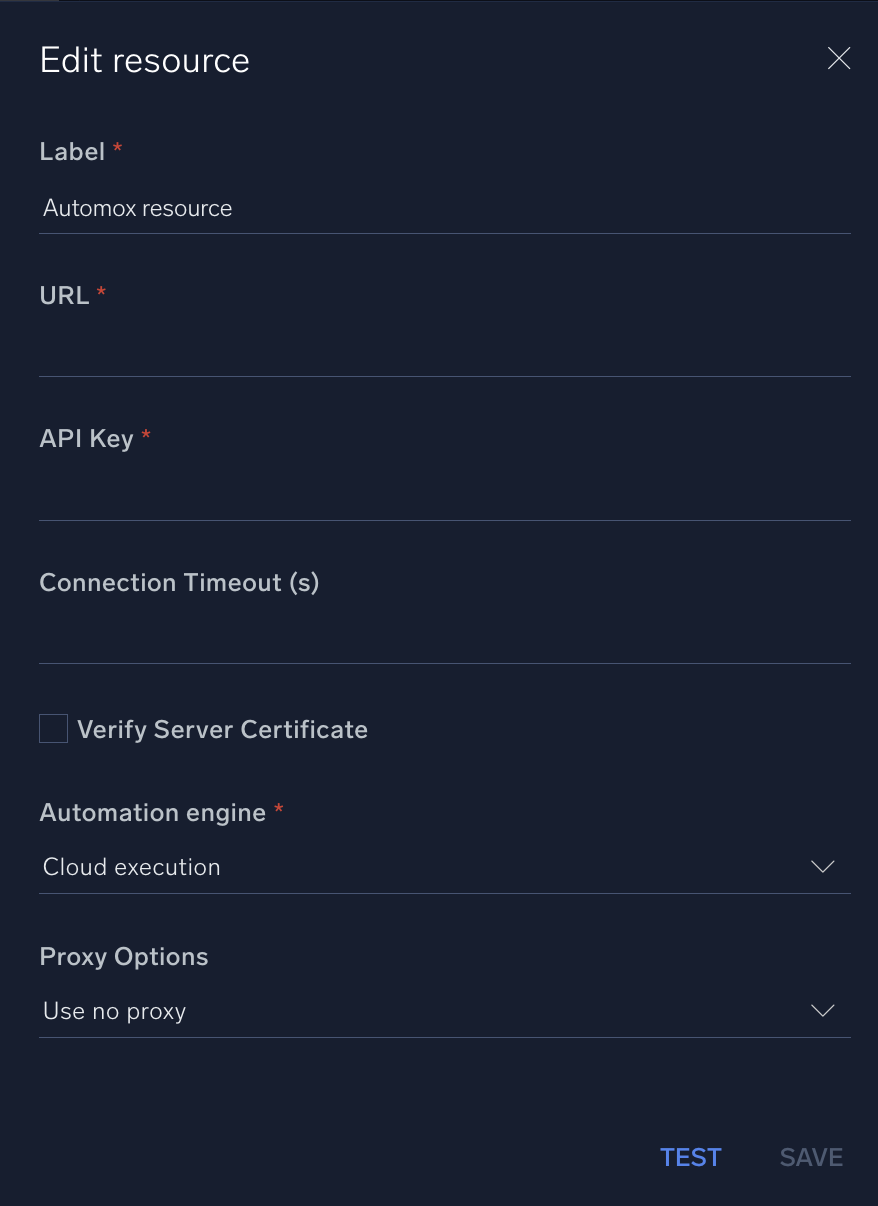
* **URL**. Enter your Automox site URL. The default value is `https://console.automox.com`
* **API Key**. Enter the API key you [copied earlier](#automox-configuration).
*
*
*
*
 For information about Automox, see [Automox documentation](https://docs.automox.com/product/Home.htm).
## Change Log
| Version | Date | Description |
|:--|:--|:--|
| v1.2 | April 27, 2026 | Upgraded the `python3_generic` Docker image (Python 3.8) to `python3_12_generic` (Python 3.12) to address Python 3.8 end-of-life and improve security and performance. |
| v1.1 | July 3, 2023 | Updated the integration with environmental variables. |
| | July 7, 2022 | Initial release of the Automox integration. |
## Additional resources
For Automox, Sumo Logic offers the [Automox source](/docs/send-data/hosted-collectors/cloud-to-cloud-integration-framework/automox-source/) and the [Automox app](/docs/integrations/saas-cloud/automox/) to collect and visualize your Automox data.
For information about Automox, see [Automox documentation](https://docs.automox.com/product/Home.htm).
## Change Log
| Version | Date | Description |
|:--|:--|:--|
| v1.2 | April 27, 2026 | Upgraded the `python3_generic` Docker image (Python 3.8) to `python3_12_generic` (Python 3.12) to address Python 3.8 end-of-life and improve security and performance. |
| v1.1 | July 3, 2023 | Updated the integration with environmental variables. |
| | July 7, 2022 | Initial release of the Automox integration. |
## Additional resources
For Automox, Sumo Logic offers the [Automox source](/docs/send-data/hosted-collectors/cloud-to-cloud-integration-framework/automox-source/) and the [Automox app](/docs/integrations/saas-cloud/automox/) to collect and visualize your Automox data.