---
title: CA Service Desk
description: ''
slug: /help/docs/integrations/automation-integrations/ca-service-desk/
canonical: https://www.sumologic.com/help/docs/integrations/automation-integrations/ca-service-desk/
---
import useBaseUrl from '@docusaurus/useBaseUrl';
 ***Version: 1.2
Updated: April 27, 2026***
Work with Resources within CA Service Desk.
## Actions
* **Add Resource** (*Enrichment*) - Add a new resource.
* **Authorize** (*Enrichment*) - Authorize Cloud SOAR for CA Service Desk. **This should only be run once and not from a Playbook**.
* **Edit Resource** (*Enrichment*) - Edit an existing resource.
* **Get Resource** (*Enrichment*) - Get resource information.
* **Search Resource** (*Enrichment*) - Search resources.
* **Delete a Resource** (*Containment*) - Delete a resource.
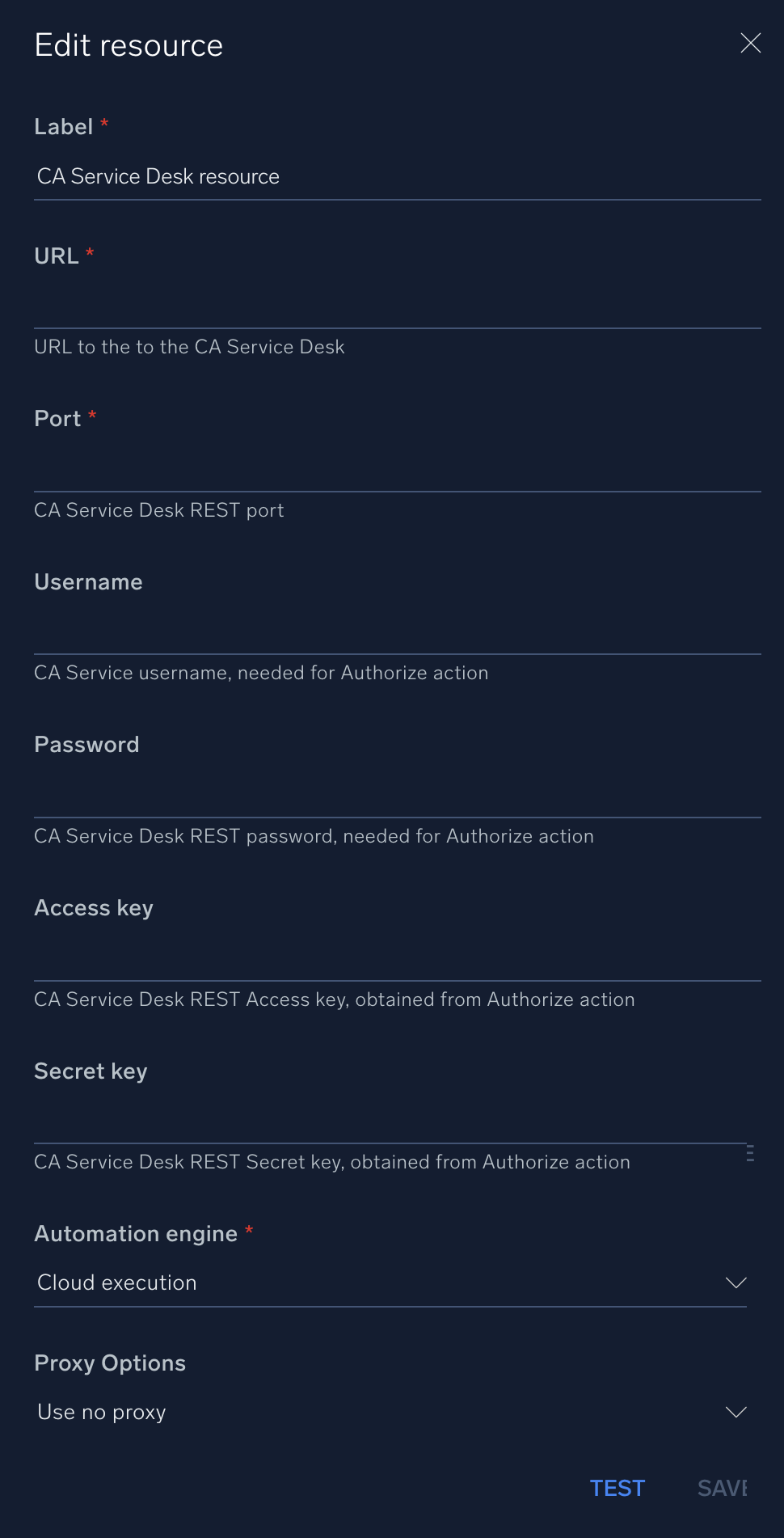
## Configure CA Service Desk in Automation Service and Cloud SOAR
import IntegrationsAuth from '../../reuse/integrations-authentication.md';
import IntegrationCertificate from '../../reuse/automation-service/integration-certificate.md';
import IntegrationEngine from '../../reuse/automation-service/integration-engine.md';
import IntegrationLabel from '../../reuse/automation-service/integration-label.md';
import IntegrationProxy from '../../reuse/automation-service/integration-proxy.md';
import IntegrationTimeout from '../../reuse/automation-service/integration-timeout.md';
*
* **URL**. Enter the URL to the CA Service Desk instance.
* **Port**. Enter the CA Service Desk [REST port](https://techdocs.broadcom.com/us/en/ca-enterprise-software/business-management/ca-service-management/17-4/installing/installation-prerequisites/supported-ports-and-port-ranges.html).
* **Username**. Enter the [username](https://techdocs.broadcom.com/us/en/ca-enterprise-software/business-management/ca-service-management/17-4/reference/ca-service-desk-manager-reference-commands/technical-reference/rest-http-methods.html#concept.dita_571265def7bea5a79bc6e3bba4cd061d4d03b036_RESTBasicAuthentication) of a CA Service admin user authorized to provide authentication for the integration. The username is needed for the Authorize action.
* **Password**. Enter the CA Service Desk REST password for the admin user. This is needed for the Authorize action.
* **Access Key**. Enter the CA Service Desk REST [Access key](https://techdocs.broadcom.com/us/en/ca-enterprise-software/business-management/ca-service-management/17-4/reference/ca-service-desk-manager-reference-commands/technical-reference/rest-http-methods.html#concept.dita_571265def7bea5a79bc6e3bba4cd061d4d03b036_RESTSecretKeyAuthentication) obtained from the Authorize action.
* **Secret Key**. Enter the CA Service Desk REST Secret key obtained from the Authorize action.
*
*
***Version: 1.2
Updated: April 27, 2026***
Work with Resources within CA Service Desk.
## Actions
* **Add Resource** (*Enrichment*) - Add a new resource.
* **Authorize** (*Enrichment*) - Authorize Cloud SOAR for CA Service Desk. **This should only be run once and not from a Playbook**.
* **Edit Resource** (*Enrichment*) - Edit an existing resource.
* **Get Resource** (*Enrichment*) - Get resource information.
* **Search Resource** (*Enrichment*) - Search resources.
* **Delete a Resource** (*Containment*) - Delete a resource.
## Configure CA Service Desk in Automation Service and Cloud SOAR
import IntegrationsAuth from '../../reuse/integrations-authentication.md';
import IntegrationCertificate from '../../reuse/automation-service/integration-certificate.md';
import IntegrationEngine from '../../reuse/automation-service/integration-engine.md';
import IntegrationLabel from '../../reuse/automation-service/integration-label.md';
import IntegrationProxy from '../../reuse/automation-service/integration-proxy.md';
import IntegrationTimeout from '../../reuse/automation-service/integration-timeout.md';
*
* **URL**. Enter the URL to the CA Service Desk instance.
* **Port**. Enter the CA Service Desk [REST port](https://techdocs.broadcom.com/us/en/ca-enterprise-software/business-management/ca-service-management/17-4/installing/installation-prerequisites/supported-ports-and-port-ranges.html).
* **Username**. Enter the [username](https://techdocs.broadcom.com/us/en/ca-enterprise-software/business-management/ca-service-management/17-4/reference/ca-service-desk-manager-reference-commands/technical-reference/rest-http-methods.html#concept.dita_571265def7bea5a79bc6e3bba4cd061d4d03b036_RESTBasicAuthentication) of a CA Service admin user authorized to provide authentication for the integration. The username is needed for the Authorize action.
* **Password**. Enter the CA Service Desk REST password for the admin user. This is needed for the Authorize action.
* **Access Key**. Enter the CA Service Desk REST [Access key](https://techdocs.broadcom.com/us/en/ca-enterprise-software/business-management/ca-service-management/17-4/reference/ca-service-desk-manager-reference-commands/technical-reference/rest-http-methods.html#concept.dita_571265def7bea5a79bc6e3bba4cd061d4d03b036_RESTSecretKeyAuthentication) obtained from the Authorize action.
* **Secret Key**. Enter the CA Service Desk REST Secret key obtained from the Authorize action.
*
*
 For information about CA Service Desk, see [CA Service Management documentation](https://techdocs.broadcom.com/us/en/ca-enterprise-software/business-management/ca-service-management/17-4.html).
## Change Log
| Version | Date | Description |
|:--|:--|:--|
| v1.2 | April 27, 2026 | Upgraded the `python3_generic` Docker image (Python 3.8) to `python3_12_generic` (Python 3.12) to address Python 3.8 end-of-life and improve security and performance. |
| v1.1 | July 6, 2023 | Updated the integration with Environmental Variables. |
| | February 14, 2019 | Initial release of the CA Service Desk integration. |
For information about CA Service Desk, see [CA Service Management documentation](https://techdocs.broadcom.com/us/en/ca-enterprise-software/business-management/ca-service-management/17-4.html).
## Change Log
| Version | Date | Description |
|:--|:--|:--|
| v1.2 | April 27, 2026 | Upgraded the `python3_generic` Docker image (Python 3.8) to `python3_12_generic` (Python 3.12) to address Python 3.8 end-of-life and improve security and performance. |
| v1.1 | July 6, 2023 | Updated the integration with Environmental Variables. |
| | February 14, 2019 | Initial release of the CA Service Desk integration. |