---
title: Coralogix - Send Logs
description: ''
slug: /help/docs/integrations/automation-integrations/coralogix-send-logs/
canonical: https://www.sumologic.com/help/docs/integrations/automation-integrations/coralogix-send-logs/
---
import useBaseUrl from '@docusaurus/useBaseUrl';
 ***Version: 1.3
Updated: April 29, 2026***
Coralogix is rebuilding the path to observability using a real-time streaming analytics pipeline that provides monitoring, visualisation, and alerting capabilities without the burden of indexing.
## Actions
* **Send Logs** (*Containment*) - Send Logs.
## Coralogix - Send Logs configuration
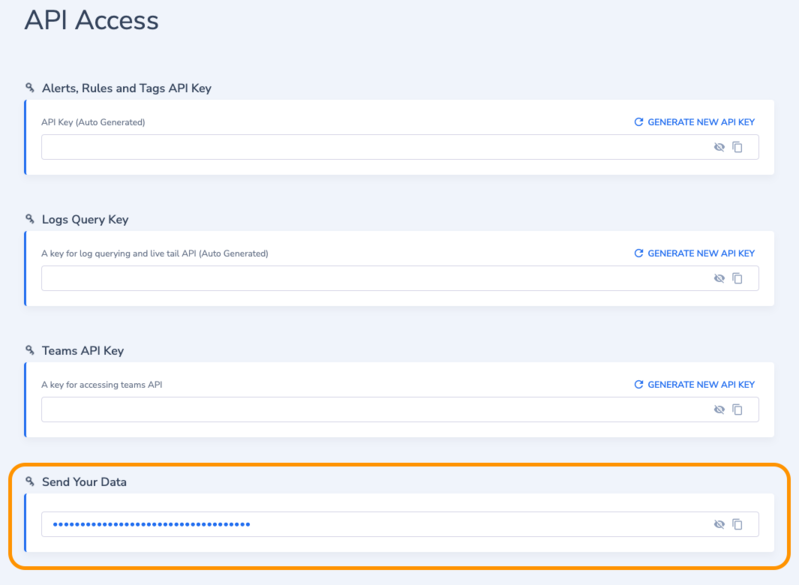
Generate and then copy the [API Key](https://coralogix.com/docs/user-guides/account-management/api-keys/api-keys/) for sending data.
`https://.coralogix.com/#/integration/apikey`
***Version: 1.3
Updated: April 29, 2026***
Coralogix is rebuilding the path to observability using a real-time streaming analytics pipeline that provides monitoring, visualisation, and alerting capabilities without the burden of indexing.
## Actions
* **Send Logs** (*Containment*) - Send Logs.
## Coralogix - Send Logs configuration
Generate and then copy the [API Key](https://coralogix.com/docs/user-guides/account-management/api-keys/api-keys/) for sending data.
`https://.coralogix.com/#/integration/apikey`
 ## Configure Coralogix - Send Logs in Automation Service and Cloud SOAR
import IntegrationsAuth from '../../reuse/integrations-authentication.md';
import IntegrationCertificate from '../../reuse/automation-service/integration-certificate.md';
import IntegrationEngine from '../../reuse/automation-service/integration-engine.md';
import IntegrationLabel from '../../reuse/automation-service/integration-label.md';
import IntegrationProxy from '../../reuse/automation-service/integration-proxy.md';
import IntegrationTimeout from '../../reuse/automation-service/integration-timeout.md';
*
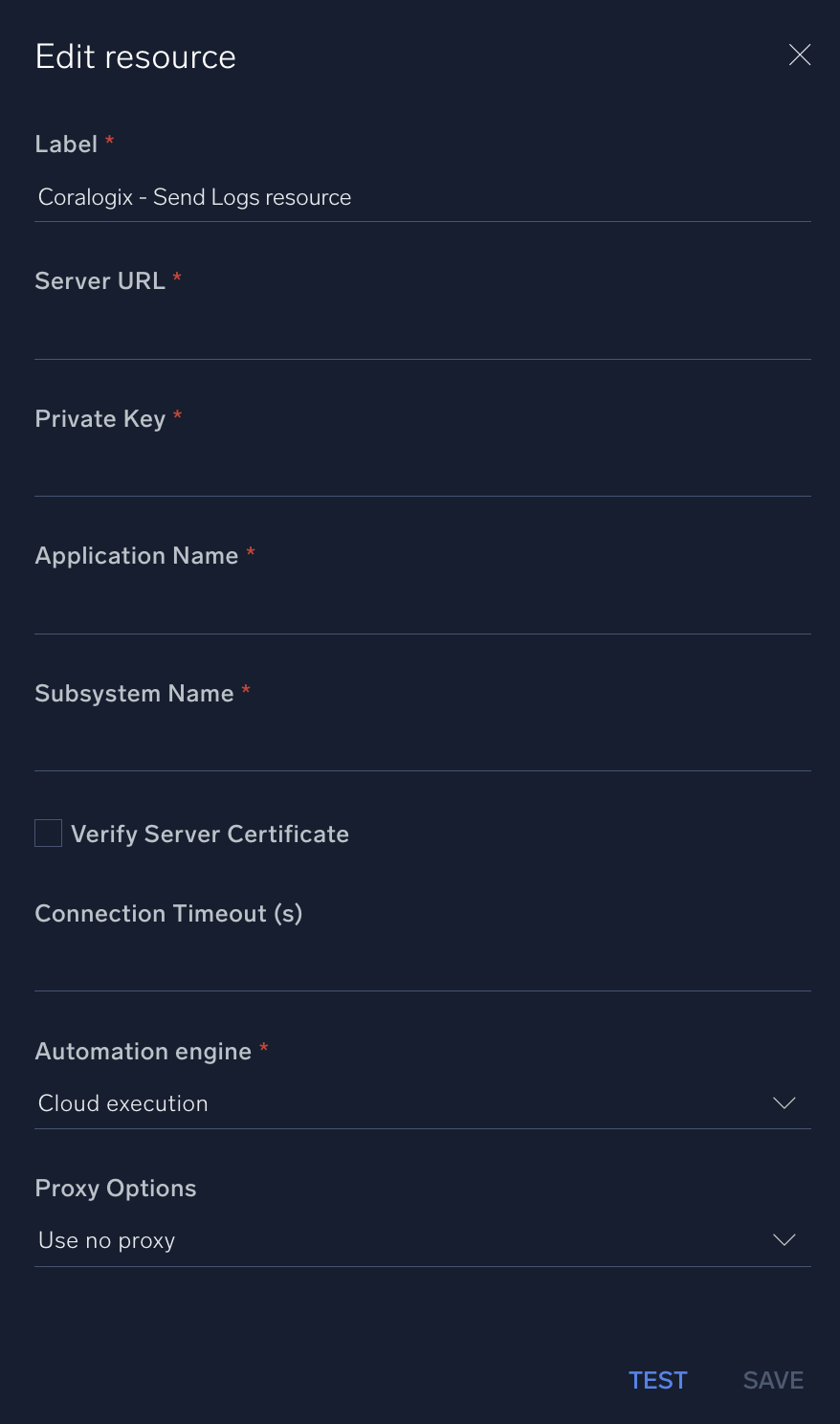
* **Server URL**. Choose between the following [Coralogix URLs](https://coralogix.com/docs/user-guides/account-management/account-settings/coralogix-domain/) depending on the top level domain of your Coralogix account (.com, .in, etc.):
* For `.eu` use `https://coralogix-esapi.coralogix.com`
* For `.us` use `https://esapi.coralogix.us`
* For `.in` use `https://es-api.app.coralogix.in`
* For `.eu2` use `https://es-api.eu2.coralogix.com`
* For `sg.com` use `https://es-api.coralogixsg.com`
* **Private Key**. Enter your Coralogix account [private key](https://coralogix.com/docs/user-guides/account-management/api-keys/api-keys/).
* **Application Name**. Enter your Coralogix [application name](https://coralogix.com/docs/user-guides/account-management/account-settings/application-and-subsystem-names/).
* **Subsystem Name**. Enter your Coralogix [subsystem name](https://coralogix.com/docs/user-guides/account-management/account-settings/application-and-subsystem-names/).
*
*
*
*
## Configure Coralogix - Send Logs in Automation Service and Cloud SOAR
import IntegrationsAuth from '../../reuse/integrations-authentication.md';
import IntegrationCertificate from '../../reuse/automation-service/integration-certificate.md';
import IntegrationEngine from '../../reuse/automation-service/integration-engine.md';
import IntegrationLabel from '../../reuse/automation-service/integration-label.md';
import IntegrationProxy from '../../reuse/automation-service/integration-proxy.md';
import IntegrationTimeout from '../../reuse/automation-service/integration-timeout.md';
*
* **Server URL**. Choose between the following [Coralogix URLs](https://coralogix.com/docs/user-guides/account-management/account-settings/coralogix-domain/) depending on the top level domain of your Coralogix account (.com, .in, etc.):
* For `.eu` use `https://coralogix-esapi.coralogix.com`
* For `.us` use `https://esapi.coralogix.us`
* For `.in` use `https://es-api.app.coralogix.in`
* For `.eu2` use `https://es-api.eu2.coralogix.com`
* For `sg.com` use `https://es-api.coralogixsg.com`
* **Private Key**. Enter your Coralogix account [private key](https://coralogix.com/docs/user-guides/account-management/api-keys/api-keys/).
* **Application Name**. Enter your Coralogix [application name](https://coralogix.com/docs/user-guides/account-management/account-settings/application-and-subsystem-names/).
* **Subsystem Name**. Enter your Coralogix [subsystem name](https://coralogix.com/docs/user-guides/account-management/account-settings/application-and-subsystem-names/).
*
*
*
*
 For information about Coralogix - Send Logs, see [Coralogix documentation](https://coralogix.com/docs/).
## Change Log
| Version | Date | Description |
|:--|:--|:--|
| v1.3 | April 29, 2026 | Upgraded the `python3_generic` Docker image (Python 3.8) to `python3_12_generic` (Python 3.12) to address Python 3.8 end-of-life and improve security and performance. |
| v1.2 | March 4, 2024 | Updated code for compatibility with Python 3.12. |
| v1.1 | July 6, 2023 | Updated the integration with Environmental Variables. |
| | July 07, 2022 | Initial release of the Coralogix - Send Logs integration. |
For information about Coralogix - Send Logs, see [Coralogix documentation](https://coralogix.com/docs/).
## Change Log
| Version | Date | Description |
|:--|:--|:--|
| v1.3 | April 29, 2026 | Upgraded the `python3_generic` Docker image (Python 3.8) to `python3_12_generic` (Python 3.12) to address Python 3.8 end-of-life and improve security and performance. |
| v1.2 | March 4, 2024 | Updated code for compatibility with Python 3.12. |
| v1.1 | July 6, 2023 | Updated the integration with Environmental Variables. |
| | July 07, 2022 | Initial release of the Coralogix - Send Logs integration. |