---
title: CrowdStrike Falcon Intelligence
description: ''
slug: /help/docs/integrations/automation-integrations/crowdstrike-falcon-intelligence/
canonical: https://www.sumologic.com/help/docs/integrations/automation-integrations/crowdstrike-falcon-intelligence/
---
import useBaseUrl from '@docusaurus/useBaseUrl';
 ***Version: 1.10
Updated: Jul 20, 2026***
CrowdStrike® Falcon Intelligence™ is an automated threat intelligence service built on the CrowdStrike Falcon Platform. It automates incident investigations and streamlines breach response so you can make faster, more confident cyber security decisions. Organizations, regardless of size or sophistication, learn from the attacks in their environment applying that knowledge to proactively prevent future attacks. Falcon Intelligence provides insight into global threats, tracked by CrowdStrike’s elite team of intelligence experts.
* Intelligence Automation
* Custom IOCs
* Threat Intelligence reports
* CrowdStrike Indicator
## Actions
* **Get Artifact** *(Enrichment)* - Get IOC packs, PCAP files, and other analysis artifacts.
* **Get Full Report** *(Enrichment)* - Get a full sandbox report.
* **Get Report Summary** *(Enrichment)* - Get a short summary version of a sandbox report.
* **Intelligence Indicators Falcon Intelligence Daemon** *(Daemon)* - Daemon to pull Intelligence Indicators.
* **Reports Falcon Intelligence Daemon***(Daemon)* - Daemon to pull sandbox reports.
* **Search Intelligence Indicators** *(Enrichment)* - Get indicators that match provided FQL filter and query.
* **Search Reports** *(Enrichment)* - Find sandbox reports by providing an FQL filter and paging details. Returns a set of a report that match your criteria.
* **Check Submission Report** (*Enrichment*) - Monitors the submission status and retrieves the sandbox report once the analysis is complete. Use the Resource ID from the **Submit URL** or **Submit File** actions.
* **Submit File** (*Enrichment*) - Submit a file for sandbox analysis. The time required for analysis varies but is usually less than 15 minutes. Use the **Check Submission Report** action to monitor progress and retrieve the report.
* **Submit URL** (*Enrichment*) - Submit a URL for sandbox analysis. The time required for analysis varies but is usually less than 15 minutes. Use the **Check Submission Report** action to monitor progress and retrieve the report.
* **Get Submission Report Scheduled** *(Scheduled)* - Periodically polls the submission status and retrieves the sandbox report once the analysis is complete. This action checks every 1 minute and expires after 30 minutes. Use the Resource ID from the **Submit URL** or **Submit File** actions.
## Sandbox Environments
The following sandbox environments are available for file and URL analysis:
| ID | Environment | Status |
|---|---|---|
| 430 | macOS Tahoe ARM | Current |
| 400 | macOS Catalina 10.15 | Deprecated → falls back to 430 |
| 330 | Linux Ubuntu 24, 64-bit | Current |
| 310 | Linux Ubuntu 20, 64-bit | Deprecated → falls back to 330 |
| 200 | Android (static analysis) | Current |
| 140 | Windows 11, 64-bit | Current |
| 160 | Windows 10, 64-bit | Current |
| 110 | Windows 7, 64-bit | Current |
| 100 | Windows 7, 32-bit | Current |
## CrowdStrike Falcon Intelligence configuration
Create API clients to grant various levels of API access for Falcon Intelligence.
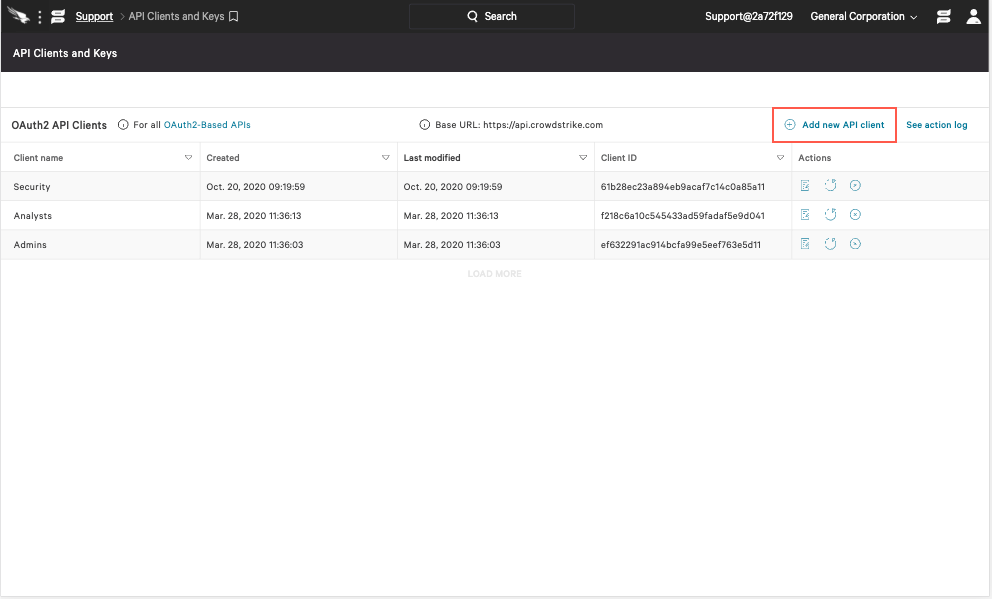
1. From the [API Clients and Keys](https://falcon.crowdstrike.com/support/api-clients-and-keys) page, click **Add new API client** on the right of the **OAuth2 API Clients** table.
***Version: 1.10
Updated: Jul 20, 2026***
CrowdStrike® Falcon Intelligence™ is an automated threat intelligence service built on the CrowdStrike Falcon Platform. It automates incident investigations and streamlines breach response so you can make faster, more confident cyber security decisions. Organizations, regardless of size or sophistication, learn from the attacks in their environment applying that knowledge to proactively prevent future attacks. Falcon Intelligence provides insight into global threats, tracked by CrowdStrike’s elite team of intelligence experts.
* Intelligence Automation
* Custom IOCs
* Threat Intelligence reports
* CrowdStrike Indicator
## Actions
* **Get Artifact** *(Enrichment)* - Get IOC packs, PCAP files, and other analysis artifacts.
* **Get Full Report** *(Enrichment)* - Get a full sandbox report.
* **Get Report Summary** *(Enrichment)* - Get a short summary version of a sandbox report.
* **Intelligence Indicators Falcon Intelligence Daemon** *(Daemon)* - Daemon to pull Intelligence Indicators.
* **Reports Falcon Intelligence Daemon***(Daemon)* - Daemon to pull sandbox reports.
* **Search Intelligence Indicators** *(Enrichment)* - Get indicators that match provided FQL filter and query.
* **Search Reports** *(Enrichment)* - Find sandbox reports by providing an FQL filter and paging details. Returns a set of a report that match your criteria.
* **Check Submission Report** (*Enrichment*) - Monitors the submission status and retrieves the sandbox report once the analysis is complete. Use the Resource ID from the **Submit URL** or **Submit File** actions.
* **Submit File** (*Enrichment*) - Submit a file for sandbox analysis. The time required for analysis varies but is usually less than 15 minutes. Use the **Check Submission Report** action to monitor progress and retrieve the report.
* **Submit URL** (*Enrichment*) - Submit a URL for sandbox analysis. The time required for analysis varies but is usually less than 15 minutes. Use the **Check Submission Report** action to monitor progress and retrieve the report.
* **Get Submission Report Scheduled** *(Scheduled)* - Periodically polls the submission status and retrieves the sandbox report once the analysis is complete. This action checks every 1 minute and expires after 30 minutes. Use the Resource ID from the **Submit URL** or **Submit File** actions.
## Sandbox Environments
The following sandbox environments are available for file and URL analysis:
| ID | Environment | Status |
|---|---|---|
| 430 | macOS Tahoe ARM | Current |
| 400 | macOS Catalina 10.15 | Deprecated → falls back to 430 |
| 330 | Linux Ubuntu 24, 64-bit | Current |
| 310 | Linux Ubuntu 20, 64-bit | Deprecated → falls back to 330 |
| 200 | Android (static analysis) | Current |
| 140 | Windows 11, 64-bit | Current |
| 160 | Windows 10, 64-bit | Current |
| 110 | Windows 7, 64-bit | Current |
| 100 | Windows 7, 32-bit | Current |
## CrowdStrike Falcon Intelligence configuration
Create API clients to grant various levels of API access for Falcon Intelligence.
1. From the [API Clients and Keys](https://falcon.crowdstrike.com/support/api-clients-and-keys) page, click **Add new API client** on the right of the **OAuth2 API Clients** table.
 2. Provide details to define your API client:
* **Client Name** (required)
* **Description** (optional)
* [API Scopes](https://falcon.crowdstrike.com/documentation/46/crowdstrike-oauth2-based-apis#api-scopes) (required):
+ Select the **Read** and/or **Write** boxes next to a scope to enable access to its endpoints.
+ A "–" displays in place of a checkbox when a **Read/Write**.
+ The scope already checked must be assigned.
2. Provide details to define your API client:
* **Client Name** (required)
* **Description** (optional)
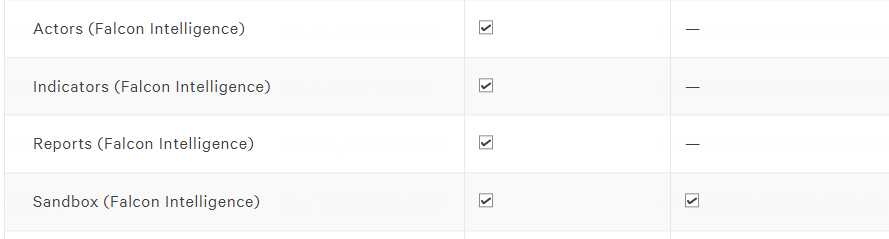
* [API Scopes](https://falcon.crowdstrike.com/documentation/46/crowdstrike-oauth2-based-apis#api-scopes) (required):
+ Select the **Read** and/or **Write** boxes next to a scope to enable access to its endpoints.
+ A "–" displays in place of a checkbox when a **Read/Write**.
+ The scope already checked must be assigned.
 3. Click **Add** to save the API client and generate the client ID and secret.
:::tip
Record your API client secret somewhere safe. After the credential window is closed, the secret is no longer visible.
:::
## Configure CrowdStrike Falcon Intelligence in Automation Service and Cloud SOAR
import IntegrationsAuth from '../../reuse/integrations-authentication.md';
import IntegrationCertificate from '../../reuse/automation-service/integration-certificate.md';
import IntegrationEngine from '../../reuse/automation-service/integration-engine.md';
import IntegrationLabel from '../../reuse/automation-service/integration-label.md';
import IntegrationProxy from '../../reuse/automation-service/integration-proxy.md';
import IntegrationTimeout from '../../reuse/automation-service/integration-timeout.md';
*
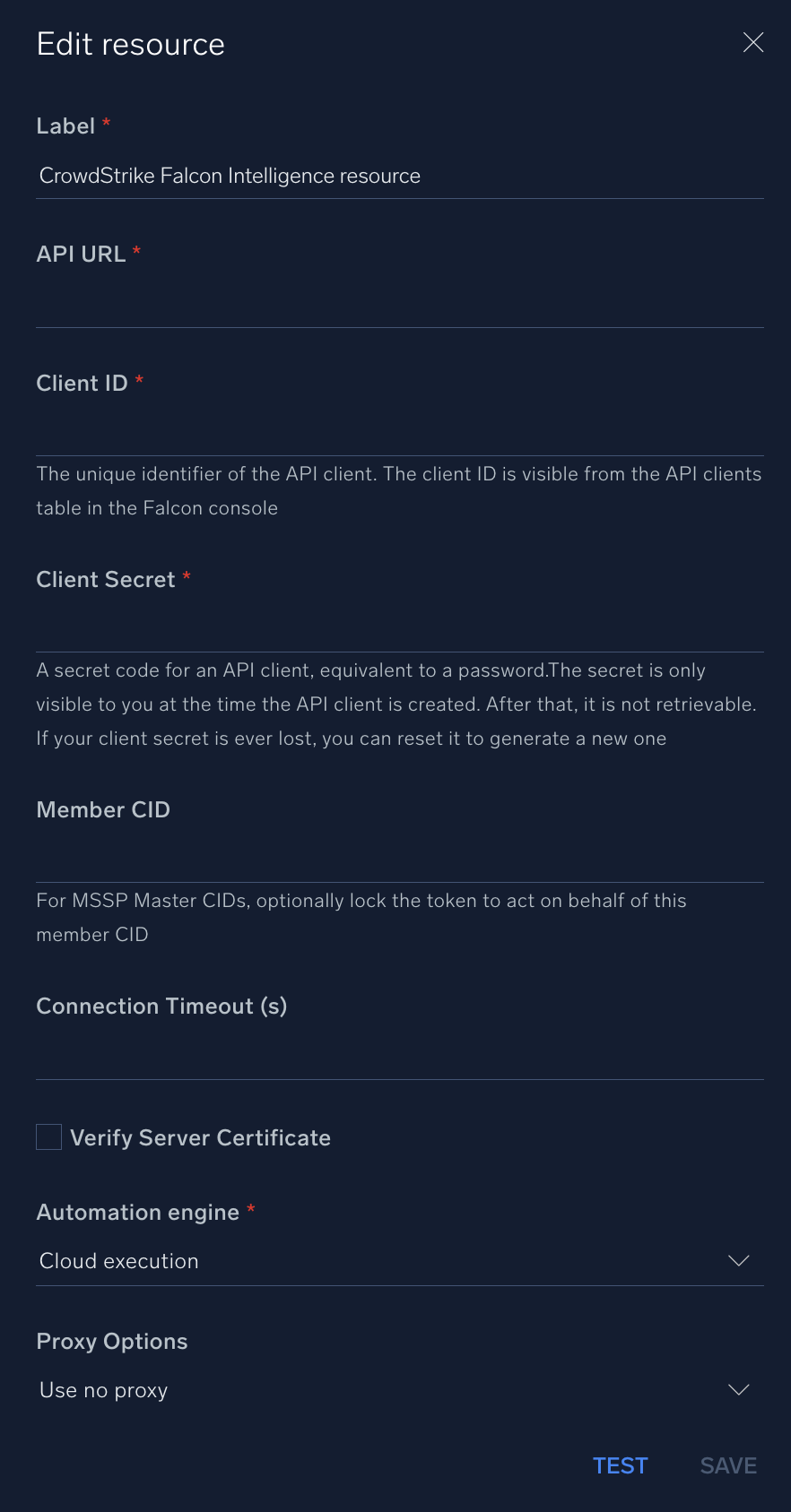
* **API URL**. Enter your CrowdStrike API URL. The default value is `https://api.crowdstrike.com`
* **Client ID**. Enter the unique identifier of the API client. The client ID is visible from the API clients table in the Falcon console.
* **Client Secret**. Enter the secret code for the API client, equivalent to a password. The secret is only visible to you at the time the API client is created. After that, it is not retrievable. If your client secret is ever lost, you can reset it to generate a new one.
* **Member CID**. Enter the member CIS. For MSSP Master CIDs, optionally lock the token to act on behalf of this member CID.
*
*
*
*
3. Click **Add** to save the API client and generate the client ID and secret.
:::tip
Record your API client secret somewhere safe. After the credential window is closed, the secret is no longer visible.
:::
## Configure CrowdStrike Falcon Intelligence in Automation Service and Cloud SOAR
import IntegrationsAuth from '../../reuse/integrations-authentication.md';
import IntegrationCertificate from '../../reuse/automation-service/integration-certificate.md';
import IntegrationEngine from '../../reuse/automation-service/integration-engine.md';
import IntegrationLabel from '../../reuse/automation-service/integration-label.md';
import IntegrationProxy from '../../reuse/automation-service/integration-proxy.md';
import IntegrationTimeout from '../../reuse/automation-service/integration-timeout.md';
*
* **API URL**. Enter your CrowdStrike API URL. The default value is `https://api.crowdstrike.com`
* **Client ID**. Enter the unique identifier of the API client. The client ID is visible from the API clients table in the Falcon console.
* **Client Secret**. Enter the secret code for the API client, equivalent to a password. The secret is only visible to you at the time the API client is created. After that, it is not retrievable. If your client secret is ever lost, you can reset it to generate a new one.
* **Member CID**. Enter the member CIS. For MSSP Master CIDs, optionally lock the token to act on behalf of this member CID.
*
*
*
*
 For information about CrowdStrike Falcon Intelligence, see [CrowdStrike documentation](https://www.crowdstrike.com/en-us/resources/guides/?lang=1).
## Change Log
| Version | Date | Description |
|:--|:--|:--|
| v1.10 | July 20, 2026 | Improved the reliability of sandbox analysis by automatically monitoring submission progress and retrieving the final report as soon as it becomes available. Deprecated the **Submission Status Polling** action in favor of the new **Check Submission Report** action. |
| v1.9 | June 30, 2026 | Updated the available sandbox environments to align with the latest platform support. Ubuntu 16.04 has been removed, Ubuntu 20 is now deprecated, and Ubuntu 24 has been added. |
| v1.8 | March 31, 2026 | Upgraded the `python3_generic` Docker image (Python 3.8) to `python3_12_generic` (Python 3.12) to address Python 3.8 end-of-life and improve security and performance. |
| v1.7 | March 4, 2024 | Updated code for compatibility with Python 3.12. |
| v1.5 | June 30, 2023 | Updated the integration with Environmental Variables. |
| | March 21, 2023 | Updated the logo. |
| | February 23, 2023 |
For information about CrowdStrike Falcon Intelligence, see [CrowdStrike documentation](https://www.crowdstrike.com/en-us/resources/guides/?lang=1).
## Change Log
| Version | Date | Description |
|:--|:--|:--|
| v1.10 | July 20, 2026 | Improved the reliability of sandbox analysis by automatically monitoring submission progress and retrieving the final report as soon as it becomes available. Deprecated the **Submission Status Polling** action in favor of the new **Check Submission Report** action. |
| v1.9 | June 30, 2026 | Updated the available sandbox environments to align with the latest platform support. Ubuntu 16.04 has been removed, Ubuntu 20 is now deprecated, and Ubuntu 24 has been added. |
| v1.8 | March 31, 2026 | Upgraded the `python3_generic` Docker image (Python 3.8) to `python3_12_generic` (Python 3.12) to address Python 3.8 end-of-life and improve security and performance. |
| v1.7 | March 4, 2024 | Updated code for compatibility with Python 3.12. |
| v1.5 | June 30, 2023 | Updated the integration with Environmental Variables. |
| | March 21, 2023 | Updated the logo. |
| | February 23, 2023 | - Renamed the integration from **CrowdStrike Falcon X** to **CrowdStrike Falcon Intelligence**.
- Updated the integration fields with Environmental Variables.
|
| | July 26, 2022 | Initial release of the CrowdStrike Falcon Intelligence integration. |
## Additional resources
- For CrowdStrike Falcon Intelligence, Sumo Logic offers the [CrowdStrike Threat Intel source](/docs/send-data/hosted-collectors/cloud-to-cloud-integration-framework/crowdstrike-threat-intel-source/) to collect your CrowdStrike Falcon Intelligence data.
- You can also find the CrowdStrike Falcon app in the Sumo Logic App Catalog to analyze and visualize your CrowdStrike Falcon Intelligence data.