---
title: Druva
description: ''
slug: /help/docs/integrations/automation-integrations/druva/
canonical: https://www.sumologic.com/help/docs/integrations/automation-integrations/druva/
---
import useBaseUrl from '@docusaurus/useBaseUrl';
 ***Version: 1.1
Updated: April 29, 2026***
Druva is a service designed primarily to respond to ransomware attacks, identified by detecting anomalies and suspicious behavior for data protected across data sources including data centers and endpoints.
## Actions
* **Delete Quarantine Range** *(Containment)* - Deletes the quarantine range for an infected resource. When you delete a quarantine range, all the snapshots on the resource are again available for restore and download.
* **Delete Snapshot** *(Containment)* - Delete an infected snapshot using the snapshot ID.
* **List Devices** *(Enrichment)* - Returns information about all the user devices protected using Druva inSync.
* **List Profiles** *(Enrichment)* - Returns a list of all the profiles configured in Druva inSync.
* **Lists Quarantine Ranges** *(Enrichment)* - Returns the list of all the defined quarantined ranges for resources along with their details.
* **List Snapshots** *(Enrichment)* - Lists all the quarantined snapshots within a specified range on the resource.
* **List Users** *(Enrichment)* - Returns the list of users in Druva inSync with their details.
* **Quarantine Snapshots Resource** *(Containment)* - Quarantine all snapshots, or snapshots within a date range on a resource.
Users and administrators cannot restore or download data from the quarantined snapshots.
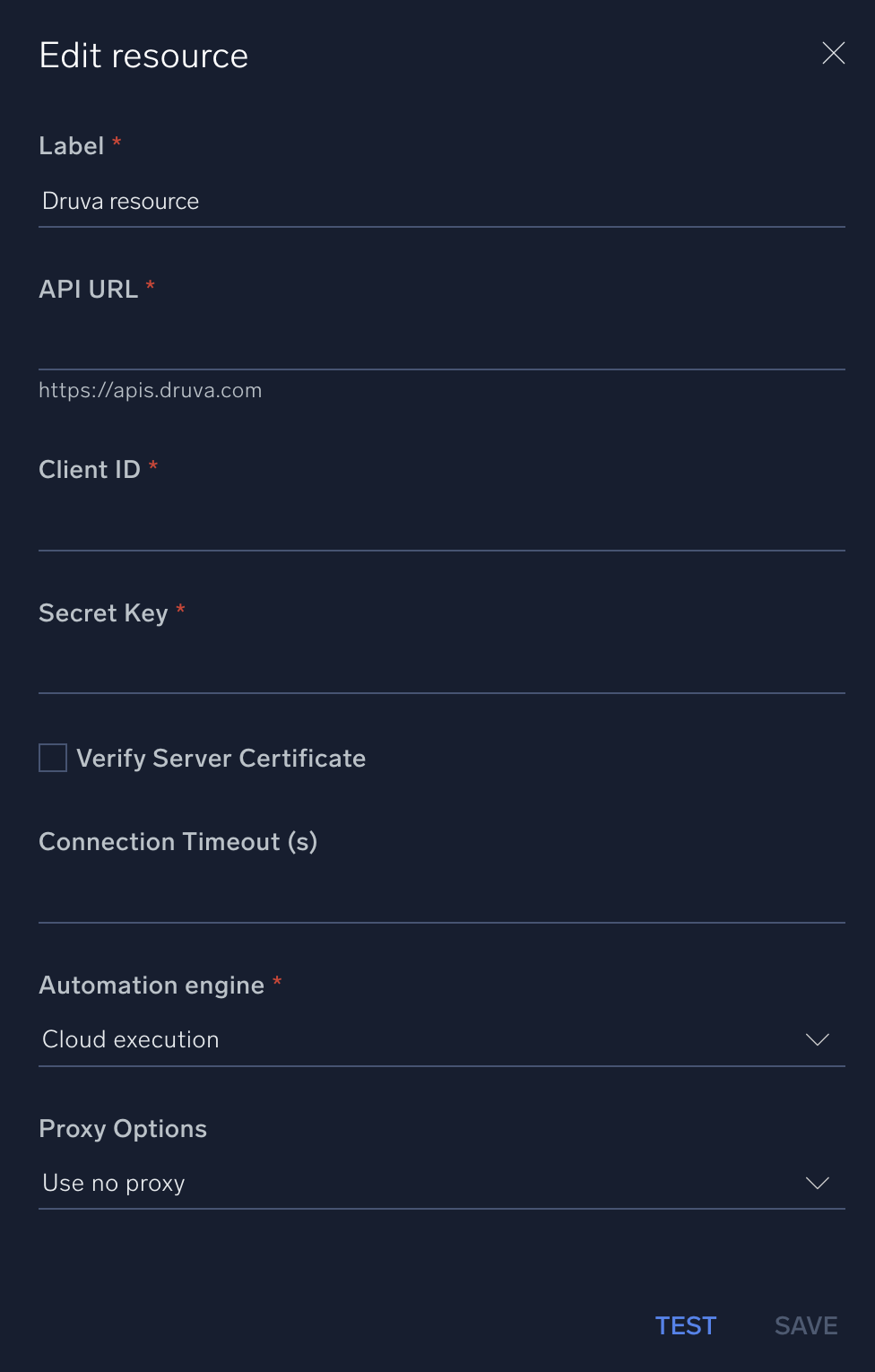
## Configure Druva in Automation Service and Cloud SOAR
import IntegrationsAuth from '../../reuse/integrations-authentication.md';
import IntegrationCertificate from '../../reuse/automation-service/integration-certificate.md';
import IntegrationEngine from '../../reuse/automation-service/integration-engine.md';
import IntegrationLabel from '../../reuse/automation-service/integration-label.md';
import IntegrationProxy from '../../reuse/automation-service/integration-proxy.md';
import IntegrationTimeout from '../../reuse/automation-service/integration-timeout.md';
*
* **API URL**. Enter your Druva API URL, for example, `https://apis.druva.com`
* **Client ID**. Enter a [Druva client ID](https://help.druva.com/en/articles/8580838-create-and-manage-api-credentials).
* **Secret Key**. Enter the secret for the client ID.
*
*
*
*
***Version: 1.1
Updated: April 29, 2026***
Druva is a service designed primarily to respond to ransomware attacks, identified by detecting anomalies and suspicious behavior for data protected across data sources including data centers and endpoints.
## Actions
* **Delete Quarantine Range** *(Containment)* - Deletes the quarantine range for an infected resource. When you delete a quarantine range, all the snapshots on the resource are again available for restore and download.
* **Delete Snapshot** *(Containment)* - Delete an infected snapshot using the snapshot ID.
* **List Devices** *(Enrichment)* - Returns information about all the user devices protected using Druva inSync.
* **List Profiles** *(Enrichment)* - Returns a list of all the profiles configured in Druva inSync.
* **Lists Quarantine Ranges** *(Enrichment)* - Returns the list of all the defined quarantined ranges for resources along with their details.
* **List Snapshots** *(Enrichment)* - Lists all the quarantined snapshots within a specified range on the resource.
* **List Users** *(Enrichment)* - Returns the list of users in Druva inSync with their details.
* **Quarantine Snapshots Resource** *(Containment)* - Quarantine all snapshots, or snapshots within a date range on a resource.
Users and administrators cannot restore or download data from the quarantined snapshots.
## Configure Druva in Automation Service and Cloud SOAR
import IntegrationsAuth from '../../reuse/integrations-authentication.md';
import IntegrationCertificate from '../../reuse/automation-service/integration-certificate.md';
import IntegrationEngine from '../../reuse/automation-service/integration-engine.md';
import IntegrationLabel from '../../reuse/automation-service/integration-label.md';
import IntegrationProxy from '../../reuse/automation-service/integration-proxy.md';
import IntegrationTimeout from '../../reuse/automation-service/integration-timeout.md';
*
* **API URL**. Enter your Druva API URL, for example, `https://apis.druva.com`
* **Client ID**. Enter a [Druva client ID](https://help.druva.com/en/articles/8580838-create-and-manage-api-credentials).
* **Secret Key**. Enter the secret for the client ID.
*
*
*
*
 For information about Druva, see [Druva documentation](https://help.druva.com/en/).
## Change Log
| Version | Date | Description |
|:--|:--|:--|
| v1.1 | April 29, 2026 | Upgraded the `python3_generic` Docker image (Python 3.8) to `python3_12_generic` (Python 3.12) to address Python 3.8 end-of-life and improve security and performance. |
| | April 4, 2024 | Initial release of the Druva integration. |
## Additional resources
For Druva, Sumo Logic offers the [Druva source](/docs/send-data/hosted-collectors/cloud-to-cloud-integration-framework/druva-source/) and the [Druva app](/docs/integrations/saas-cloud/druva/) to collect and visualize your Druva data.
For information about Druva, see [Druva documentation](https://help.druva.com/en/).
## Change Log
| Version | Date | Description |
|:--|:--|:--|
| v1.1 | April 29, 2026 | Upgraded the `python3_generic` Docker image (Python 3.8) to `python3_12_generic` (Python 3.12) to address Python 3.8 end-of-life and improve security and performance. |
| | April 4, 2024 | Initial release of the Druva integration. |
## Additional resources
For Druva, Sumo Logic offers the [Druva source](/docs/send-data/hosted-collectors/cloud-to-cloud-integration-framework/druva-source/) and the [Druva app](/docs/integrations/saas-cloud/druva/) to collect and visualize your Druva data.