---
title: Elasticsearch V2
description: ''
slug: /help/docs/integrations/automation-integrations/elasticsearch-v2/
canonical: https://www.sumologic.com/help/docs/integrations/automation-integrations/elasticsearch-v2/
---
import useBaseUrl from '@docusaurus/useBaseUrl';
 ***Version: 1.4
Updated: Jul 23, 2026***
Query Elasticsearch
## Actions
* **Query** (*Enrichment*) - Query Elasticsearch using a query string.
* **Get Indices** (*Enrichment*) - Get a list of indices from Elasticsearch.
* **Get Indices Stats** (*Enrichment*) - Get a list of indices stats from Elasticsearch.
* **Get Indices Fields Mappings** (*Enrichment*) - Get a list for fields mappings from Elasticsearch.
* **Query Extended** (*Enrichment*) - Elasticsearch Query working with hidden Indices.
## Elasticsearch Configuration
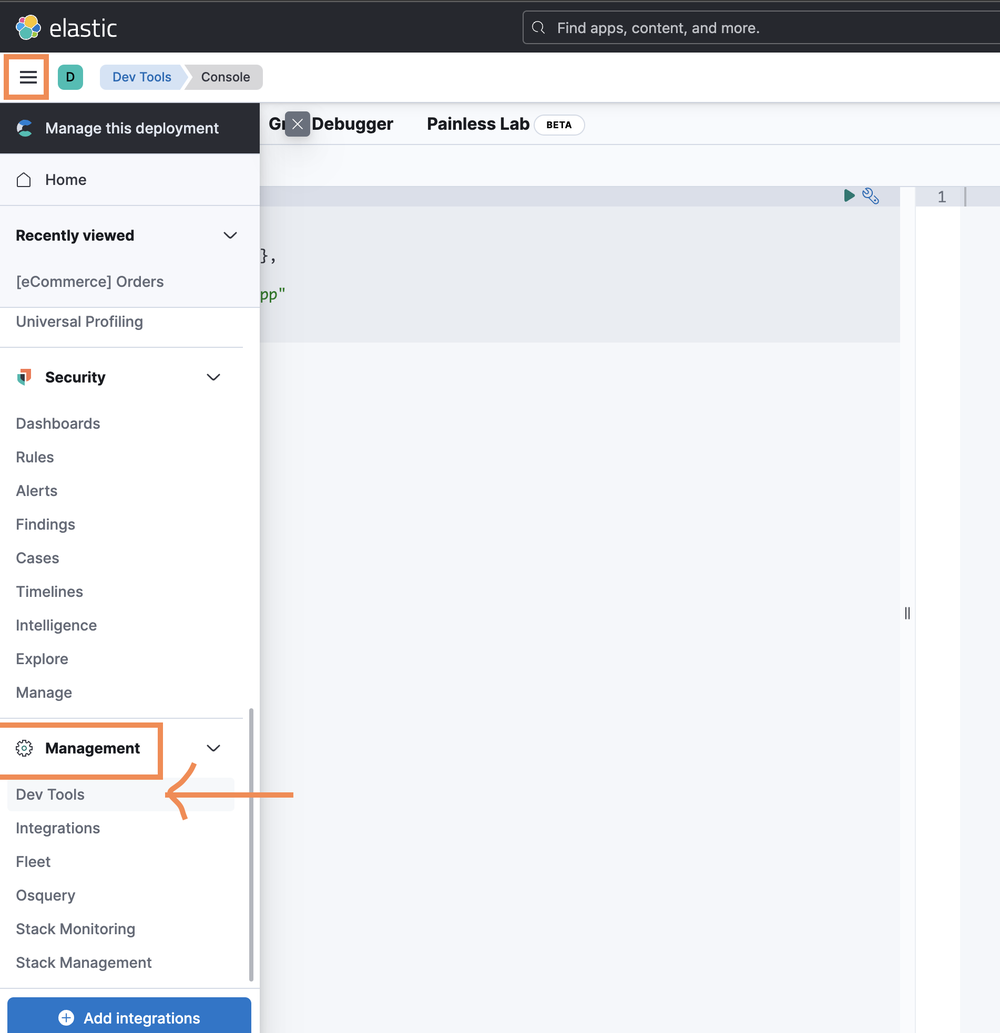
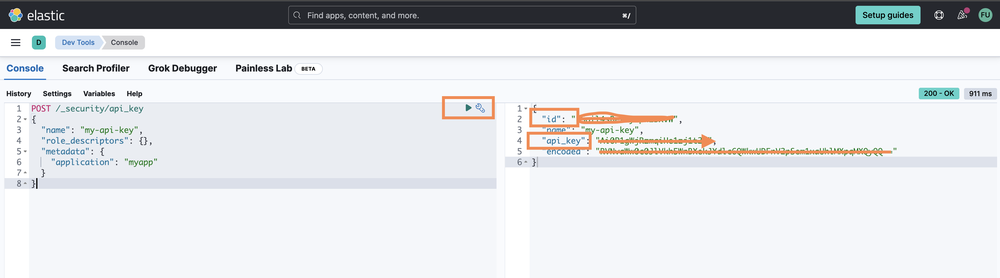
To retrieve the API Credentials, refer to the [guide](https://www.elastic.co/guide/en/elasticsearch/reference/current/security-api-create-api-key.html).
Retrieve the API Key/ID using the console, Log in to the [Elasticsearch Service Console](https://cloud.elastic.co/?page=docs&placement=docs-body).
***Version: 1.4
Updated: Jul 23, 2026***
Query Elasticsearch
## Actions
* **Query** (*Enrichment*) - Query Elasticsearch using a query string.
* **Get Indices** (*Enrichment*) - Get a list of indices from Elasticsearch.
* **Get Indices Stats** (*Enrichment*) - Get a list of indices stats from Elasticsearch.
* **Get Indices Fields Mappings** (*Enrichment*) - Get a list for fields mappings from Elasticsearch.
* **Query Extended** (*Enrichment*) - Elasticsearch Query working with hidden Indices.
## Elasticsearch Configuration
To retrieve the API Credentials, refer to the [guide](https://www.elastic.co/guide/en/elasticsearch/reference/current/security-api-create-api-key.html).
Retrieve the API Key/ID using the console, Log in to the [Elasticsearch Service Console](https://cloud.elastic.co/?page=docs&placement=docs-body).
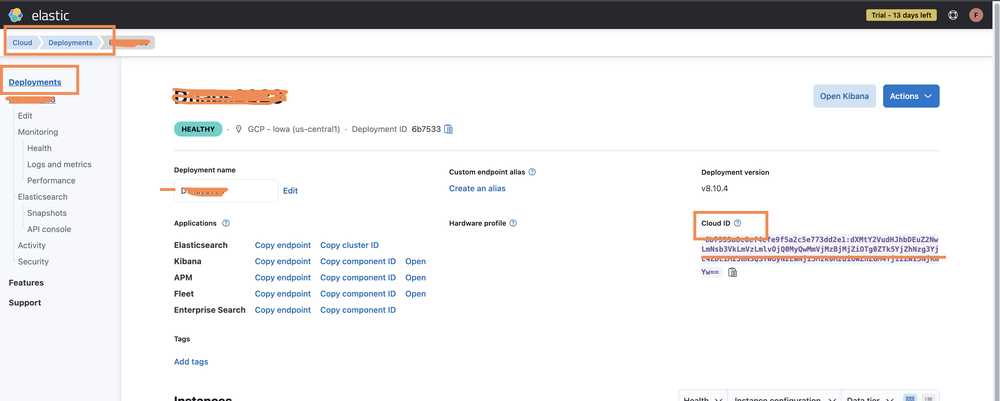
 On the deployment overview page, copy down the **Cloud ID**.
 ## External Libraries
* [Elasticsearch-py](https://github.com/elastic/elasticsearch-py/blob/master/LICENSE)
* [Elasticsearch-dsl-pu](https://github.com/elastic/elasticsearch-dsl-py/blob/master/LICENSE)
## Configure Elasticsearch V2 in Automation Service and Cloud SOAR
import IntegrationsAuth from '../../reuse/integrations-authentication.md';
import IntegrationCertificate from '../../reuse/automation-service/integration-certificate.md';
import IntegrationEngine from '../../reuse/automation-service/integration-engine.md';
import IntegrationLabel from '../../reuse/automation-service/integration-label.md';
import IntegrationProxy from '../../reuse/automation-service/integration-proxy.md';
import IntegrationTimeout from '../../reuse/automation-service/integration-timeout.md';
*
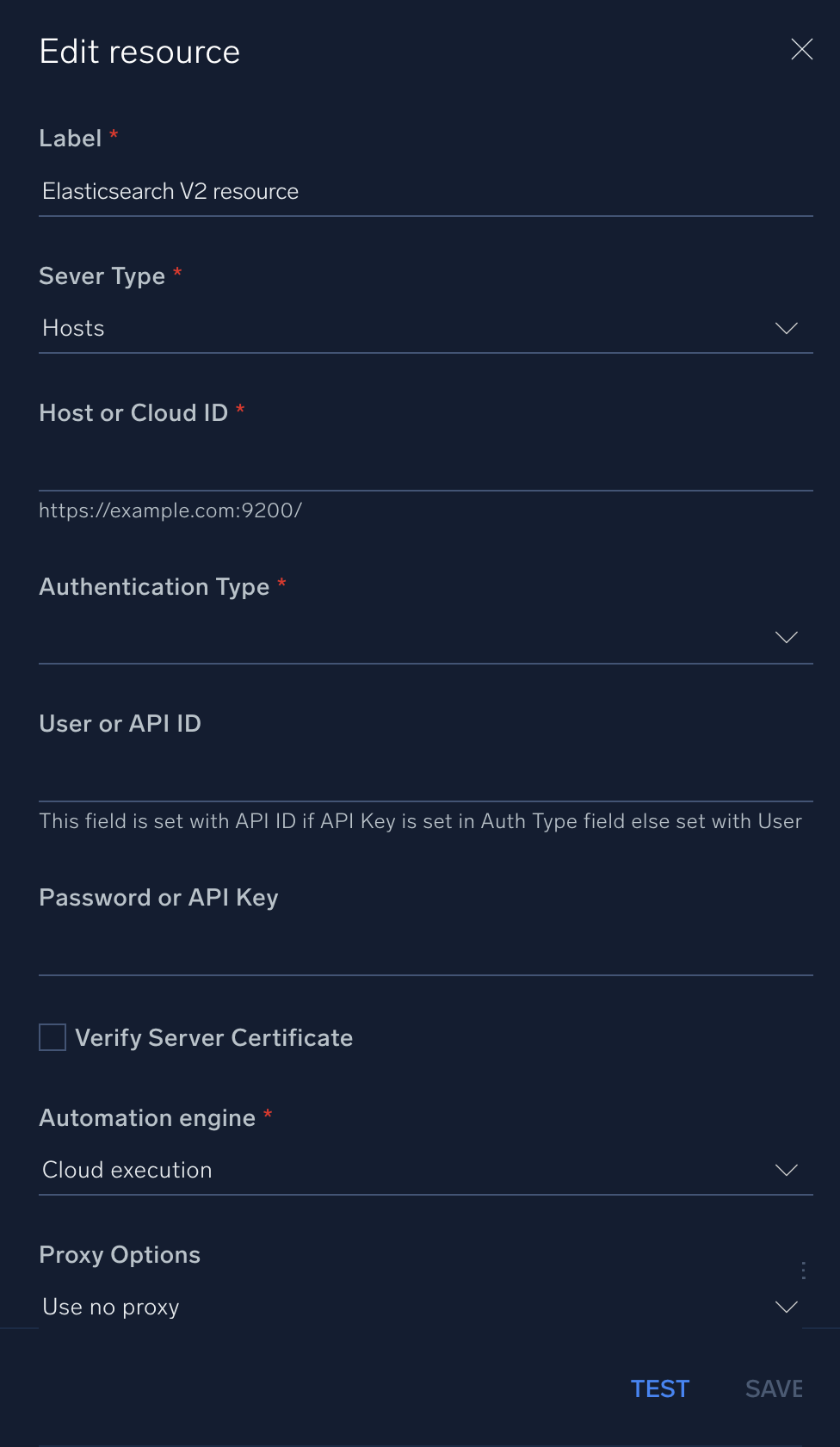
* **Server Type**. Select the type of verification depending on the type of Elasticsearch server you use, either [hosted](https://www.elastic.co/docs/deploy-manage/deploy/elastic-cloud/cloud-hosted) (select **Hosts**) or [cloud](https://www.elastic.co/docs/deploy-manage/deploy/elastic-cloud) (select **Cloud ID**).
* **Host or Cloud ID**. Enter your Elasticsearch [hostname](https://www.elastic.co/docs/reference/elasticsearch/configuration-reference/networking-settings) (if you selected **Hosts** above) or the [cloud ID](https://www.elastic.co/docs/solutions/search/search-connection-details) (if you selected **Cloud ID**).
* **Authentication Type**. Select **Basic Authentication**, **No Authentication**, or **API Key**.
* **User or API ID**. Enter an Elasticsearch admin username (if you selected **Basic Authentication** above) or enter an Elasticsearch [API ID](https://www.elastic.co/docs/deploy-manage/api-keys/elastic-cloud-api-keys) (if you selected **API Key** above).
* **Password or API Key**. Enter the admin user password (if you selected **Basic Authentication** above) or enter the [API key](https://www.elastic.co/docs/deploy-manage/api-keys/elastic-cloud-api-keys) corresponding to the API ID (if you selected **API Key** above).
*
*
*
## External Libraries
* [Elasticsearch-py](https://github.com/elastic/elasticsearch-py/blob/master/LICENSE)
* [Elasticsearch-dsl-pu](https://github.com/elastic/elasticsearch-dsl-py/blob/master/LICENSE)
## Configure Elasticsearch V2 in Automation Service and Cloud SOAR
import IntegrationsAuth from '../../reuse/integrations-authentication.md';
import IntegrationCertificate from '../../reuse/automation-service/integration-certificate.md';
import IntegrationEngine from '../../reuse/automation-service/integration-engine.md';
import IntegrationLabel from '../../reuse/automation-service/integration-label.md';
import IntegrationProxy from '../../reuse/automation-service/integration-proxy.md';
import IntegrationTimeout from '../../reuse/automation-service/integration-timeout.md';
*
* **Server Type**. Select the type of verification depending on the type of Elasticsearch server you use, either [hosted](https://www.elastic.co/docs/deploy-manage/deploy/elastic-cloud/cloud-hosted) (select **Hosts**) or [cloud](https://www.elastic.co/docs/deploy-manage/deploy/elastic-cloud) (select **Cloud ID**).
* **Host or Cloud ID**. Enter your Elasticsearch [hostname](https://www.elastic.co/docs/reference/elasticsearch/configuration-reference/networking-settings) (if you selected **Hosts** above) or the [cloud ID](https://www.elastic.co/docs/solutions/search/search-connection-details) (if you selected **Cloud ID**).
* **Authentication Type**. Select **Basic Authentication**, **No Authentication**, or **API Key**.
* **User or API ID**. Enter an Elasticsearch admin username (if you selected **Basic Authentication** above) or enter an Elasticsearch [API ID](https://www.elastic.co/docs/deploy-manage/api-keys/elastic-cloud-api-keys) (if you selected **API Key** above).
* **Password or API Key**. Enter the admin user password (if you selected **Basic Authentication** above) or enter the [API key](https://www.elastic.co/docs/deploy-manage/api-keys/elastic-cloud-api-keys) corresponding to the API ID (if you selected **API Key** above).
*
*
*
 For information about Elasticsearch, see [Elasticsearch documentation](https://www.elastic.co/docs/solutions/search).
## Change Log
| Version | Date | Description |
|:--|:--|:--|
| v1.4 | July 23, 2026 | Resolved an issue where the integration fails due to deprecated dependency warnings. |
| v1.3 | November 3, 2023 |
For information about Elasticsearch, see [Elasticsearch documentation](https://www.elastic.co/docs/solutions/search).
## Change Log
| Version | Date | Description |
|:--|:--|:--|
| v1.4 | July 23, 2026 | Resolved an issue where the integration fails due to deprecated dependency warnings. |
| v1.3 | November 3, 2023 | - Updated the integration with Environmental Variables.
- Improved error handling.
- Removed leading and trailing spaces.
|
| v1.2 | November 10, 2022 | Added a new action: **Query Extended**. |
| | November 17, 2020 | Initial release of the Elasticsearch V2 integration. |