---
title: FortiWeb V2
description: ''
slug: /help/docs/integrations/automation-integrations/fortiweb-v2/
canonical: https://www.sumologic.com/help/docs/integrations/automation-integrations/fortiweb-v2/
---
import useBaseUrl from '@docusaurus/useBaseUrl';
 ***Version: 1.2
Updated: April 29, 2026***
List and create policies and rules with Fortinet FortiWeb.
## Actions
* **Get HTTP Service List** (*Enrichment*) - List the HTTP services.
* **Get Inline Protection Profile** (*Enrichment*) - List all inline protection profiles.
* **Get IP List** (*Enrichment*) - List all IP lists.
* **Get Offline Protection Profile** (*Enrichment*) - List all offline protection profiles.
* **Get Server Policy** (*Enrichment*) - List all server policies.
* **Get Server Pool** (*Enrichment*) - List all server pools.
* **Get Signature Policy** (*Enrichment*) - List all signature policies.
* **Get Trigger Policy** (*Enrichment*) - List all trigger policies.
* **Get URL Access Policy** (*Enrichment*) - List all URL access policies.
* **Get Virtual Server** (*Enrichment*) - List all virtual servers.
* **Create IP List** (*Containment*) - Create a new IP list.
* **Create IP List Policy Member** (*Containment*) - Create a new IP list policy member.
* **Create IP Reputation Exception** (*Containment*) - Create a new IP reputation exception.
* **Create Offline Protection Profile** (*Containment*) - Create a new offline protection profile.
* **Create Server Policy** (*Containment*) - Create a new server policy.
* **Create URL Access Policy** (*Containment*) - Create a new URL access policy.
* **Create URL Access Rule** (*Containment*) - Create a new URL access rule.
* **Create Inline Protection Profile** (*Containment) -* Create a new inline protection profile.
* **Get URL Access Rule** (*Containment*) - Get access rules for URLs.
## Configure FortiWeb V2 in Automation Service and Cloud SOAR
import IntegrationsAuth from '../../reuse/integrations-authentication.md';
import IntegrationCertificate from '../../reuse/automation-service/integration-certificate.md';
import IntegrationEngine from '../../reuse/automation-service/integration-engine.md';
import IntegrationLabel from '../../reuse/automation-service/integration-label.md';
import IntegrationProxy from '../../reuse/automation-service/integration-proxy.md';
import IntegrationTimeout from '../../reuse/automation-service/integration-timeout.md';
*
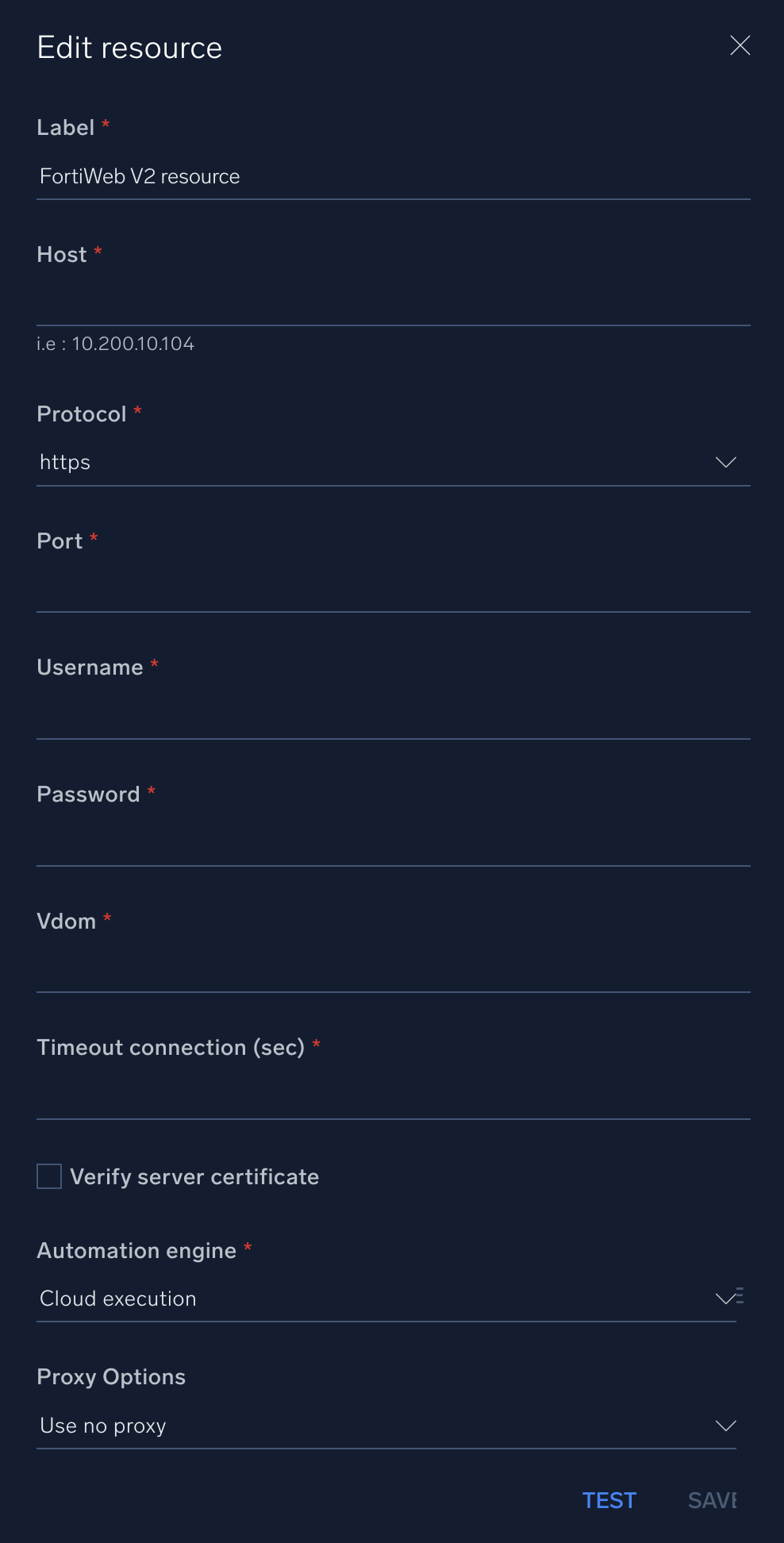
* **Host**. Enter the [hostname](https://docs.fortinet.com/document/fortiweb/7.6.2/administration-guide/307213/changing-the-fortiweb-appliance-s-host-name) for your FortiWeb instance, for example, `10.200.10.104`
* **Protocol**. Select the protocol, `https` or `http`.
* **Port**. Enter your FortiWeb [port number](https://docs.fortinet.com/document/fortiweb/7.6.3/administration-guide/806024/appendix-a-port-numbers).
* **Username**. Enter the username of a FortiWeb admin user authorized to authenticate the integration.
* **Password**. Enter the password for the admin user.
* **Vdom**. Enter your FortiWeb [virtual domain](https://docs.fortinet.com/document/fortiadc/7.4.3/handbook/442832/virtual-domain-vdom-and-administrative-domain-adom-overview).
*
*
*
*
***Version: 1.2
Updated: April 29, 2026***
List and create policies and rules with Fortinet FortiWeb.
## Actions
* **Get HTTP Service List** (*Enrichment*) - List the HTTP services.
* **Get Inline Protection Profile** (*Enrichment*) - List all inline protection profiles.
* **Get IP List** (*Enrichment*) - List all IP lists.
* **Get Offline Protection Profile** (*Enrichment*) - List all offline protection profiles.
* **Get Server Policy** (*Enrichment*) - List all server policies.
* **Get Server Pool** (*Enrichment*) - List all server pools.
* **Get Signature Policy** (*Enrichment*) - List all signature policies.
* **Get Trigger Policy** (*Enrichment*) - List all trigger policies.
* **Get URL Access Policy** (*Enrichment*) - List all URL access policies.
* **Get Virtual Server** (*Enrichment*) - List all virtual servers.
* **Create IP List** (*Containment*) - Create a new IP list.
* **Create IP List Policy Member** (*Containment*) - Create a new IP list policy member.
* **Create IP Reputation Exception** (*Containment*) - Create a new IP reputation exception.
* **Create Offline Protection Profile** (*Containment*) - Create a new offline protection profile.
* **Create Server Policy** (*Containment*) - Create a new server policy.
* **Create URL Access Policy** (*Containment*) - Create a new URL access policy.
* **Create URL Access Rule** (*Containment*) - Create a new URL access rule.
* **Create Inline Protection Profile** (*Containment) -* Create a new inline protection profile.
* **Get URL Access Rule** (*Containment*) - Get access rules for URLs.
## Configure FortiWeb V2 in Automation Service and Cloud SOAR
import IntegrationsAuth from '../../reuse/integrations-authentication.md';
import IntegrationCertificate from '../../reuse/automation-service/integration-certificate.md';
import IntegrationEngine from '../../reuse/automation-service/integration-engine.md';
import IntegrationLabel from '../../reuse/automation-service/integration-label.md';
import IntegrationProxy from '../../reuse/automation-service/integration-proxy.md';
import IntegrationTimeout from '../../reuse/automation-service/integration-timeout.md';
*
* **Host**. Enter the [hostname](https://docs.fortinet.com/document/fortiweb/7.6.2/administration-guide/307213/changing-the-fortiweb-appliance-s-host-name) for your FortiWeb instance, for example, `10.200.10.104`
* **Protocol**. Select the protocol, `https` or `http`.
* **Port**. Enter your FortiWeb [port number](https://docs.fortinet.com/document/fortiweb/7.6.3/administration-guide/806024/appendix-a-port-numbers).
* **Username**. Enter the username of a FortiWeb admin user authorized to authenticate the integration.
* **Password**. Enter the password for the admin user.
* **Vdom**. Enter your FortiWeb [virtual domain](https://docs.fortinet.com/document/fortiadc/7.4.3/handbook/442832/virtual-domain-vdom-and-administrative-domain-adom-overview).
*
*
*
*
 For information about FortiWeb, see [FortiWeb documentation](https://docs.fortinet.com/product/fortiweb/7.6).
## Change Log
| Version | Date | Description |
|:--|:--|:--|
| v1.2 | April 29, 2026 | Upgraded the `python3_generic` Docker image (Python 3.8) to `python3_12_generic` (Python 3.12) to address Python 3.8 end-of-life and improve security and performance. |
| v1.1 | July 6, 2023 | Updated the integration with Environmental Variables. |
| | April 28, 2021 | First upload. |
For information about FortiWeb, see [FortiWeb documentation](https://docs.fortinet.com/product/fortiweb/7.6).
## Change Log
| Version | Date | Description |
|:--|:--|:--|
| v1.2 | April 29, 2026 | Upgraded the `python3_generic` Docker image (Python 3.8) to `python3_12_generic` (Python 3.12) to address Python 3.8 end-of-life and improve security and performance. |
| v1.1 | July 6, 2023 | Updated the integration with Environmental Variables. |
| | April 28, 2021 | First upload. |