---
title: Freshdesk
description: ''
slug: /help/docs/integrations/automation-integrations/freshdesk/
canonical: https://www.sumologic.com/help/docs/integrations/automation-integrations/freshdesk/
---
import useBaseUrl from '@docusaurus/useBaseUrl';
 ***Version: 1.2
Updated: April 29, 2026***
Interact with Freshdesk contacts and tickets.
## Actions
* **Get All Agents** (*Enrichment*) - Gather a list of all available agents.
* **List Canned Response Folders** (*Enrichment*) - Gather a list of canned response folders.
* **Get Canned Response In Folder** (*Enrichment*) - Gather information from a specific canned response folder.
* **Get All Contacts** (*Enrichment*) - Gather a list of all available contacts.
* **Get Groups** (*Enrichment*) - Gather a list of all available groups.
* **Get Ticket Conversations** (*Enrichment*) - Get a specific ticket conversation.
* **View Ticket** (*Enrichment*) - View details of a specific ticket.
* **Get All Tickets** (*Enrichment*) - Get all tickets.
* **Add Reply** (*Containment*) - Add a replay to an existing conversation.
* **Create Note** (*Containment*) - Create a new note.
* **Create Ticket On Freshdesk** (*Containment*) - Create a new ticket in Freshdesk.
* **Create Ticket With Attachment** (*Containment*) - Create a new ticket with an attachment.
* **Delete Ticket** (*Containment*) - Delete an existing ticket.
* **Update Ticket On Freshdesk** (*Containment*) - Update a specific ticket in Freshdesk.
## Configure Freshdesk in Automation Service and Cloud SOAR
import IntegrationsAuth from '../../reuse/integrations-authentication.md';
import IntegrationCertificate from '../../reuse/automation-service/integration-certificate.md';
import IntegrationEngine from '../../reuse/automation-service/integration-engine.md';
import IntegrationLabel from '../../reuse/automation-service/integration-label.md';
import IntegrationProxy from '../../reuse/automation-service/integration-proxy.md';
import IntegrationTimeout from '../../reuse/automation-service/integration-timeout.md';
*
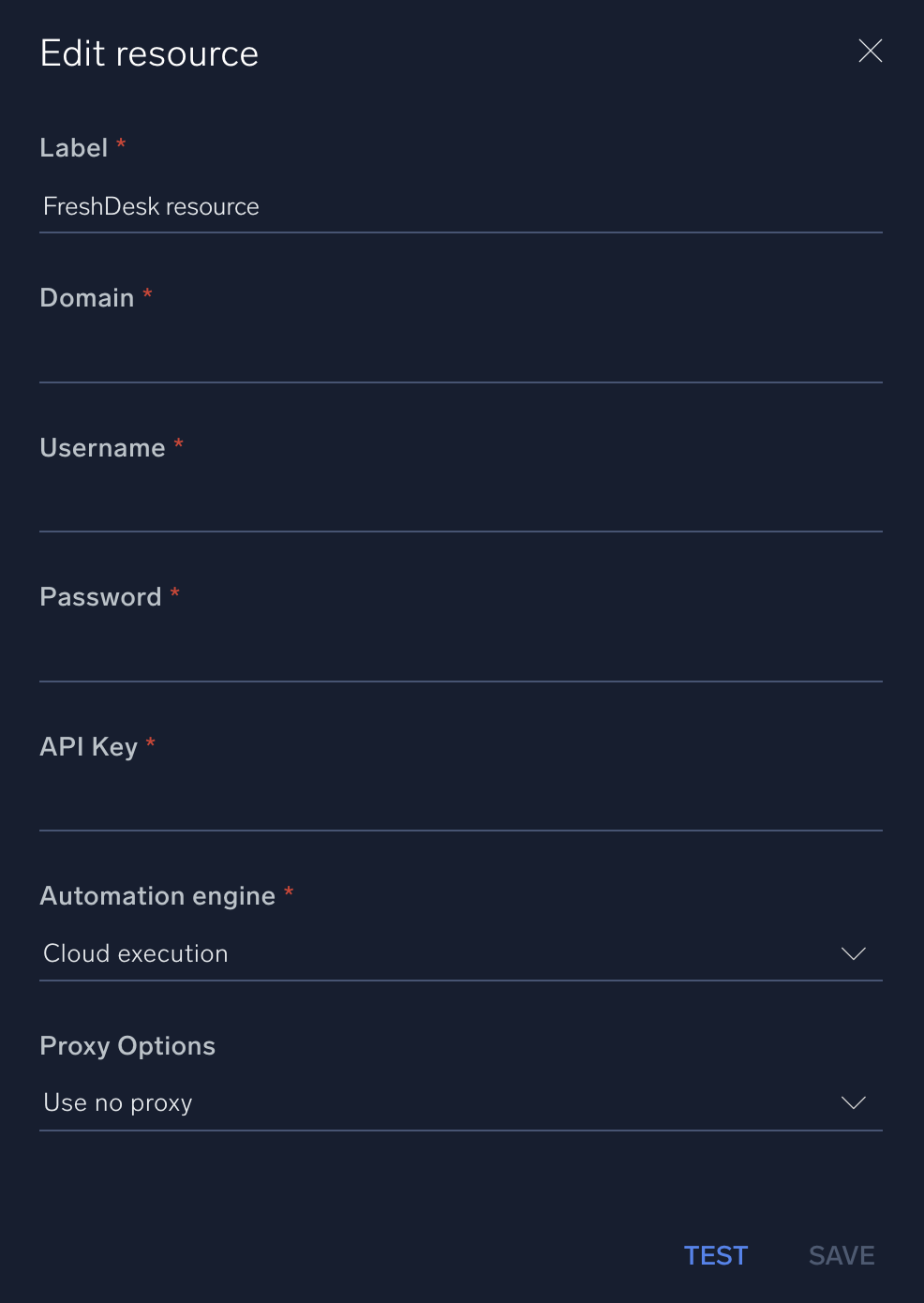
* **Domain**. Enter your Freshdesk [domain](https://crmsupport.freshworks.com/support/solutions/articles/50000004766-how-to-find-the-freshchat-domain-id).
* **Username**. Enter the username of a Freshdesk admin user authorized to authenticate the integration.
* **Password**. Enter the password for the admin user.
* **API Key**. Enter a Freshdesk [API key](https://support.freshdesk.com/support/solutions/articles/215517-how-to-find-your-api-key).
*
*
***Version: 1.2
Updated: April 29, 2026***
Interact with Freshdesk contacts and tickets.
## Actions
* **Get All Agents** (*Enrichment*) - Gather a list of all available agents.
* **List Canned Response Folders** (*Enrichment*) - Gather a list of canned response folders.
* **Get Canned Response In Folder** (*Enrichment*) - Gather information from a specific canned response folder.
* **Get All Contacts** (*Enrichment*) - Gather a list of all available contacts.
* **Get Groups** (*Enrichment*) - Gather a list of all available groups.
* **Get Ticket Conversations** (*Enrichment*) - Get a specific ticket conversation.
* **View Ticket** (*Enrichment*) - View details of a specific ticket.
* **Get All Tickets** (*Enrichment*) - Get all tickets.
* **Add Reply** (*Containment*) - Add a replay to an existing conversation.
* **Create Note** (*Containment*) - Create a new note.
* **Create Ticket On Freshdesk** (*Containment*) - Create a new ticket in Freshdesk.
* **Create Ticket With Attachment** (*Containment*) - Create a new ticket with an attachment.
* **Delete Ticket** (*Containment*) - Delete an existing ticket.
* **Update Ticket On Freshdesk** (*Containment*) - Update a specific ticket in Freshdesk.
## Configure Freshdesk in Automation Service and Cloud SOAR
import IntegrationsAuth from '../../reuse/integrations-authentication.md';
import IntegrationCertificate from '../../reuse/automation-service/integration-certificate.md';
import IntegrationEngine from '../../reuse/automation-service/integration-engine.md';
import IntegrationLabel from '../../reuse/automation-service/integration-label.md';
import IntegrationProxy from '../../reuse/automation-service/integration-proxy.md';
import IntegrationTimeout from '../../reuse/automation-service/integration-timeout.md';
*
* **Domain**. Enter your Freshdesk [domain](https://crmsupport.freshworks.com/support/solutions/articles/50000004766-how-to-find-the-freshchat-domain-id).
* **Username**. Enter the username of a Freshdesk admin user authorized to authenticate the integration.
* **Password**. Enter the password for the admin user.
* **API Key**. Enter a Freshdesk [API key](https://support.freshdesk.com/support/solutions/articles/215517-how-to-find-your-api-key).
*
*
 For information about Freshdesk, see [Freshdesk documentation](https://developers.freshdesk.com/).
## Change Log
| Version | Date | Description |
|:--|:--|:--|
| v1.2 | April 29, 2026 | Upgraded the `python3_generic` Docker image (Python 3.8) to `python3_12_generic` (Python 3.12) to address Python 3.8 end-of-life and improve security and performance. |
| v1.1 | June 30, 2023 | Updated the integration with Environmental Variables. |
| | April 21, 2022 | Updated the logo. |
| | March 20, 2020 | First upload. |
For information about Freshdesk, see [Freshdesk documentation](https://developers.freshdesk.com/).
## Change Log
| Version | Date | Description |
|:--|:--|:--|
| v1.2 | April 29, 2026 | Upgraded the `python3_generic` Docker image (Python 3.8) to `python3_12_generic` (Python 3.12) to address Python 3.8 end-of-life and improve security and performance. |
| v1.1 | June 30, 2023 | Updated the integration with Environmental Variables. |
| | April 21, 2022 | Updated the logo. |
| | March 20, 2020 | First upload. |