---
title: Freshservice
description: ''
slug: /help/docs/integrations/automation-integrations/freshservice/
canonical: https://www.sumologic.com/help/docs/integrations/automation-integrations/freshservice/
---
import useBaseUrl from '@docusaurus/useBaseUrl';
 ***Version: 1.9
Updated: April 29, 2026***
Freshservice is a cloud-based IT Help Desk and service management solution that enables organizations to simplify their IT operations. The solution offers features that include a ticketing system, self-service portal, and knowledge-base.
## Actions
* **Create Ticket** *(Notification)* - Create a new ticket in your service desk.
* **Get Tickets** *(Enrichment)* - List all tickets with filter options.
* **View Ticket** *(Enrichment)* - View details of a ticket.
* **Update Ticket** *(Notification)* - Change the parameters of a ticket.
* **Delete Ticket** *(Containment)* - Delete an existing ticket.
* **Add Reply** *(Notification)* - Add a replay to a conversation.
* **Get Agents** *(Enrichment)* - View information about all agents in the account.
* **Get Requesters** *(Enrichment)* - Get a list of all requesters in the account.
* **Get Ticket Conversations** *(Enrichment)* - Get all conversations of a Ticket.
* **Create Note** *(Notification)* - Add a new note to a ticket.
* **Get Groups** *(Enrichment)* - Get a list of all available groups.
* **List Canned Response Folders** *(Enrichment)* - List all the Canned Response Folders that are present in the account.
* **Get Canned Response Folder** *(Enrichment)* - Show a Canned Response Folder.
* **Show Canned Response** *(Enrichment)* - Show a specific Canned Response.
* **Get Canned Responses In Folder** *(Enrichment)* - Lists all the Canned Responses that are present in the folder.
* **Freshservice Tickets Daemon** *(Enrichment) -* Automatically retrieves new tickets. If the value for updated since is not populated, it will return the tickets updated since 30 days before.
## Freshservice configuration
1. Login to your Freshservice Support Portal.
***Version: 1.9
Updated: April 29, 2026***
Freshservice is a cloud-based IT Help Desk and service management solution that enables organizations to simplify their IT operations. The solution offers features that include a ticketing system, self-service portal, and knowledge-base.
## Actions
* **Create Ticket** *(Notification)* - Create a new ticket in your service desk.
* **Get Tickets** *(Enrichment)* - List all tickets with filter options.
* **View Ticket** *(Enrichment)* - View details of a ticket.
* **Update Ticket** *(Notification)* - Change the parameters of a ticket.
* **Delete Ticket** *(Containment)* - Delete an existing ticket.
* **Add Reply** *(Notification)* - Add a replay to a conversation.
* **Get Agents** *(Enrichment)* - View information about all agents in the account.
* **Get Requesters** *(Enrichment)* - Get a list of all requesters in the account.
* **Get Ticket Conversations** *(Enrichment)* - Get all conversations of a Ticket.
* **Create Note** *(Notification)* - Add a new note to a ticket.
* **Get Groups** *(Enrichment)* - Get a list of all available groups.
* **List Canned Response Folders** *(Enrichment)* - List all the Canned Response Folders that are present in the account.
* **Get Canned Response Folder** *(Enrichment)* - Show a Canned Response Folder.
* **Show Canned Response** *(Enrichment)* - Show a specific Canned Response.
* **Get Canned Responses In Folder** *(Enrichment)* - Lists all the Canned Responses that are present in the folder.
* **Freshservice Tickets Daemon** *(Enrichment) -* Automatically retrieves new tickets. If the value for updated since is not populated, it will return the tickets updated since 30 days before.
## Freshservice configuration
1. Login to your Freshservice Support Portal.
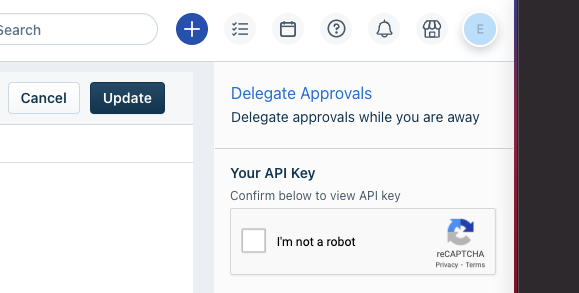
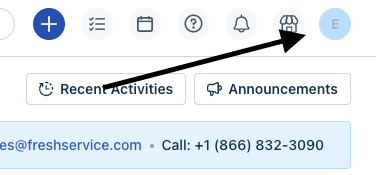 1. Go to Profile settings Page. [Your API key](https://support.freshservice.com/support/solutions/articles/50000000306-where-do-i-find-my-api-key-) will be available below the change password section to your right. Copy the API KEY.
 ## Configure Freshservice in Automation Service and Cloud SOAR
import IntegrationsAuth from '../../reuse/integrations-authentication.md';
import IntegrationCertificate from '../../reuse/automation-service/integration-certificate.md';
import IntegrationEngine from '../../reuse/automation-service/integration-engine.md';
import IntegrationLabel from '../../reuse/automation-service/integration-label.md';
import IntegrationProxy from '../../reuse/automation-service/integration-proxy.md';
import IntegrationTimeout from '../../reuse/automation-service/integration-timeout.md';
*
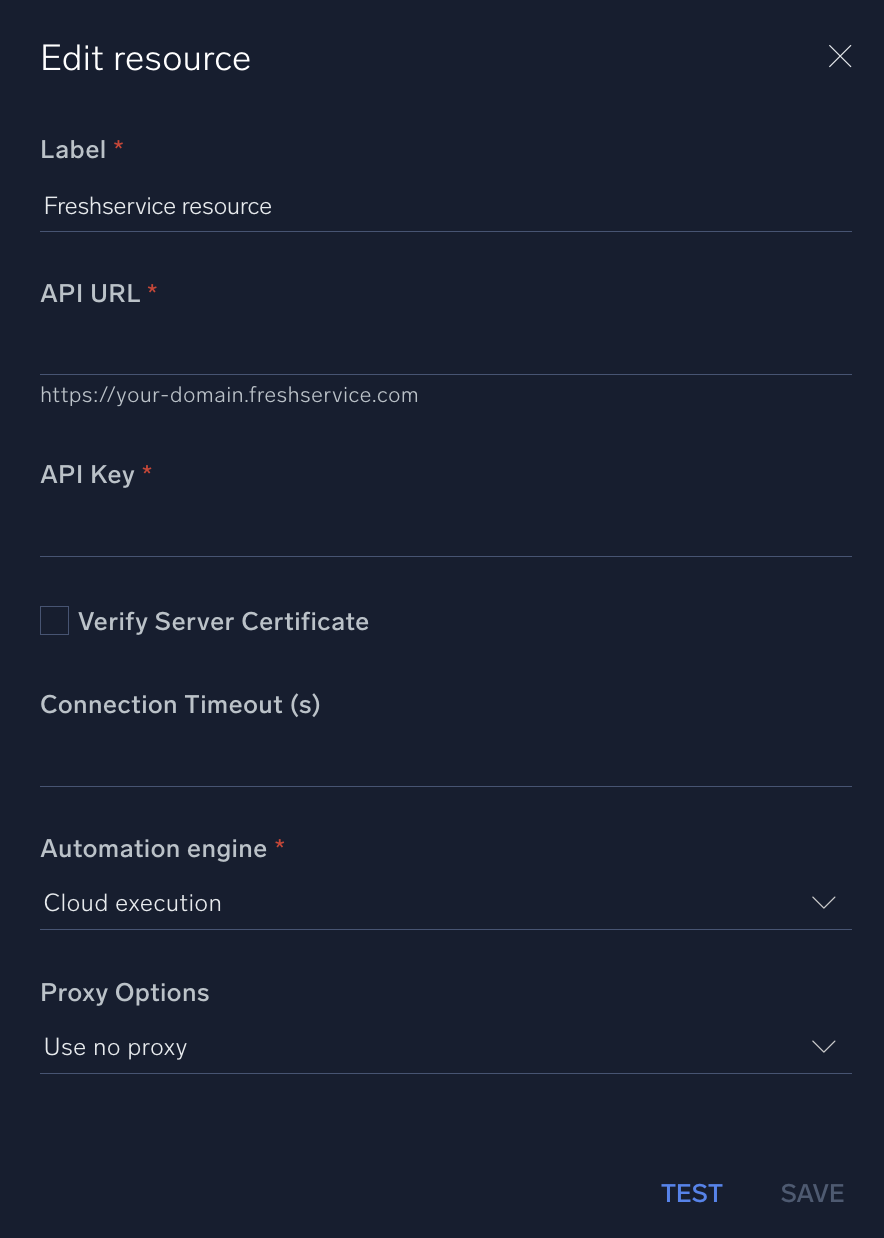
* **API URL**. Enter your Freshservice API URL, for example, `https://your-domain.freshservice.com`
* **API Key**. Enter the Freshservice [API key](https://support.freshservice.com/support/solutions/articles/50000000306-where-do-i-find-my-api-key-) you [copied earlier](#freshservice-configuration).
*
*
*
*
## Configure Freshservice in Automation Service and Cloud SOAR
import IntegrationsAuth from '../../reuse/integrations-authentication.md';
import IntegrationCertificate from '../../reuse/automation-service/integration-certificate.md';
import IntegrationEngine from '../../reuse/automation-service/integration-engine.md';
import IntegrationLabel from '../../reuse/automation-service/integration-label.md';
import IntegrationProxy from '../../reuse/automation-service/integration-proxy.md';
import IntegrationTimeout from '../../reuse/automation-service/integration-timeout.md';
*
* **API URL**. Enter your Freshservice API URL, for example, `https://your-domain.freshservice.com`
* **API Key**. Enter the Freshservice [API key](https://support.freshservice.com/support/solutions/articles/50000000306-where-do-i-find-my-api-key-) you [copied earlier](#freshservice-configuration).
*
*
*
*
 For information about Freshservice, see [Freshservice documentation](https://support.freshservice.com/support/solutions#agentguidepage).
## Category
Ticketing System
:::note
Providing an invalid or unauthorized Workspace ID may result in a 400 Bad Request error. Verify that the Workspace ID is correct and accessible to the API user.
:::
## Change Log
| Version | Date | Description |
|:--|:--|:--|
| v1.9 | April 29, 2026 | Upgraded the `python3_generic` Docker image (Python 3.8) to `python3_12_generic` (Python 3.12) to address Python 3.8 end-of-life and improve security and performance. |
| v1.8 | Dec 30, 2025 | The **Create Ticket** and **Update Ticket** actions now support an optional Workspace ID. Updated existing custom ticket fields. |
| v1.6 | Sept 11, 2024 | Updated the **Update Ticket** action. |
| v1.5 | July 11, 2023 | Removed leading/trailing spaces. |
| v1.4 | March 22, 2023 | Updated the integration fields with Environmental Variables. |
| | June 29, 2022 |
For information about Freshservice, see [Freshservice documentation](https://support.freshservice.com/support/solutions#agentguidepage).
## Category
Ticketing System
:::note
Providing an invalid or unauthorized Workspace ID may result in a 400 Bad Request error. Verify that the Workspace ID is correct and accessible to the API user.
:::
## Change Log
| Version | Date | Description |
|:--|:--|:--|
| v1.9 | April 29, 2026 | Upgraded the `python3_generic` Docker image (Python 3.8) to `python3_12_generic` (Python 3.12) to address Python 3.8 end-of-life and improve security and performance. |
| v1.8 | Dec 30, 2025 | The **Create Ticket** and **Update Ticket** actions now support an optional Workspace ID. Updated existing custom ticket fields. |
| v1.6 | Sept 11, 2024 | Updated the **Update Ticket** action. |
| v1.5 | July 11, 2023 | Removed leading/trailing spaces. |
| v1.4 | March 22, 2023 | Updated the integration fields with Environmental Variables. |
| | June 29, 2022 | - Added a new action: **Freshservice Tickets Daemon**.
- Updated the **Get Tickets** action.
|
| | June 24, 2022 | Added a daemon action. |
| | April 4, 2022 | First upload. |