---
title: Jamf
description: ''
slug: /help/docs/integrations/automation-integrations/jamf/
canonical: https://www.sumologic.com/help/docs/integrations/automation-integrations/jamf/
---
import useBaseUrl from '@docusaurus/useBaseUrl';
 ***Version: 1.4
Updated: April 29, 2026***
The Jamf platform creates IT software that manages Apple devices.
## Actions
* **Get Computer Details** *(Enrichment)* - Return a computer general details.
* **Get macOs Managed Software Updates** *(Enrichment)* - Retrieves available macOs managed software updates.
* **List Computer Groups** *(Enrichment)* - Returns a list of computer groups.
* **List Computers** *(Enrichment)* - Returns a list of computers.
* **List Config Profiles** *(Enrichment)* - Search for config profiles linked to Jamf Connect.
* **Remove Computer** *(Containment)* - Remove specified Computer record.
* **Send macOs Managed Software Updates** *(Containment)* - Apply major update to macOs managed software updates.
## Configure Jamf in Automation Service and Cloud SOAR
import IntegrationsAuth from '../../reuse/integrations-authentication.md';
import IntegrationCertificate from '../../reuse/automation-service/integration-certificate.md';
import IntegrationEngine from '../../reuse/automation-service/integration-engine.md';
import IntegrationLabel from '../../reuse/automation-service/integration-label.md';
import IntegrationProxy from '../../reuse/automation-service/integration-proxy.md';
import IntegrationTimeout from '../../reuse/automation-service/integration-timeout.md';
*
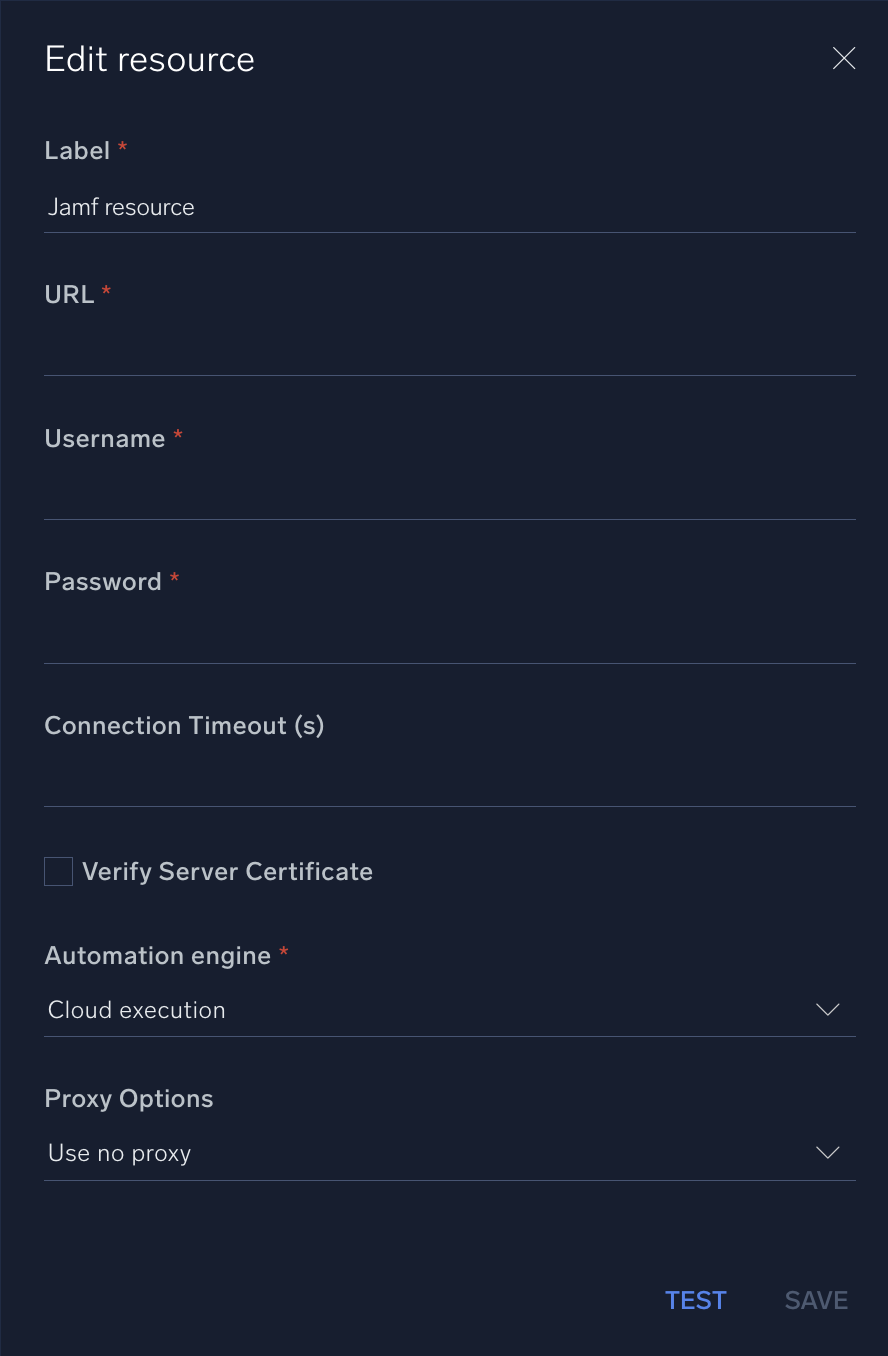
* **URL**. Enter your [Jamf URL](https://learn.jamf.com/en-US/bundle/jamf-pro-documentation-current/page/Jamf_Pro_URL.html).
* **Username**. Enter the username of a Jamf admin user authorized to authenticate the integration.
* **Password**. Enter the password for the admin user.
*
*
*
*
***Version: 1.4
Updated: April 29, 2026***
The Jamf platform creates IT software that manages Apple devices.
## Actions
* **Get Computer Details** *(Enrichment)* - Return a computer general details.
* **Get macOs Managed Software Updates** *(Enrichment)* - Retrieves available macOs managed software updates.
* **List Computer Groups** *(Enrichment)* - Returns a list of computer groups.
* **List Computers** *(Enrichment)* - Returns a list of computers.
* **List Config Profiles** *(Enrichment)* - Search for config profiles linked to Jamf Connect.
* **Remove Computer** *(Containment)* - Remove specified Computer record.
* **Send macOs Managed Software Updates** *(Containment)* - Apply major update to macOs managed software updates.
## Configure Jamf in Automation Service and Cloud SOAR
import IntegrationsAuth from '../../reuse/integrations-authentication.md';
import IntegrationCertificate from '../../reuse/automation-service/integration-certificate.md';
import IntegrationEngine from '../../reuse/automation-service/integration-engine.md';
import IntegrationLabel from '../../reuse/automation-service/integration-label.md';
import IntegrationProxy from '../../reuse/automation-service/integration-proxy.md';
import IntegrationTimeout from '../../reuse/automation-service/integration-timeout.md';
*
* **URL**. Enter your [Jamf URL](https://learn.jamf.com/en-US/bundle/jamf-pro-documentation-current/page/Jamf_Pro_URL.html).
* **Username**. Enter the username of a Jamf admin user authorized to authenticate the integration.
* **Password**. Enter the password for the admin user.
*
*
*
*
 For information about Jamf, see [Jamf documentation](https://www.jamf.com/resources/product-documentation/jamf-pro-administrators-guide/).
## Minimum permissions required
The following permissions are required for the integration:
* **Read Computers**. Allows reading details of computers in the Jamf inventory.
* **Read Smart Computer Groups**. Grants access to view smart computer groups.
* **Read Static Computer Groups**. Grants access to view static computer groups.
* **Read Jamf Connect Deployments**. Provides access to view Jamf Connect deployments.
#### Jamf Pro Server URL:
Example: [https://yourServer.jamfcloud.com](https://yourServer.jamfcloud.com)
## Change Log
| Version | Date | Description |
|:--|:--|:--|
| v1.4 | April 29, 2026 | Upgraded the `python3_generic` Docker image (Python 3.8) to `python3_12_generic` (Python 3.12) to address Python 3.8 end-of-life and improve security and performance. |
| v1.3 | June 28, 2023 | Updated the **List Computers** action. |
| v1.2 | June 15, 2023 | Updated the integration with Environmental Variables. |
| | November 23, 2022 | Initial release of the Jamf integration. |
## Additional resources
For Jamf, Sumo Logic offers the [Jamf source](/docs/send-data/hosted-collectors/cloud-to-cloud-integration-framework/jamf-source/) and the [Jamf app](/docs/integrations/saas-cloud/jamf/) to collect and visualize your Jamf data.
For information about Jamf, see [Jamf documentation](https://www.jamf.com/resources/product-documentation/jamf-pro-administrators-guide/).
## Minimum permissions required
The following permissions are required for the integration:
* **Read Computers**. Allows reading details of computers in the Jamf inventory.
* **Read Smart Computer Groups**. Grants access to view smart computer groups.
* **Read Static Computer Groups**. Grants access to view static computer groups.
* **Read Jamf Connect Deployments**. Provides access to view Jamf Connect deployments.
#### Jamf Pro Server URL:
Example: [https://yourServer.jamfcloud.com](https://yourServer.jamfcloud.com)
## Change Log
| Version | Date | Description |
|:--|:--|:--|
| v1.4 | April 29, 2026 | Upgraded the `python3_generic` Docker image (Python 3.8) to `python3_12_generic` (Python 3.12) to address Python 3.8 end-of-life and improve security and performance. |
| v1.3 | June 28, 2023 | Updated the **List Computers** action. |
| v1.2 | June 15, 2023 | Updated the integration with Environmental Variables. |
| | November 23, 2022 | Initial release of the Jamf integration. |
## Additional resources
For Jamf, Sumo Logic offers the [Jamf source](/docs/send-data/hosted-collectors/cloud-to-cloud-integration-framework/jamf-source/) and the [Jamf app](/docs/integrations/saas-cloud/jamf/) to collect and visualize your Jamf data.