---
title: ManageEngine Desktop Central
description: ''
slug: /help/docs/integrations/automation-integrations/manage-engine-desktop-central/
canonical: https://www.sumologic.com/help/docs/integrations/automation-integrations/manage-engine-desktop-central/
---
import useBaseUrl from '@docusaurus/useBaseUrl';
 ***Version: 1.3
Updated: April 30, 2026***
Query data an utilize actions in Desktop Central unified endpoint management (UEM) solution for managing servers, laptops, desktops, smartphones.
## Actions
* **List Patches** *(Enrichment)* - Retrieve the all patch list.
* **Install Patches** *(Containment)* - Install specific patches in all systems.
* **List Systems** *(Enrichment)* - Retrieve the all system list.
* **Patch Scan Computers** *(Containment)* - Perform patch scan on all computers.
* **Patch Scan Computer** *(Containment)* - Perform scan action on particular computers.
* **Approve Patch** *(Containment)* - Initiate Approve patch actions.
* **Unapprove Patch** *(Containment)* - Initiate Unapprove patch actions.
* **Patch Scan Details** *(Enrichment)* - Retrieve the patch scan system list.
* **Deployment Policies** *(Enrichment)* - Retrieve the patch deployment policy list.
* **Initiation Request** *(Containment)* - Get the device code as input for Polling Request action.
* **Polling Request** *(Containment)* - Get the Access Token.
## Configure ManageEngine Desktop Central in Automation Service and Cloud SOAR
import IntegrationsAuth from '../../reuse/integrations-authentication.md';
import IntegrationCertificate from '../../reuse/automation-service/integration-certificate.md';
import IntegrationEngine from '../../reuse/automation-service/integration-engine.md';
import IntegrationLabel from '../../reuse/automation-service/integration-label.md';
import IntegrationProxy from '../../reuse/automation-service/integration-proxy.md';
import IntegrationTimeout from '../../reuse/automation-service/integration-timeout.md';
*
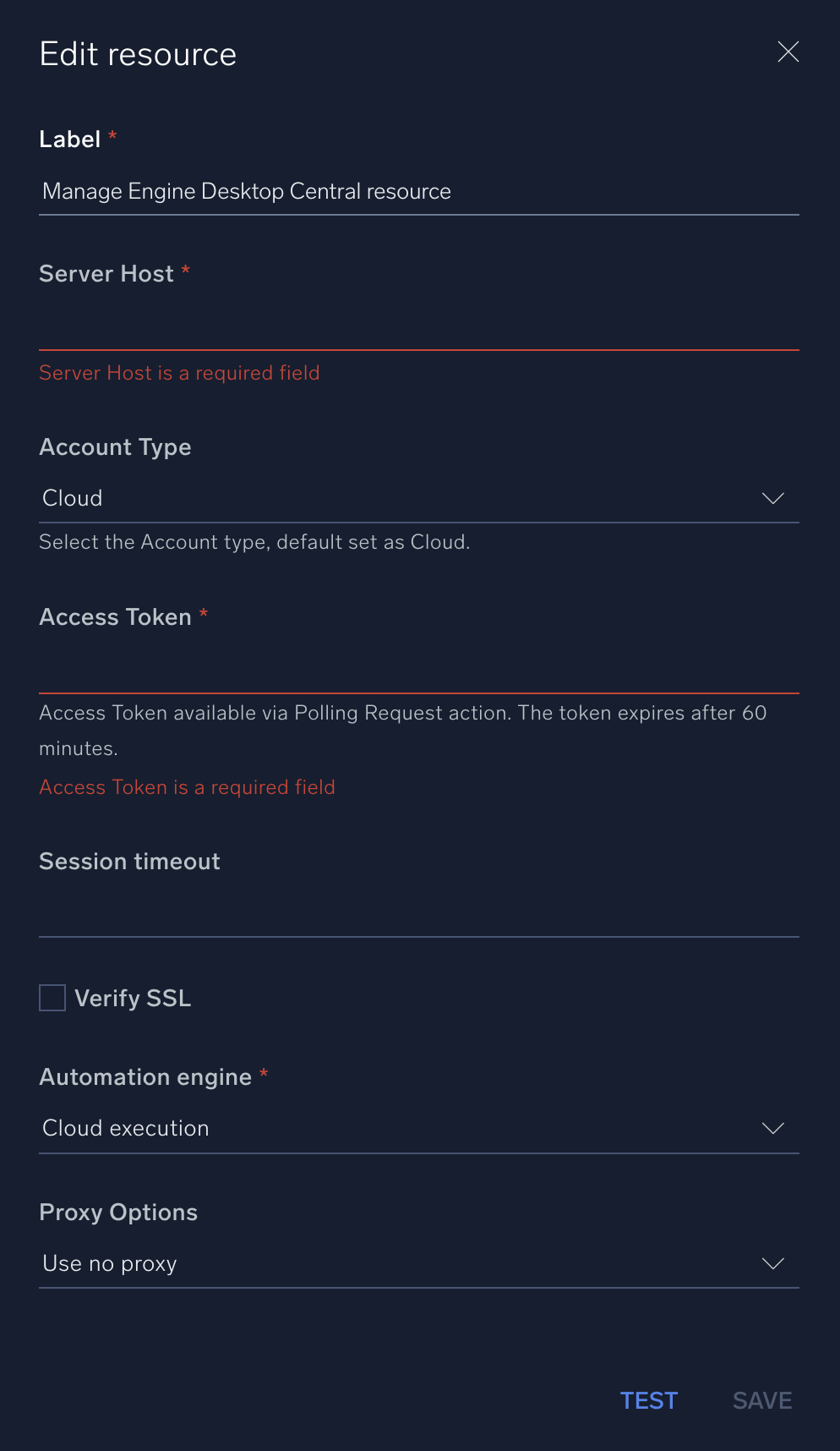
* **Server Host**. Enter your ManageEngine Desktop Central [hostname](https://www.manageengine.com/products/desktop-central/help/getting_started/working_with_desktop_central.html).
* **Account Type**. Select your Account type (default is Cloud).
* **Access Token**. Enter your ManageEngine Desktop Central [authentication key](https://www.manageengine.com/products/desktop-central/api/).
*
*
*
*
***Version: 1.3
Updated: April 30, 2026***
Query data an utilize actions in Desktop Central unified endpoint management (UEM) solution for managing servers, laptops, desktops, smartphones.
## Actions
* **List Patches** *(Enrichment)* - Retrieve the all patch list.
* **Install Patches** *(Containment)* - Install specific patches in all systems.
* **List Systems** *(Enrichment)* - Retrieve the all system list.
* **Patch Scan Computers** *(Containment)* - Perform patch scan on all computers.
* **Patch Scan Computer** *(Containment)* - Perform scan action on particular computers.
* **Approve Patch** *(Containment)* - Initiate Approve patch actions.
* **Unapprove Patch** *(Containment)* - Initiate Unapprove patch actions.
* **Patch Scan Details** *(Enrichment)* - Retrieve the patch scan system list.
* **Deployment Policies** *(Enrichment)* - Retrieve the patch deployment policy list.
* **Initiation Request** *(Containment)* - Get the device code as input for Polling Request action.
* **Polling Request** *(Containment)* - Get the Access Token.
## Configure ManageEngine Desktop Central in Automation Service and Cloud SOAR
import IntegrationsAuth from '../../reuse/integrations-authentication.md';
import IntegrationCertificate from '../../reuse/automation-service/integration-certificate.md';
import IntegrationEngine from '../../reuse/automation-service/integration-engine.md';
import IntegrationLabel from '../../reuse/automation-service/integration-label.md';
import IntegrationProxy from '../../reuse/automation-service/integration-proxy.md';
import IntegrationTimeout from '../../reuse/automation-service/integration-timeout.md';
*
* **Server Host**. Enter your ManageEngine Desktop Central [hostname](https://www.manageengine.com/products/desktop-central/help/getting_started/working_with_desktop_central.html).
* **Account Type**. Select your Account type (default is Cloud).
* **Access Token**. Enter your ManageEngine Desktop Central [authentication key](https://www.manageengine.com/products/desktop-central/api/).
*
*
*
*
 For information about ManageEngine Endpoint Central (formerly Desktop Central), see [ManageEngine Endpoint Central documentation](https://www.manageengine.com/products/desktop-central/api/).
## Change Log
| Version | Date | Description |
|:--|:--|:--|
| v1.3 | April 30, 2026 | Upgraded the `python3_generic` Docker image (Python 3.8) to `python3_12_generic` (Python 3.12) to address Python 3.8 end-of-life and improve security and performance. |
| v1.2 | June 24, 2025 | Updated authentication headers to support both cloud and on-prem account type. |
| v1.1 | July 5, 2023 | Updated the integration with Environmental Variables. |
| | July 8, 2021 | Initial release of the ManageEngine Desktop Central integration. |
For information about ManageEngine Endpoint Central (formerly Desktop Central), see [ManageEngine Endpoint Central documentation](https://www.manageengine.com/products/desktop-central/api/).
## Change Log
| Version | Date | Description |
|:--|:--|:--|
| v1.3 | April 30, 2026 | Upgraded the `python3_generic` Docker image (Python 3.8) to `python3_12_generic` (Python 3.12) to address Python 3.8 end-of-life and improve security and performance. |
| v1.2 | June 24, 2025 | Updated authentication headers to support both cloud and on-prem account type. |
| v1.1 | July 5, 2023 | Updated the integration with Environmental Variables. |
| | July 8, 2021 | Initial release of the ManageEngine Desktop Central integration. |