---
title: Microsoft 365 Defender
description: ''
slug: /help/docs/integrations/automation-integrations/microsoft-365-defender/
canonical: https://www.sumologic.com/help/docs/integrations/automation-integrations/microsoft-365-defender/
---
import useBaseUrl from '@docusaurus/useBaseUrl';
 ***Version: 1.6
Updated: April 30, 2026***
Microsoft 365 Defender is a part of Microsoft’s XDR solution which can automatically analyze threat data across domains, building a complete picture of each attack in a single dashboard. Microsoft 365 Defender integration allows us to query and update incident related data from the solution itself.
## Actions
* **Microsoft 365 Defender Incidents Daemon** (*Daemon*) - Automatically pull Microsoft 365 security Incidents.
* **Search Incidents** (*Enrichment*) - Get a list of incidents.
* **Get Incident** (*Enrichment*) - Get specific incident details.
* **Update Defender Incident** (*Notification*) - Update a specific incident.
## Microsoft 365 Defender Configuration
Refer to the [Microsoft 365 Defender](https://docs.microsoft.com/en-us/microsoft-365/security/defender/api-create-app-web?view=o365-worldwide) guide to create an Application in Azure Portal and add Permissions to access Microsoft 365 Defender.
## Category
EDR
## Configure Microsoft 365 Defender in Automation Service and Cloud SOAR
import IntegrationsAuth from '../../reuse/integrations-authentication.md';
import IntegrationCertificate from '../../reuse/automation-service/integration-certificate.md';
import IntegrationEngine from '../../reuse/automation-service/integration-engine.md';
import IntegrationLabel from '../../reuse/automation-service/integration-label.md';
import IntegrationProxy from '../../reuse/automation-service/integration-proxy.md';
import IntegrationTimeout from '../../reuse/automation-service/integration-timeout.md';
*
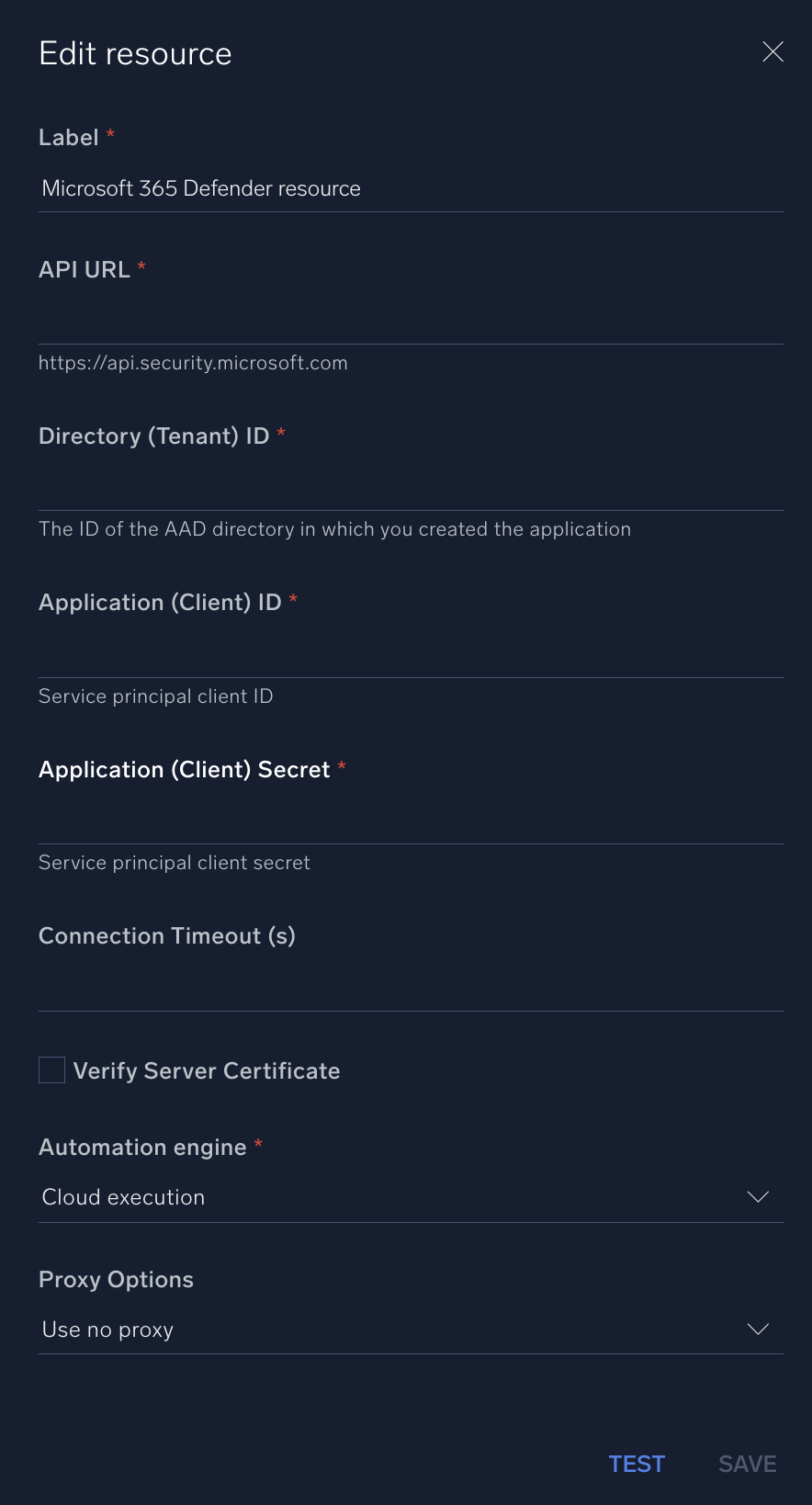
* **API URL**. Enter your Microsoft 365 Defender API URL, for example, `https://api.security.microsoft.com`
* **Directory (Tenant) ID**. Enter the [tenant ID](https://learn.microsoft.com/en-us/azure/healthcare-apis/register-application#application-id-client-id) of the AAD directory in which you created the application.
* **Application (Client) ID**. Enter your Microsoft 365 Defender [application ID](https://learn.microsoft.com/en-us/azure/healthcare-apis/register-application#application-id-client-id).
*
*
*
*
***Version: 1.6
Updated: April 30, 2026***
Microsoft 365 Defender is a part of Microsoft’s XDR solution which can automatically analyze threat data across domains, building a complete picture of each attack in a single dashboard. Microsoft 365 Defender integration allows us to query and update incident related data from the solution itself.
## Actions
* **Microsoft 365 Defender Incidents Daemon** (*Daemon*) - Automatically pull Microsoft 365 security Incidents.
* **Search Incidents** (*Enrichment*) - Get a list of incidents.
* **Get Incident** (*Enrichment*) - Get specific incident details.
* **Update Defender Incident** (*Notification*) - Update a specific incident.
## Microsoft 365 Defender Configuration
Refer to the [Microsoft 365 Defender](https://docs.microsoft.com/en-us/microsoft-365/security/defender/api-create-app-web?view=o365-worldwide) guide to create an Application in Azure Portal and add Permissions to access Microsoft 365 Defender.
## Category
EDR
## Configure Microsoft 365 Defender in Automation Service and Cloud SOAR
import IntegrationsAuth from '../../reuse/integrations-authentication.md';
import IntegrationCertificate from '../../reuse/automation-service/integration-certificate.md';
import IntegrationEngine from '../../reuse/automation-service/integration-engine.md';
import IntegrationLabel from '../../reuse/automation-service/integration-label.md';
import IntegrationProxy from '../../reuse/automation-service/integration-proxy.md';
import IntegrationTimeout from '../../reuse/automation-service/integration-timeout.md';
*
* **API URL**. Enter your Microsoft 365 Defender API URL, for example, `https://api.security.microsoft.com`
* **Directory (Tenant) ID**. Enter the [tenant ID](https://learn.microsoft.com/en-us/azure/healthcare-apis/register-application#application-id-client-id) of the AAD directory in which you created the application.
* **Application (Client) ID**. Enter your Microsoft 365 Defender [application ID](https://learn.microsoft.com/en-us/azure/healthcare-apis/register-application#application-id-client-id).
*
*
*
*
 For information about Microsoft 365 Defender, see [Microsoft 365 Defender documentation](https://learn.microsoft.com/en-us/defender-office-365/).
## Change Log
| Version | Date | Description |
|:--|:--|:--|
| v1.6 | April 30, 2026 | Upgraded the `python3_generic` Docker image (Python 3.8) to `python3_12_generic` (Python 3.12) to address Python 3.8 end-of-life and improve security and performance. |
| v1.5 | March 4, 2024 | Updated code for compatibility with Python 3.12. |
| v1.4 | June 28, 2023 | Removed leading/trailing spaces. |
| v1.3 | May 23, 2023 | Updated the integration fields with Environmental Variables and improved error handling. |
| | January 30, 2023 | Updated the Microsoft 365 Defender Incidents Daemon to remove duplicate results. |
| | May 4, 2021 | Updated actions to accept multiple DateTime formats. |
| | April 8, 2021 | Initial release of the Microsoft 365 Defender integration. |
For information about Microsoft 365 Defender, see [Microsoft 365 Defender documentation](https://learn.microsoft.com/en-us/defender-office-365/).
## Change Log
| Version | Date | Description |
|:--|:--|:--|
| v1.6 | April 30, 2026 | Upgraded the `python3_generic` Docker image (Python 3.8) to `python3_12_generic` (Python 3.12) to address Python 3.8 end-of-life and improve security and performance. |
| v1.5 | March 4, 2024 | Updated code for compatibility with Python 3.12. |
| v1.4 | June 28, 2023 | Removed leading/trailing spaces. |
| v1.3 | May 23, 2023 | Updated the integration fields with Environmental Variables and improved error handling. |
| | January 30, 2023 | Updated the Microsoft 365 Defender Incidents Daemon to remove duplicate results. |
| | May 4, 2021 | Updated actions to accept multiple DateTime formats. |
| | April 8, 2021 | Initial release of the Microsoft 365 Defender integration. |