---
title: Microsoft Defender ATP
description: ''
slug: /help/docs/integrations/automation-integrations/microsoft-defender-atp/
canonical: https://www.sumologic.com/help/docs/integrations/automation-integrations/microsoft-defender-atp/
---
import useBaseUrl from '@docusaurus/useBaseUrl';
 ***Version: 1.4
Updated: May 18, 2026***
Microsoft Defender Advanced Threat Protection (ATP) is a product that enables preventive protection, post-breach detection, automated investigation and response. It is a complete security solution that:
* Is built-in to Windows 10 and uses a combination of Windows 10 and cloud services to catch suspicious endpoint behaviours.
* Automates alerts and remediation of complex threats in minutes.
* When used together with Microsoft 365, can share detection and exploration across devices, identities and information to speed up response and recovery.
* Requires no additional deployment or infrastructure and is always up to date.
## Actions
* **Fetch Investigation Package URI** *(Enrichment)* - Retrieve a URI that allows downloading of an Investigation package.
* **Get Machine Action Details** *(Enrichment)* - Retrieve specific machine action by its ID.
* **List Indicators** *(Enrichment)* - Retrieve a collection of all active Indicators.
* **List Machines** *(Enrichment)* - Retrieves a collection of machines that have communicated with Microsoft Defender for Endpoint cloud.
* **List Machine Actions** *(Enrichment)* - Retrieves a collection of machine actions.
* **Delete Indicator** *(Containment)* - Delete an Indicator entity by ID.
* **Isolate Machine** *(Containment)* - Isolate a device from accessing external network.
* **Release Machine From Isolation** *(Containment)* - Undo isolation of a device.
* **Run Antivirus Scan** *(Containment)* - Initiate Microsoft Defender Antivirus scan on a device.
* **Start Automated Investigation** *(Containment)* - Start automated investigation on a device.
* **Stop And Quarantine File** *(Containment)* - Stop execution of a file on a device and delete it.
* **Submit Indicator** *(Containment)* - Submit or update new Indicator entity.
* **Run Advanced Hunting Query** *(Custom)* - Inspect unusual activity, detect possible threats and even respond to attacks.
* **Collect Investigation Package** *(Scheduled)* - Collect investigation package from a device.
## Microsoft Defender ATP configuration
1. Log in to Azure with a user that has the Global Administrator role. Navigate to **Azure Active Directory > App registrations > [New registration](https://learn.microsoft.com/en-us/defender-endpoint/api/exposed-apis-create-app-nativeapp#create-an-app)**.
***Version: 1.4
Updated: May 18, 2026***
Microsoft Defender Advanced Threat Protection (ATP) is a product that enables preventive protection, post-breach detection, automated investigation and response. It is a complete security solution that:
* Is built-in to Windows 10 and uses a combination of Windows 10 and cloud services to catch suspicious endpoint behaviours.
* Automates alerts and remediation of complex threats in minutes.
* When used together with Microsoft 365, can share detection and exploration across devices, identities and information to speed up response and recovery.
* Requires no additional deployment or infrastructure and is always up to date.
## Actions
* **Fetch Investigation Package URI** *(Enrichment)* - Retrieve a URI that allows downloading of an Investigation package.
* **Get Machine Action Details** *(Enrichment)* - Retrieve specific machine action by its ID.
* **List Indicators** *(Enrichment)* - Retrieve a collection of all active Indicators.
* **List Machines** *(Enrichment)* - Retrieves a collection of machines that have communicated with Microsoft Defender for Endpoint cloud.
* **List Machine Actions** *(Enrichment)* - Retrieves a collection of machine actions.
* **Delete Indicator** *(Containment)* - Delete an Indicator entity by ID.
* **Isolate Machine** *(Containment)* - Isolate a device from accessing external network.
* **Release Machine From Isolation** *(Containment)* - Undo isolation of a device.
* **Run Antivirus Scan** *(Containment)* - Initiate Microsoft Defender Antivirus scan on a device.
* **Start Automated Investigation** *(Containment)* - Start automated investigation on a device.
* **Stop And Quarantine File** *(Containment)* - Stop execution of a file on a device and delete it.
* **Submit Indicator** *(Containment)* - Submit or update new Indicator entity.
* **Run Advanced Hunting Query** *(Custom)* - Inspect unusual activity, detect possible threats and even respond to attacks.
* **Collect Investigation Package** *(Scheduled)* - Collect investigation package from a device.
## Microsoft Defender ATP configuration
1. Log in to Azure with a user that has the Global Administrator role. Navigate to **Azure Active Directory > App registrations > [New registration](https://learn.microsoft.com/en-us/defender-endpoint/api/exposed-apis-create-app-nativeapp#create-an-app)**.
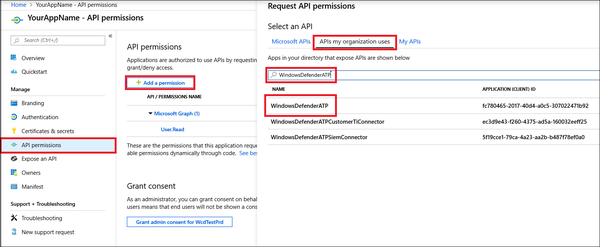
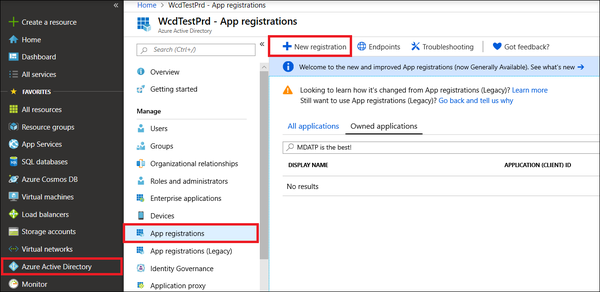 1. Choose a name for your application, and then select Register. To enable your app to access Defender for Endpoint and assign it 'Read all alerts' permission, on your application page, select **API Permissions > Add permission > APIs my organization uses**, type *WindowsDefenderATP*, and then select WindowsDefenderATP.
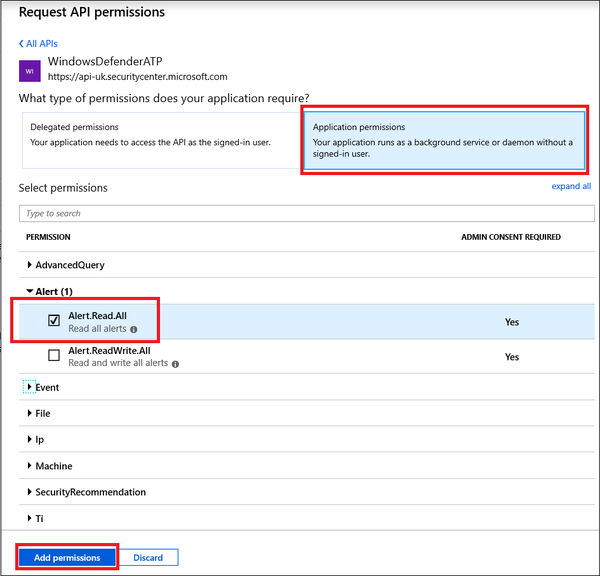
 1. Select the relevant permissions. For example, 'Read All Alerts'.
 1. All the permissions would be something like this.
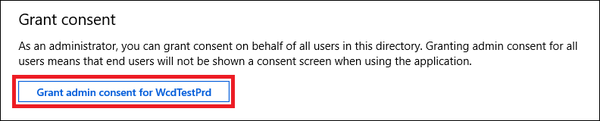
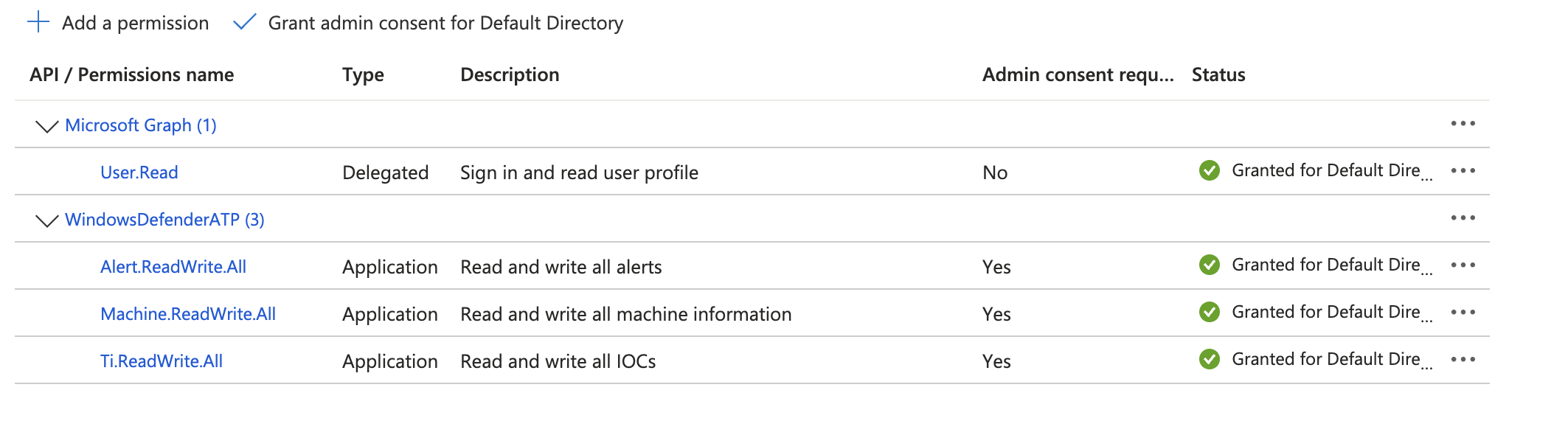 2. Select Grant consent.
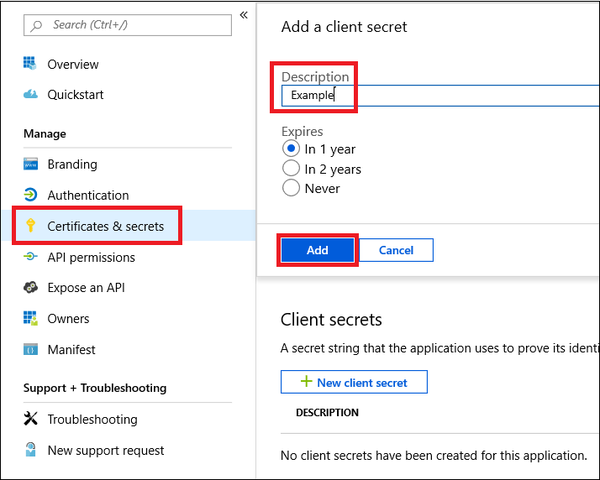
 1. Next, add a secret to the application. Select **Certificates & secrets**, add a description to the secret, and then select **Add**.
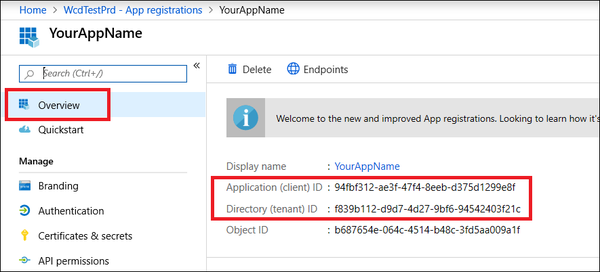
 1. Navigate to **Overview**, copy and save your application ID and your tenant ID.
 ## Configure Microsoft Defender ATP in Automation Service and Cloud SOAR
import IntegrationsAuth from '../../reuse/integrations-authentication.md';
import IntegrationCertificate from '../../reuse/automation-service/integration-certificate.md';
import IntegrationEngine from '../../reuse/automation-service/integration-engine.md';
import IntegrationLabel from '../../reuse/automation-service/integration-label.md';
import IntegrationProxy from '../../reuse/automation-service/integration-proxy.md';
import IntegrationTimeout from '../../reuse/automation-service/integration-timeout.md';
*
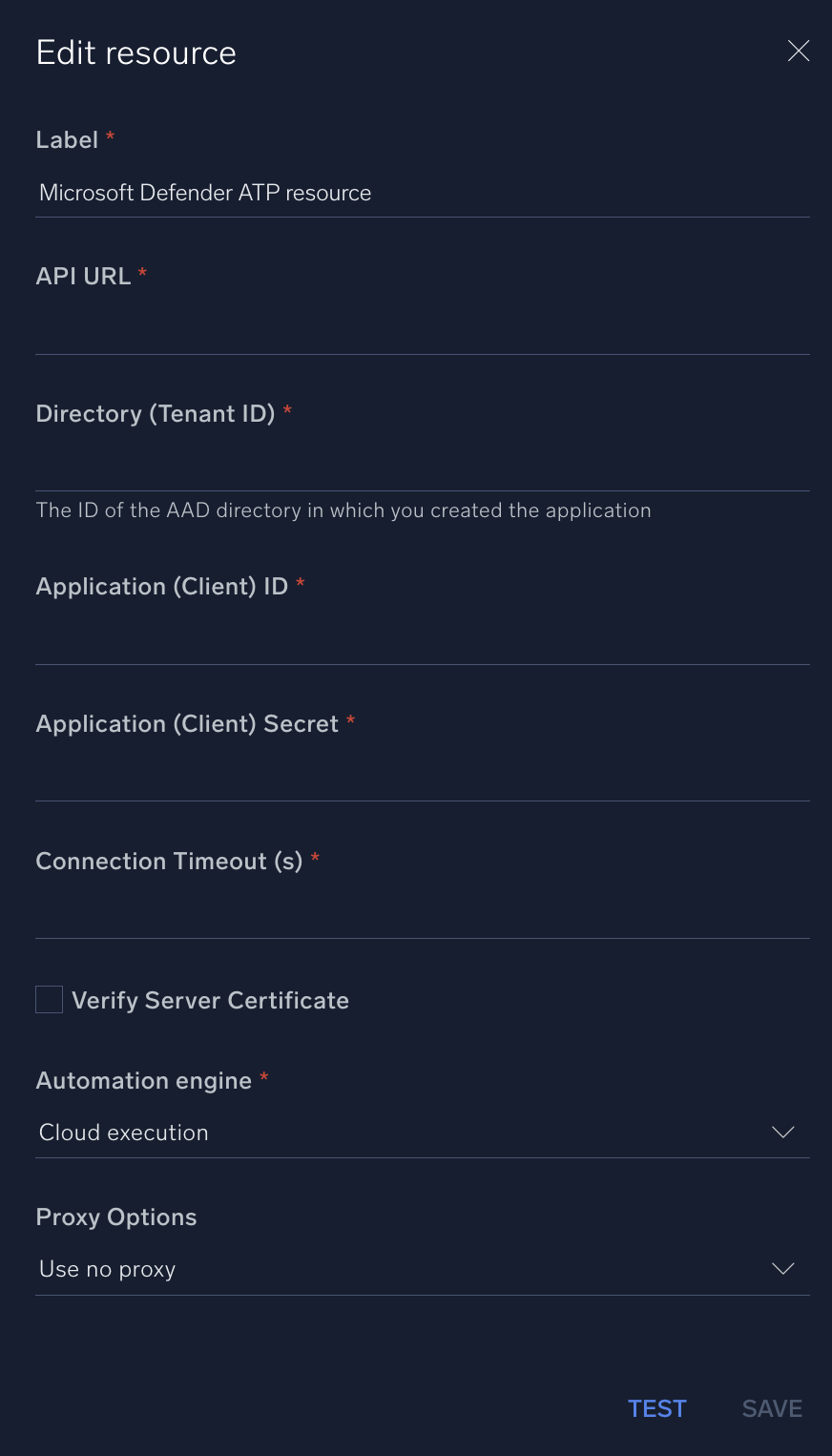
* **API URL**. Enter the [Microsoft Defender API URL](https://learn.microsoft.com/en-us/defender-endpoint/api/exposed-apis-list) for the server that is closer to your geo location:
* `api-us.securitycenter.microsoft.com`
*` api-eu.securitycenter.microsoft.com`
* `api-uk.securitycenter.microsoft.com`
* **Directory (Tenant ID)**. Enter the tenant ID you [copied earlier](#microsoft-defender-atp-configuration).
* **Application (Client) ID**. Enter the client ID you [copied earlier](#microsoft-defender-atp-configuration).
* **Application (Client) Secret**. Enter the client secret you [copied earlier](#microsoft-defender-atp-configuration).
*
*
*
*
## Configure Microsoft Defender ATP in Automation Service and Cloud SOAR
import IntegrationsAuth from '../../reuse/integrations-authentication.md';
import IntegrationCertificate from '../../reuse/automation-service/integration-certificate.md';
import IntegrationEngine from '../../reuse/automation-service/integration-engine.md';
import IntegrationLabel from '../../reuse/automation-service/integration-label.md';
import IntegrationProxy from '../../reuse/automation-service/integration-proxy.md';
import IntegrationTimeout from '../../reuse/automation-service/integration-timeout.md';
*
* **API URL**. Enter the [Microsoft Defender API URL](https://learn.microsoft.com/en-us/defender-endpoint/api/exposed-apis-list) for the server that is closer to your geo location:
* `api-us.securitycenter.microsoft.com`
*` api-eu.securitycenter.microsoft.com`
* `api-uk.securitycenter.microsoft.com`
* **Directory (Tenant ID)**. Enter the tenant ID you [copied earlier](#microsoft-defender-atp-configuration).
* **Application (Client) ID**. Enter the client ID you [copied earlier](#microsoft-defender-atp-configuration).
* **Application (Client) Secret**. Enter the client secret you [copied earlier](#microsoft-defender-atp-configuration).
*
*
*
*
 For information about Microsoft Defender for Endpoint (formerly Defender ATP), see [Microsoft Defender for Endpooint documentation](https://learn.microsoft.com/en-us/defender-endpoint/).
## Change Log
| Version | Date | Description |
|:--|:--|:--|
| v1.4 | May 18, 2026 | Fixed `List Machine Actions` action: resolved an issue where the machine name filter was not applied correctly. |
| v1.3 | April 30, 2026 | Upgraded the `python3_generic` Docker image (Python 3.8) to `python3_12_generic` (Python 3.12) to address Python 3.8 end-of-life and improve security and performance. |
| v1.2 | July 12, 2023 | Changed field visibility. |
| | January 4, 2023 |
For information about Microsoft Defender for Endpoint (formerly Defender ATP), see [Microsoft Defender for Endpooint documentation](https://learn.microsoft.com/en-us/defender-endpoint/).
## Change Log
| Version | Date | Description |
|:--|:--|:--|
| v1.4 | May 18, 2026 | Fixed `List Machine Actions` action: resolved an issue where the machine name filter was not applied correctly. |
| v1.3 | April 30, 2026 | Upgraded the `python3_generic` Docker image (Python 3.8) to `python3_12_generic` (Python 3.12) to address Python 3.8 end-of-life and improve security and performance. |
| v1.2 | July 12, 2023 | Changed field visibility. |
| | January 4, 2023 | - Added new actions: **Fetch Investigation Package URI**, **List Machines**, **Start Automated Investigation**, **Run Advanced Hunting Query**, and **Collect Investigation Package**.
- Modified actions: **Get Machine Action Details**, **List Indicators**, **List Machine Actions**, **Delete Indicator**, **Isolate Machine**, **Release Machine From Isolation**, **Run Antivirus Scan**, **Stop And Quarantine File**, and **Submit Indicator**.
|
| | December 15, 2022 | Initial release of the Microsoft Defender ATP integration. |
| | May 4, 2021 | Updated actions to accept MD5 hash values. |