---
title: Microsoft EWS Extension
description: ''
slug: /help/docs/integrations/automation-integrations/microsoft-ews-extension/
canonical: https://www.sumologic.com/help/docs/integrations/automation-integrations/microsoft-ews-extension/
---
import useBaseUrl from '@docusaurus/useBaseUrl';
 ***Version: 1.3
Updated: Oct 06, 2023***
:::note Exchange Online and the EWS retirement
This integration is not affected by Microsoft's retirement of Exchange Web Services (EWS) in Exchange Online. It connects through Exchange PowerShell instead.
Microsoft has disabled Basic authentication, including Remote PowerShell, in Exchange Online, so the **Basic** authentication method can't connect to Exchange Online. See [Microsoft's retirement announcement](https://learn.microsoft.com/en-us/exchange/clients-and-mobile-in-exchange-online/deprecation-of-ews-exchange-online) for the EWS timeline.
:::
Perform actions on Microsoft EWS mailboxes, accounts, and security settings.
## Actions
* **Message Trace** (*Enrichment*) - Trace an email message.
* **Get Client Access** (*Enrichment*) - Gather mailbox application access information.
* **Update Client Access** (*Containment*) - Adjust mailbox application access.
* **Change Mailbox Status** (*Containment*) - Enable/disable mailbox status.
* **Block IP** (*Containment*) - Block a sender IP.
* **Block Sender** (*Containment*) - Block a sender email address.
* **Unblock IP** (*Containment*) - Unblock a sender IP.
* **Unblock Sender** (*Containment*) - Unblock a sender email address.
* **List Quarantine Emails** (*Enrichment*) - List quarantined mails.
* **Remove Email From Quarantine** (*Containment*) - Remove emails from quarantine.
* **Release Email From Quarantine** (*Containment*) - Release emails from quarantine.
* **Get Mailbox** (*Enrichment*) - Fetch a specific domain or specific user mailbox.
* **Get Mailbox Folder** (*Enrichment*) - Fetch a specific folder for mailbox.
* **List Spam Filter Policies** (*Enrichment*) - Sender allow list and Sender block list.
* **List Connection Filter Policies** (*Enrichment*) - Listing of Allow IP and Block IP.
* **List Malware Filter Policies** (*Enrichment*) - List the policies for filtering malwares.
* **List Spam Filter Rule** (*Enrichment*) - List the Rules for filtering Spam.
* **Delete User** (*Containment*) - Delete the mailbox and the associated user account.
* **Add New User** (*Containment*) - Create a mailbox and user account at the same time.
* **List Users** (*Enrichment*) - List existing user objects in your organization. This action returns all objects that have user accounts (for example, user mailboxes, mail users, and user accounts).
* **Remove Member From Distribution Group** (*Containment*) - Remove a single member from distribution groups or mail-enabled security groups.
* **Add Member To Distribution Group** (*Containment*) - Add a single recipient to distribution groups and mail-enabled security groups.
* **List Distribution Group** (*Enrichment*) - List existing distribution groups or mail-enabled security groups.
* **Get Distribution Group Members** (*Enrichment*) - Get the members of distribution groups and mail-enabled security groups.
## Configure Microsoft EWS Extension in Automation Service and Cloud SOAR
import IntegrationsAuth from '../../reuse/integrations-authentication.md';
import IntegrationCertificate from '../../reuse/automation-service/integration-certificate.md';
import IntegrationEngine from '../../reuse/automation-service/integration-engine.md';
import IntegrationLabel from '../../reuse/automation-service/integration-label.md';
import IntegrationProxy from '../../reuse/automation-service/integration-proxy.md';
import IntegrationTimeout from '../../reuse/automation-service/integration-timeout.md';
*
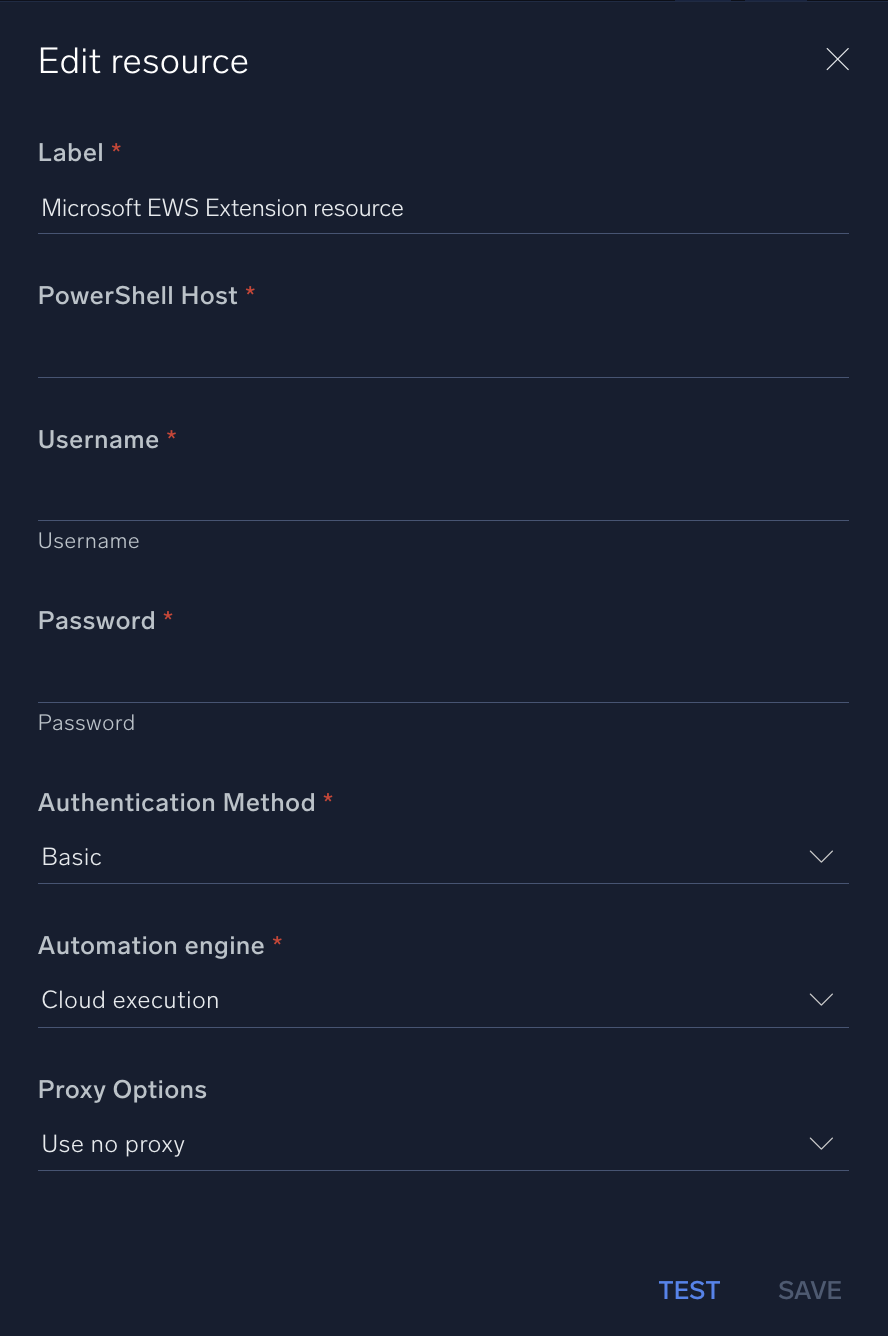
* **PowerShell Host**. Enter your [PowerShell](https://learn.microsoft.com/en-us/powershell/exchange/exchange-management-shell?view=exchange-ps) hostname.
* **Username**. Enter the username of a Microsoft EWS Extension admin user authorized to authenticate the integration.
* **Password**. Enter the password for the admin user.
* **Authentication Method**. Select [**Basic**](https://learn.microsoft.com/en-us/exchange/client-developer/exchange-web-services/authentication-and-ews-in-exchange#basic-authentication) or [**NTML**](https://learn.microsoft.com/en-us/exchange/client-developer/exchange-web-services/authentication-and-ews-in-exchange#ntlm-authentication).
*
*
***Version: 1.3
Updated: Oct 06, 2023***
:::note Exchange Online and the EWS retirement
This integration is not affected by Microsoft's retirement of Exchange Web Services (EWS) in Exchange Online. It connects through Exchange PowerShell instead.
Microsoft has disabled Basic authentication, including Remote PowerShell, in Exchange Online, so the **Basic** authentication method can't connect to Exchange Online. See [Microsoft's retirement announcement](https://learn.microsoft.com/en-us/exchange/clients-and-mobile-in-exchange-online/deprecation-of-ews-exchange-online) for the EWS timeline.
:::
Perform actions on Microsoft EWS mailboxes, accounts, and security settings.
## Actions
* **Message Trace** (*Enrichment*) - Trace an email message.
* **Get Client Access** (*Enrichment*) - Gather mailbox application access information.
* **Update Client Access** (*Containment*) - Adjust mailbox application access.
* **Change Mailbox Status** (*Containment*) - Enable/disable mailbox status.
* **Block IP** (*Containment*) - Block a sender IP.
* **Block Sender** (*Containment*) - Block a sender email address.
* **Unblock IP** (*Containment*) - Unblock a sender IP.
* **Unblock Sender** (*Containment*) - Unblock a sender email address.
* **List Quarantine Emails** (*Enrichment*) - List quarantined mails.
* **Remove Email From Quarantine** (*Containment*) - Remove emails from quarantine.
* **Release Email From Quarantine** (*Containment*) - Release emails from quarantine.
* **Get Mailbox** (*Enrichment*) - Fetch a specific domain or specific user mailbox.
* **Get Mailbox Folder** (*Enrichment*) - Fetch a specific folder for mailbox.
* **List Spam Filter Policies** (*Enrichment*) - Sender allow list and Sender block list.
* **List Connection Filter Policies** (*Enrichment*) - Listing of Allow IP and Block IP.
* **List Malware Filter Policies** (*Enrichment*) - List the policies for filtering malwares.
* **List Spam Filter Rule** (*Enrichment*) - List the Rules for filtering Spam.
* **Delete User** (*Containment*) - Delete the mailbox and the associated user account.
* **Add New User** (*Containment*) - Create a mailbox and user account at the same time.
* **List Users** (*Enrichment*) - List existing user objects in your organization. This action returns all objects that have user accounts (for example, user mailboxes, mail users, and user accounts).
* **Remove Member From Distribution Group** (*Containment*) - Remove a single member from distribution groups or mail-enabled security groups.
* **Add Member To Distribution Group** (*Containment*) - Add a single recipient to distribution groups and mail-enabled security groups.
* **List Distribution Group** (*Enrichment*) - List existing distribution groups or mail-enabled security groups.
* **Get Distribution Group Members** (*Enrichment*) - Get the members of distribution groups and mail-enabled security groups.
## Configure Microsoft EWS Extension in Automation Service and Cloud SOAR
import IntegrationsAuth from '../../reuse/integrations-authentication.md';
import IntegrationCertificate from '../../reuse/automation-service/integration-certificate.md';
import IntegrationEngine from '../../reuse/automation-service/integration-engine.md';
import IntegrationLabel from '../../reuse/automation-service/integration-label.md';
import IntegrationProxy from '../../reuse/automation-service/integration-proxy.md';
import IntegrationTimeout from '../../reuse/automation-service/integration-timeout.md';
*
* **PowerShell Host**. Enter your [PowerShell](https://learn.microsoft.com/en-us/powershell/exchange/exchange-management-shell?view=exchange-ps) hostname.
* **Username**. Enter the username of a Microsoft EWS Extension admin user authorized to authenticate the integration.
* **Password**. Enter the password for the admin user.
* **Authentication Method**. Select [**Basic**](https://learn.microsoft.com/en-us/exchange/client-developer/exchange-web-services/authentication-and-ews-in-exchange#basic-authentication) or [**NTML**](https://learn.microsoft.com/en-us/exchange/client-developer/exchange-web-services/authentication-and-ews-in-exchange#ntlm-authentication).
*
*
 For information about Microsoft EWS, see [Microsoft Exchange Web Services documentation](https://learn.microsoft.com/en-us/exchange/client-developer/exchange-web-services/explore-the-ews-managed-api-ews-and-web-services-in-exchange).
## Change Log
| Version | Date | Description |
|:--|:--|:--|
| v1.3 | October 6, 2023 | Updated the integration. |
| v1.2 | July 19, 2023 | Removed leading/trailing spaces. |
| v1.1 | October 17, 2022 | Added new actions: **Delete User**, **Add New User**, **List Users**, **Remove Member From Distribution Group**, **Add Member To Distribution Group**, **List Distribution Group**, and **Get Distribution Group Members**. |
| | March 10, 2022 | Updated the logo in Microsoft EWS Extension integration. |
| | September 24, 2019 | Added additional optional parameters to the **Update Client Access** action. |
| | September 4, 2019 | Added new actions. |
| | April 12, 2019 | Initial release of the Microsoft EWS Extension integration. |
For information about Microsoft EWS, see [Microsoft Exchange Web Services documentation](https://learn.microsoft.com/en-us/exchange/client-developer/exchange-web-services/explore-the-ews-managed-api-ews-and-web-services-in-exchange).
## Change Log
| Version | Date | Description |
|:--|:--|:--|
| v1.3 | October 6, 2023 | Updated the integration. |
| v1.2 | July 19, 2023 | Removed leading/trailing spaces. |
| v1.1 | October 17, 2022 | Added new actions: **Delete User**, **Add New User**, **List Users**, **Remove Member From Distribution Group**, **Add Member To Distribution Group**, **List Distribution Group**, and **Get Distribution Group Members**. |
| | March 10, 2022 | Updated the logo in Microsoft EWS Extension integration. |
| | September 24, 2019 | Added additional optional parameters to the **Update Client Access** action. |
| | September 4, 2019 | Added new actions. |
| | April 12, 2019 | Initial release of the Microsoft EWS Extension integration. |