---
title: Microsoft OneDrive
description: ''
slug: /help/docs/integrations/automation-integrations/microsoft-onedrive/
canonical: https://www.sumologic.com/help/docs/integrations/automation-integrations/microsoft-onedrive/
---
import useBaseUrl from '@docusaurus/useBaseUrl';
 ***Version: 1.10
Updated: March 31, 2026***
Utilize and manipulate files for incident investigation using OneDrive.
## Actions
* **List Files** (*Enrichment*) - List all available files in OneDrive.
* **List File Changes** (*Enrichment*) - List file changes in OneDrive.
* **Download File** (*Enrichment*) - Download a file from OneDrive.
* **Delete File** (*Containment*) - Delete a file from OneDrive.
* **Upload File** (*Containment*) - Upload a file to OneDrive.
## Configure Microsoft OneDrive in Automation Service and Cloud SOAR
import IntegrationsAuth from '../../reuse/integrations-authentication.md';
import IntegrationCertificate from '../../reuse/automation-service/integration-certificate.md';
import IntegrationEngine from '../../reuse/automation-service/integration-engine.md';
import IntegrationLabel from '../../reuse/automation-service/integration-label.md';
import IntegrationProxy from '../../reuse/automation-service/integration-proxy.md';
import IntegrationTimeout from '../../reuse/automation-service/integration-timeout.md';
import CloudSOARAPIURL from '../../reuse/automation-service/cloud-soar-api-url.md';
import AccessID from '../../reuse/automation-service/access-id.md';
import AccessKey from '../../reuse/automation-service/access-key.md';
*
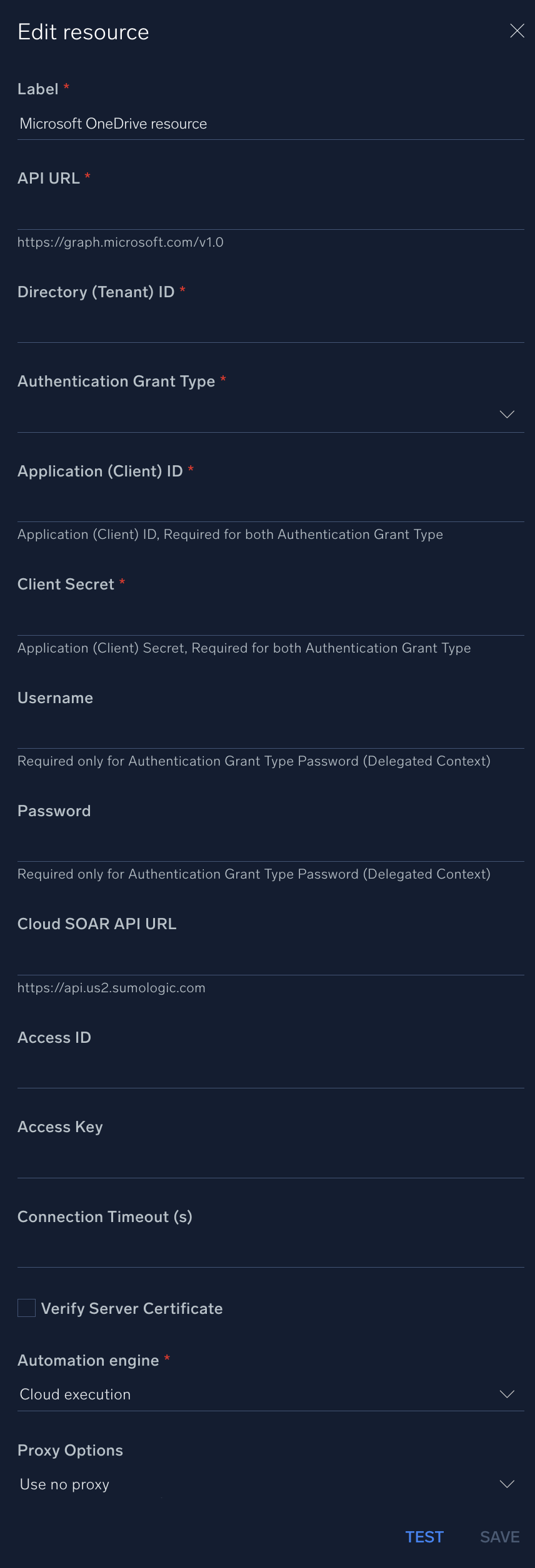
* **API URL**. Enter your OneDrive API URL, for example, `https://graph.microsoft.com/v1.0`
* **Directory (Tenant) ID**. Enter the [tenant ID](https://learn.microsoft.com/en-us/azure/healthcare-apis/register-application#application-id-client-id) of the AAD directory in which you created the application. (You can check from your [app registration page](https://learn.microsoft.com/en-us/graph/auth-register-app-v2)).
* **Authentication Grant Type**. Choose one of the following according to the permissions you add to your app:
* **Password (Delegated Context)**
* **Client Credentials (Application Context)**
* **Application (Client) ID**. Enter your application ID. (You can check from your [app registration page](https://learn.microsoft.com/en-us/graph/auth-register-app-v2)). This is required for both authentication grant types.
* **Client Secret**. Enter your client secret. This is required for both authentication grant types.
* **Username**. Enter the username of an admin user authorized to authenticate the integration. This is required only if you set the authentication grant type as **Password (Delegated Context)**. Leave this field empty if you set the authentication grant type as **Client Credentials (Application Context)**.
* **Password**. Enter the password for the admin user. This is required only if you set the authentication grant type as **Password (Delegated Context)**. Leave this field empty if you set the authentication grant type as **Client Credentials (Application Context)**.
*
*
*
*
*
*
*
***Version: 1.10
Updated: March 31, 2026***
Utilize and manipulate files for incident investigation using OneDrive.
## Actions
* **List Files** (*Enrichment*) - List all available files in OneDrive.
* **List File Changes** (*Enrichment*) - List file changes in OneDrive.
* **Download File** (*Enrichment*) - Download a file from OneDrive.
* **Delete File** (*Containment*) - Delete a file from OneDrive.
* **Upload File** (*Containment*) - Upload a file to OneDrive.
## Configure Microsoft OneDrive in Automation Service and Cloud SOAR
import IntegrationsAuth from '../../reuse/integrations-authentication.md';
import IntegrationCertificate from '../../reuse/automation-service/integration-certificate.md';
import IntegrationEngine from '../../reuse/automation-service/integration-engine.md';
import IntegrationLabel from '../../reuse/automation-service/integration-label.md';
import IntegrationProxy from '../../reuse/automation-service/integration-proxy.md';
import IntegrationTimeout from '../../reuse/automation-service/integration-timeout.md';
import CloudSOARAPIURL from '../../reuse/automation-service/cloud-soar-api-url.md';
import AccessID from '../../reuse/automation-service/access-id.md';
import AccessKey from '../../reuse/automation-service/access-key.md';
*
* **API URL**. Enter your OneDrive API URL, for example, `https://graph.microsoft.com/v1.0`
* **Directory (Tenant) ID**. Enter the [tenant ID](https://learn.microsoft.com/en-us/azure/healthcare-apis/register-application#application-id-client-id) of the AAD directory in which you created the application. (You can check from your [app registration page](https://learn.microsoft.com/en-us/graph/auth-register-app-v2)).
* **Authentication Grant Type**. Choose one of the following according to the permissions you add to your app:
* **Password (Delegated Context)**
* **Client Credentials (Application Context)**
* **Application (Client) ID**. Enter your application ID. (You can check from your [app registration page](https://learn.microsoft.com/en-us/graph/auth-register-app-v2)). This is required for both authentication grant types.
* **Client Secret**. Enter your client secret. This is required for both authentication grant types.
* **Username**. Enter the username of an admin user authorized to authenticate the integration. This is required only if you set the authentication grant type as **Password (Delegated Context)**. Leave this field empty if you set the authentication grant type as **Client Credentials (Application Context)**.
* **Password**. Enter the password for the admin user. This is required only if you set the authentication grant type as **Password (Delegated Context)**. Leave this field empty if you set the authentication grant type as **Client Credentials (Application Context)**.
*
*
*
*
*
*
*
 For information about Microsoft OneDrive, see [OneDrive documentation](https://learn.microsoft.com/en-us/onedrive/developer/rest-api/getting-started/authentication?view=odsp-graph-online).
## Change Log
| Version | Date | Description |
|:--|:--|:--|
| v1.10 | March 31, 2026 | Upgraded the `python3_generic` Docker image (Python 3.8) to `python3_12_generic` (Python 3.12) to address Python 3.8 end-of-life and improve security and performance. |
| v1.9 | November 28, 2025 |
For information about Microsoft OneDrive, see [OneDrive documentation](https://learn.microsoft.com/en-us/onedrive/developer/rest-api/getting-started/authentication?view=odsp-graph-online).
## Change Log
| Version | Date | Description |
|:--|:--|:--|
| v1.10 | March 31, 2026 | Upgraded the `python3_generic` Docker image (Python 3.8) to `python3_12_generic` (Python 3.12) to address Python 3.8 end-of-life and improve security and performance. |
| v1.9 | November 28, 2025 | - Added support for downloading files from a site document library using hostname and site name parameters.
- Added support for downloading files from specific user accounts using the user principal name parameter.
|
| v1.8 | October 10, 2025 | - Added support for listing files from a site document library using hostname and site name parameters.
- Added support for listing files from specific user accounts using the user principal name parameter.
|
| v1.7 | August 14, 2025 | Set `required=False` for the username and password parsers in all actions. |
| v1.6 | April 25, 2025 | Set `required=False` for the username and password parsers in the integration file. |
| v1.5 | July 02, 2024 | - Updated the **Upload File** action with the new Cloud SOAR API; results can now be saved as incident attachments and artifacts.
- Added a new field to the integration resource named **Authentication Grant Type**, allowing you to select a value based on the permissions added to your app: Password (Delegated Context) or Client Credentials (Application Context).
|
| v1.4 | September 19, 2023 | Updated the integration's versioning. |
| v1.3 | September 4, 2023 | Fixed a bug where if the timeout was not specified, an error would occur. |
| v1.2 | August 17, 2023 | Updated the integration with Environmental Variables. |
| | March 10, 2022 | Updated the logo in Microsoft OneDrive integration. |
| | August 5, 2019 | Initial release of the Microsoft OneDrive integration. |