---
title: Microsoft SharePoint
description: ''
slug: /help/docs/integrations/automation-integrations/microsoft-sharepoint/
canonical: https://www.sumologic.com/help/docs/integrations/automation-integrations/microsoft-sharepoint/
---
import useBaseUrl from '@docusaurus/useBaseUrl';
 ***Version: 1.6
Updated: April 30, 2026***
Utilize Microsoft SharePoint lists, files, and folders during incident investigations.
## Actions
* **Get List** (*Enrichment*) - Gather a specified list from SharePoint.
* **Get Lists** (*Enrichment*) - Gather all lists from SharePoint.
* **Get List Item Files** (*Enrichment*) - Gather all files for a specific item.
* **Get Files** (*Enrichment*) - Gather all files from SharePoint.
* **Get Folders** (*Enrichment*) - Gather all folders from SharePoint.
* **Get List Item File** (*Enrichment*) - Gather a specific file from an item.
* **Get File** (*Enrichment*) - Gather a specific file from SharePoint.
* **Get List Fields** (*Enrichment*) - Gather all list fields from SharePoint.
* **Create List** (*Notification*) - Create a new list.
* **Add File** (*Notification*) - Add a new file to SharePoint.
* **Add List Item** (*Notification*) - Add a new list item.
* **Add List Item File** (*Notification*) - Add a new file to an existing list item.
## Configure Microsoft SharePoint in Automation Service and Cloud SOAR
import IntegrationsAuth from '../../reuse/integrations-authentication.md';
import IntegrationCertificate from '../../reuse/automation-service/integration-certificate.md';
import IntegrationEngine from '../../reuse/automation-service/integration-engine.md';
import IntegrationLabel from '../../reuse/automation-service/integration-label.md';
import IntegrationProxy from '../../reuse/automation-service/integration-proxy.md';
import IntegrationTimeout from '../../reuse/automation-service/integration-timeout.md';
*
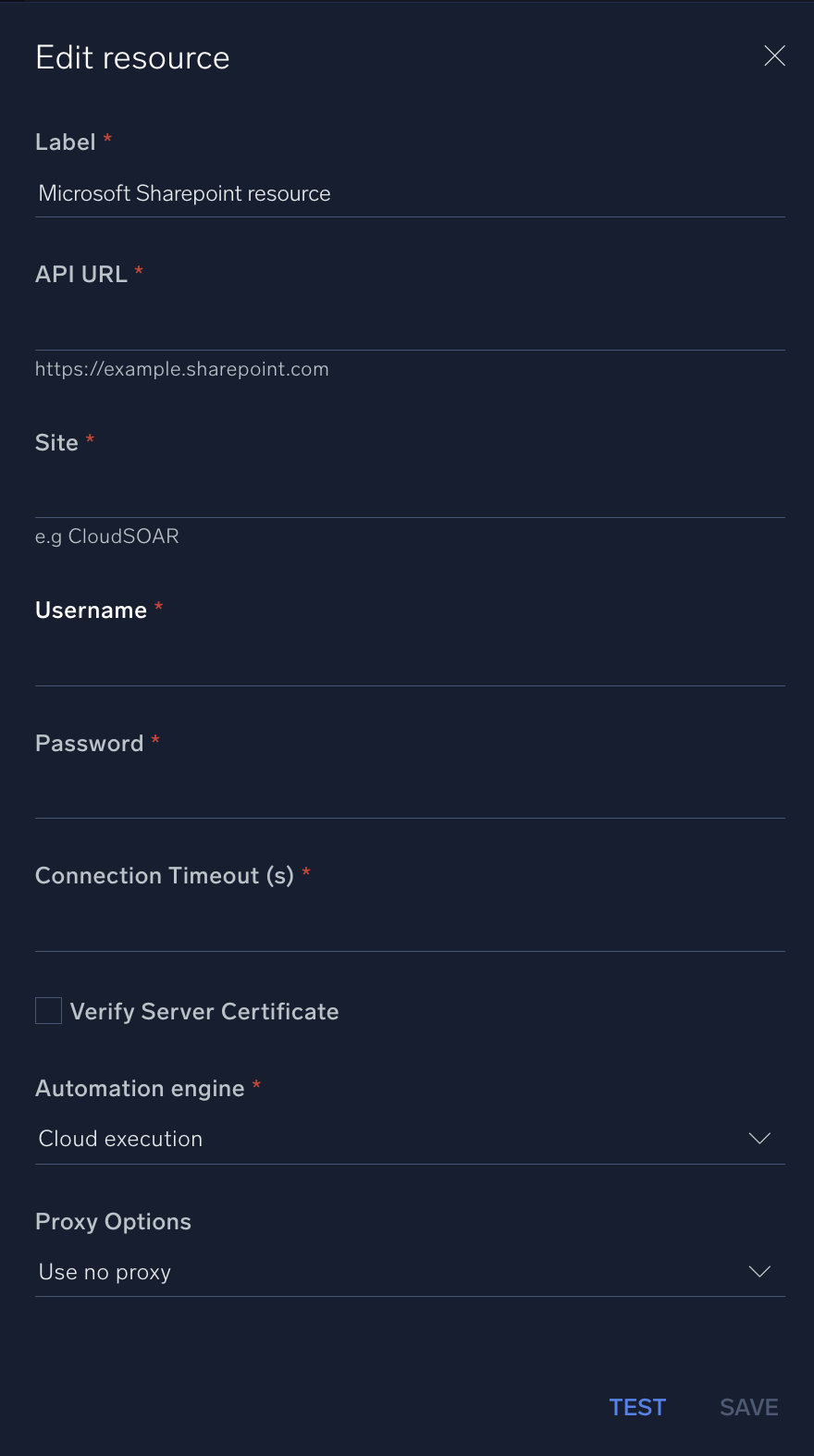
* **API URL**. Enter the SharePoint API URL, for example, `https://example.sharepoint.com`
* **Site**. Enter your [SharePoint site](https://learn.microsoft.com/en-us/sharepoint/manage-site-creation).
* **Username**. Enter the username of a SharePoint admin user authorized to authenticate the integration.
* **Password**. Enter the admin user password.
*
*
*
*
***Version: 1.6
Updated: April 30, 2026***
Utilize Microsoft SharePoint lists, files, and folders during incident investigations.
## Actions
* **Get List** (*Enrichment*) - Gather a specified list from SharePoint.
* **Get Lists** (*Enrichment*) - Gather all lists from SharePoint.
* **Get List Item Files** (*Enrichment*) - Gather all files for a specific item.
* **Get Files** (*Enrichment*) - Gather all files from SharePoint.
* **Get Folders** (*Enrichment*) - Gather all folders from SharePoint.
* **Get List Item File** (*Enrichment*) - Gather a specific file from an item.
* **Get File** (*Enrichment*) - Gather a specific file from SharePoint.
* **Get List Fields** (*Enrichment*) - Gather all list fields from SharePoint.
* **Create List** (*Notification*) - Create a new list.
* **Add File** (*Notification*) - Add a new file to SharePoint.
* **Add List Item** (*Notification*) - Add a new list item.
* **Add List Item File** (*Notification*) - Add a new file to an existing list item.
## Configure Microsoft SharePoint in Automation Service and Cloud SOAR
import IntegrationsAuth from '../../reuse/integrations-authentication.md';
import IntegrationCertificate from '../../reuse/automation-service/integration-certificate.md';
import IntegrationEngine from '../../reuse/automation-service/integration-engine.md';
import IntegrationLabel from '../../reuse/automation-service/integration-label.md';
import IntegrationProxy from '../../reuse/automation-service/integration-proxy.md';
import IntegrationTimeout from '../../reuse/automation-service/integration-timeout.md';
*
* **API URL**. Enter the SharePoint API URL, for example, `https://example.sharepoint.com`
* **Site**. Enter your [SharePoint site](https://learn.microsoft.com/en-us/sharepoint/manage-site-creation).
* **Username**. Enter the username of a SharePoint admin user authorized to authenticate the integration.
* **Password**. Enter the admin user password.
*
*
*
*
 For information about Microsoft SharePoint, see [SharePoint documentation](https://learn.microsoft.com/en-us/sharepoint/dev/sp-add-ins/sharepoint-admin-apis-authentication-and-authorization).
## Change Log
| Version | Date | Description |
|:--|:--|:--|
| v1.6 | April 30, 2026 | Upgraded the `python3_generic` Docker image (Python 3.8) to `python3_12_generic` (Python 3.12) to address Python 3.8 end-of-life and improve security and performance. |
| v1.5 | September 19, 2023 | Updated the integration's versioning. |
| v1.4 | September 4, 2023 | Fixed a bug where if the timeout was not specified, an error would occur. |
| v1.3 | August 17, 2023 | Updated the integration with Environmental Variables. |
| | March 10, 2022 | Updated the logo in Microsoft SharePoint integration. |
| | August 14, 2019 | Initial release of the Microsoft SharePoint integration. |
For information about Microsoft SharePoint, see [SharePoint documentation](https://learn.microsoft.com/en-us/sharepoint/dev/sp-add-ins/sharepoint-admin-apis-authentication-and-authorization).
## Change Log
| Version | Date | Description |
|:--|:--|:--|
| v1.6 | April 30, 2026 | Upgraded the `python3_generic` Docker image (Python 3.8) to `python3_12_generic` (Python 3.12) to address Python 3.8 end-of-life and improve security and performance. |
| v1.5 | September 19, 2023 | Updated the integration's versioning. |
| v1.4 | September 4, 2023 | Fixed a bug where if the timeout was not specified, an error would occur. |
| v1.3 | August 17, 2023 | Updated the integration with Environmental Variables. |
| | March 10, 2022 | Updated the logo in Microsoft SharePoint integration. |
| | August 14, 2019 | Initial release of the Microsoft SharePoint integration. |