---
title: Mimecast
description: ''
slug: /help/docs/integrations/automation-integrations/mimecast/
canonical: https://www.sumologic.com/help/docs/integrations/automation-integrations/mimecast/
---
import useBaseUrl from '@docusaurus/useBaseUrl';
 ***Version: 1.5
Updated: April 30, 2026***
Mimecast protects an enterprise's email infrastructure from viruses, malware, phishing, and the rise of deep-fake attacks. It does this by deploying a layered cyber resilience solution that prevents email-borne infections and reduces data loss by archiving emails.
## Actions
* **Get Account** *(Enrichment)* - Get the details about the used Mimecast account.
* **Get Audit Events** *(Enrichment)* - Get the attacks that have already occurred or is in progress.
* **Get Internal Domain** *(Enrichment)* - Get the internal domain inside the account.
* **Get Internal Users** *(Enrichment)* - Get the internal users inside a specific account domain.
* **Permit Block Emails** *(Containment)* - Permit and block sending email.
* **Send Email** *(Notification)* - Sent email to another email.
## Mimecast configuration
To configure Mimecast, see [Mimecast documentation](https://integrations.mimecast.com/documentation/api-overview/).
## Configure Mimecast in Automation Service and Cloud SOAR
import IntegrationsAuth from '../../reuse/integrations-authentication.md';
import IntegrationCertificate from '../../reuse/automation-service/integration-certificate.md';
import IntegrationEngine from '../../reuse/automation-service/integration-engine.md';
import IntegrationLabel from '../../reuse/automation-service/integration-label.md';
import IntegrationProxy from '../../reuse/automation-service/integration-proxy.md';
import IntegrationTimeout from '../../reuse/automation-service/integration-timeout.md';
*
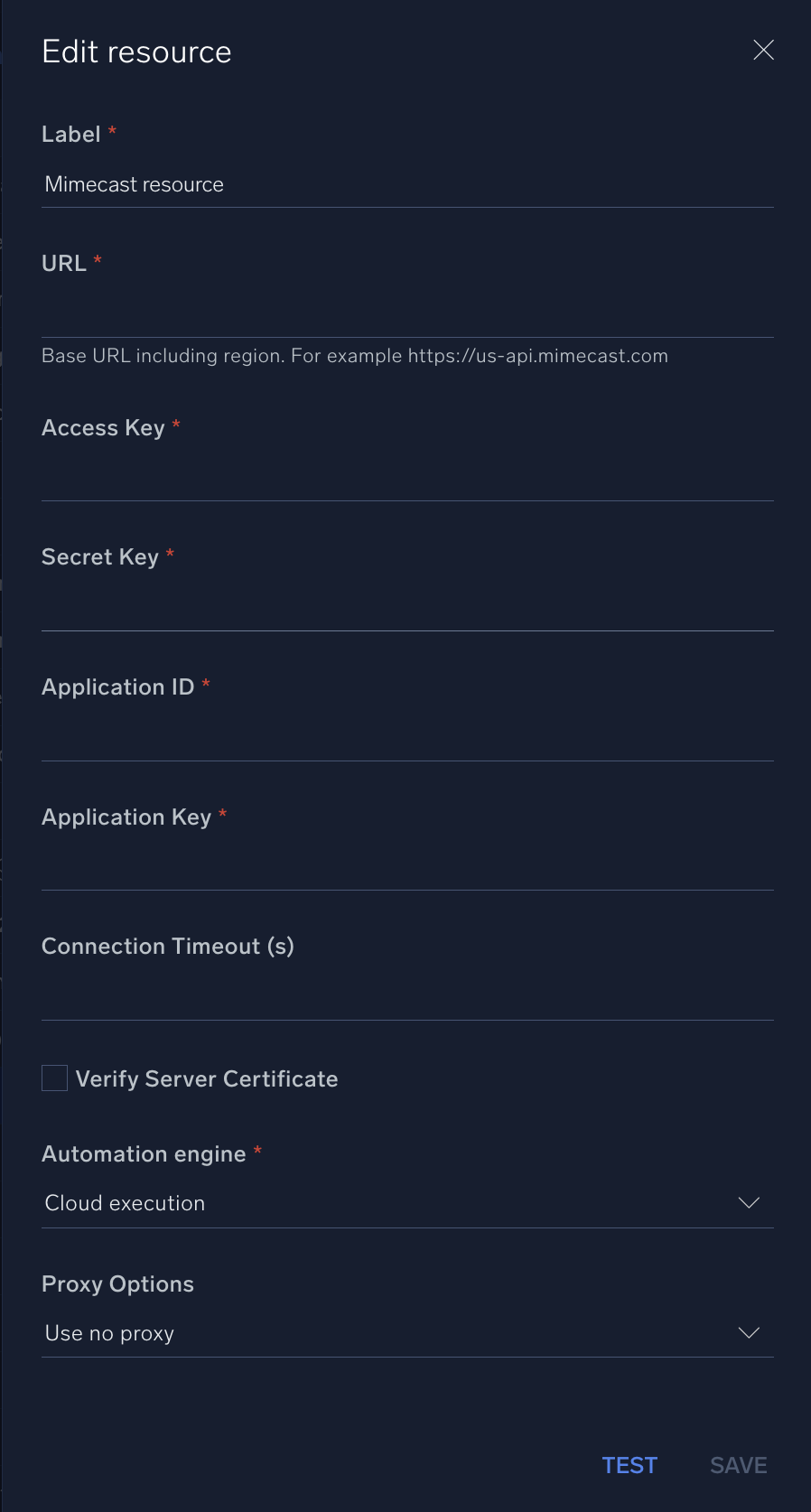
* **URL**. Enter the Mimecast base URL including region. For example, `https://us-api.mimecast.com`
* **Access Key**. Enter the Mimecast [access key](https://mimecastsupport.zendesk.com/hc/en-us/articles/34000328220691-API-Integrations-Managing-API-1-0-for-Cloud-Gateway#h_01J9NHPTM1WHT43ZW6E34BEJMB).
* **Secret Key**. Enter the Mimecast secret key associated with the access key.
* **Application ID**. Enter the Mimecast [application ID](https://mimecastsupport.zendesk.com/hc/en-us/articles/34000328220691-API-Integrations-Managing-API-1-0-for-Cloud-Gateway#h_01J9NHPTM0SBEQH63A2AZBP9YA).
* **Application Key**. Enter the Mimecast application key associated with the application ID.
*
*
*
*
***Version: 1.5
Updated: April 30, 2026***
Mimecast protects an enterprise's email infrastructure from viruses, malware, phishing, and the rise of deep-fake attacks. It does this by deploying a layered cyber resilience solution that prevents email-borne infections and reduces data loss by archiving emails.
## Actions
* **Get Account** *(Enrichment)* - Get the details about the used Mimecast account.
* **Get Audit Events** *(Enrichment)* - Get the attacks that have already occurred or is in progress.
* **Get Internal Domain** *(Enrichment)* - Get the internal domain inside the account.
* **Get Internal Users** *(Enrichment)* - Get the internal users inside a specific account domain.
* **Permit Block Emails** *(Containment)* - Permit and block sending email.
* **Send Email** *(Notification)* - Sent email to another email.
## Mimecast configuration
To configure Mimecast, see [Mimecast documentation](https://integrations.mimecast.com/documentation/api-overview/).
## Configure Mimecast in Automation Service and Cloud SOAR
import IntegrationsAuth from '../../reuse/integrations-authentication.md';
import IntegrationCertificate from '../../reuse/automation-service/integration-certificate.md';
import IntegrationEngine from '../../reuse/automation-service/integration-engine.md';
import IntegrationLabel from '../../reuse/automation-service/integration-label.md';
import IntegrationProxy from '../../reuse/automation-service/integration-proxy.md';
import IntegrationTimeout from '../../reuse/automation-service/integration-timeout.md';
*
* **URL**. Enter the Mimecast base URL including region. For example, `https://us-api.mimecast.com`
* **Access Key**. Enter the Mimecast [access key](https://mimecastsupport.zendesk.com/hc/en-us/articles/34000328220691-API-Integrations-Managing-API-1-0-for-Cloud-Gateway#h_01J9NHPTM1WHT43ZW6E34BEJMB).
* **Secret Key**. Enter the Mimecast secret key associated with the access key.
* **Application ID**. Enter the Mimecast [application ID](https://mimecastsupport.zendesk.com/hc/en-us/articles/34000328220691-API-Integrations-Managing-API-1-0-for-Cloud-Gateway#h_01J9NHPTM0SBEQH63A2AZBP9YA).
* **Application Key**. Enter the Mimecast application key associated with the application ID.
*
*
*
*
 For information about Mimecast, see [Mimecast documentation](https://integrations.mimecast.com/documentation/).
## Change Log
| Version | Date | Description |
|:--|:--|:--|
| v1.5 | April 30, 2026 | Upgraded the `python3_generic` Docker image (Python 3.8) to `python3_12_generic` (Python 3.12) to address Python 3.8 end-of-life and improve security and performance. |
| v1.4 | February 28, 2024 | Updated code for compatibility with Python 3.12. |
| v1.3 | July 14, 2023 | Code refactoring. |
| v1.2 | July 7, 2023 | Removed leading/trailing spaces. |
| v1.1 | June 9, 2023 | Refactored. |
| | November 3, 2021 | Initial release of the Mimecast integration. |
## Additional resources
For Mimecast, Sumo Logic offers the [Mimecast source](/docs/send-data/hosted-collectors/cloud-to-cloud-integration-framework/mimecast-source/) and the [Mimecast app](/docs/integrations/saas-cloud/mimecast/) to collect and visualize your Mimecast data.
For information about Mimecast, see [Mimecast documentation](https://integrations.mimecast.com/documentation/).
## Change Log
| Version | Date | Description |
|:--|:--|:--|
| v1.5 | April 30, 2026 | Upgraded the `python3_generic` Docker image (Python 3.8) to `python3_12_generic` (Python 3.12) to address Python 3.8 end-of-life and improve security and performance. |
| v1.4 | February 28, 2024 | Updated code for compatibility with Python 3.12. |
| v1.3 | July 14, 2023 | Code refactoring. |
| v1.2 | July 7, 2023 | Removed leading/trailing spaces. |
| v1.1 | June 9, 2023 | Refactored. |
| | November 3, 2021 | Initial release of the Mimecast integration. |
## Additional resources
For Mimecast, Sumo Logic offers the [Mimecast source](/docs/send-data/hosted-collectors/cloud-to-cloud-integration-framework/mimecast-source/) and the [Mimecast app](/docs/integrations/saas-cloud/mimecast/) to collect and visualize your Mimecast data.