---
title: Salesforce
description: ''
slug: /help/docs/integrations/automation-integrations/salesforce/
canonical: https://www.sumologic.com/help/docs/integrations/automation-integrations/salesforce/
---
import useBaseUrl from '@docusaurus/useBaseUrl';
 ***Version: 1.3
Updated: April 30, 2026***
Query data and utilize actions in Salesforce.
## Actions
* **Create Account Record** *(Containment)* - Create a record for a specific account.
* **Get Account Details** *(Enrichment)* - Get details for an account.
* **Get Campaign Details** *(Enrichment)* - Get details for a specific campaign.
* **Get Contact Details** *(Enrichment)* - Get details for a contact.
* **Get Lead Details** *(Enrichment)* - Get details for a lead.
* **Get List Objects** *(Enrichment)* - Get list of objects.
* **Send Email** *(Containment)* - Send an email.
* **String Search** *(Enrichment)* - Search for a specific string.
* **Update Account Record** *(Containment)* - Update a record for an account.
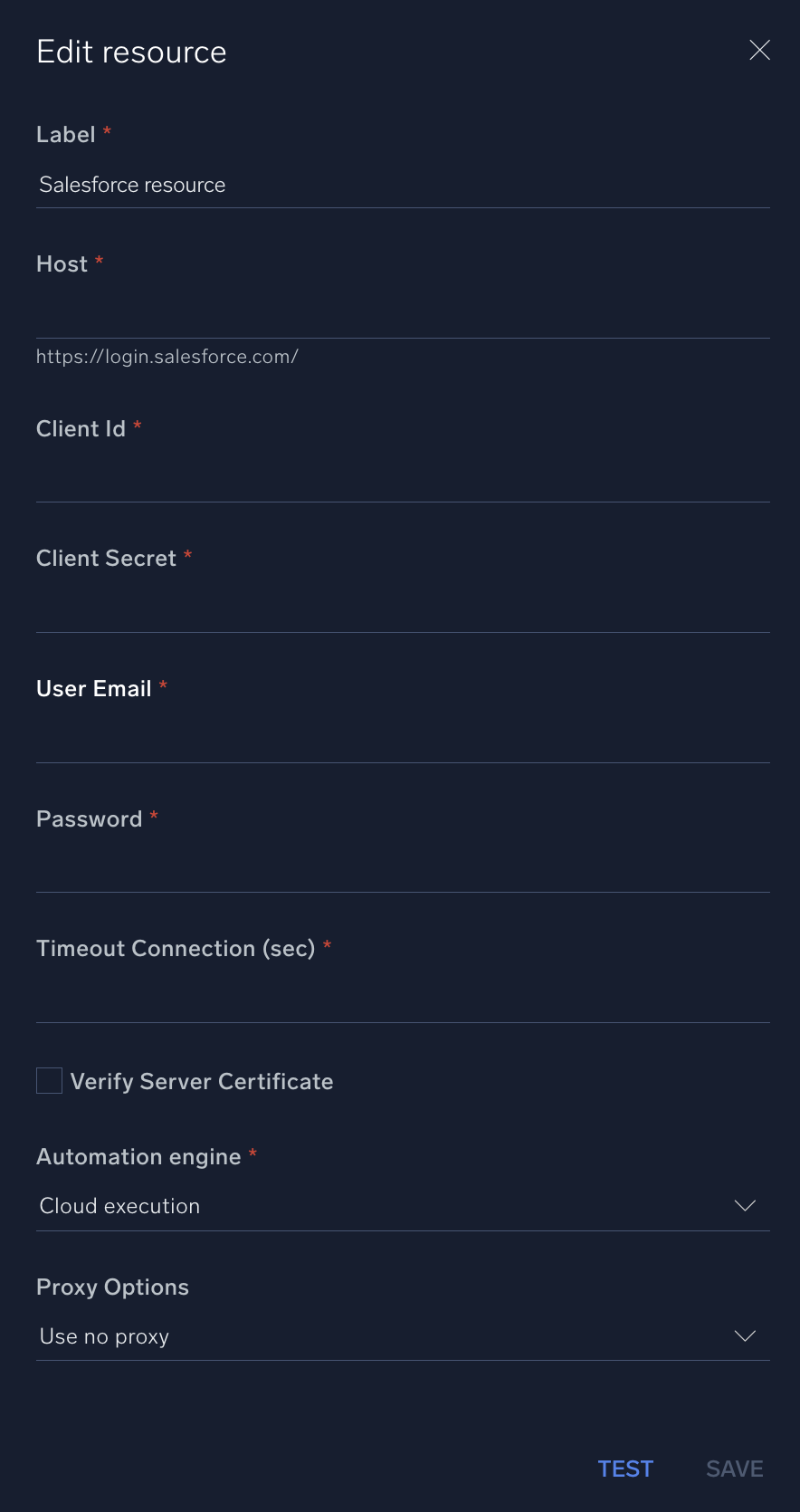
## Configure Salesforce in Automation Service and Cloud SOAR
import IntegrationsAuth from '../../reuse/integrations-authentication.md';
import IntegrationCertificate from '../../reuse/automation-service/integration-certificate.md';
import IntegrationEngine from '../../reuse/automation-service/integration-engine.md';
import IntegrationLabel from '../../reuse/automation-service/integration-label.md';
import IntegrationProxy from '../../reuse/automation-service/integration-proxy.md';
import IntegrationTimeout from '../../reuse/automation-service/integration-timeout.md';
*
* **Host**. Enter your Salesforce [host URL](https://developer.salesforce.com/docs/atlas.en-us.api_rest.meta/api_rest/intro_rest_resources.htm), for example, `https://login.salesforce.com/`.
* **Client ID**. Enter a Salesforce [client ID](https://help.salesforce.com/s/articleView?id=cc.b2c_generate_api_client_id.htm&type=5).
* **Client Secret**. Enter the secret corresponding to the client ID.
* **User Email**. Enter the email used for login by a [Salesforce admin user](https://help.salesforce.com/s/articleView?id=platform.integration_user.htm&type=5). This email will provide authentication for the integration.
* **Password**. Enter the password of the admin user.
*
*
*
*
***Version: 1.3
Updated: April 30, 2026***
Query data and utilize actions in Salesforce.
## Actions
* **Create Account Record** *(Containment)* - Create a record for a specific account.
* **Get Account Details** *(Enrichment)* - Get details for an account.
* **Get Campaign Details** *(Enrichment)* - Get details for a specific campaign.
* **Get Contact Details** *(Enrichment)* - Get details for a contact.
* **Get Lead Details** *(Enrichment)* - Get details for a lead.
* **Get List Objects** *(Enrichment)* - Get list of objects.
* **Send Email** *(Containment)* - Send an email.
* **String Search** *(Enrichment)* - Search for a specific string.
* **Update Account Record** *(Containment)* - Update a record for an account.
## Configure Salesforce in Automation Service and Cloud SOAR
import IntegrationsAuth from '../../reuse/integrations-authentication.md';
import IntegrationCertificate from '../../reuse/automation-service/integration-certificate.md';
import IntegrationEngine from '../../reuse/automation-service/integration-engine.md';
import IntegrationLabel from '../../reuse/automation-service/integration-label.md';
import IntegrationProxy from '../../reuse/automation-service/integration-proxy.md';
import IntegrationTimeout from '../../reuse/automation-service/integration-timeout.md';
*
* **Host**. Enter your Salesforce [host URL](https://developer.salesforce.com/docs/atlas.en-us.api_rest.meta/api_rest/intro_rest_resources.htm), for example, `https://login.salesforce.com/`.
* **Client ID**. Enter a Salesforce [client ID](https://help.salesforce.com/s/articleView?id=cc.b2c_generate_api_client_id.htm&type=5).
* **Client Secret**. Enter the secret corresponding to the client ID.
* **User Email**. Enter the email used for login by a [Salesforce admin user](https://help.salesforce.com/s/articleView?id=platform.integration_user.htm&type=5). This email will provide authentication for the integration.
* **Password**. Enter the password of the admin user.
*
*
*
*
 For information about Salesforce, see [Salesforce documentation](https://help.salesforce.com/s/products).
## Change Log
| Version | Date | Description |
|:--|:--|:--|
| v1.3 | April 30, 2026 | Upgraded the `python3_generic` Docker image (Python 3.8) to `python3_12_generic` (Python 3.12) to address Python 3.8 end-of-life and improve security and performance. |
| v1.2 | June 22, 2023 | Changed the **Send Email** action type to Notification. |
| v1.1 | June 22, 2023 | Updated the integration with Environmental Variables. |
| | August 17, 2021 | Initial release of the Salesforce integration. |
## Additional resources
For Salesforce, Sumo Logic offers the [Salesforce source](/docs/send-data/hosted-collectors/cloud-to-cloud-integration-framework/salesforce-source/) and the [Salesforce app](/docs/integrations/saas-cloud/salesforce/) to collect and visualize your Salesforce data.
For information about Salesforce, see [Salesforce documentation](https://help.salesforce.com/s/products).
## Change Log
| Version | Date | Description |
|:--|:--|:--|
| v1.3 | April 30, 2026 | Upgraded the `python3_generic` Docker image (Python 3.8) to `python3_12_generic` (Python 3.12) to address Python 3.8 end-of-life and improve security and performance. |
| v1.2 | June 22, 2023 | Changed the **Send Email** action type to Notification. |
| v1.1 | June 22, 2023 | Updated the integration with Environmental Variables. |
| | August 17, 2021 | Initial release of the Salesforce integration. |
## Additional resources
For Salesforce, Sumo Logic offers the [Salesforce source](/docs/send-data/hosted-collectors/cloud-to-cloud-integration-framework/salesforce-source/) and the [Salesforce app](/docs/integrations/saas-cloud/salesforce/) to collect and visualize your Salesforce data.