---
title: Splunk
description: ''
slug: /help/docs/integrations/automation-integrations/splunk/
canonical: https://www.sumologic.com/help/docs/integrations/automation-integrations/splunk/
---
import useBaseUrl from '@docusaurus/useBaseUrl';
 ***Version: 1.4
Updated: April 30, 2026***
Search and send events with Splunk.
## Actions
* **Search Into Events Splunk** (*Enrichment*) - Search Splunk events.
* **Send Splunk Events** (*Notification*) - Send an event to Splunk.
* **Splunk Events Daemon** (*Daemon*) - Daemon to gather new Splunk events.
* **Splunk Alerts Daemon** (*Daemon*) - Daemon to gather new Splunk alerts.
* **Update Notable Event** (*Notification*) - Update a notable (important) event in Splunk.
## Notes
* ***Important***: Change the line `\_indextime>0000000000` to indicate the time in Epoch format you wish to begin creating incidents from in the Splunk Events Daemon action.
* Only default fields, such as `[].\_raw`, `[].host`, and `[].source` are included in the Search Into Splunk Events and Splunk Events Daemon actions.
To use any custom fields from Splunk within Cloud SOAR, make sure they are added to these action files.
## Configure Splunk in Automation Service and Cloud SOAR
import IntegrationsAuth from '../../reuse/integrations-authentication.md';
import IntegrationCertificate from '../../reuse/automation-service/integration-certificate.md';
import IntegrationEngine from '../../reuse/automation-service/integration-engine.md';
import IntegrationLabel from '../../reuse/automation-service/integration-label.md';
import IntegrationProxy from '../../reuse/automation-service/integration-proxy.md';
import IntegrationTimeout from '../../reuse/automation-service/integration-timeout.md';
*
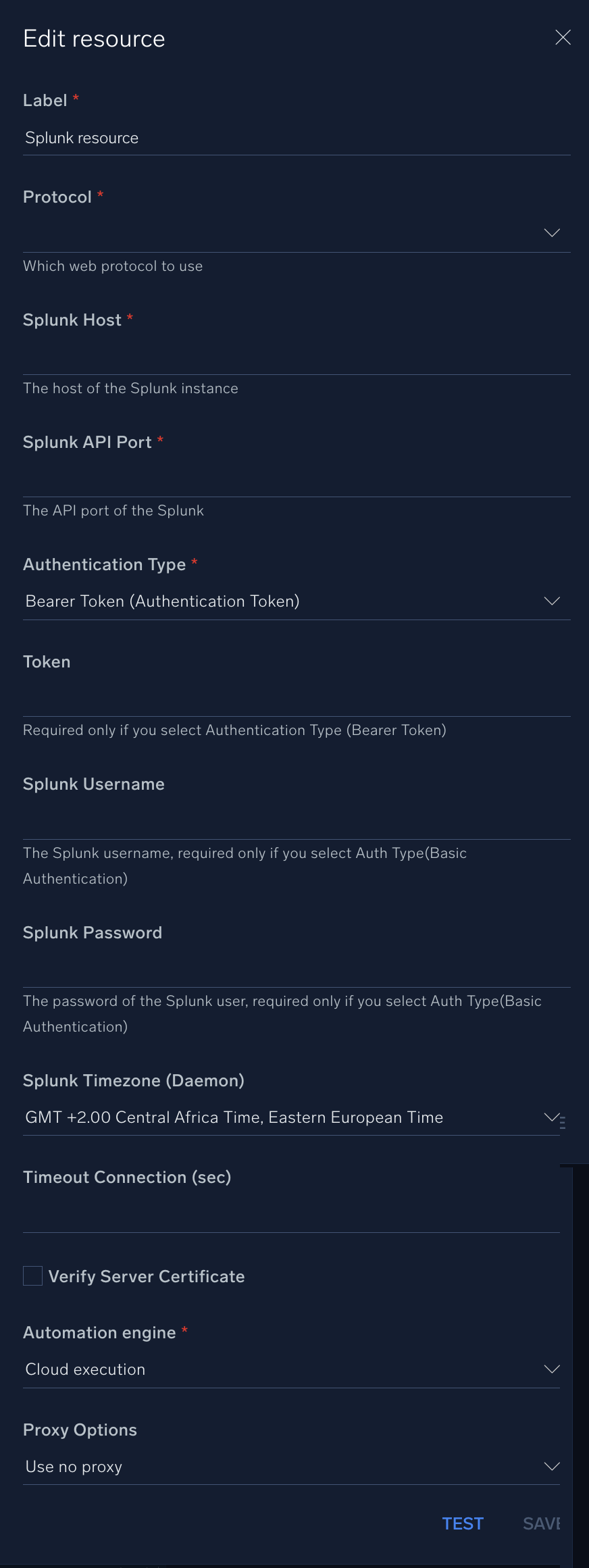
* **Protocol**. Enter your protocol:
* **HTTP**
* **HTTPS**
* **Splunk Host**. Enter the [hostname of your Splunk instance](https://help.splunk.com/en/splunk-enterprise/get-started/get-data-in/9.3/configure-host-values/set-a-default-host-for-a-splunk-platform-instance).
* **Splunk API Port**. Enter your [Splunk API port](https://docs.splunk.com/Documentation/SplunkCloud/latest/RESTTUT/RESTandCloud), for example,`8089`.
* **Authentication Type**. Select the authentication type:
* **Username and Password (Basic Authentication)**
* **Bearer Token (Authentication Token)**
* **Token**. Enter your [Splunk token](https://dev.splunk.com/observability/docs/apibasics/authentication_basics#Obtain-tokens). Required only if you selected **Bearer Token (Authentication Token)**.
* **Splunk Username**. Enter the username of a Splunk admin user authorized to authenticate the integration. Required only if you selected **Username and Password (Basic Authentication)**
* **Splunk Password**. Enter the password for the Splunk user. Required only if you selected **Username and Password (Basic Authentication)**
* **Splunk Timezone (Daemon)**. Select your timezone.
*
*
*
*
***Version: 1.4
Updated: April 30, 2026***
Search and send events with Splunk.
## Actions
* **Search Into Events Splunk** (*Enrichment*) - Search Splunk events.
* **Send Splunk Events** (*Notification*) - Send an event to Splunk.
* **Splunk Events Daemon** (*Daemon*) - Daemon to gather new Splunk events.
* **Splunk Alerts Daemon** (*Daemon*) - Daemon to gather new Splunk alerts.
* **Update Notable Event** (*Notification*) - Update a notable (important) event in Splunk.
## Notes
* ***Important***: Change the line `\_indextime>0000000000` to indicate the time in Epoch format you wish to begin creating incidents from in the Splunk Events Daemon action.
* Only default fields, such as `[].\_raw`, `[].host`, and `[].source` are included in the Search Into Splunk Events and Splunk Events Daemon actions.
To use any custom fields from Splunk within Cloud SOAR, make sure they are added to these action files.
## Configure Splunk in Automation Service and Cloud SOAR
import IntegrationsAuth from '../../reuse/integrations-authentication.md';
import IntegrationCertificate from '../../reuse/automation-service/integration-certificate.md';
import IntegrationEngine from '../../reuse/automation-service/integration-engine.md';
import IntegrationLabel from '../../reuse/automation-service/integration-label.md';
import IntegrationProxy from '../../reuse/automation-service/integration-proxy.md';
import IntegrationTimeout from '../../reuse/automation-service/integration-timeout.md';
*
* **Protocol**. Enter your protocol:
* **HTTP**
* **HTTPS**
* **Splunk Host**. Enter the [hostname of your Splunk instance](https://help.splunk.com/en/splunk-enterprise/get-started/get-data-in/9.3/configure-host-values/set-a-default-host-for-a-splunk-platform-instance).
* **Splunk API Port**. Enter your [Splunk API port](https://docs.splunk.com/Documentation/SplunkCloud/latest/RESTTUT/RESTandCloud), for example,`8089`.
* **Authentication Type**. Select the authentication type:
* **Username and Password (Basic Authentication)**
* **Bearer Token (Authentication Token)**
* **Token**. Enter your [Splunk token](https://dev.splunk.com/observability/docs/apibasics/authentication_basics#Obtain-tokens). Required only if you selected **Bearer Token (Authentication Token)**.
* **Splunk Username**. Enter the username of a Splunk admin user authorized to authenticate the integration. Required only if you selected **Username and Password (Basic Authentication)**
* **Splunk Password**. Enter the password for the Splunk user. Required only if you selected **Username and Password (Basic Authentication)**
* **Splunk Timezone (Daemon)**. Select your timezone.
*
*
*
*
 For information about Splunk, see [Splunk documentation](https://docs.splunk.com/Documentation).
## Change Log
| Version | Date | Description |
|:--|:--|:--|
| v1.4 | April 30, 2026 | Upgraded the `python3_generic` Docker image (Python 3.8) to `python3_12_generic` (Python 3.12) to address Python 3.8 end-of-life and improve security and performance. |
| v1.3 | September 18, 2025 |
For information about Splunk, see [Splunk documentation](https://docs.splunk.com/Documentation).
## Change Log
| Version | Date | Description |
|:--|:--|:--|
| v1.4 | April 30, 2026 | Upgraded the `python3_generic` Docker image (Python 3.8) to `python3_12_generic` (Python 3.12) to address Python 3.8 end-of-life and improve security and performance. |
| v1.3 | September 18, 2025 | - Improved timezone handling in alert queries.
- Improved URL encoding to handle reserved characters.
|
| v1.2 | July 13, 2023 | - Updated the integration with environmental variables.
- Renamed the integration from Splunk OIF to Splunk.
- Changed fields visibility.
- Changed Daemon compatibility (Splunk Alerts Daemon).
|
| | March 25, 2021 | Updated authentication, adding support for Authentication Token and Basic Authentication. |
| | March 9, 2021 | Added a new action. |
| | February 21, 2020 | Updated the Splunk Events Daemon. |
| | December 19, 2019 | Added the Splunk Alerts Daemon. |
| | June 19, 2019 | Updated the Search Into Events Daemon. |
| | June 4, 2019 | Updated the Search Into Events Daemon. |
| | May 5, 2019 | Initial release of the Splunk integration. |