---
title: Sumo Logic Notifications
description: ''
slug: /help/docs/integrations/automation-integrations/sumo-logic-notifications/
canonical: https://www.sumologic.com/help/docs/integrations/automation-integrations/sumo-logic-notifications/
---
import useBaseUrl from '@docusaurus/useBaseUrl';
 ***Version: 1.3
Updated: April 30, 2026***
Integration with Sumo Logic platform for monitors and Slack Notification.
## Actions
* **Assess Alert Status** (*Scheduled*) - Periodically monitor status of a Sumo Logic alert and notify a Slack user about unresolved alert.
## Sumo Logic Notifications configuration
### Create a Sumo Logic access key
[Create an access key](/docs/manage/security/access-keys/#create-an-access-key) and copy the resulting **Access ID** and **Access Key**. Store the ID and access key (temporally) into a text editor.
:::note
The ID and key won't be available again once you close the confirmation screen.
:::
### Create a Slack token
Configure a Bot or User OAuth token in Slack as described in [Slack Configuration](/docs/integrations/automation-integrations/slack/#slack-configuration). You will provide the token when you configure the integration as described in the next section.
Add the following scopes to the token:
* For sending notifications (messages) to Slack:
* `chat:write`. Required to send messages to a user or channel.
* `chat:write.public` (optional). Only needed if the bot needs to post to public channels where it’s not a member yet.
* For looking up a Slack user by email:
* `users:read.email`. Required to find a user by their email address.
* `users:read` (optional). Add if general user profile information is also needed.
## Configure Sumo Logic Notifications in Automation Service and Cloud SOAR
import IntegrationsAuth from '../../reuse/integrations-authentication.md';
import IntegrationCertificate from '../../reuse/automation-service/integration-certificate.md';
import IntegrationEngine from '../../reuse/automation-service/integration-engine.md';
import IntegrationLabel from '../../reuse/automation-service/integration-label.md';
import IntegrationProxy from '../../reuse/automation-service/integration-proxy.md';
import IntegrationTimeout from '../../reuse/automation-service/integration-timeout.md';
import SumoLogicAPIURL from '../../reuse/automation-service/sumo-logic-api-url.md';
import CloudSOARAPIURL from '../../reuse/automation-service/cloud-soar-api-url.md';
import AccessID from '../../reuse/automation-service/access-id.md';
import AccessKey from '../../reuse/automation-service/access-key.md';
*
*
*
*
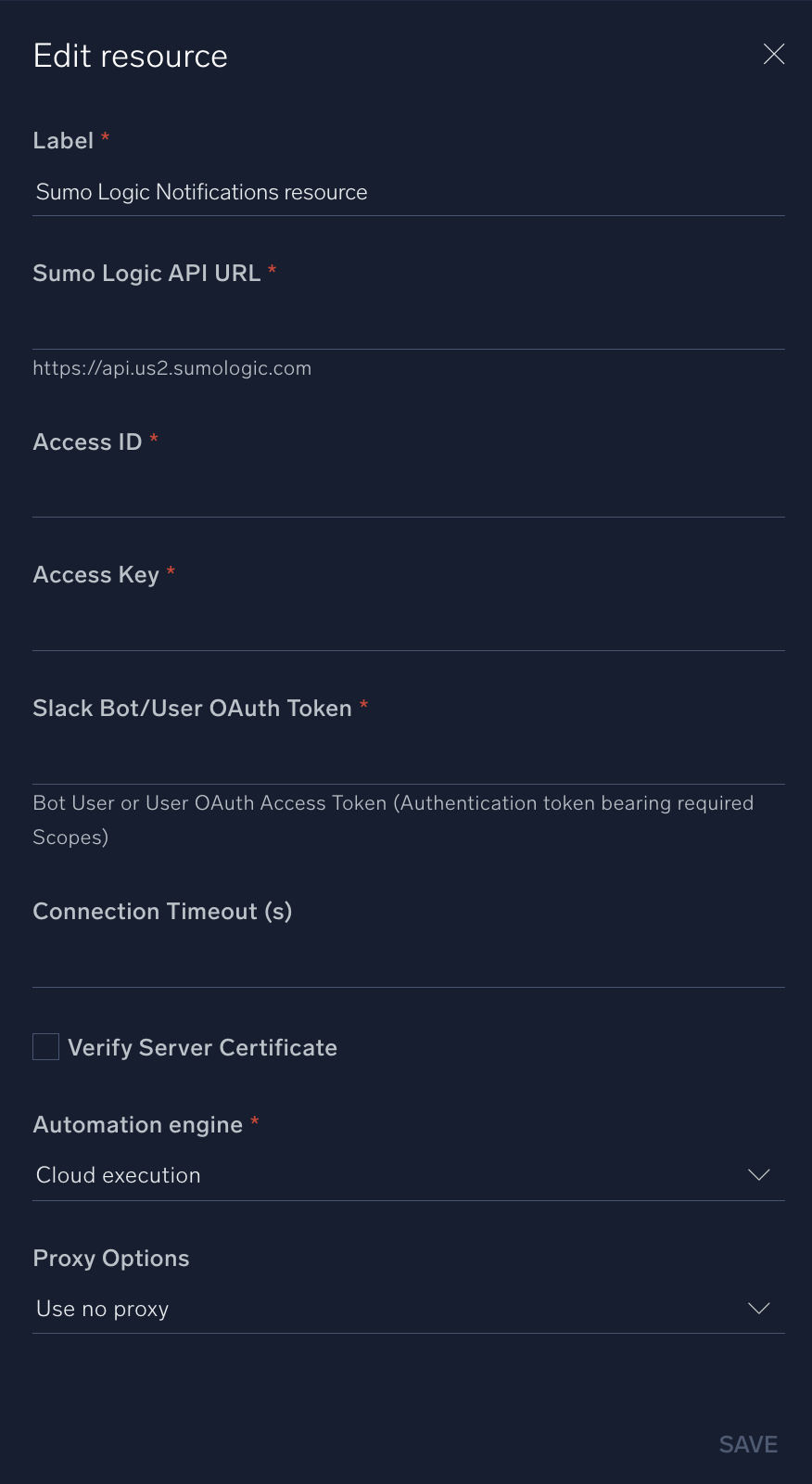
* **Slack Bot/User OAuth Token**. Enter the Slack token. See [Create a Slack token](#create-a-slack-token) above.
*
*
*
*
***Version: 1.3
Updated: April 30, 2026***
Integration with Sumo Logic platform for monitors and Slack Notification.
## Actions
* **Assess Alert Status** (*Scheduled*) - Periodically monitor status of a Sumo Logic alert and notify a Slack user about unresolved alert.
## Sumo Logic Notifications configuration
### Create a Sumo Logic access key
[Create an access key](/docs/manage/security/access-keys/#create-an-access-key) and copy the resulting **Access ID** and **Access Key**. Store the ID and access key (temporally) into a text editor.
:::note
The ID and key won't be available again once you close the confirmation screen.
:::
### Create a Slack token
Configure a Bot or User OAuth token in Slack as described in [Slack Configuration](/docs/integrations/automation-integrations/slack/#slack-configuration). You will provide the token when you configure the integration as described in the next section.
Add the following scopes to the token:
* For sending notifications (messages) to Slack:
* `chat:write`. Required to send messages to a user or channel.
* `chat:write.public` (optional). Only needed if the bot needs to post to public channels where it’s not a member yet.
* For looking up a Slack user by email:
* `users:read.email`. Required to find a user by their email address.
* `users:read` (optional). Add if general user profile information is also needed.
## Configure Sumo Logic Notifications in Automation Service and Cloud SOAR
import IntegrationsAuth from '../../reuse/integrations-authentication.md';
import IntegrationCertificate from '../../reuse/automation-service/integration-certificate.md';
import IntegrationEngine from '../../reuse/automation-service/integration-engine.md';
import IntegrationLabel from '../../reuse/automation-service/integration-label.md';
import IntegrationProxy from '../../reuse/automation-service/integration-proxy.md';
import IntegrationTimeout from '../../reuse/automation-service/integration-timeout.md';
import SumoLogicAPIURL from '../../reuse/automation-service/sumo-logic-api-url.md';
import CloudSOARAPIURL from '../../reuse/automation-service/cloud-soar-api-url.md';
import AccessID from '../../reuse/automation-service/access-id.md';
import AccessKey from '../../reuse/automation-service/access-key.md';
*
*
*
*
* **Slack Bot/User OAuth Token**. Enter the Slack token. See [Create a Slack token](#create-a-slack-token) above.
*
*
*
*
 ## Change Log
| Version | Date | Description |
|:--|:--|:--|
| v1.3 | April 30, 2026 | Upgraded the `python3_generic` Docker image (Python 3.8) to `python3_12_generic` (Python 3.12) to address Python 3.8 end-of-life and improve security and performance. |
| v1.2 | March 4, 2024 | Updated code for compatibility with Python 3.12. |
| v1.1 | October 18, 2023 | Updated the **Assess Alert Status** action so the Scheduled input is now set dynamically. |
| | September 22, 2023 | Initial release of the Sumo Logic Notifications integration. |
## Change Log
| Version | Date | Description |
|:--|:--|:--|
| v1.3 | April 30, 2026 | Upgraded the `python3_generic` Docker image (Python 3.8) to `python3_12_generic` (Python 3.12) to address Python 3.8 end-of-life and improve security and performance. |
| v1.2 | March 4, 2024 | Updated code for compatibility with Python 3.12. |
| v1.1 | October 18, 2023 | Updated the **Assess Alert Status** action so the Scheduled input is now set dynamically. |
| | September 22, 2023 | Initial release of the Sumo Logic Notifications integration. |