---
title: Telegram V2
description: ''
slug: /help/docs/integrations/automation-integrations/telegram-v2/
canonical: https://www.sumologic.com/help/docs/integrations/automation-integrations/telegram-v2/
---
import useBaseUrl from '@docusaurus/useBaseUrl';
 ***Version: 2.2
Updated: April 30, 2026***
Send messages from Cloud SOAR integration with Telegram V2.
## Actions
* **Send Message** (*Enrichment*) - Send a new message.
## Telegram V2 configuration
In Telegram application, create new [bot](https://core.telegram.org/bots) sending a message /newbot to Botfather. Choose name and username for your bot. After creating your bot you will receive a message with your token to access the HTTP API. Keep your token secure and store it safely.
:::note
* The bot must be the administrator of the chat to send your message.
* The chat ID will be sent without writing it as a parameter in the Chat field if there are chat updates in 24 hours. Otherwise, it needs to send a message to the chat in the Telegram application to continue. Another possible way to obtain a chat ID is to follow these steps in the Telegram application: go on the group of choice, add @rose bot, type the command /id, and the chat ID will be sent. Use that value in the parameter for Chat.
:::
## Configure Telegram V2 in Automation Service and Cloud SOAR
import IntegrationsAuth from '../../reuse/integrations-authentication.md';
import IntegrationCertificate from '../../reuse/automation-service/integration-certificate.md';
import IntegrationEngine from '../../reuse/automation-service/integration-engine.md';
import IntegrationLabel from '../../reuse/automation-service/integration-label.md';
import IntegrationProxy from '../../reuse/automation-service/integration-proxy.md';
import IntegrationTimeout from '../../reuse/automation-service/integration-timeout.md';
*
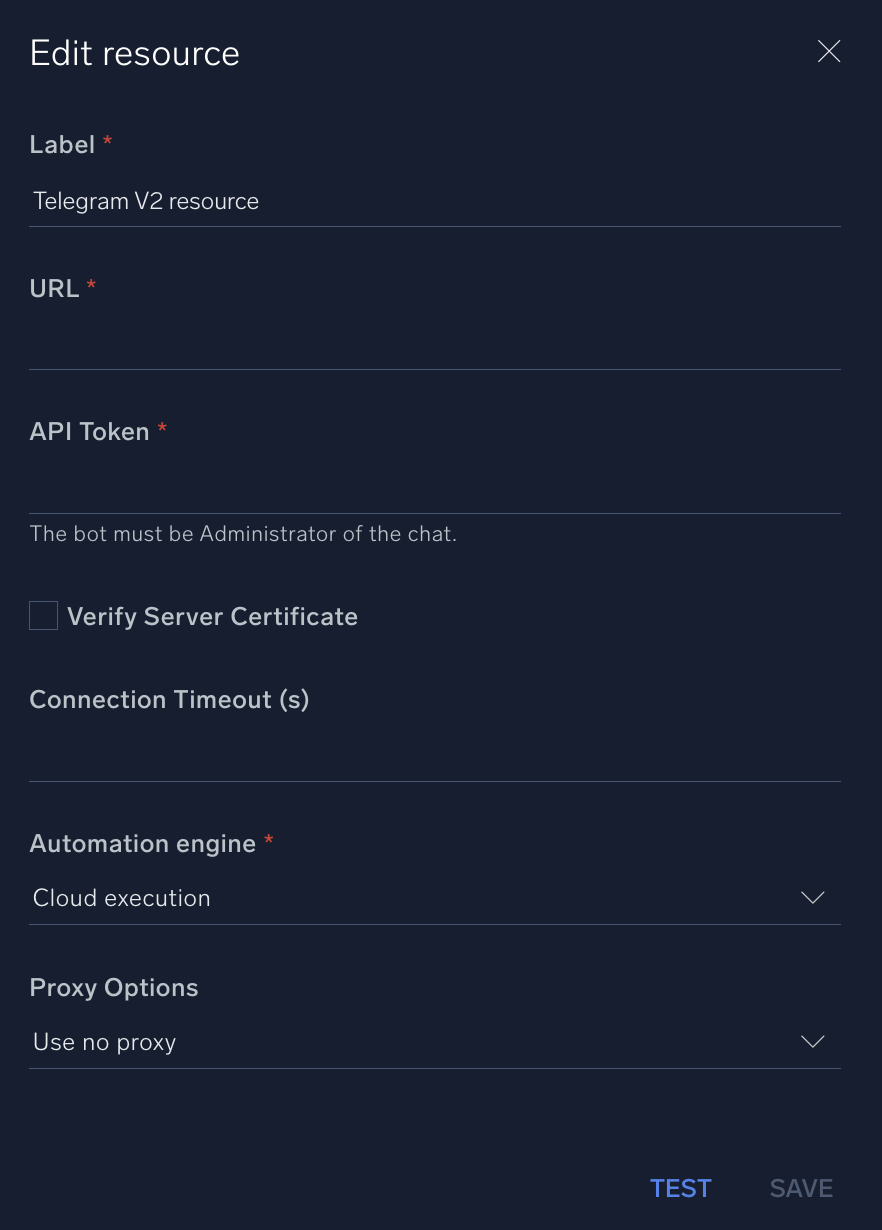
* **URL**. Enter your Telegram API URL, for example, `https://api.telegram.org/`.
* **API Token**. Enter the API [token](https://core.telegram.org/bots/tutorial#obtain-your-bot-token) you [copied earlier](#telegram-v2-configuration) when creating your bot.
*
*
*
*
***Version: 2.2
Updated: April 30, 2026***
Send messages from Cloud SOAR integration with Telegram V2.
## Actions
* **Send Message** (*Enrichment*) - Send a new message.
## Telegram V2 configuration
In Telegram application, create new [bot](https://core.telegram.org/bots) sending a message /newbot to Botfather. Choose name and username for your bot. After creating your bot you will receive a message with your token to access the HTTP API. Keep your token secure and store it safely.
:::note
* The bot must be the administrator of the chat to send your message.
* The chat ID will be sent without writing it as a parameter in the Chat field if there are chat updates in 24 hours. Otherwise, it needs to send a message to the chat in the Telegram application to continue. Another possible way to obtain a chat ID is to follow these steps in the Telegram application: go on the group of choice, add @rose bot, type the command /id, and the chat ID will be sent. Use that value in the parameter for Chat.
:::
## Configure Telegram V2 in Automation Service and Cloud SOAR
import IntegrationsAuth from '../../reuse/integrations-authentication.md';
import IntegrationCertificate from '../../reuse/automation-service/integration-certificate.md';
import IntegrationEngine from '../../reuse/automation-service/integration-engine.md';
import IntegrationLabel from '../../reuse/automation-service/integration-label.md';
import IntegrationProxy from '../../reuse/automation-service/integration-proxy.md';
import IntegrationTimeout from '../../reuse/automation-service/integration-timeout.md';
*
* **URL**. Enter your Telegram API URL, for example, `https://api.telegram.org/`.
* **API Token**. Enter the API [token](https://core.telegram.org/bots/tutorial#obtain-your-bot-token) you [copied earlier](#telegram-v2-configuration) when creating your bot.
*
*
*
*
 For information about Telegram, see the [Telegram website](https://telegram.org/).
## Change Log
| Version | Date | Description |
|:--|:--|:--|
| v2.2 | April 30, 2026 | Upgraded the `python3_generic` Docker image (Python 3.8) to `python3_12_generic` (Python 3.12) to address Python 3.8 end-of-life and improve security and performance. |
| v2.1 | July 7, 2023 | Updated the integration with environmental variables. |
| | February 12, 2021 | Initial release of the Telegram V2 integration. |
For information about Telegram, see the [Telegram website](https://telegram.org/).
## Change Log
| Version | Date | Description |
|:--|:--|:--|
| v2.2 | April 30, 2026 | Upgraded the `python3_generic` Docker image (Python 3.8) to `python3_12_generic` (Python 3.12) to address Python 3.8 end-of-life and improve security and performance. |
| v2.1 | July 7, 2023 | Updated the integration with environmental variables. |
| | February 12, 2021 | Initial release of the Telegram V2 integration. |