---
title: ThreatConnect V3
description: ''
slug: /help/docs/integrations/automation-integrations/threatconnect-v3/
canonical: https://www.sumologic.com/help/docs/integrations/automation-integrations/threatconnect-v3/
---
import useBaseUrl from '@docusaurus/useBaseUrl';
 ***Version: 1.4
Updated: October 15, 2026***
[ThreatConnect](https://knowledge.threatconnect.com/docs/threatconnect-platform) is a threat intelligence platform that supports threat detection, security operations, and cyber risk management. Utilize ThreatConnect intelligence data during incident investigations using V3 APIs.
## Actions
* **Search Intelligence** (*Enrichment*) - Search ThreatConnect data for information matching the specified query.
* **Update Intelligence** (*Notification*) - Update ThreatConnect intelligence data.
## Configure ThreatConnect in Automation Service and Cloud SOAR
import IntegrationsAuth from '../../reuse/integrations-authentication.md';
import IntegrationCertificate from '../../reuse/automation-service/integration-certificate.md';
import IntegrationEngine from '../../reuse/automation-service/integration-engine.md';
import IntegrationLabel from '../../reuse/automation-service/integration-label.md';
import IntegrationProxy from '../../reuse/automation-service/integration-proxy.md';
import IntegrationTimeout from '../../reuse/automation-service/integration-timeout.md';
*
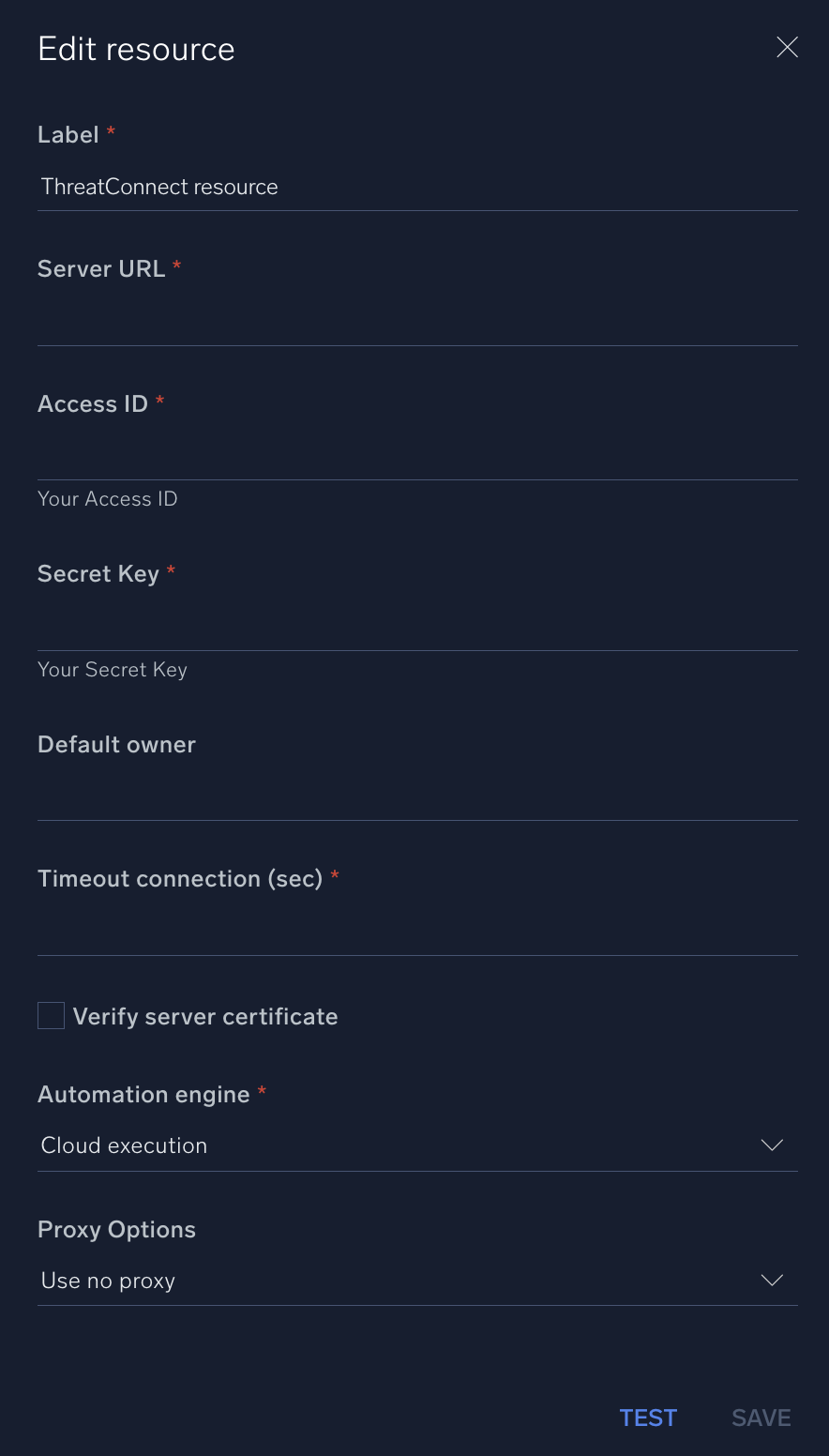
* **Server URL**. Enter your ThreatConnect [server URL](https://docs.threatconnect.com/en/latest/rest_api/quick_start.html), for example, `https://api.threatconnect.com`.
* **Access ID**. Enter a ThreatConnect [access ID](https://knowledge.threatconnect.com/docs/managing-user-accounts#creating-an-api-user).
* **Secret Key**. Enter the secret for the access ID.
* **Default owner**. Enter the default [owner](https://knowledge.threatconnect.com/docs/en/ownership-in-threatconnect).
*
*
*
*
***Version: 1.4
Updated: October 15, 2026***
[ThreatConnect](https://knowledge.threatconnect.com/docs/threatconnect-platform) is a threat intelligence platform that supports threat detection, security operations, and cyber risk management. Utilize ThreatConnect intelligence data during incident investigations using V3 APIs.
## Actions
* **Search Intelligence** (*Enrichment*) - Search ThreatConnect data for information matching the specified query.
* **Update Intelligence** (*Notification*) - Update ThreatConnect intelligence data.
## Configure ThreatConnect in Automation Service and Cloud SOAR
import IntegrationsAuth from '../../reuse/integrations-authentication.md';
import IntegrationCertificate from '../../reuse/automation-service/integration-certificate.md';
import IntegrationEngine from '../../reuse/automation-service/integration-engine.md';
import IntegrationLabel from '../../reuse/automation-service/integration-label.md';
import IntegrationProxy from '../../reuse/automation-service/integration-proxy.md';
import IntegrationTimeout from '../../reuse/automation-service/integration-timeout.md';
*
* **Server URL**. Enter your ThreatConnect [server URL](https://docs.threatconnect.com/en/latest/rest_api/quick_start.html), for example, `https://api.threatconnect.com`.
* **Access ID**. Enter a ThreatConnect [access ID](https://knowledge.threatconnect.com/docs/managing-user-accounts#creating-an-api-user).
* **Secret Key**. Enter the secret for the access ID.
* **Default owner**. Enter the default [owner](https://knowledge.threatconnect.com/docs/en/ownership-in-threatconnect).
*
*
*
*
 For information about ThreatConnect, see [ThreatConnect documentation](https://docs.threatconnect.com/en/latest/).
## Change Log
| Version | Date | Description |
|:--|:--|:--|
| v1.4 | October 15, 2026 |
For information about ThreatConnect, see [ThreatConnect documentation](https://docs.threatconnect.com/en/latest/).
## Change Log
| Version | Date | Description |
|:--|:--|:--|
| v1.4 | October 15, 2026 | - Added **Tags** and **Tags Mode** fields to the **Update Intelligence** action. You can now add, replace, or remove tags on an indicator.
- Added the **Owner** field to the **Update Intelligence** action, matching the **Search Intelligence** action, so you can specify the owner of the indicator you want to update.
- Fixed an issue where the **Search Intelligence** action could fail when you didn't select an indicator type.
|
| v1.3 | March 23, 2026 | Upgraded the `python3_generic` Docker image (Python 3.8) to `python3_12_generic` (Python 3.12) to address Python 3.8 end-of-life and improve security and performance. |
| | February 19, 2026 | - Added an observations parameter to the **Update Intelligence** action to enable recording observation counts for indicators.
- Added output field definitions, which help with playbook data mapping.
|
| | February 11, 2026 | - Improved API error handling.
- Updated **Search Intelligence** handling to avoid errors on empty or missing results.
|
| | October 17, 2025 | Initial release of the ThreatConnect V3 integration. |